
説明
Search Storm allows you to search for an article by combining multiple categories
Search Storm allows you to search:
1) entering a keyword without selecting a category
2) entering a keyword and selecting one or more categories
要件
スクリーンショット

設定項目 
Plugin in action on wordpress page 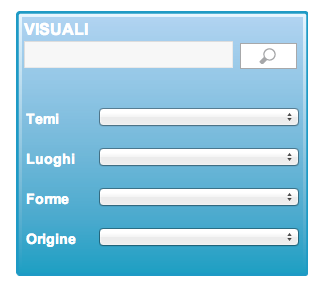
Plugin with css in action on wordpress page
インストール
- Upload this plugin to your WordPress plugin directory( generally wp-content/plugins/ ).
- Activate it in admin area.
- Your theme should have a hardcoded search form or you should add a “Search” widget to sidebar to allow visitors searching.
Search Storm is working now! - If Search Storm doesn’t work, check whether or not there is a “searchform.php” file in your current theme directory, if not, you don’t need do anything; If yes, edit this “searchform.php” following the below instructions:
Your theme’s “searchform.php” file may looks like below, with some other codes:
....
<form method="get" id="searchform" action="<?php bloginfo('url'); ?>">
    <input type="text" id="s" name="s" value="<?php the_search_query(); ?>"  />
    <input type="submit" id="searchsubmit" value="Search" />
</form>
...
add the <?php if(function_exists('wss_add_form_field')) wss_add_form_field(); ?> code to proper place inside <form> element, in most cases you can put it just after <input type="submit" value="Search" /> button and before </form> close tag.
That’s all. You may want to add css styles to make search form nicer.
FAQ
- What do I need to use this plugin?
-
To use this plugin you need a plan yTicket and a website developed with wordpress
評価
このプラグインにはレビューがありません。
貢献者と開発者


“Multiple Category Search Storm” をあなたの言語に翻訳しましょう。
開発に興味がありますか ?
変更履歴
0.1
- 最初のリリース。
1.0
- Added dinamic categories selection by admin panel
1.1
- The Menu category is disabled if the category no contain the subcategories or the category is not selected
- In admin panel you can select a empty option for category
1.2
- Fixed problems loading the list of categories on the search form
1.3
- Fixed problems loading locale
- Add custom css in admin
1.4
- Tested with WP 4.0