

説明
WordPress のメディアライブラリをフォルダーで分類する、史上最高のプラグインです。
✨NEW! Let’s organize WordPress pages & posts using a drag and drop organizer.
FileBird は、直感的なフォルダ整理、スムーズなドラッグ & ドロップ、そしてスマートな並べ替え機能で WordPress メディアライブラリを一新します。画像を素早く見つけ、Gutenberg ブロックに簡単に挿入し、使用されていないファイルを素早く特定して削除できます。
無料版では、無制限のメインフォルダーとサブフォルダーの作成が可能です。
📌 アドオン | FileBird無料版と Pro 版の比較
⚡️ 機能
FileBird を使用すると、仮想フォルダを作成して、WordPress のメディア ファイルのアップロードをカテゴリ分けできます。そのため、ファイルやフォルダを移動しても、ページや投稿コンテンツ内の画像へのパーマリンクが壊れることはありません。
FileBirdを使えば、WP メディア管理にかかる時間を節約し、あらゆるファイル& フォルダーを検索し、分類し、商品画像ギャラリーを追加し、メディアフォルダーをダウンロード / エクスポートすることができます。管理者のワークフローと生産性を高める素晴らしい方法です。
Folder Tree Themes (PRO)
Instead of the traditional gray shade of folder icon, now you can transform your “Folderella” into Dropbox theme or Windows 11 styling.
メディアフォルダーのダウンロード (PRO)
サブフォルダーとファイルを含むメディアフォルダー全体を1つの ZIP ファイルにエクスポートします。同じフォルダー構造を維持します。分類されたメディアファイルをバックアップします。
スマートスタートアップフォルダー
起動時に特定のフォルダーまたは以前に開いたフォルダーを選択します。すばやく仕事に戻りましょう。より多くの時間を節約します。
ファイルの場所
その詳細モーダル内の任意のファイルを検索し、簡単にその含まれているフォルダーを変更します。
親しみやすいユーザーインターフェース
ドラッグ アンド ドロップでファイルをアップロードしたり、フォルダーに一括移動したりできます。ドラッグ アンド ドロップでフォルダやサブフォルダを整理できます。
スマートコンテキストメニュー
FileBird のフォルダーを右クリックすると、サブフォルダーの作成、名前の変更、色の設定、切り取り、貼り付け、削除が、コンピューター上で行うのと同じようにすばやく行えます。
1つのツールバーでフルコントロール
FileBird の折りたたみ可能なサイドバーは、すべての WordPress メディアライブラリフォルダーを究極にコントロールすることができます。
痛みのない移行
拡張メディアライブラリー、JoomUnited のWP メディアフォルダー、Max Foundry の WordPress メディアライブラリーフォルダー、Real Media Library、HappyFiles からメディアカテゴリ / フォルダー構造をインポートしてシームレスに同期します。
エクスポートフォルダー構成。
ワンクリックで WP メディアフォルダー構造全体をエクスポートし、ライブサイトに移行したり、単にバックアップを保持することができます。
ユーザーベースフォルダービュー
このモードを有効化すると、管理者や他のユーザーが自分のカテゴリー / ディレクトリを作成することができます。ユーザーは他のユーザーのディレクトリ構造に影響を与えることなく、自分のフォルダーを自由に管理することができます。
強力な検索機能。
メディアライブラリ内だけでなく、ページ / 投稿エディターで画像を閲覧している間にも、ファイル名やフォルダー名の並べ替えや検索が可能です。
さまざまなソートオプション (PRO)
フォルダーをソートする2つの方法とファイルをソートする10通りの方法で高度な操作を行います。これは、すべての忙しい WordPress 管理者とウェブマスターには偉大な時間の節約になります。
ファイルサイズでファイルを並べ替え (PRO)↵
これで、1回のクリックで添付ファイルのサイズを計算し、ファイルサイズでファイルを並べ替えることができます。
カスタムフォルダー色 (PRO)
特定のフォルダーを右クリックして、異なる色を選択します。これにより、多数のフォルダと区別しやすくなります。
複数のツリービュースタイル (PRO)
階層ツリービューとは別に、ツリービューからレベルを隠す設定もあります。このフラットなツリービューは、フォルダー数が多い場合に非常に便利です。
ページ、投稿、カスタム投稿タイプを分類する (PRO)
WordPress の固定ページ、投稿、プラグイン、WooCommerce のクーポン、割引、その他の CPT を整理するために、フォルダツリーを簡単に有効化します。
カスタマイズ可能なデフォルトのファイル順序↵
ファイル名、タイトル、日付、変更日、作成者の昇順 / 降順でファイルをアルファベット順に並べ替える方法を設定します。
フォルダーの一括削除↵
File Bird フォルダーを一括選択し、ワンクリックで削除できるようになりました。これらのファイルはすべて未分類フォルダーに移動され、そのまま残ります。
RTL 対応
FileBird はヘブライ語、アラビア語などの RTL 言語をサポートしています。
多くの言語をサポート
このプラグインは、英語、スペイン語、イタリア語、フランス語、ドイツ語、オランダ語、ヘブライ語などのほとんどの一般的な言語をサポートしています。
🙋♂️知っていますか ?
あの FileBird が、Gutenberg と FileBird のフォルダーを使ってスタンドアロンの WordPress ドキュメントギャラリーを作るためのアドオンを提供開始 ?
必ずチェックしてください: FileBird Document Library。
👍 FILEBIRDはどのような仕組みになっているのですか ?
WordPress のサイト管理者ですか ?
WordPress サイトを管理するということは、画像、動画、音声ファイル、ドキュメントなどのマルチメディアファイルを WP メディアライブラリに大量に追加するということです。
その結果、ライブラリは何千ものファイルを保存しなければならず、大混乱に陥る可能性があります。WordPress のデフォルトのファイル名検索機能は良いものですが、フォルダーに直接アクセスできる手軽さにはかなわないでしょう。そこで、WordPressでファイルを管理する FileBird の登場です。
このメディアファイルマネージャーは、フォルダー間のドラッグアンドドロップですべてのファイルを簡単に整理する機能を提供します。 FileBird が手元にあれば、物事は以前よりもずっと良くなります。
フォルダーベースの構造の一番の利点は、必要なファイルを見つけるのがとても簡単になり、時間を大幅に節約できることです。
FileBird は一度に1つのフォルダーをスマートロードするため、WordPress メディアライブラリがロードされないことはありません。
🚀 FileBird で WP メディアフォルダをプロのように管理するためのヒント
- 複数のフォルダーとそのファイルをコンピューターから WordPress に直接アップロード
- Create a gallery from folders using the Gutenberg block of FileBird gallery
- ショートコードを使用して WordPress ドキュメントギャラリーを作成する
- 左サイドバーのサイズを変更して、すべてのフォルダーの概要を表示します
- アップロード先のフォルダーをドロップダウンから選択し、特定のフォルダーにファイルをアップロードすることができます
- ファイル / フォルダー名を簡単に検索できます
- 固定ページ / 投稿のコンポーザーから、FileBird UI でファイルとフォルダーを参照します
- ドラッグ & ドロップのメールビルダーで WooCommerce メールをカスタマイズしている間、必要な画像をすばやく見つけることができます。
- ファイルサイズで並べ替え機能を使って古いファイルを整理し、フォルダーをすっきりさせましょう
- ESC キーを押して一括選択モードを終了します
⛩️ プレミアム互換性
FileBird Pro では、フォルダーを使って投稿、ページ、WooCommerce 商品、クーポン、テンプレート、その他のカスタム投稿タイプを整理することができます。これらのプレミアム限定機能には、サードパーティのテーマやプラグインとの統合も含まれています。
テーマ
- Avada – WordPress 史上最も売れたテーマ
- Divi – ElegantThemes からのテーマ
- Enfold – これまでで最もユーザーフレンドリーな WordPress テーマ
- Uncode – 待望のフロントエンドエディター
- Jupiter – Elementor 多目的テーマ
- Flatsome – ベストセラー WooCommerce のテーマ
- Salient – レスポンシブ多目的テーマ
- XStore – レスポンシブ多目的 WooCommerce WordPress テーマ
- KLEO – コミュニティ多目的 BuddyPress テーマ
- Bricks Builder
- そしてその他にもたくさん
プラグイン
- WPML – サイトを翻訳し、あらゆる言語で表示するための最高の WP プラグイン
- Polylang – バイリンガルまたはマルチリンガルの WordPress サイトを作成できるプラグイン
- Elementor Website Builder
- JetEngine
- Flatsome UX Builder
- Divi Builder
- Visual Composer
- Beaver Builder
- SiteOrigin Pro
- KingComposer
- Tatsu Builder
- Oxygen
- Thrive Architect
- Classic Editor – ツリービューのフォルダーを表示する古い WordPress エディター
- Slider Revolution – ベストセラーの WordPress レスポンシブスライダープラグイン
- EWWW Image Optimizer
- FooGallery Image Gallery – レスポンシブフォトギャラリー
- Smush – 圧縮、画像オプティマイザ、遅延読み込み、WebP 画像
- 他にもたくさん +++
スクリーンショット
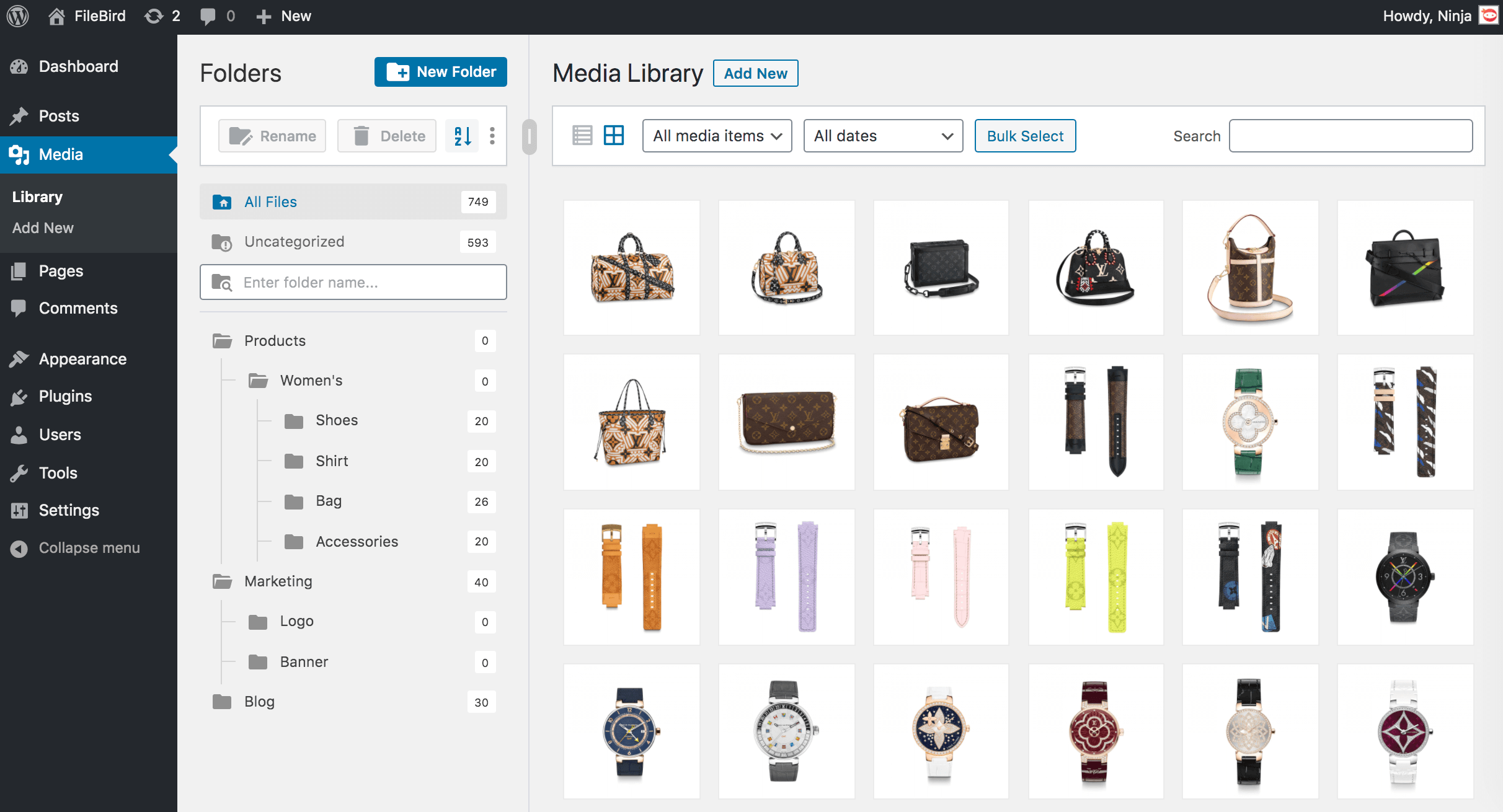
メディアライブラリフォルダー 
ドラッグ & ドロップでフォルダーを整理 
ファイルの一括選択とフォルダーへの移動 
スマートコンテキストメニューのフォルダー名の変更 
フォルダーの並べ替え 
ファイルの並べ替え 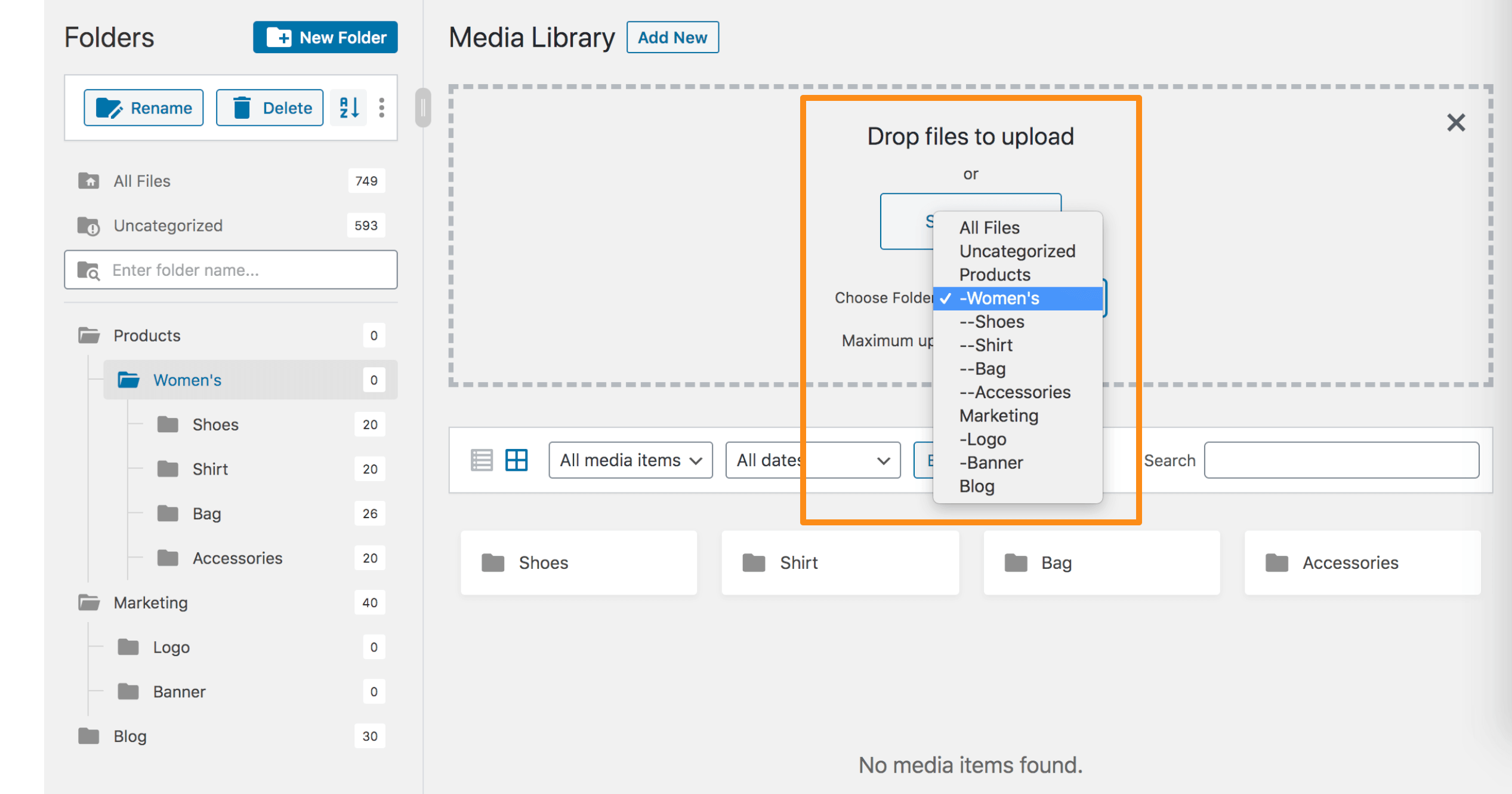
特定のフォルダーにファイルをアップロード 
FileBird ギャラリーブロックの設定
ブロック
このプラグインは1個のブロックを提供します。
- FileBird Gallery Display folder images in a rich gallery.
インストール
FileBird (または File Bird) のセットアップは簡単で、1分もかかりません。
- プラグインを wordpress.org からダウンロードして解凍し、[FileBird] フォルダーを wp-content/plugins/ ディレクトリにアップロードします。
- WordPress の「プラグイン」メニューからプラグインを有効化します。
- WordPress のメインメニュー > メディアに移動して、ファイルを管理するフォルダーを作成します。
これで完了です。お楽しみください。
FAQ
-
このプラグインを最初にインストールした後、以前にアップロードしたすべてのファイルは同じままですか ?
-
はい、すべてのアップロードはすべてのファイルフォルダーにあります。
-
画像を別のフォルダに移動すると、この操作はページ / 投稿での画像の表示に影響しますか ?
-
いいえ、サイトのフロントエンドで画像に変更を加えることはありません。
-
フォルダーやカテゴリーを作成した場合、WordPress のデフォルトのパス `wp-content/uploads/` を上書きしてしまうのでしょうか ?
-
いいえ、違います。このプラグインは、ファイルを視覚的にフォルダーに整理するのに役立ちます。すべてのファイルのパーマリンク / URL は変更されません。
-
FileBird をアンインストールすると、サイトはどうなりますか ?
-
ご心配なく、サイトは全く影響を受けません。無効化すると、すべてのファイルはデフォルトの WordPress メディアライブラリにあります。
-
どのようにサポートを受けることができますか ?
-
こちらから連絡を取ることができます https://ninjateam.org/support/
-
すべてのプレミアムページビルダーで FileBird フォルダーを使用したい場合は、FileBird PRO にアップグレードしてください。プレミアム機能には、ファイルとフォルダーの高度な並び替えとフィルタリング、メディアフォルダー全体のダウンロード、より多くのテーマ、プラグイン、ページビルダーのサポートが含まれます。
-
FileBird Pro では1回限りの支払いですか ?
-
はい ! FileBird のライフタイムライセンスは、1回限りの料金で、1つのサイトで使用でき、無制限のアップデートを受けることができます。
Happy Organizing! 😍
評価


貢献者と開発者
FileBird – WordPress Media Library Folders & File Manager はオープンソースソフトウェアです。以下の人々がこのプラグインに貢献しています。
貢献者
変更履歴
May 22, 2026 – Version 6.5.4
- Fixed: UI issues in WordPress 7.0
- Fixed: Translation strings in several languages
- Improved: UI elements in the Tools screen
May 11, 2026 – Version 6.5.3
- Added: Folders for post/page (1 level folder supported) in FileBird free version
- Added: File counter in both parent folder and subfolders in FileBird free version
- Updated: Remove Document Library settings
- Updated: Hide “Create first folders” 3 months when user dismisses it
- Improved: Compatible with WordPress 7.0
- Improved: Compatible with FIFU plugin
- Fixed: Block layout issue
- Fixed: CSS issue on Zen Browser
Dec 5, 2025 – Version 6.5.2
- Added: Auto rename when add new folder and it’s name exists
- Improved: Security
Oct 22, 2025 – Version 6.5.1
- Improved: Security (Access Control Authenticated (Subscriber+))
- Fixed: Inputs were not working properly
Oct 17, 2025 – Version 6.5.0
- Added: Double click folder to rename
- Improved: Security for Clear All Data function
Aug 4, 2025 – Version 6.4.9
- Added: Accessibility improvements based on WCAG guidelines
- Fixed: Security
Apr 19, 2025 – Version 6.4.8
- Added: FileBird Gallery Element for WPBakery Page Builder (PRO)
- Added: Support Import/Export Custom Post Types (PRO)
Mar 19, 2025 – Version 6.4.7
- Improved: Code for Performance and maintainability
Feb 12, 2025 – Version 6.4.6
- Added: Display caption for lightbox
- Improved: Request handling (conflict with JobBoardWP plugin)
- Fixed: Security (reported by researcher Revan Arifio)
Dec 11, 2024 – Version 6.4.2.1
- Fixed: Zoom out feature in Gutenberg editor is disabled
- Updated: Block uses Tree instead of Select
Oct 17, 2024 – Version 6.4.2
- Added: Auto Select Previous Folder in Upload New Media Page
- Added: Change some user settings to global settings, not belong to each user anymore (Folder counter, Theme, Breadcrumb)
- Updated: Polish pl_PL language
- Added: Some new filter hooks
- Fixed: Laggy text selection when using with Divi Builder
- Fixed: Sort folders (display wrong order) in custom post types
- Fixed: An issue where the script sometimes doesn’t load
Aug 23, 2024 – Version 6.3.4
- Fixed: CSV Export Vulnerability
- Fixed: Change to use Translations files from wp.org (https://wordpress.org/support/topic/translation-conflict-with-filebird-plugin/)
- Fixed: Exclude trashed posts out of folder count
Jun 25, 2024 – Version 6.3.3
- Fixed: Plugin dependencies
Jun 25, 2024 – Version 6.3.2
- Fixed: Issue with loading media in Add New Media File page
- Fixed: CSS hiding all admin notices
Jun 24, 2024 – Version 6.3
- Added: FileBird folder column in Media list and Post Type table (PRO)
- Improved: WordPress TableList Drag/Drop
- Fixed: WordPress VIP service doesn’t load FileBird styles
- Fixed: WPML/Polylang not sync file to folder when add new attachment (PRO)
Jun 14, 2024 – Version 6.2.5
- Fixed: Folder dropdown not showing in Featured Image upload tab when Elementor is activated
May 23, 2024 – Version 6.2.3
- New: Full compatibility of folders for pages, posts, custom post types with WPML, Polylang, etc.
- New: SVG upload & sanitization
- New: Each user can now experience new folder skins in different themes
- New: Quickly display folder ID
- New: File counter options for each user
- New: UI/UX & icon design
- Required: At least PHP 7.4
- Improved: Unstyled component
- Improved: Smooth resizeable folder sidebar
- Improved: Lightweight plugin bundle with minified packages
- Improved: Faster performance
- Improved: Smart load assets per task
- Improved: File search scope in list view
- Improved: Performance
- Fixed: Default folder settings not working in Elementor
- Fixed: Default folder settings not saved in some CPTs
- Fixed: PHP 8.0 auto-update library
Mar 29, 2024 – Version 5.6.4
- Fixed: Wordfence bug report
Mar 11, 2024 – Version 5.6.3
- Fixed: Compatible with PHP 8.2
- Added: Show Buy Banner in Zion Builder
Mar 2, 2024 – Version 5.6.2
- Updated: Open for Elementor free version
- Added: Import folder from Mediamatic plugin
- Improved: Image gallery
Jan 19, 2024 – Version 5.6.1
- Fixed: XSS vulnerability
Jan 9, 2024 – Version 5.6.0
- Fixed: Firewall blocking (Sucuri, GoDaddy, etc.)
Jan 9, 2024 – Version 5.5.9
- Fixed: I18N issues
- Fixed: Support SVG file
- Fixed: Special symbols in folder name when exported
- Updated: POT file
Dec 7, 2023 – Version 5.5.8.1
- Fixed: Folder names in document library not seen on mobile
Nov 28, 2023 – Version 5.5.8
- Fixed: Compatible with Polylang latest version
Nov 22, 2023 – Version 5.5.7
- Added: Support YooTheme ver 4 and greater
- Fixed: Conflict with ATUM Purchase Order Pro plugin (by Stock Management Labs™)
Nov 13, 2023 – Version 5.5.6
- Fixed: Sorting in WooCommerce Products (PRO)
Nov 8, 2023 – Version 5.5.5
- Fixed: Compatible with WP 6.4
- Improved: Review suggestion
Oct 25, 2023 – Version 5.5.4
- Fixed: Not show folder tree in post types (PRO)
Oct 24, 2023 – Version 5.5.3
- Improved: Work with cache
Aug 31, 2023 – Version 5.5.2
- Fixed: Counter wrong in popup modal with WPML (PRO)
- Fixed: Support Betheme latest version (PRO)
- Fixed: Conflict tooltip style with Betheme builder (PRO)
- Fixed: Drag/drop attachment not working correctly (conflict with betheme builder drag/drop) (PRO)
Aug 23, 2023 – Version 5.5.1
- Fixed: Error with WP 6.0.x
Aug 3, 2023 – Version 5.5
- Added: New filter for Post Types Support: filebird_post_types
- Added: Label All Posts/Pages/Items (PRO) & Logo Empty Folder
- Added: Counter of folder on the right
- Fixed: Tooltip of folder on the right
- 修正: 移動のラグ
- 改善: ロジックとパフォーマンス
- 更新: POT ファイル、オランダ語更新
Jul 7, 2023 – Version 5.4.5
- Added: Compatible with PDF Image Generator (By Mizuho Ogino)
- Updated: Document Link
- Fixed: PHP 8 warning
Jul 3, 2023 – Version 5.4.4
- Added: Compatible with text block of UX builder (Theme Flatsome)
- Fixed: Drop item when a subfolder is deleted
- Fixed: Conpatible with Twenty twenty three theme
Jun 27, 2023 – Version 5.4.3
- Fixed: Conflict with plugin CMS Tree Page View
- Fixed: Set folder for cropped image
Jun 20, 2023 – Version 5.4.2
- Added: Sync WPML
Jun 7, 2023 – Version 5.4.1
- Fixed: Compatible with the latest version of Beaver Builder (PRO)
- Fixed: PostType Tree keep loading with Editor Role (PRO)
Jun 5, 2023 – Version 5.4
- Added: Support migrate folders from Wicked Folders plugin
May 15, 2023 – Version 5.3.2
- Fixed: SQL security
May 11, 2023 – Version 5.3.1
- Fixed: Guide link
May 8, 2023 – Version 5.3
- Added: Options Choose user folder when import CSV (with attachments)
- Fixed: Compatible with PHP 5.6, PHP 8.2
- Fixed: Disable button Bulk select after moving files
Apr 18, 2023 – Version 5.2
- Added: Folders for other post types (PRO)
- Fixed: Error with layout of woo product
- Fixed: Move files
- Fixed: sql_require_primary_key
Apr 10, 2023 – Version 5.1.6
- Fixed: Sql_require_primary_key in Digital Ocean
- Fixed: Can not active when email has plus character
Mar 23, 2023 – Version 5.1.5
- Supported: LearnPress
- Supported: BeTheme
- Fixed: Permission for generate-key api
- Fixed: Gutenberg scroll folder
Jan 9, 2023 – Version 5.1.4
- Fixed: Special symbol in image alt in gallery
Jan 4, 2023 – Version 5.1.3
- Fixed: Conflict with PHP <7.4
Jan 3, 2023 – Version 5.1.2
- Fixed: Download folder error (PRO)
Dec 28, 2022 – Version 5.1.1
- Fixed and improved: Sort by file name (PRO)
Nov 15, 2022 – Version 5.1
- Fixed: Import folders from WP Media Folders (by Damien Barrère)
- Fixed: Move attachment
Nov 10, 2022 – Version 5.0.9
- Added: Import folders from WP Media Folders (by Damien Barrère)
Oct 10, 2022 – Version 5.0.8
- Improved: Review notice (display after 3 days when activated the first time)
- Added: Hook for not create folder when uploading
- Added: Open folder tree view for CPT UI plugin
- Fixed: Small CSS
Sep 16, 2022 – Version 5.0.7
- Updated: New algorithm
Sep 12, 2022 – Version 5.0.6
- Fixed: SVG Icon in Safari
- Added: Notice when create/update folder fail
- Fixed: FileBird Gallery not display image when using EWWW Image Optimizer plugin
- Fixed: Some bugs
Aug 11, 2022 – Version 5.0.5
- Fixed: Some bugs
Aug 9, 2022 – Version 5.0.4
- Fixed: Issue with wordpress.com
- Fixed: Compatible with Themify
- Fixed: PHP warnings
Jul 25, 2022 – Version 5.0.3
- Fixed: Import from 3rd party plugins
Jul 21, 2022 – Version 5.0.2
- Removed: CSS Gallery when not using Gutenberg
- Improved: UI on mobile
- Fixed: PHP warning
Jul 5, 2022 – Version 5.0.1
- Updated: Korean Language
- Removed: All .DS_Store files
- Fixed: Module build failed
Jun 30, 2022 – Version 5.0
- Added: FileBird Gallery Layouts (Flex | Manasory | Grid) and Lightbox
- Added: New API method for Dev
- Added: Some new settings
- Added: Full Support Gutenberg Block Translation with new json file (you can generate by using wp i18n make-json which have been published by WP version 5)
- Added: Support Korean Language
- Added: Support Themify
- Added: Recommended plugins
- Optimized: Performance (FileBird 5 loads the previous versions, refactored code base, optimized query, removed some library, changed structure)
- Improved: UI and notices
- Updated: POT file
- Fixed: CSS with LMS Plugin
- Fixed: Minimize Upload Popup
- Fixed: Warning in PHP 8 (Tested in PHP 8.1)
- Fixed: Compatible with Enhanced Media plugin
- Fixed: Some bugs
Feb 9, 2022 – Version 4.9.9.1
- Optimized code
Jan 7, 2022 – Version 4.9.9
- Fixed: Slow query
- Fixed: File permissions
- Fixed: Hide tab Import/Export error
Dec 30, 2021 – Version 4.9.8
- Added: Import/Export folder structure into CSV
- Added: Flat/Default tree view in modal
- Improved: UI and text
- Fixed: Conflict with Envato Market plugin
Dec 14, 2021 – Version 4.9.7
- Fixed: Conflict with ACF
- Fixed: Error in folder.php
Dec 06, 2021 – Version 4.9.6
- Added: Support MailPoet
Dec 02, 2021 – Version 4.9.5
- Added: Folder selector in Edit media
- Fixed: WooCommerce conflict (break Upload Theme button)
Nov 10, 2021 – Version 4.9.4
- Fixed: Elementor With PolyLang wrong folder counter
- Fixed: Image ALT in FileBird Gutenberg Gallery
Sep 30, 2021
- Updated: Some notice
Sep 14, 2021 – Version 4.9.3
- Added: Import folders for Folders by Premio
- Fixed: Compatible with WordPress old version.
Sep 9, 2021 – Version 4.9.2
- Improved: Import notice
- Fixed: Some small bugs
Aug 25, 2021 – Version 4.9.1
- Fixed: Gutenberg widgets missing
Aug 13, 2021 – Version 4.9
- Added: Infinite scroll
- Added: Plugin activation alert
- Added: Sorting by File Name in FileBird Gallery
- Improved: Folder name sorting
- Improved: German translation
- Fixed: Drag files in Tablet
Jul 21, 2021 – Version 4.8
- Fixed: Compatible with WordPress 5.8
- Fixed: Replace image
Jul 15, 2021 – Version 4.7.8
- Fixed: Conflict with Photo Gallery plugin
- Fixed: ACF warning
- Fixed: ACF meta field image can’t load
- Fixed: WPML Counter (in WPML last version 4.4.10)
Jul 2, 2021 – Version 4.7.7
- Added: Notice when a license was used
- Supported: Enhanced Media Library
- Supported: Media Library Assistant
- Improved: Load large files
- Improved: Translation (Added missing strings)
- Fixed: Loading Uncategorized folder
- Fixed: Context menu position
- Fixed: Security
- Fixed: Small bugs
Jun 11, 2021 – Version 4.7.4
- Updated: Languages
- Fixed: JS conflict with Divi builder
- Fixed: WPML non translated mode make folder counter and files in folders get wrong
- Fixed: Conflict with Debug Bar plugin
- Fixed: PolyLang get missing files in folder
- Fixed: Folder always loading
- Fixed: Important security updates.
May 26, 2021 – Version 4.7.3
- Improved: FileBird UI in Mobile
- Improved: Library
- Improved: Translations, update POT file
- Fixed: Auto Update function conflict with plugins and themes
- Fixed: Image validation for ACF plugin
- Fixed: Gutenberg issues (Wrong tag in frontend, Large images chosen when create gallery)
- Fixed: Missing language “NL”
- Fixed: RestAPI (404 Error)
- Fixed: WPML/Polylang Full Compatible modes in Setting Media, support “All languages in admin bar”, Counter
Apr 07, 2021 – Version 4.7.2
- Improved: Tooltip
- Improved: UI
- Optimized: FileBird zip size
- Fixed: Can’t set folder Uncategorized as default in folder load
- Fixed: Update database make folders duplicated when “Each user folder mode” enabled
Apr 01, 2021 – Version 4.7.1
- Added: Upload multiple images in multiple folders when upload processing
- Fixed: Append wrong folders in right side
Mar 30, 2021 – Version 4.7
- Added: New Resize bar
- Improved: Performance
- Improved: Optimize code
- Improved: UI
- Improved: Text
- Supported: PHP 8 and greater
- Supported: Tatsu Builder
- Fixed: Counter in WPML
- Fixed: Tooltip bugs
- Fixed: Can’t set “Uncategorized” default folder load
- Fixed: Reorder on Edit gallery
- Fixed: Small bugs
Feb 5, 2021 – Version 4.5
- New feature: Download folder (Pro)
- Added: Unlimited folders
- Added: Limited file explorer with 3rd party plugins
- Improved: Performance
- Fixed: Draggable for tablet
- Fixed: Edit Gallery
- Fixed: Over The Max Number Of attachmentID
- Fixed: FileBird Gallery selector in Gutenberg
- Fixed: Duplicate folder when import
- Fixed: Folder scroll
- Fixed: Folder counter bug when moving images in user-based folder mode
- Fixed: Conflict with Picu plugin
- Fixed: Conflict with TutorLMS plugin
- Disable: Draggable attachment in Mobile
Dec 21, 2020 – Version 4.3.1
- Added: Support shortcode for Document Gallery
- Added: API – Get folder detail by folder_id
- Fixed: Modal append (Conflict with Yoast SEO)
- Fixed: Conflict with Uncode theme
- Fixed: Not loading media when uploaded by different modal in Elementor
- Fixed: Reset file selection when move file in bulk select
Dec 14, 2020 – Version 4.3
- Added: Press ESC key to exit Bulk select mode
- Improved: Alert text
- Improved: Icon size and default folders with long names in some languages
- Fixed: Missing folder container
- Fixed: Security
- Fixed: SQL
- Fixed: Upload new image can’t insert to the post in modal
- Fixed: Prevent reload attachments when sort folders
Nov 25, 2020 – Version 4.2
- Added: Set previous folder selected as default folder
- Added: Compatible with Oxygen Builder
- Fixed: ACF warning
- Fixed: Conflict with WPML rest API
- Fixed: CSS conflict with The Grid plugin
- Improved: Prevent warning when upload folder containing desktop.ini or .DS_Store file
Oct 27, 2020 – Version 4.1
- Added: Set default folder to open
- Added: New APIs
- Added: Support ACF
- Improved: Notice of creating the first folder
- Removed: Folder selector when no item available in modal popup
- Fixed: Some bugs in folder container
Sep 16, 2020 – Version 4.0.7
- Added: User can use API to create folders
- Improved: Cut/Paste function
- Fixed: Counter with Polylang
- Fixed: Import function
- Fixed: Counter in import message
Aug 26, 2020 – Version 4.0.6
- Added: Compatible with Cornerstone Page Builder (From X Theme)
- Fixed: Browser security issue with Microsoft Edge, Firefox
- Fixed: Conflict jQuery-UI with ACF plugin
- Fixed: Can’t create table ‘fbv_attachment_folder’
- Fixed: Screen Option hidden in Media Upload
4.0.5
- Fixed: Cache issues
- Fixed: Mobile view
- Fixed: Compatible with The7 theme
- Fixed: Improve performance on modal
- Fixed: Upload bugs
- Fixed: Count on parent folder
- Fixed: Small bugs
4.0.4
- Improved: Notifications
- Improved: Keep old folders from 4.0 version
- Improved: Performance
4.0.3
- Added: Gutenberg block
- Improved: Keep old folders from 4.0 version after update database
- Improved: UI/UX
4.0.2
- Fixed: Update FileBird database
- Fixed: Bulk delete folders
- Fixed: Some small bugs
4.0.1
- Fixed: Auto import folders from old version
4.0
- Added: New designs
- Added: Use new technology
- Added: Smooth performance for unlimited folders and large numbers of files
- Added: REST API for developers
- Added: Sort files by Name, Date, Modified, Author (PRO)
- Added: Bulk select folders
- Added: Bulk delete folders
- Added: Wipe old data
- Added: Clean all data
- Added: Import from Media Library Assistant
- Added: Import from WP Media Folder by JoomUnited
- Added: Support Brizy builder
- Added: Support Fusion builder (PRO)
- Added: Compatible with KnowherePro theme
- Improved: Switchers
- Improved: Text and Popups
- Improved: Documentation
- Fixed: Special characters in folder name
- Fixed: Auto detect site width
- Fixed: SQL syntax errors
- Fixed: Bugs in list view
- Fixed: Duplicate queries
- Fixed: Bugs with WPML
- Fixed: Small bugs
2.8
- Added: Support Thrive Architect
- Added: Language files for Taiwan (Thanks to soga172)
- Fixed: List view order item bug
- Fixed: WPML bug
- Fixed: Scroll bar
- Fixed: Some smart bugs
- Fixed: Tree view show modal
2.7
- Added: New FileBird layout
- Added: New icon
- Added: Separate Folder(s) for different user
- Added: Import files from 2 media library plugins (Enhanced Media Library by webbistro and WordPress Media Library Folders by Max Foundry)
- Added: Folder sort, folder search
- Fixed: Support PolyLang
- Fixed: Count
- Fixed: Splitter
- Fixed: Rename folder in list view mode
- Fixed: Some bugs in right to left screen
- Fixed: Move large folders
- Fixed: Filter is hidden when using Smush plugin
- Removed: Unused css
- Removed: Unused libraries
2.6
- Added: FileBird Gallery Block
- Improved: Optimize FileBird Modal
- Fixed: Can’t edit Image in media setting
- Fixed: CSS corrupts site menu
- Fixed: Conflict with Menubar icon plugin
- Fixed: Uncategorised view the following error message
- Fixed: Some small bugs
2.5.1
- Improved: Remove unuse CSS
- Fixed: Elementor
- Fixed: List view don’t load images
- Fixed: ACF plugin CSS conflict
- Fixed: Remove trigger which conflict with Divi builder
- Fixed: Conflict with Gridd Theme
- Fixed: Count uncategories items
2.5
- Added: Option turn on/off load FileBird JS at front-end for page builders
- Improved: Removed CDN for customScrollBar
- Fixed: Small bug will Elementor
- Fixed: Select option doesn’t not change in modal popup upload
- Fixed: Only call move image when moving folder position
2.4.2
- Fixed: Go Pro version links
2.4.1
- Fixed: Security required
2.4
- Improved: Performance and Optimize Code
- Improved: Optimize Code
- Improved: Optimize Code
- Fixed: Sorting error in list view
- Fixed: Conflict with WordPress Customize Function
- Fixed: Some small bugs
- Fixed: “nt_wmc_folder” in Google Search Console results
- Fixed: Error in full front end Divi Page Builder editor
- Fixed: PHP notice on line 582 and 586
- Fixed: Load JS script on front end
- Fixed: Error “FileBird is loading” on Elementor builder
- Fixed: Compatible with FooGallery and Final Tiles Grid Gallery
- Fixed: Warning notice in WordPress
- Fixed: Margin Overlay
- Fixed: Other small bugs
2.3
Jul 24, 2019 – Version 2.3
* Improved: Fast append treeview
* Improved: Prevent public folders link
* Improved: CSS UI
* Fixed: Prevent plublic taxonomy folder
* Fixed: Query database callback alltime
* Fixed: FileBird treeview show on top left in product editor in WooCommerce
* Fixed: Can’t drop file when create first folder
* Fixed: Work with WPML when Post Types Translation: Media tick not translatable
* Fixed: 10 folders create in Lite version
* Fixed: Bulk select moving images into folders by itself
* Fixed: Move folder with length folder text
* Fixed: Resize bar not save in min minimum width
* Fixed: Remove map file library
* Fixed: Conflict photo gallery
2.2
Jun 13, 2019 – Version 2.2
* Added: RTL display
* Added: Hebrew language
* Added: Support Advanced Custom Field
* Fixed: Create new folders in edit attachment page
* Fixed: RTL languages in Beaver and Divi builder
2.1
Jun 04, 2019 – Version 2.1
* Improved: Change drag-drop library
* Improved: Optimize drag-drop
* Improved: Change drag-drop to trigger folders, list view
* Improved: Change syntax jQuery
* Fixed: CSS not show in all folders treeview from classic editor
* Fixed: Move many files
* Fixed: Move all categories
* Fixed: Auto Deselect bulk when none file
* Fixed: Count file selected in bulk select
* Fixed: Conflict with Avada theme
* Updated: CSS
* Removed: Unused files
2.0
May 29, 2019 – Version 2.0
* Added: Treeview interface in page, post, custom post type
* Added: Treeview interface in Divi Builder, Beaver Builder, Visual Composer, WPBakery Page Builder, Elementor Builder
* Added: Treeview interface for Gutenberg
* Added: Bulk auto deselect when change folder
* Added: Compatible with WPML 4.x version
* Fixed: WPML 3.9 conflict
* Fixed: Move one file not click image
* Fixed: CSS over when edit folder
* Fixed: Load too much database
* Fixed: Treeview interface Elementor Builder
* Fixed: Upload images
* Improved: No load FileBird files on frontend if not use builder
* Improved: Optimize FileBird
* Improved: UI/UX
* Removed: Unused files
1.8
Mar 13, 2019 – Version 1.8
* Added: Compatible with Elementor
* Added: Compatible with Visual Composer
* Added: Compatible with Beaver Builder
* Added: Refresh folder
* Added: Save position for resizable sidebar
* Added: Russian Translation
* Improved: Languages and Documentation
Improved: Doesn’t jump to destination folder when moving files
* Improved: CSS
* Improved: Clean code
* Fixed: Removed WordPress notification
* Fixed: Categories dropdown from Media Library popup
* Fixed: Folder structure when insert files in page/post
* Fixed: Press double clicks for OK/cancel button
* Fixed: Bulk select error
* Fixed: Scroll to view folders
* Fixed: Many small bugs
1.7
Dec 14, 2018 – Version 1.7
* Added: Drag and drop files to folders for List mode
* Added: Count items after dragging
* Added: Load effect while dragging
* Added: Hover effect (List mode and gird mode)
* Added: Show loading progress bar when upload file
* Improved: CSS
* Improved: Clean code
* Improved: Loading effect smoother
* Fixed: Resize bug when dragging back
* Fixed: Hide list attachments after load attachment
* Fixed: Conflict with 404 to 301 plugin
* Fixed: Error in Theme Customize Tab
* Fixed: Some small bugs
1.6
Aug 15, 2018 – Version 1.6
* Fixed: Some small bugs
1.5
July 2, 2018 – Version 1.5
* Added: Display location latest folder place use.
* Improved: New UI/UX
* Improved: Change icons
* Improved: CSS styles
1.4
March 28, 2018 – Version 1.4
* Improved: New drag and drop Javascript
* Fixed: JS conflicts
1.3
March 18, 2018 – Version 1.3
* Fixed: Load files in folder
* Fixed: More bugs
1.2
March 10, 2018 – Version 1.2
* Fixed: Drag and drop files
* Fixed: More bugs
1.1
March 5, 2018 – Version 1.1
* Fixed: JS conflicts
* Fixed: Drag and drop folders
1.0
May 1, 2016 – Version 1.0
* Version 1.0 Initial Release