

Descrizione
Simple log of user logins. Tracks user name, time of login, IP address and browser user agent.
Features include:
- ability to filter by user name, successful/failed logins, month and year;
- export into CSV file;
- log auto-truncation;
- option to record failed login attempts.
Translations:
- Persian [fa_IR] by MohammadHadi Nasiri
- German [de_DE] by Philipp Moore
- Russian [ru_RU]
- Ukrainian [ua_UA]
- Chinese [zh_CN] by Mihuwa
-
French [fr_FR] by Mehdi Hamida
-
Author: Max Chirkov
- Author: Joris Le Blansch
Translation
If you would like to contribute, the POT file is available in the languages folder. Translation file name convention is sll-{locale}.mo, where {locale} is the locale of your language. Fore example, Russian file name would be sll-ru_RU.po.
Screenshot

Simple Login Log Settings. 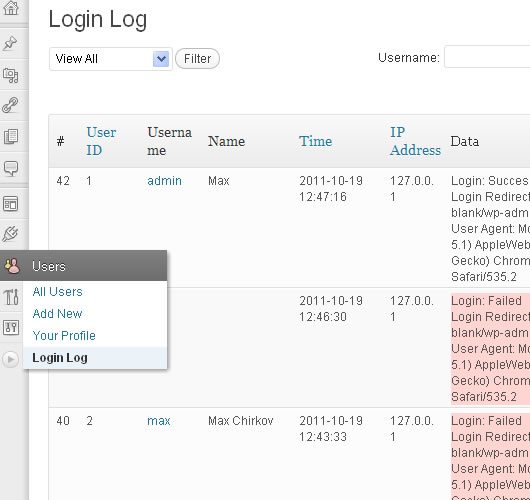
Login Log Management Screen.
Installazione
- Install and activate like any other basic plugin.
- If you wish to set log truncation or opt-in to record failed login attempts, go to Settings => General. Scroll down to Simple Login Log.
- To view login log, go to Users => Login Log. You can export the log to CSV file form the same page.
Screen Options are available at the top of the Login Log page. Click on the Screen Options tab to expand the options section. You’ll be able to change the number of results per page as well as hide/display table columns.
Recensioni


Contributi e sviluppo
“Simple Login Log” è un software open source. Le persone che hanno contribuito allo sviluppo di questo plugin sono indicate di seguito.
Collaboratori

“Simple Login Log” è stato tradotto in 1 lingua. Grazie a chi traduce per il contributo.
Traduci “Simple Login Log” nella tua lingua.
Ti interessa lo sviluppo?
Esplora il codice segui il repository SVN, segui il log delle modifiche tramite RSS.
Changelog
2.0.0 – 2025-11-26
- Code completely re-factored for modern standards.
Version 1.1.3
– Minor fix.
Version 1.1.2
- Fixed: logins were not recorded due to (multiple) agent roles assigned to the same user a longer than 30 characters.
- Fixed: sql injection vulnerability.
Version 1.1.0
- WP 4.6 compatibility update
Version 1.1.0
- Fixed: some SQL queries were requesting all records, which caused some sites to run out of memory.
- Numerous minor fixes and improvements.
- Added Chinese and French translations.
- New Feature: Delete All link – deletes all log records at once.
Version 1.0
- WP 3.8 compatibility update.
Version 0.9.6
- Bug Fix: records weren’t truncated in multi-site setup.
- Added German, Russian and Ukrainian translations.
Version 0.9.5
- Fixed: filtered log results weren’t getting exported correctly.
- Improvement: log real IP per Alexander’s recommendation.
- Added Persian translation.
Version 0.9.4 – Highly Advised!
- Numerous vulnerability fixes!
Version 0.9.3
- Improvement: search by partial user name as well as partial IP address per Commeuneimage’s recommendation.
- Updated POT file.
- Added uninstall.php to all plugin’s data from the database on plugin deletion.
Version 0.9.2
- Daily cron job with log truncation didn’t work.
Version 0.9
- Changed access to the log for users with capability to “list_users”.
Version 0.8
- Bug Fix: Columns’ checkboxes weren’t showing in Screen Options in WP 3.3.
Version 0.7
- Added user role filter via link. Filter will apply only to newly registered logins, because user roles weren’t recorded in versions prior to v.0.6.
Version 0.6
- Added new column – User Role.
- Minor PHP warning notices cleanup.
Version 0.5
- Bug fix: in_array() warning for hidden columns not returning an array.
Version 0.4
- Added option to export filtered log results.
- Added Views filters All/Successful/Failed logins.
- Added Screen Options: number of items per page, output visibility options for table columns.
- Added sll-output-data filter, which allows to alter data output in each column of the table.
- Added support for localization.
Version 0.3
- Added support for third-party login plugins.
- Added option to log Failed Login Attempts.