Vai al contenuto
WordPress.org

Italia

  • Temi
  • Plugin
  • Notizie
  • Supporto
    • Documentazione
    • Forum
  • Info
  • Community
    • Manifesto
    • Unisciti alla Community
    • Team
    • Manuali
    • Traduci
    • Meetup italiani
    • WordCamp
    • Five for the Future
    • Proposte di lavoro
    • Swag Store
  • Risorse
    • Directory delle foto
    • Learn WordPress
    • Openverse
    • Pattern
    • Playground
    • Prova l’editor Gutenberg
    • WordPress.tv
  • Eventi
  • Scarica WordPress
Scarica WordPress
WordPress.org

Plugin Directory

Secure Admin Login With Customize

  • Invia un plugin
  • I miei preferiti
  • Accedi
  • Invia un plugin
  • I miei preferiti
  • Accedi

Secure Admin Login With Customize

Di Dilip Bheda
Scarica
  • Dettagli
  • Recensioni
  • Installazione
  • Sviluppo
Supporto

Descrizione

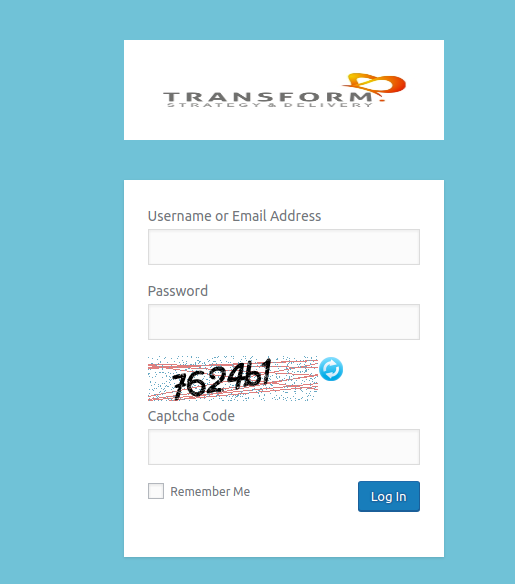
Create your own custom admin login page with google recaptcha and captcha code.

Plugin allows to change custom logo with replace with wordpress default logo, background color, background image, background slide show, form color, font size, login form position and many more features.

Supports full features.

  • You can add Google Recaptcha in your wordpress admin form (Site Key & Secret Key are required).
  • You can add Captcha Code in your wordpress admin form.
  • You can add customer logo above wordpress admin form.
  • You can add background color and background image to the wordpress admin form.
  • You can add custom message/text above & bottom of your wordpress admin login form.
  • Free support.
  • Multi-lingual support.
  • Translation ready (Gujarati, Hindi).

Main features.

  • Google Recaptcha.
  • Captcha Code.
  • Login button hover color.
  • Login button color.
  • Admin form custom color.
  • Admin form border custom style.
  • Admin form label size.
  • Admin form opacity.
  • Admin form custom background image.
  • Change label color.
  • Change login form color.
  • Set custom background image.
  • Set background color.
  • Add custom logo to admin login form.
  • Logo width.
  • Logo height.
  • Logo link.
  • Logo title.

Screenshot

Installazione

  1. Upload the plugin to your ‘wp-content/plugins’ directory, or download and install automatically through your wordpress admin panel.
  2. Activate the plugin through the ‘plugins’ menu in WordPress.

FAQ

How to customizer?

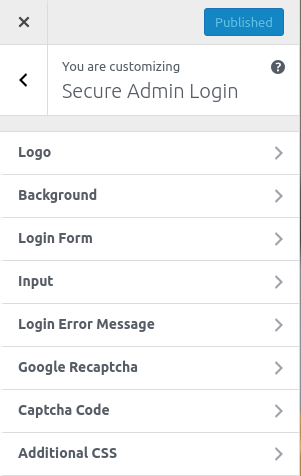
Go to WordPress dashboard, Navigate to Appearance > Customize > Customize secure login to get started.

How to get google reCpatch keys

Go to your google reCaptach dashboard and select the new/existing site with “Invisible reCAPTCHA” label and enter your host where you want to add google recaptch and save it. After then you will get site and secret key from you have added site on google recaptcha

Recensioni

Non ci sono recensioni per questo plugin.

Contributi e sviluppo

“Secure Admin Login With Customize” è un software open source. Le persone che hanno contribuito allo sviluppo di questo plugin sono indicate di seguito.

Collaboratori
  • Dilip Bheda
  • Girish Panchal
  • Jaydip
  • Hardik Raval

Traduci “Secure Admin Login With Customize” nella tua lingua.

Ti interessa lo sviluppo?

Esplora il codice segui il repository SVN, segui il log delle modifiche tramite RSS.

Changelog

1.0

  • Initial release.

1.1

  • Multi-lingual support.
  • Translation ready for Gujarati & Hindi.

1.2

  • Security Update.

1.3

  • Tested up to 5.0

Meta

  • Versione 1.4
  • Ultimo aggiornamento 1 anno fa
  • Installazioni attive 10+
  • Versione WordPress 5.9 o superiore
  • Testato fino alla versione 6.7.4
  • Versione PHP 7.2 o superiore
  • Lingua
    English (US)
  • Tag
    custom admin logincustom login logocustom wp-loginlogin customizer
  • Visualizzazione avanzata

Valutazioni

Non sono state ancora inviate recensioni.

Lascia la tua valutazione

Vedi tutte le recensioni

Collaboratori

  • Dilip Bheda
  • Girish Panchal
  • Jaydip
  • Hardik Raval

Supporto

Hai qualcosa da dire? Ti serve aiuto?

Chiedi nel forum di supporto

  • Chi siamo
  • News
  • Hosting
  • Privacy
  • Vetrina
  • Temi
  • Plugin
  • Pattern
  • Learn (Training)
  • Supporto
  • Sviluppo
  • WordPress.tv ↗
  • Partecipa
  • Eventi
  • Donazioni ↗
  • Five for the Future
  • WordPress.com ↗
  • Matt ↗
  • bbPress ↗
  • BuddyPress ↗
WordPress.org
WordPress.org

Italia

  • Visita il nostro account X (ex Twitter)
  • Visita il nostro account Bluesky
  • Visita il nostro account Mastodon
  • Visita il nostro account Threads
  • Visita la nostra pagina Facebook
  • Visita il nostro account Instagram
  • Visita il nostro account LinkedIn
  • Visita il nostro account TikTok
  • Visita il nostro canale YouTube
  • Visita il nostro account Tumblr
Code is Poetry.
The WordPress® trademark is the intellectual property of the WordPress Foundation. WordPress® is not the same thing as WP Engine®. Since October 2024, WordPress.org’s creator Matt Mullenweg is a defendant in a legal action from WP Engine®. The WordPress Hosting page does not recommend WP Engine®.