

Descrizione
This plugin adds a new block type in the Block Editor. Add a Google Maps map in your pages using the style you like the most. Use a marker to highlight a specific location.
Features
- Different align options are available.
- Use different Google Map styles.
- Enable/disable zoom and pan.
- Add a single marker in the map.
- Add a text box on top of the map with information about the marker.
Screenshot

Add beautiful Google Maps in your pages or posts. 
Change the style of your maps using one of the predefined styles or use your own. 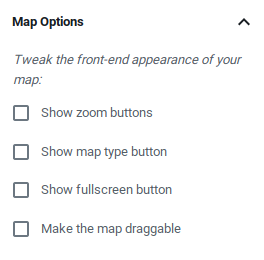
Customize your maps’ buttons and behavior with simple and comprehensible settings. 
Add one marker in your map. 
Find locations easily with the integrated search field.
Blocchi
Questo plugin fornisce 1 blocco.
- Google Map Add and customize a beautiful Google Map with an optional marker.
Installazione
- Upload
nelio-mapsfolder to the/wp-content/plugins/directory - Activate the plugin through the Plugins menu in WordPress
FAQ
-
How can I get a Google Maps API Key?
-
Please adhere to these instructions to generate the Google Maps API Key you’ll need to use Nelio Maps.
Recensioni
Non ci sono recensioni per questo plugin.
Contributi e sviluppo
“Nelio Maps” è un software open source. Le persone che hanno contribuito allo sviluppo di questo plugin sono indicate di seguito.
Collaboratori


“Nelio Maps” è stato tradotto in 3 lingue. Grazie a chi traduce per il contributo.
Traduci “Nelio Maps” nella tua lingua.
Ti interessa lo sviluppo?
Esplora il codice segui il repository SVN, segui il log delle modifiche tramite RSS.
Changelog
2.0.1 (December 2, 2025)
- Update coding standards.
- Update block to API version 3.
- Disable keyboard interaction if map is not draggable.
2.0.0 (August 19, 2025)
- Rewrite codebase with TypeScript
- Update inner dependencies
1.0.2
- Added options page to easily specify Google API Key.
- Improved internationalization.
- Simplified developer dependencies.
1.0.1
- Modified CSS and JS handlers.
- Fixed positioning of marker address.
- Added version number in enqueued scripts and styles.
1.0.0
- First release.