
Descrizione
Adding email signup forms to your blog has never been easier.
In 2 easy steps, connect to one of the listed email services below, or use your custom form code to begin placing email signup forms throughout your blog. It’s easy, just drag a Widget.
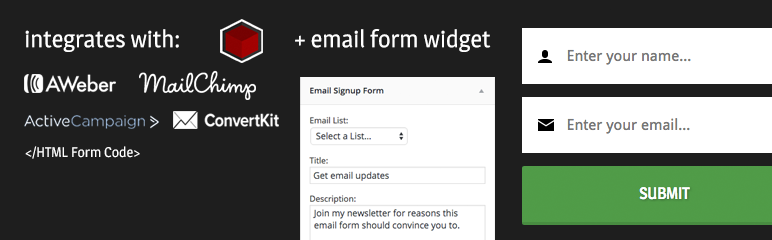
Kolakube Email Forms currently integrates with:
- AWeber
- MailChimp
- ActiveCampaign
- ConvertKit
- Custom HTML Form Codes
NEW: See what’s new in version 1.1 · Watch this quick demonstration video →
Kolakube Email Forms does its best to inherit your theme’s CSS styles and offers no design options. This strictly outputs email form codes and relies on your theme to style it (can easily be tweaked with CSS).
NOTE: more email services will be added soon. Please leave a review and tell me about your experience using this plugin! More features available in Marketers Delight
Screenshot

In order to use the email widget, you must first connect to an email service.

Once you select a service (see description for currently available integrations), click ‘Get Authorization Code’ to get a unique API/auth code to paste into the text box and click ‘Connect’.

If the connection is successful, you will see the success screen. You can now use the email widget.

All of your email lists are available for your choosing in a select box, as well as some other personalization fields.

Depending on which email service you connect to, you will get different settings to play with. The screenshot below is what the widget looks like when you’re connected to AWeber (as opposed to the MailChimp widget above).

Here is what the widget looks like if you choose to use a custom form code.
Installazione
- Upload
kolakube-email-formsto the/wp-content/plugins/directory - Activate the plugin through the ‘Plugins’ menu in WordPress
- Go to Tools > Email Service Setup to follow onscreen instructions to connect to your email service (or choose your own custom form code)
- Once connected, you can now use the ‘Kolakube Email Signup Form’ widget in the Appearance > Widgets admin screen.
- For articles and video guides, check out documentation
FAQ
- Installation Instructions
-
- Upload
kolakube-email-formsto the/wp-content/plugins/directory - Activate the plugin through the ‘Plugins’ menu in WordPress
- Go to Tools > Email Service Setup to follow onscreen instructions to connect to your email service (or choose your own custom form code)
- Once connected, you can now use the ‘Kolakube Email Signup Form’ widget in the Appearance > Widgets admin screen.
- For articles and video guides, check out documentation
- Upload
- What if my Email Service Provider isn’t integrated?
-
As more email services are included in this plugin (like GetResponse and Constant Contact), you can place your custom HTML form code into the widget.
- Can I customize email forms with this plugin?
-
Yes, the form will style to match with your theme and can be further customized with CSS in a child theme.
As of version 1.1, you can customize the full email form HTML template with a child theme, as well as hook into various places throughout the email form. Read documentation →
Recensioni
Non ci sono recensioni per questo plugin.
Contributi e sviluppo
“Kolakube Email Forms” è un software open source. Le persone che hanno contribuito allo sviluppo di questo plugin sono indicate di seguito.
Collaboratori
Traduci “Kolakube Email Forms” nella tua lingua.
Ti interessa lo sviluppo?
Esplora il codice segui il repository SVN, segui il log delle modifiche tramite RSS.
Changelog
1.1.1
- You can use basic HTML in title, description, and the after form text fields for further customization.
1.1
- New: ActiveCampaign + ConvertKit integrations
- New: After Form Text setting
- New: Display email form on single posts only
- Developer: Customize the full HTML template with a child theme
- Developer: New template hooks
- Developer: Better inline documentation
- Improvement: Simplified API that collects less and more organized email data
- Improvement: Removed URL protocol from form action to prevent breaking https
- Improvement: Simplified user interface + connection process
1.0.2
- Just a quick fix that adds a unique class name to the email input field so it can be targeted with CSS.
1.0.1
- Added a new feature that let’s you display this form ONLY on your blog homepage
- Updated core files to better meet WordPress coding standards (thanks Rob Neu)
1.0
- Released to the world