

Descrizione
- create multiple menu items at once
- menu items are created from multiline text
- you can provide menu items labels one per line
- use 2 space indent to create subitem
- you can provide menu items URLs one per line – they are automatically paired line by line
- if you don’t provide URLs, then hash is automatically generated for each label
- quick delete menu item with or without all subitems
- quick copy/clone menu item
PRO version features (BUY HERE):
-
generate posts directly from the Menus screen
- no need to leave your Menus screen to create new drafts that you will need later
- generate multiple posts, pages or other post type posts at once
- use 2 space / tab indent to create subpages
- you can provide custom slugs for newly generated posts or let them generate automatically from the titles
-
duplicate menu functionality
- works with all the menu items metas
- you will not lose your Polylang Languages settings
- also works with ACF icons or other data
-
taxonomy terms auto generated menu items
- select any public taxonomy like Blog post categories or WooCommerce product categories or other custom taxonomies
- you can limit how many terms will be listed
- you can limit how many levels of subterms will be listed
- you can exclude some specific terms
- you can order terms by name, parent, count, or other parameters
- you can show/hide empty terms
- you can show/hide terms count (number of assigned posts)
-
post type posts auto generated menu items
- select any public post type like Posts, Pages, Products or other custom post types
- you can limit how many posts will be listed
- you can limit how many levels of subposts will be listed
- you can exclude some specific posts
- you can filter posts by any term and taxonomy
- you can order posts by title, author, date, or other parameters
-
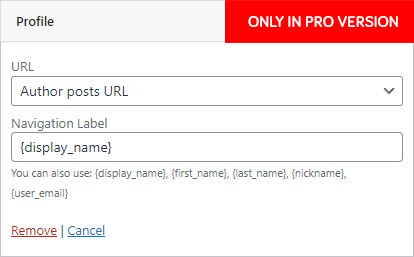
Profile menu item
- show current user in menu
- you can use variables {display_name}, {first_name}, {last_name}, {nickname}, {user_email} to create any custom menu item, like `Hello John ([email protected])` by `Hello {first_name} ({user_email})`
- you can link it to admin profile or author posts URL or choose from WooCommerce account endpoint URLs or to # to use it just as a parent menu item for dropdown
-
Login / Logout menu item
- show login and logout links in menu
- you can provide your own login URL or use default WP login
- you can provide your own login and logout redirect URL
- you can provide your own login and logout menu item label and it’s fully translatable with WPML, Polylang or others
- you can use variables {display_name}, {first_name}, {last_name}, {nickname}, {user_email} in logout menu item
-
special field for hash or $_GET parameters for any post menu item
- you can write some `#hash` that will be added at the end of the post URL
- you can write some `?get_attribute=123` that will be added at the end of the post URL
-
automatically generates anchor links menu items for any post
- click on anchor button to get all anchors from that specific post
- you can select title for every anchor
- you can decide which anchors to add
Screenshot

Bulk menu creator 
Quick delete 




Installazione
- Upload
bulk-menu-creatordirectory to the/wp-content/plugins/directory - Activate the plugin through the ‘Plugins’ menu in WordPress
- In case you don’t see Bulk menu in Appearance > Menus, just click on top right Screen Options and activate it
Recensioni

19 Settembre 2022
This plugin saved me a ton of time compared to manually adding one menu item at a time. Super fast!

9 Febbraio 2022
This plugin has just saved me days worth of work building out a huge mega menu of countries and districts of the world, each with it’s own URL parameter to trigger an action on a map.
To bulk edit this project, I used google sheets (excel would work too) to create a 4 column spreadsheet:
Column A contained 1 empty cell then double spaces below (double space = sub menu item)
Column B contains the country menu title
In column C I used CONCATENATE to combine column A & B to generate the text that I then pasted into the Bulk Menu Creator app.
The finally column D contains the link
Simply copy and paste column C into the Menu items labels, and column D into the Menu items URLs.
I made the mistake of missing the top link the first time, but the delete button that comes with this amazing plugin makes correcting it a 10 second job breeze.
Absolutely amazing app, one of the best time saving plugins on WordPress if you want to create and edit large menus.

24 Gennaio 2021
Didn’t find a comparable solution to create a very large menu. Fantastic!

11 Ottobre 2020
Очень удобный плагин для массового создания меню из ссылок.

4 Ottobre 2020
So convenient and easy to use. it saved me a lot of time!

5 Settembre 2020
Useful and time saving
Contributi e sviluppo
“Bulk menu creator” è un software open source. Le persone che hanno contribuito allo sviluppo di questo plugin sono indicate di seguito.
Collaboratori
Traduci “Bulk menu creator” nella tua lingua.
Ti interessa lo sviluppo?
Esplora il codice segui il repository SVN, segui il log delle modifiche tramite RSS.
Changelog
9.6
- Tested on WP 6.9
- PRO ONLY: generate posts directly from the Menus screen
9.5
- Tested on WP 6.5
- stop wrapping lines inside Bulk menu textareas
- now you can resize Bulk menu textareas horizontally and vertically
- PRO ONLY: now you can use TAB and SHIFT+TAB in Bulk menu textareas to change indent
9.4
- Tested on WP 6.4
9.3
- Tested on WP 6.3
- PRO version promo notice
9.2
- Tested on WP 6.1
- new features in PRO version
9.1
- previous fix was not updated… what the hell?
9.0
- fix missing JS localization
8.0
- new Quick copy button on every menu item
- rewrite quick delete to use WordPress core JS functions for better compatibility
7.0
- fix Firefox not working new line with Enter
6.0
- Tested on WP 5.9
- fix children detection for Quick delete
- PRO version introduced
5.0
- Tested on WP 5.7
- possibility to quick delete menu item with or without all subitems – trash icon will appear on hover
4.0
- Tested on WP 5.4
- textarea has now numbers so you can easily visually pair labels and urls
- possibility to create subitems with 2 spaces indent ( use 4 spaces to create sub-sub-item etc. )
3.0
- Tested on WP 5.2.1
- auto generate hash from title if URL is empty
2.0
- Tested on WP 5.0
- Optimized for translations
- Auto unhide metabox on plugin activation
1.0
- First version