Frequently Asked Questions

How can we help?

Manage your ISPE membership, conference and training registrations, guidance document purchases, subscriptions, learn about advertising, exhibit and sponsorship opportunities, give feedback and more by accessing the help guide below that gives you answers to frequently asked questions.

My Account, Email, or Profile
  • Where can I find my username or password?

    Go to the Member Login page and click on “Forgot Username?” or “Forgot Password?” to get started. If you don’t see the recovery email in your inbox, be sure to check your spam or junk folder. Still need help? Reach out to our friendly Member Services team at [email protected] or call us at +1-813-960-2105—we’re happy to assist! 
  • How do I change the email linked to my account?

    Go to the Sign In (ispe.org) and log into your account. Click on “Welcome [your first name]” and select My Account. Under Profile Progress, click on Contact Information, and update your phone, email and address. You can email Member Services or call us at +1-813-960-2105 for assistance.  
  • I am receiving unwanted emails

    On the bottom of the email there is the link for you to opt out or unsubscribe. You can also set up your email preferences by logging into your account – select My Account – PROFILE – scroll down to My Addresses to update your email and Data Privacy to make necessary changes to your email preferences. Or you can contact Member Services or call us at +1-813-960-2105 for assistance.  
  • I am not receiving my emails

    Please verify your email address. If it is correct, please check if ISPE email goes to your spam or junk mail. If it is not in spam or junk mail, please email Member Services or call us at +1-813-960-2105 for assistance.  
  • How do I join an Affiliate or Chapter?

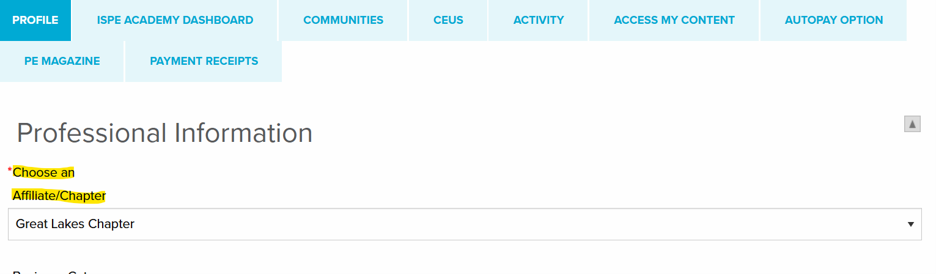
    Find your local affiliate/chapter here Affiliates and Chapters. Log into your account – Sign In (ispe.org) select My Account – PROFILE – Under Professional Information, select the appropriate affiliate/chapter.

    ISPE account Profile tab showing the Choose an Affiliate/Chapter dropdown under Professional Information

    Please note that each member may select only one primary chapter. If you’re interested in receiving updates from additional chapters, just contact Member Services—we’ll be happy to add you to their mailing lists.  

  • How do I join a Community of Practice?

    Please log into your account – select My Account – Communities – and select as many communities as you wish. To see how to do this, view the help video on the Communities of Practice page.  
  • How do I update my name?

    Please email Member Services or call us at +1-813-960-2105 for assistance.  
  • My account is locked out. What do I do?

    If your account is locked out, you must wait 15 minutes before you can attempt to login again. Please click on "Forgot Password?" before your 5th attempt to avoid being locked out. On your ISPE account page, under the Profile tab, scroll down to the bottom and you can change Username or Password.

    Bottom of the ISPE account Profile tab showing the options to change username and password 

  • Will ISPE contact me by text message?

    If you have opted in to receive mobile SMS (text) messages in your member profile, ISPE may send important updates related to your membership, conference and event notifications, and other relevant member communications. Official ISPE text messages will only be sent from: (301) 900-3647.

    If you no longer wish to receive SMS communications, you may opt out at any time by replying STOP to any message. 

Billing or Invoice

  • I have a question about my invoice/quote

    Please email Member Services your inquiry. Please provide the ISPE ID, full name of purchaser, and details of invoice.  
  • I need a copy of my receipt

    Your membership dues renewal invoices and other purchase receipts are available online and you can access these at any time without any delay.

    Here’s how to access:

    • Visit www.ispe.org
    • Click on ‘Login’ in the top right corner using your ISPE username.
    • Click on ‘Welcome’ and then ‘My Account’
    • Visit My Account > Payment Receipts tab

    You are able to view this online and print out a PDF version. 

Membership

ISPE Conferences

Webinars

Training

  • How can I register for a training? 

    Please click here ISPE Training for our current training courses. Please select an appropriate region then pick the training course you wish to attend. Please scroll down to Daily Schedule and Pricing and click on REGISTER button to register with credit card payment. If you wish to pay by check or bank transfer, please send your request to Member Services.  
  • Who do I contact to set up custom, onsite training?

    Please click here ISPE Onsite Training Courses for more information about our custom training and request a quote. If you have any questions, please email ISPE Training team. 
  • How do I get more information about a scheduled course?

    Please click here ISPE Training for our current training courses. Please select the appropriate region then pick the training course you wish to attend. Please scroll down to Daily Schedule and Pricing to see daily schedule, time zone, prices, and cancellations/refund policy. 
  • How do I access the online training portal?

    Once you are registered for an online training course you will receive access information a week prior to your event with the email on file for the account used to register you for the training. It is important you check your spam/junk folders in case the email was sent there instead of your inbox because it may not come from ispe.org. If you determine you have not received the access information, please contact us or call us at +1-813-960-2105 as soon as possible prior to the training.  
  • Where can I find the download resources as part of a training course?

    Once you are registered for a training course, a webinar and/or downloadable resource will be added to your account a week prior to your training date. Once you receive a notification about this please log into your account – select My Account – ACCESS MY CONTENT – click on MY GUIDANCE DOCUMENTS to download the pdf resource or click on Dashboard Login to view the webinar.  
  • How do I make changes to a training course I’ve already registered for? 

    If you would like to edit your registration, please send the request to Member Services or call us at +1-813-960-2105 to make the change as soon as possible prior to the training.  
  • Where can I find proof of a certificate of completing a training course? 

    ISPE will provide continuing education units (ISPE CEUs) for all courses. Verification of CEUs is based on attendance as well as satisfactory completion of all evaluation materials.

    When you have attended an ISPE Classroom Training course, you will find your CEUs by going to the CEUs tab in your Membership profile.

    When you have attended an ISPE Online Learning course, you will find your CEUs by going to the ACCESS MY CONTENT tab and following the Dashboard Login link. Please review your training history in this dashboard to access your CEUs.
     
  • How do I register for training as part of a group?

    Group discount applies to Member/Nonmember rate only. To qualify, all registrant information must be submitted at the same time. Registrations that arrive later will NOT be eligible for the group discount. To register as a group, please contact ISPE by telephone, +1-813-960-2105 or by email Member Services.

    Group discount registration cannot be done online and cannot be combined with other discounts.  
  • Where can I get my receipt/confirmation for my registration? 

    Our system automatically emails receipt/confirmation to all attendees. Please check your spam or junk folder for those emails or you can send the request to Member Services or call us at +1-813-960-2105 for assistance.  
  • Can I cancel my training and get a full refund?

    Please click here ISPE Training and select the training that you’ve registered for, scroll down to Daily Schedule and Pricing to view the Cancellations/Refunds policy. 

Guidance Documents

Pharmaceutical Engineering® magazine

Advertisers, Exhibitors, & Sponsors

Website

ISPE Academy

Please see ISPE Academy FAQs here: Pharmaceutical Certificate Programs | ISPE Academy Training & Certification


Office Locations

Worldwide Headquarters

6110 Executive Blvd.
Suite 600
North Bethesda, MD 20852
United States (map)

Operations

701 N Westshore Blvd.
Suite 207
Tampa, FL 33609
United States
