

Lýsing
SiteFix is different. While other accessibility plugins slap a widget overlay on your site (which is NOT WCAG-compliant), SiteFix actually fixes accessibility issues in the backend — the way it should be done.
Why Overlay Widgets Are Not WCAG Compliant
Accessibility overlays like AccessiBe, UserWay, and similar tools add a floating widget that tries to „fix“ accessibility on the client side. The problem? WCAG 2.1 requires that content be natively accessible — not patched with JavaScript overlays. Courts have consistently ruled that overlays don’t satisfy ADA requirements.
SiteFix takes the correct approach: server-side fixes that modify your actual HTML output.
8 Free Automatic Fixes
- 🖼️ Smart Alt Text — Context-aware alt text from filenames, attachment titles, and captions. Not just filename dumps.
- 📑 Heading Hierarchy — Fixes skipped heading levels (H1H3 becomes H1H2H3). Multi-pass with loop protection.
- 🔗 Link Accessibility — ARIA labels for empty links, rel=“noopener noreferrer“ for external links, generic link text detection.
- 📝 Form Labels — Auto-injects aria-label on inputs, selects, and textareas without associated labels.
- 📊 Table Headers — Adds scope=“col“ to th elements and role=“table“ for screen readers.
- 🏷️ ARIA Landmarks — Adds roles (navigation, main, contentinfo, banner, complementary) to theme elements.
- 🌐 Language Attribute — Ensures the html tag has a proper lang attribute set.
- 🎯 Focus & Skip Links — Visible :focus-visible outlines and skip-to-content link for keyboard navigation.
Compliance Badge (Free)
Display a real-time compliance badge on your frontend showing:
- Accessibility score (0-100) based on actual scan results
- Which protections are active (green ✓) or inactive (red ✗)
- Compliance status for WCAG 2.1 AA, ADA (US), EAA (EU), AODA (Canada), EN 301 549
- Toggle on/off from the dashboard — no code needed
- Links back to your site as „Powered by SiteFix“ (great for awareness)
This is NOT a fake seal. The badge reflects your real scan results and active fixes.
Built for Performance
- Zero layout shifts (CLS = 0)
- Minimal JS — only a lightweight MutationObserver for dynamic content
- All core fixes are PHP server-side content filters
- Works with Gutenberg, Elementor, Divi, Beaver Builder, and any theme
European Accessibility Act (EAA) — June 2025
The EAA requires all e-commerce websites in the EU to be accessible starting June 28, 2025. SiteFix helps you prepare by automatically fixing the most common WCAG 2.1 AA violations. Learn more about the EAA.
ADA Compliance (United States)
Title III of the ADA requires businesses to make their websites accessible. Thousands of ADA lawsuits are filed every year. SiteFix automatically addresses the most commonly cited violations: missing alt text, poor heading structure, inaccessible forms, and missing skip links. ADA web guidance.
Pro Features
Upgrade to SiteFix Pro (€39 one-time, lifetime updates) for:
- 🎨 Advanced Contrast Boost — Automatic WCAG AA color contrast ratio fixes
- 🤖 AI Alt Text — Real image descriptions powered by OpenAI (not just filenames)
- 📄 PDF Accessibility Check — Scan uploaded PDFs for accessibility issues
- 📋 Downloadable Compliance Reports — PDF reports for clients and auditors
- ⚖️ Legal Compliance Templates — Pre-written statements for ADA, EAA, AODA
- 📊 Scheduled Auto-Scans — Daily/weekly scans with email notifications
- 🎨 Custom Badge Styling — Change colors, shape, and position of the compliance badge
- 🔗 WCAG Rule References — Each issue links to the relevant WCAG success criterion
- 💬 Priority Support — Direct email support with 24h response time
More from PluginJoy
- Clarity SEO — Lightweight SEO & Schema plugin
- SafeSnap Pro — Cloud backup with alerts
- All Plugins — View the full collection
Skjámyndir

Dashboard — Compliance score, active fixes, and scan results at a glance 
Accessibility Fixes — Toggle each fix on/off with one click 
Scan Results — Detailed issues per category with „Enable Fix“ buttons 
Frontend Badge — Shows real-time compliance score to visitors 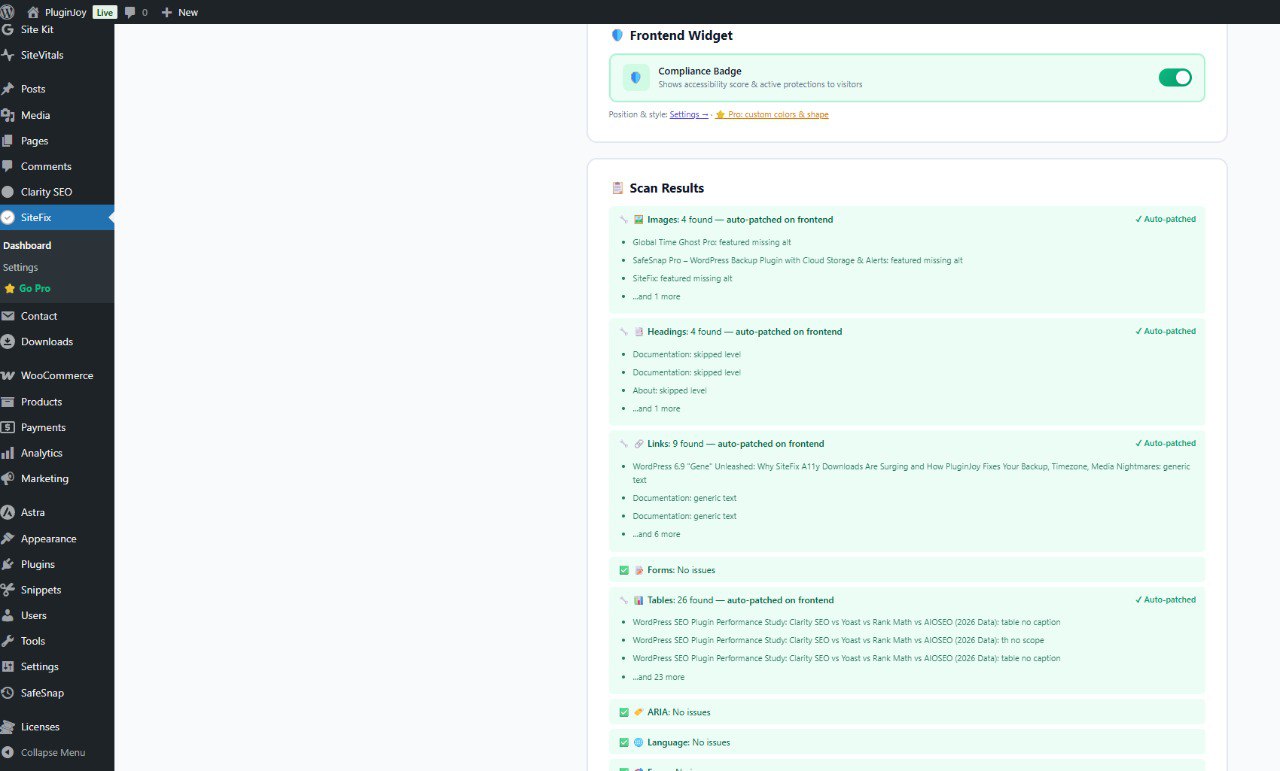
Settings — Badge position, Pro license, and configuration 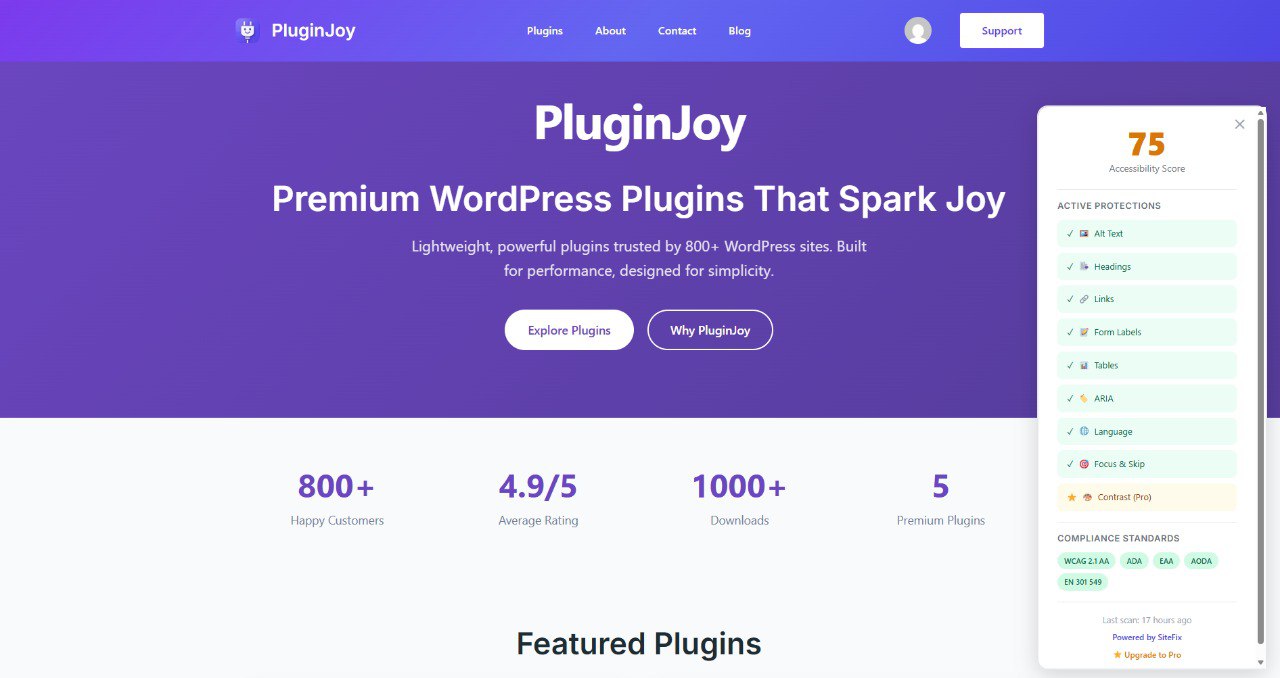
Go Pro — Compliance standards info and Pro feature overview
Uppsetning
- Upload the plugin files to
/wp-content/plugins/sitefix/or install directly from the WordPress plugin directory. - Activate the plugin through the ‘Plugins’ screen in WordPress.
- Go to SiteFix Dashboard to run your first accessibility scan.
- Toggle on the fixes you want — they apply instantly to your frontend.
- Optionally enable the Compliance Badge to show your score to visitors.
SOS
-
Why are accessibility overlays not WCAG compliant?
-
WCAG 2.1 requires content to be natively accessible in the source HTML. Overlay widgets try to patch accessibility with client-side JavaScript, which doesn’t modify the actual DOM served to assistive technologies. Multiple US courts have ruled that overlays alone don’t satisfy ADA requirements. SiteFix modifies the actual HTML output server-side.
-
Will SiteFix slow down my site?
-
No. All core fixes are PHP content filters that run server-side before HTML reaches the browser. The only client-side JS is a lightweight MutationObserver (< 2KB) for dynamic content like Elementor popups. Zero CLS impact.
-
Does SiteFix work with Elementor, Divi, and other page builders?
-
Yes. SiteFix hooks into WordPress content filters (
the_content,widget_text) which catch output from all page builders. For dynamically loaded content (AJAX popups, lazy-loaded sections), the MutationObserver handles fixes in real-time. -
What is the European Accessibility Act (EAA)?
-
The EAA is an EU directive requiring all e-commerce websites to be accessible by June 28, 2025. Non-compliance can result in fines. SiteFix addresses the most common violations automatically. More info.
-
What is ADA compliance for websites?
-
The Americans with Disabilities Act (ADA) Title III has been interpreted by courts to include websites. Thousands of lawsuits are filed annually against non-compliant sites. The most common issues — missing alt text, poor headings, inaccessible forms — are exactly what SiteFix fixes. ADA web guidance.
-
What compliance standards does SiteFix cover?
-
WCAG 2.1 Level AA (international standard), ADA (US), European Accessibility Act (EU), AODA (Canada), and EN 301 549 (EU ICT standard). These standards significantly overlap — meeting WCAG 2.1 AA covers the technical requirements of all of them.
-
What’s the difference between Free and Pro?
-
Free includes 8 automatic fixes and the compliance badge — enough for most sites to reach 90+ Lighthouse scores. Pro adds AI-powered alt text, advanced contrast fixing, PDF checks, downloadable compliance reports, legal templates, scheduled scans, and custom badge styling.
-
Does the compliance badge guarantee legal compliance?
-
No badge or tool can guarantee legal compliance. The badge shows your current accessibility status based on automated scans. SiteFix addresses 80-90% of common WCAG violations automatically, but we recommend a professional manual audit for full legal assurance.
-
How does the accessibility score work?
-
The score (0-100) is weighted across 10 categories: images (15%), headings (12%), links (12%), forms (12%), contrast (12%), focus (10%), ARIA (10%), badge (7%), tables (5%), language (5%). You get full points when a fix is enabled AND no issues remain, partial points when the fix is active but issues persist in your source content.
-
Can I disable the frontend badge?
-
Yes. The badge has its own toggle on the dashboard. Turn it off and no badge appears on your site. You can also change its position (bottom-right, bottom-left, top-right, top-left) in Settings.
-
Does SiteFix modify my database or post content?
-
No. All fixes are applied at runtime through WordPress filters. Your actual post content in the database is never modified. Deactivate the plugin and everything reverts to its original state.
Umsagnir
There are no reviews for this plugin.
Þátttakendur & höfundar
“SiteFix – Backend Accessibility Fixes | WCAG, ADA & EAA Compliance” er opinn hugbúnaður. Eftirfarandi aðilar hafa lagt sitt af mörkum við smíði þessarar viðbótar.
Höfundar
“SiteFix – Backend Accessibility Fixes | WCAG, ADA & EAA Compliance” has been translated into 1 locale. Thank you to the translators for their contributions.
Translate “SiteFix – Backend Accessibility Fixes | WCAG, ADA & EAA Compliance” into your language.
Interested in development?
Browse the code, check out the SVN repository, or subscribe to the development log by RSS.
Breytingarsaga
4.0.0
- Major rewrite — 8 free fixes (was 4 in v3)
- NEW: Form labels auto-fixer (inputs, selects, textareas)
- NEW: Table headers auto-fixer (scope, role attributes)
- NEW: ARIA landmarks injection (nav, main, footer, aside, search)
- NEW: Language attribute checker and fixer
- NEW: Compliance badge for frontend (toggle on/off)
- NEW: Weighted compliance score (0-100)
- NEW: Daily automated background scans
- NEW: „Enable Fix“ buttons in scan results
- NEW: Auto-patched status for active fixes
- NEW: Cross-links to PluginJoy plugins
- NEW: Compliance standards info (ADA, EAA, WCAG, AODA)
- IMPROVED: Smart alt text (context-aware — uses attachment titles, captions, not just filename)
- IMPROVED: Heading fixer (max 5 passes with loop protection)
- IMPROVED: Link fixer (rel=noopener, generic text detection like „click here“)
- IMPROVED: Score calculation (weighted, requires enabled + resolved)
- IMPROVED: Modern dashboard UI with real-time AJAX scanning
- IMPROVED: Badge reads fresh settings on every page load
- FIX: Settings compatibility with different value formats (bool, string, int)
- FIX: Badge correctly reflects enabled/disabled state
3.0.0
- Dashboard redesign with modern UI
- 4 free fixes + 1 Pro fix (contrast)
- Tracker for install analytics
2.8.0
- WordPress 6.9 compatibility
- Heading hierarchy refinements
- PHP 8.5 compatibility
2.7.3
- SEO-optimized readme for WordPress.org directory
- Updated tested compatibility
2.7.0
- Rebranded to SiteFix
- Enhanced universal fixes