What is ML Perf
The primary tool for MLPerf benchmarks is the MLPerf suite itself, which includes both training and inference benchmarks. These benchmarks are available for a variety of platforms, including cloud, edge, and mobile environments. You can access the MLPerf benchmarks through their official GitHub repository or the MLCommons website, which provides detailed instructions on how to run the benchmarks and interpret the results.
Why we need it
The myriad combinations of ML hardware and ML software make assessing MLsystem performance in an architecture-neutral, representative, and reproducible manner challenging. There is a clear need for industry-wide standard ML benchmarking and evaluation criteria.
Test System Spec
- Hardware (Laptop)
- AMD Ryzen 9 6800HS
- AMD Radeon RX 6700-S
- Software
- Ubuntu 22.04.3 LTS
- mlcommons v3.1 Inference
Installation
1. Install cm language
2. Prerequisites and installation
Results
Resnet-50 | imagenet-val dataset | Onnx model
cmr "run mlperf inference generate-run-cmds _submission" --quiet --submitter="MLCommons" --hw_name=default --model=resnet50 --implementation=reference --backend=onnxruntime --device=cpu --scenario=Offline --adr.compiler.tags=gcc --target_qps=1 --category=edge --division=open

I got 74.258 QPS (= latency in ms 13.47) for resnet50 model with imagenet validation set.
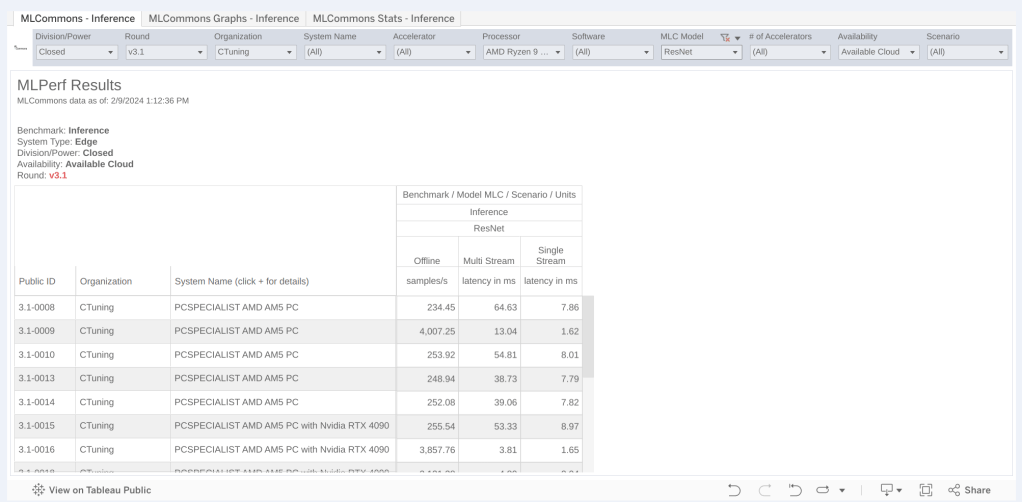
We can find the MLPerf benchmark in ML Commons Inference table, and the result of AMD Ryzen 9 7950X 16-Core Processor was around 7.8 latency in ms.
retinanet | openimage dataset | onnx model
cmr "run mlperf inference generate-run-cmds _submission" --quiet --submitter="MLCommons" --hw_name=default --model=retinanet --implementation=reference --backend=onnxruntime --device=cpu --scenario=Offline --adr.compiler.tags=gcc --target_qps=1 --category=edge --division=open

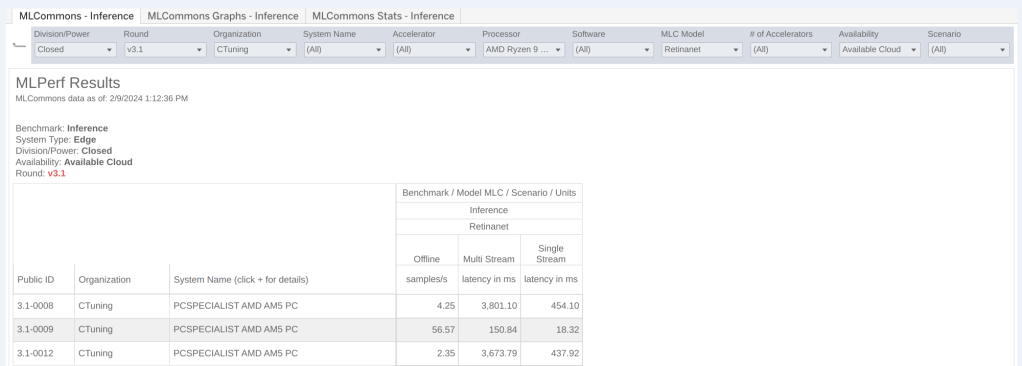
I got 1.193 QPS (= 518.13 latency in ms) and it was not that bad compared to AMD 7950X performance, 454 latency in ms.