

Deskripsi
The “WP Plugin Showroom” Plugin is a very easy way to show Wordpres plugins in a showroom. You can show a wp plugin in a post or site.
Usage
- Create a post or site
- Paste the following shortcode [plgshow name=””]
- finished
Bugs, technical hints or contribute
Please give me feedback, contribute and file technical bugs on GitHub Repository. Thanks 🙂
Credits
Developed by Triopsi
Donations
If you like the plugin, consider a donation to support further development. Click here
Tangkapan Layar
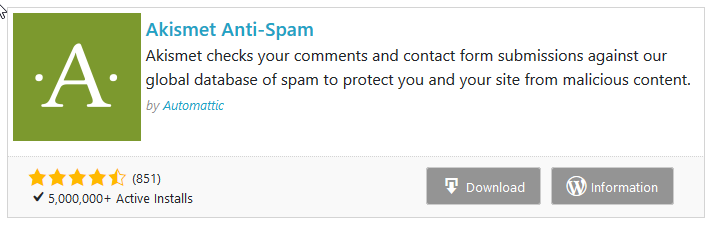
Plugin Showroom in a Post 
Plugin Showroom in a Post 
Shortcode in a post
Blok
Plugin ini menyediakan 1 blok.
- WP Plugin Showroom
Instalasi
- Upload
wp-plugin-showroomto the/wp-content/plugins/directory - Activate the plugin through the ‘Plugins’ menu in WordPress
Tanya Jawab
Nothing yet.
Ulasan
Belum ada ulasan untuk plugin ini.
Kontributor & Pengembang
“WP Plugin Showroom” adalah perangkat lunak open source. Berikut ini mereka yang sudah berkontribusi pada plugin ini.
Kontributor
Terjemahkan “WP Plugin Showroom” dalam bahasa Anda.
Tertarik mengembangkan?
Lihat kode, periksa repositori SVN , atau mendaftar ke log pengembangan melalui RSS.
Log Perubahan
1.1.2
- Tested up WP 5.7
- litle php code fixe
- code formatted
1.1.1 (05/02/2021)
- functions deprecated fix
1.1.0 (13/02/2020)
- Add Gutenberg Block
1.0.1 (10/02/2020)
- Add option links into plugin list
- Bugfix: date fix
1.0.0 (10/02/2020)
- Bugfix: Verify – No Plugin found
- Add setting page
- Add clear buffer button on the setting page
- Bugifx: Author Link
- Style: Description Font Size 0.8em
0.0.1 (09/02/2020)
- First release.