

Deskripsi
UpdateGuard – Safe Auto Updates, Semantic Version Control and Update Manager provides intelligent automatic updates for WordPress plugins, themes, and core using semantic versioning principles. Unlike WordPress’s default auto-update system that updates to any available version, this plugin gives you granular control over update types.
Perfect for:
* WordPress site administrators who want automatic security updates without breaking changes
* Developers managing multiple WordPress sites
* Businesses requiring stable, secure WordPress installations
* Agencies maintaining dozens of client websites
* Anyone who wants to prevent major version updates from breaking their site
Why Use UpdateGuard – Safe Auto Updates, Semantic Version Control and Update Manager?
WordPress’s built-in auto-update feature applies ALL updates automatically, including major version changes that can break your site. UpdateGuard – Safe Auto Updates, Semantic Version Control and Update Manager lets you:
* Automatically install security patches and minor updates
* Block major version updates that might break compatibility
* Configure update policies per plugin or globally
* Get email notifications about updates
* Track all update activity with comprehensive logs
* Manually test and trigger updates on demand
* Block both auto and manual updates that violate your policy
Key Features:
- Semantic Versioning Support – Automatically detects major.minor.patch version numbers and categorizes every pending update
- Selective Update Control – Choose to allow only minor and patch updates while blocking major version changes
- 4-Level Update Policy – Set each plugin to Major, Minor, Patch, or Hold (block all updates entirely)
- Per-Plugin Configuration – Set individual update levels for each plugin in a compact, sortable table, or use a global default
- Safe Update Strategy – Prevents breaking changes from major version updates
- Manual & Auto Update Blocking – UpdateGuard blocks not only auto-updates but also manual/bulk updates from the Plugins page that violate your policy
- Test Update Workflow – One-click “Check and Update Plugins Now” button lets you immediately trigger bulk updates using a separate test update level, independent from your global policy
- Comprehensive Logging – Track all completed plugin updates with plugin names, version changes, and timestamps. Log retention is configurable
- Email Notifications – Get notified about applied automatic updates, blocked/manual-only updates, and new pending updates. Emails include changelog links for each plugin
- Pending Updates Dashboard – View all pending updates at a glance, color-coded: green for updates that will be applied automatically and red for updates blocked by your policy
- Full Multisite / Network Support – Network-wide settings, network admin menu, and proper permission checks
- Theme Auto-Updates – Enable or disable automatic updates for all installed themes with a single checkbox
- Translation Auto-Updates – Enable or disable automatic updates for all translation files with a single checkbox
- Lock Settings – Administrators can lock the settings page to prevent other users from changing the update policy
- Custom Admin Email – Send update notifications to any email address, not just the default admin email
- Clean Uninstall – All plugin options are cleanly removed from the database on uninstall
- Lightweight & Fast – No external API calls, no bloat, fast batch processing
How It Works:
The plugin uses semantic versioning (semver) to categorize updates:
* Major updates (e.g., 3.0.0 4.0.0) – Breaking changes, blocked by default
* Minor updates (e.g., 3.1.0 3.2.0) – New features, backwards compatible
* Patch updates (e.g., 3.1.1 3.1.2) – Bug fixes and security patches
* Hold – Block all updates for a specific plugin
You can configure the plugin to automatically apply only minor and patch updates while requiring manual review for major version changes, ensuring your site stays updated with security fixes while avoiding potentially breaking changes.
How UpdateGuard Protects Your Site:
- When WordPress checks for updates (every 12 hours), UpdateGuard intercepts the update check.
- It compares the installed version with the available version and determines the update level (major, minor, or patch).
- If the update level exceeds your configured policy, the update is blocked — both for automatic updates AND for manual/bulk updates from the Plugins page.
- Allowed updates proceed normally, and the plugin logs the update with timestamp and version details.
- Email notifications are sent to your configured address with a summary of applied, blocked, and pending updates.
Tangkapan Layar
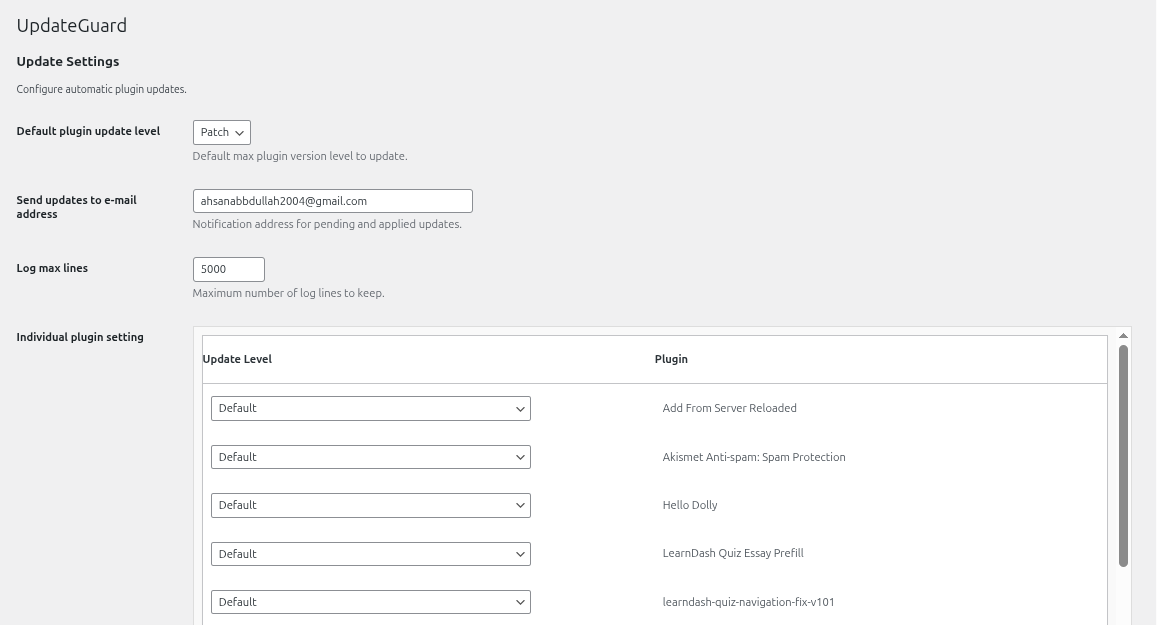
Main Settings – Configure default update level, notification email, and log settings. 
Per-Plugin Update Levels – Set individual update policy for each installed plugin. 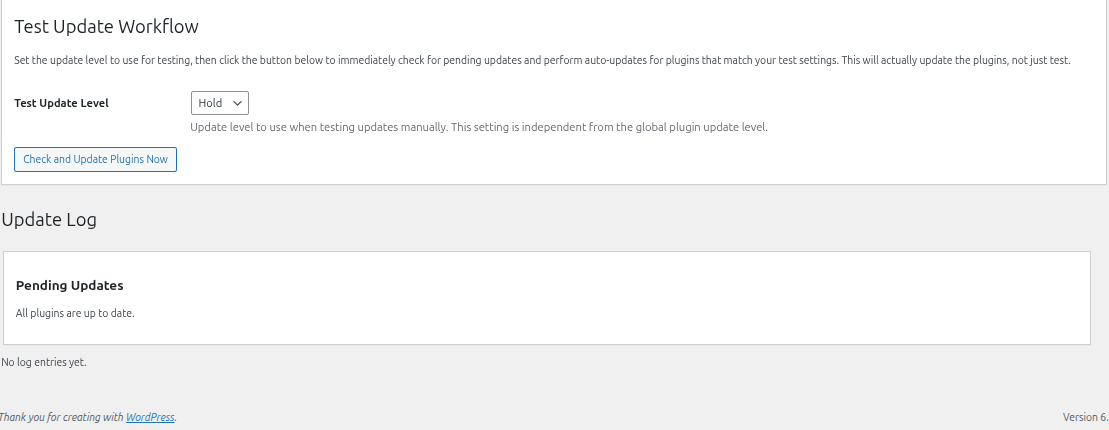
Pending Updates – Color-coded view showing which updates will auto-apply (green) and which are blocked (red).
Instalasi
- Upload the plugin files to the
/wp-content/plugins/updateguarddirectory, or install the plugin through the WordPress plugins screen directly. - Activate the plugin through the ‘Plugins’ menu in WordPress.
- Navigate to ‘UpdateGuard – Safe Auto Updates, Semantic Version Control and Update Manager’ in the WordPress admin menu to configure the plugin.
- Set your preferred default update level (Major, Minor, or Patch).
- Optionally configure individual plugin update levels.
- Save your changes.
Tanya Jawab
-
What is semantic versioning?
-
Semantic versioning (semver) is a versioning scheme that uses three numbers: MAJOR.MINOR.PATCH (e.g., 4.2.1). Major versions indicate breaking changes, minor versions add new features in a backwards-compatible way, and patch versions contain bug fixes and security updates.
-
Why should I block major updates?
-
Major version updates often include breaking changes that can cause compatibility issues with your theme, other plugins, or custom code. By blocking major updates, you can review and test them manually before applying.
-
Will this work with all plugins?
-
The plugin works best with plugins that follow semantic versioning. Plugins without official WordPress.org slugs may not be processed correctly, but WordPress will still handle their updates through the standard auto-update system.
-
How often are updates checked?
-
WordPress checks for updates every 12 hours via cron. The plugin filters these update checks and only allows updates that match your configured version level.
-
Can I update inactive plugins?
-
No. WordPress only auto-updates active plugins. Inactive plugins will not be updated automatically regardless of your settings.
-
Does UpdateGuard block manual updates too?
-
Yes. Unlike most update manager plugins, UpdateGuard blocks both automatic AND manual/bulk updates from the WordPress Plugins page if they violate your configured policy.
-
What does the “Hold” setting do?
-
Setting a plugin to “Hold” (level 0) blocks ALL updates for that plugin — major, minor, and patch. This is useful for plugins you never want to update automatically, such as a customized plugin or one known to have breaking changes.
-
How does the Test Update Workflow work?
-
The “Check and Update Plugins Now” button lets you immediately trigger a bulk update check and apply updates. It uses a separate “Test Update Level” setting that is independent from your global policy — so you can test with a higher level (e.g., Major) without permanently changing your safe default.
-
Does UpdateGuard work with WordPress Multisite?
-
Yes, fully. UpdateGuard registers its menu in Network Admin and settings apply network-wide across all sites.
-
Can I get email notifications for updates?
-
Yes. UpdateGuard sends email notifications for: (1) automatic updates that were applied, (2) updates that were blocked and require manual action, and (3) new pending updates. Emails include changelog links for each plugin. You can configure a custom email address in settings.
-
What happens when I uninstall the plugin?
-
All plugin settings and data are cleanly removed from the database. No leftover data is stored.
-
Does UpdateGuard update themes and translations too?
-
Yes. You can enable automatic theme updates and translation updates independently using simple checkboxes in the settings page. These are separate from the per-plugin semantic versioning controls.
Ulasan
Belum ada ulasan untuk plugin ini.
Kontributor & Pengembang
“UpdateGuard – Safe Auto Updates, Semantic Version Control and Update Manager” adalah perangkat lunak open source. Berikut ini mereka yang sudah berkontribusi pada plugin ini.
Kontributor

Tertarik mengembangkan?
Lihat kode, periksa repositori SVN , atau mendaftar ke log pengembangan melalui RSS.