orienteer/orienteer
Open Source Business Application Platform
4.8K
orienteer/orienteer repository overview


Orienteer
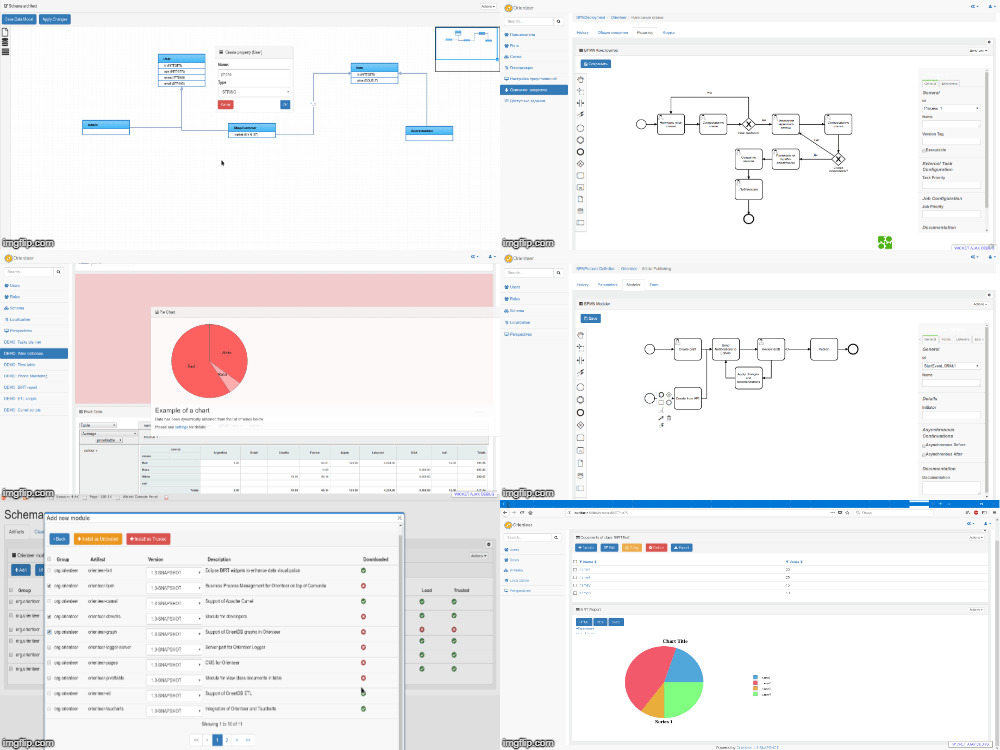
What is Orienteer
Orienteer is Business Application Platform:
- Easy creation of business applications
- Extendable to fit your needs
- Dynamic datamodel
- Rest/JSON enabled
- Developers friendly
- Scalling and cloud ready (support of Docker)
Git Pitch
User Guide
Demo Site
Orienteer installation
There are 3 options for Orienteer installation:
- Docker
- Embedded (on application server)
- Standalone (no need in application server)
Docker
Run new container by command docker run -p 8080:8080 orienteer/orienteer. Adjust this command if needed:
-v <runtime>:/app/runtime - mount runtime directory with databases, dynamically installed modules and etc.
-v <maven>:/root/m2 - mount your local maven repository
ORIENTDB_ADMIN_PASSWORD=<password> - specify admin password by default
ORIENTDB_GUEST_PASSWORD=<password> - specify reader password by default
Embedded
Orienteer is Java Servlet 3.1 web application and can be installed on all famous compatible containers:
- Jboss
- Weblogic
- IBM WebSphere
- Tomcat
- Jetty
- and etc.
To install Orienteer in embedded mode:
- Download latest orienteer.war
- Put orienteer.war into deployment folder for your application server
- Configure orienteer.properties according to your environment and place it in the same directory or above
- Run application server
Standalone
Orienteer in standalone mode use embedded jetty server to run yourself. To install Orienteer in standalone mode:
- Download latest orienteer-standalone.jar
- Put orienteer-standalone.jar into any directory
- Optionally configure orienteer.properties accordging to your environment and place it in the same directory or above
- By default, Orienteer, will run OrientDB database embedded
- Run Orinteer as
java -Xmx512m -Xms512m -jar orienteer-standalone.jar. JVM parameters can be adjusted accordingly. Additional application parameters can be supplied:--config=<filename>- specification of path to orienteer configuration file--embedded- run embedded OrientDB database--port=<port number>- run Orienteer on specified port (Default: 8080)--help- display help
Orienteer initial configuration
orienteer.properties is the main file to store initial configuration paramenters for your installation. Sample properties file can be always found here.
orienteer.production=false  //Run Orienteer in production mode or not
orientdb.embedded=false     //Run embedded OrientDB server?
orientdb.url=remote:localhost/Orienteer   //OrientDB server URL
orientdb.guest.username=reader               //Default OrientDB user (will be used for guests as well)
orientdb.guest.password=reader               //Password for default OrientDB user
orientdb.admin.username=admin    //OrientDB user to user for administrative stuff
orientdb.admin.password=admin    //Password for OrientDB user used for administrative stuff

# Optional properties

#orientdb.rest.url=http://localhost:2480
#plantuml.url=http://custom-plantuml-url
#plantuml.showuml=false;

#webjars.readFromCacheTimeout=5 seconds
#webjars.useCdnResources=true
#webjars.cdnUrl=//maxcdn.bootstrapcdn.com:80
Setup of development environment
Prerequisites
- java 8+
- git
- maven
- OrientDB, if you want to use OrientDB remotely
Steps
Install of wicket-orientdb github SNAPSHOT
This step is optional: wicket-orientdb SNAPSHOT always available on Maven central
git clone <your fork URL for wicket-orientdb>
cd wicket-orientdb
mvn clean install
Install Orienteer
cd ..
git clone <your fork URL for Orienteer>
cd Orienteer
mvn clean install
Modify orienteer.properties file
See configuration section above
Code compilation
mvn clean install
Run jetty server by command
mvn jetty:run
Goto the application
Open http://localhost:8080 is in your browser
Tag summary
Content type
Image
Digest
sha256:62d28311a…
Size
263.5 MB
Last updated
about 2 years ago
docker pull orienteer/orienteer