
Leírás
This plugin will show google map in your post or pages with the help of short code then will plugin will place a link and your google
map will be view in a lightbox [map_link suburb=”suburb name” state=”state name” country=”country name” description=”description „]
Képernyőmentések

Screenshot of the admin panel menu.
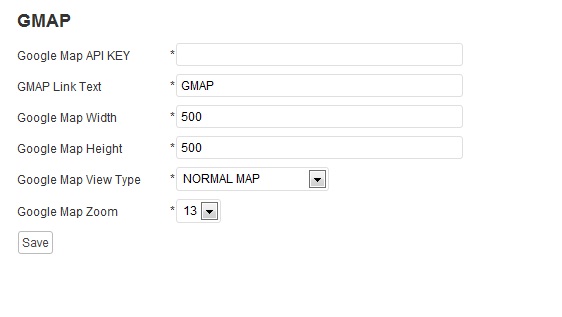
Screenshot of the add google map key and map link .

Screenshot of the map link in the post.

Screenshot of the google map in light box.
Telepítés
1.Upload the sukhjot-google-map.zip plugin to your wordpress plugin directory „wp-content/plugins/”.
2.Then go to your wp-admin panel and under the plugins list activate the Auto Poster plugin.
3.After activation in the admin panel you will see a new menu called „GMAP”.
4.Here you can add the google map key and name for link which will viewes by users .
.
5.Done
GYIK
- How do I use it?
-
Simple install
Vélemények
Nincsenek értékelések erről a bővítményről.
Közreműködők és fejlesztők
“Google Map With Short Code” egy nyílt forráskódú szoftver. A bővítményhez a következő személyek járultak hozzá:
Közreműködők

“Google Map With Short Code” fordítása a saját nyelvünkre.
Érdekeltek vagyunk a fejlesztésben?
Browse the code, check out the SVN repository, or subscribe to the development log by RSS.
Változási napló
1.0
- Initial release
1.1
- New Version Available