WordPress.org

Magyar

  • Sablonok
  • Bővítmények
  • Hírek
  • Névjegy
    • Történet
    • Követelmények
    • Telepítés
  • Tárhely
  • Frissítés
  • Biztonsági mentés
  • Biztonság
  • WordPress letöltése
WordPress letöltése
WordPress.org

Plugin Directory

Hide User Profile Fields

  • Submit a plugin
  • My favorites
  • Log in
  • Submit a plugin
  • My favorites
  • Log in

Ez a bővítmény nem lett tesztelve a WordPress legutóbbi 3 fő kiadásával. Lehetséges, hogy már nincs karbantartva, frissítve és a használata gondot jelenthet a frissebb WordPress verziókkal.

Hide User Profile Fields

Szerző: gugabguerra
Letöltés
  • Részletek
  • Vélemények
  • Telepítés
  • Fejlesztés
Támogatás

Leírás

A simple plugin with no-backend interface, to clean up some dummy fields from user profiles edition and creation pages, focused on corporate purposes. The following fields are removed right after this plugin activation: Colors Profile, Keyboard Shortcuts, Toolbar, AIM, Jabber, Yahoo IM, Website URL, Biography Description and User Role (every new user is created as Subscriber)
Some contents was inspired on teachingyou.net

Képernyőmentések
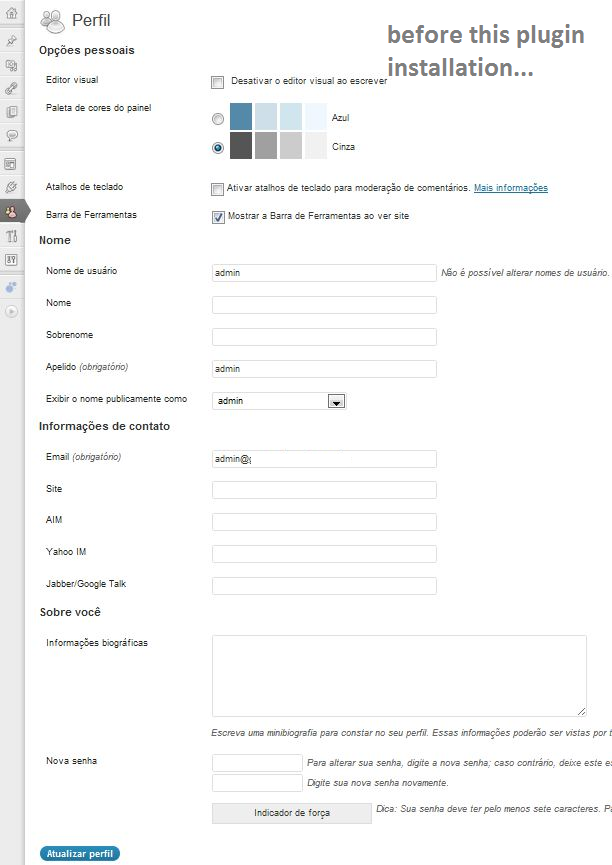
  • Before installation and activation of Hide User Profile Fields plugin.
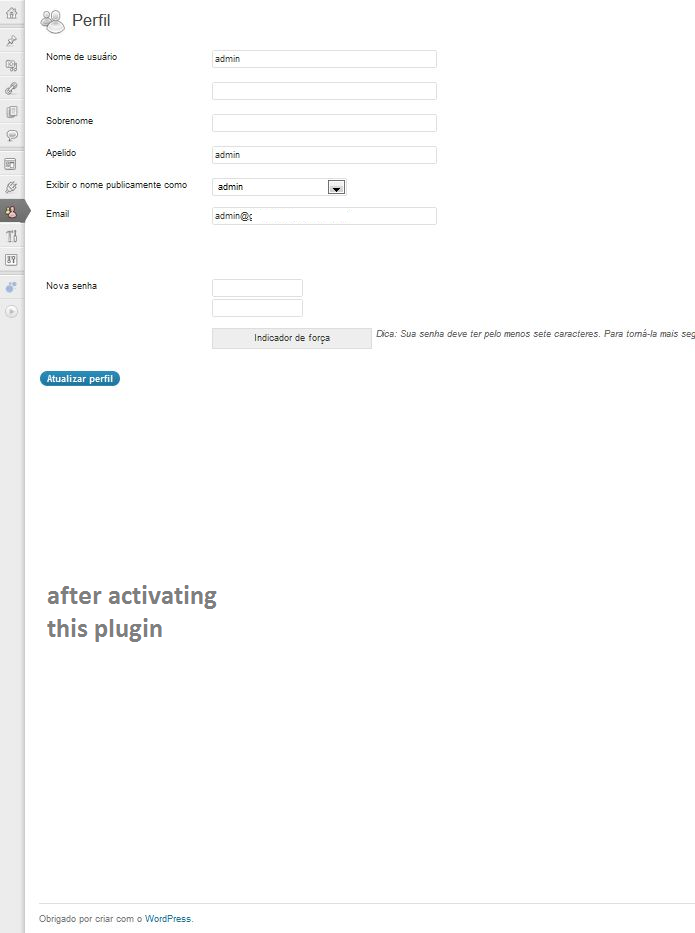
  • After installation and activation of Hide User Profile Fields plugin.

Telepítés

  1. Upload hide-user-fields.php to the /wp-content/plugins/ directory
  2. Activate the plugin through the ‘Plugins’ menu in WordPress
  3. Navigate to the ‘Hide User Profile Fields’ Settings menu and enable it.

GYIK

How do I enable this plugin?

Once the plugin itself is installed, navigate to the ‘Hide User-Profile Fields’ Settings menu, check the lone checkbox, and click ‘Update Options’.

How can I hide/unhide some specific fields?

You can’t, not through this plugin, but you can edit this as your needs.

Vélemények

Excellent but not for non programmers

rafi.w 2016.09.03.
Very good basis for hiding items on your profile. This plugin must be a result of lots of research work, on how to hide items on the profile page. Using browser’s „inspect” feature, you can find the individual fields info and edit the plugin accordingly to hide them.
6 (az összes) vélemény olvasása

Közreműködők és fejlesztők

“Hide User Profile Fields” egy nyílt forráskódú szoftver. A bővítményhez a következő személyek járultak hozzá:

Közreműködők
  • gugabguerra

“Hide User Profile Fields” fordítása a saját nyelvünkre.

Érdekeltek vagyunk a fejlesztésben?

Browse the code, check out the SVN repository, or subscribe to the development log by RSS.

Változási napló

1.2

  • Color Profiles and other checkboxes will also be hidden on this version.

1.0.0

  • First published version.

Meta

  • Version 1.2
  • Last updated 13 év ezelőtt
  • Active installations 200+
  • WordPress version 3.0.0 vagy magasabb
  • Tested up to 3.4.2
  • Language
    English (US)
  • Tags
    aimfieldshideuser profile
  • Bővített nézet

Vélemények

3.8 out of 5 stars.
  • 2 5-star reviews 5 stars 2
  • 2 4-star reviews 4 stars 2
  • 0 3-star reviews 3 stars 0
  • 0 2-star reviews 2 stars 0
  • 1 1-star review 1 star 1

Értékelés hozzáadása

See all reviews

Közreműködők

  • gugabguerra

Támogatás

Vélemény? Segítségkérés?

Támogatói fórum megtekintése

Adomány

Szeretnénk támogatni ennek a bővítménynek a fejlődését?

Ha tehetjük, támogassuk ezt a bővítményt

  • Rólunk
  • Hírek
  • Tárhelyszolgatatás
  • Adatvédelem
  • Showcase
  • Sablonok
  • Bővítmények
  • Patterns
  • Tanuljunk
  • Support
  • Fejlesztők
  • WordPress.tv ↗︎
  • Get Involved
  • Events
  • Adományozás ↗
  • Five for the Future
  • WordPress.com ↗
  • Matt ↗
  • bbPress ↗
  • BuddyPress ↗
WordPress.org
WordPress.org

Magyar

  • Visit our X (formerly Twitter) account
  • Visit our Bluesky account
  • Visit our Mastodon account
  • Visit our Threads account
  • Facebook oldalunk megtekintése
  • Visit our Instagram account
  • Visit our LinkedIn account
  • Visit our TikTok account
  • Visit our YouTube channel
  • Visit our Tumblr account
A kód költemény.