

Leírás
WordPress Text to Speech Plugin – GSpeech TTS
GSpeech is an advanced WordPress Text to Speech plugin that converts WordPress posts, pages, and WooCommerce product descriptions into natural-sounding text-to-audio narration in 70+ languages. It automatically adds a modern WordPress audio player to posts and pages, allowing visitors to listen to articles, blog posts, and product content instead of just reading them.
Trusted by thousands of websites and rated ⭐4.8/5 on WordPress.org, GSpeech has received 200+ five-star reviews across WordPress.org (150+ reviews), Joomla Extensions Directory, AppSumo, and Trustpilot. GSpeech is also featured in the AppSumo Customer Favorites collection, with a 4.9/5 rating from 40+ verified reviews. Since 2012, GSpeech has helped publishers improve WordPress accessibility, engagement, and listening experience, allowing visitors to listen to blog posts, articles, and WooCommerce product content while browsing or multitasking.
Audio is generated once using cloud voices and then cached for instant playback, making GSpeech one of the fastest text-to-speech plugins for WordPress websites. GSpeech can generate audio for very long articles, supporting content with up to 7 hours of playback per article. Adding audio versions of content helps improve SEO signals, grow organic traffic, increase time on page, and boost engagement, while allowing visitors to listen instead of reading and helping publishers turn written content into audio for easier consumption. Publishers use GSpeech to improve accessibility, increase content engagement, and boost conversions by turning written content into engaging audio experiences.
Unlike many text-to-speech solutions that rely on limited browser voices or require users to configure and pay for external API keys, GSpeech provides access to premium AI voices and advanced speech technologies with simple all-in-one pricing, no API key setup, and one-click activation. GSpeech uses cloud-generated voices powered by Google technology, processed on the GSpeech cloud infrastructure to deliver consistent audio playback across all browsers and devices. Commercial plans include premium AI voices powered by OpenAI (ChatGPT) text-to-speech and Google Cloud Text-to-Speech, including Gemini Flash TTS, Gemini Pro TTS, Chirp3 HD, Neural2, Polyglot, and WaveNet, along with speed and pitch controls, custom voice instructions, and the unique Voices Vibes system with 100+ expressive voice styles.
The integrated GSpeech Cloud Console lets users generate and manage WordPress text-to-speech audio directly from the admin panel. GSpeech is powered by a scalable cloud platform, ensuring fast and reliable audio generation for WordPress websites at scale. Commercial plans also support real-time audio translation in 70+ languages, allowing visitors to translate and listen to content instantly. Even single-language websites can become multilingual audio experiences, helping publishers reach a global audience. The same GSpeech engine can also be integrated into Shopify, Wix, Joomla, and custom HTML websites, enabling publishers to add text-to-speech audio across multiple platforms.
🌐 Useful Links – GSpeech Text-to-Speech Resources
Explore more about the GSpeech WordPress Text-to-Speech plugin through the resources below:
- 🔗 GSpeech Homepage – AI text-to-audio platform that converts website content into natural-sounding speech.
- 🔗 Live Demo – Hear text-to-speech in action with real examples in multiple languages.
- 🔗 Implementation Guide – Step-by-step installation and configuration guide.
- 🔗 Support – Contact the GSpeech team for installation and configuration assistance.
- 🔗 GSpeech Cloud Console – Manage voices, analytics, and settings from the GSpeech Cloud Console integrated with WordPress.
- 🔗 Commercial Plans – Unlock AI voices, translation, analytics, and advanced features.
- 🔗 Video Tutorials – Learn how to use GSpeech effectively.
🎬 WordPress Text-to-Speech Plugin – Step-by-Step Video Tutorial
🎬 GSpeech – Full Text-to-Speech Platform Overview
👆 Why Use the GSpeech Text-to-Speech Plugin?
- ✅ Improve Website Accessibility – Provide audio versions of your content for visually impaired users and visitors who prefer listening instead of reading.
- ✅ Increase Engagement – Let users listen to articles, blog posts, and product descriptions with modern audio players.
- ✅ Boost SEO and Time on Page – Audio content improves engagement signals and enhances the user experience.
- ✅ Cloud-Generated Voices – GSpeech generates audio in the cloud for consistent playback across all browsers and devices.
- ✅ Smart Audio Caching – Audio is generated once and delivered instantly on future visits.
- ✅ Simple Pricing, No API Keys – Access premium AI voices from OpenAI and Google Cloud with one straightforward plan. No separate API accounts, no external billing, and no technical setup required.
🎯 Use Cases – Where WordPress Text-to-Speech Is Most Valuable
GSpeech helps different types of websites turn written content into engaging audio experiences.
- 📰 Blogs and News Websites – Let readers listen to long articles and narrated blog posts while multitasking, commuting, or working.
- 🛒 WooCommerce Product Pages – Add audio narration to product descriptions to improve accessibility and engagement.
- 🎓 Education and E-Learning – Help students absorb lessons and documentation through audio learning.
- ♿ Accessibility-Focused Websites – Provide audio versions of content for visually impaired users and visitors with reading difficulties.
- 📚 Long-Form Articles and Documentation – Make guides, tutorials, and reports easier to consume through text-to-speech narration.
- 🌍 Multilingual Websites – Automatically generate audio in multiple languages to reach a global audience.
- 📈 Content Marketing & SEO – Increase time on page and engagement by giving visitors the option to listen instead of reading.
👉 Text to Speech by GSpeech – Free Plugin Features
- ✅ Easy Setup: Convert WordPress posts and pages into audio with just a few clicks.
- ✅ 70+ Supported Languages: Generate natural-sounding speech in more than 70 languages. See the full list in the FAQ.
- ✅ Cloud-Generated Voices – GSpeech generates audio in the cloud for consistent playback across all browsers and devices.
- ✅ Multiple Audio Players: Choose from 3 player types – Full Page Player, Button Player, and Circle Player. See the Demo.
- ✅ Shortcodes Support: Insert players anywhere using [gspeech], [gspeech-button], or [gspeech-circle].
- ✅ 1-Click Activation: Activate the GSpeech Cloud Console directly from WP Admin.
- ✅ Smart Audio Caching: Audio is generated once and delivered instantly on future visits.
- ✅ Long-Article Support: Generate audio for very long content with up to 7 hours of playback per article.
- ✅ Read Highlighted Text (RHT): Instantly play audio for any selected text – Demo.
- ✅ Read Aloud Functionality: Let visitors listen to posts, pages, and product content with natural-sounding audio.
- ✅ Welcome Messages: Automatically greet visitors with audio when they open your website.
- ✅ Audio Database: Manage and download generated audio files directly from WP Admin.
- ✅ Flexible Display Rules: Automatically show players on pages or control where they appear.
- ✅ Text Optimization: Automatically removes URLs and special characters from audio output.
- ✅ 16+ Player Themes: Customize the audio player design to match your website.
- ✅ No API Keys Required: GSpeech manages all speech engine integrations.
- ✅ Built-in Analytics: View statistics by country, city, and play count directly inside WordPress.
- ✅ WooCommerce Support: Add text-to-speech to WooCommerce products and descriptions.
- ✅ Device Statistics: Analyze usage across desktop, mobile, and tablet visitors.
- ✅ Performance Optimized: Lightweight and designed not to slow down your website.
- ✅ Mobile Friendly: Fully responsive audio players that work on all devices.
- ✅ Cross-Browser Compatible: Works consistently across all modern browsers.
- ✅ No Server Configuration: Works instantly without special server setup.
- ✅ Modern UI: Clean audio players with smooth animations.
- ✅ Professional Support: Fast and friendly support from the GSpeech team.
⚙️ WordPress Compatibility
GSpeech works seamlessly with most WordPress environments, including popular themes, page builders, multilingual plugins, caching systems, and WooCommerce websites.
- ✅ Gutenberg Editor
- ✅ WooCommerce
- ✅ Divi
- ✅ Elementor
- ✅ WPBakery
- ✅ GTranslate, WPML, Polylang, TranslatePress
- ✅ WP Rocket, LiteSpeed Cache, W3 Total Cache
- ✅ Yoast SEO, RankMath, All in One SEO
The plugin works with most WordPress themes and hosting environments without requiring special server configuration.
🌍 Supported Languages – WordPress Text to Speech in 70+ Languages
GSpeech supports 70+ languages for text-to-speech generation, making it ideal for multilingual WordPress websites and global audiences.
Some of the most popular supported languages include:
- English (US, UK, AU) (English): Text to Speech
- Spanish (Spain, US, Latin America, Mexico) (Español): Texto a voz
- French (France, Canada) (Français): Synthèse vocale
- German (Deutsch): Text-zu-Sprache
- Italian (Italiano): Sintesi vocale
- Portuguese (Brazil, Portugal) (Português): Texto para fala
- Russian (Русский): Преобразование текста в речь
- Armenian (Հայերեն): Տեքստից խոսք
- Arabic (العربية): تحويل النص إلى كلام
- Hebrew (עברית): טקסט לדיבור
- Hindi (हिन्दी): पाठ से वाक्
- Bengali (বাংলা): টেক্সট টু স্পিচ
- Chinese (中文): 文字转语音
- Japanese (日本語): テキスト読み上げ
- Korean (한국어): 텍스트 음声 변환
Additional supported languages include Afrikaans, Albanian, Amharic, Basque, Bosnian, Bulgarian, Catalan, Cantonese, Croatian, Czech, Danish, Estonian, Filipino, Finnish, Galician, Greek, Gujarati, Georgian, Hungarian, Icelandic, Indonesian, Javanese, Kannada, Kazakh, Khmer, Latin, Latvian, Lithuanian, Luxembourgish, Lao, Macedonian, Malay, Malayalam, Marathi, Maori, Mongolian, Nepali, Norwegian, Persian, Punjabi, Romanian, Serbian, Sinhala, Slovak, Slovenian, Swedish, Swahili, Tamil, Telugu, Thai, Urdu, Welsh, and more.
See the full list of supported languages in the FAQ section.
📚 Usage – GSpeech Text-to-Speech Plugin
- ✅ Activate the GSpeech Cloud Console directly from WP Admin with one click.
- ✅ The audio player will automatically appear on posts and pages.
- ✅ To edit player settings, go to Cloud Console Widgets Multi-Page.
- ✅ The Read Highlighted Text (RHT) player works automatically after activation.
🔧 Available Shortcodes
Use these shortcodes to insert players anywhere in your content:
- [gspeech] – Full Page Player
- [gspeech-button] – Button Player
- [gspeech-circle] – Circle Player
⚙️ Additional Options
- ✅ View player examples on the Demo Page.
- ✅ Manage player settings in Cloud Console Widgets.
- ✅ Enable Welcome Messages by publishing the widget in Cloud Console.
- ✅ Exclude elements from audio playback using the class nospeech.
- ✅ For advanced configuration and examples, see the FAQ.
💬 WordPress Text to Speech Plugin – CUSTOMER TESTIMONIAL
A Premium Text-to-Speech Service ⭐⭐⭐⭐⭐
„We’ve been using the GSpeech Text-to-Speech (TTS) service on our AI-focused website, and it has been an absolute game-changer for our platform. The quality of the voice output is outstanding, delivering natural-sounding speech that enhances the user experience for our audience. Our readers have praised the feature for its clarity and accessibility, particularly for consuming long-form content.
We’ve noticed a significant uptick in user engagement since implementing GSpeech, especially among users who prefer audio content or are multitasking. It’s a perfect fit for our website’s commitment to innovation and accessibility in the AI space.”
— Antoine Tardif – CEO Unite.AI
⭐ What Users Say About GSpeech
Read real feedback from publishers, bloggers, and website owners on the GSpeech Testimonials page.
🚀 Upgrade to GSpeech Commercial Plans for Advanced Features
Unlock premium features by upgrading to GSpeech Commercial.
The commercial version of the plugin provides advanced capabilities, premium AI voices, and the best listening experience for your visitors.
🌟 GSpeech Text-to-Speech – Commercial Features
- ✅ AI Voices: Access 230+ voices in 76 languages. Choose from premium AI voices powered by OpenAI and Google Cloud Text-to-Speech, including Chirp3 HD, Gemini Flash TTS, Gemini Pro TTS, Neural2, Polyglot, and WaveNet. Control speed, pitch, and voice style to match your content. See demo (AI voices marked with a star).
- ✅ Real-Time Translation: Translate WordPress content and listen in 70+ languages using Google neural translation technology. See the language list in the FAQ.
- ✅ Multilingual Mode: Automatically detects the active website language and generates speech with the appropriate voice. Perfect for multilingual WordPress websites using GTranslate, WPML, Polylang or TranslatePress.
- ✅ Voice Tuning: Adjust speaking pitch (±20 semitones) and speed (up to 4× faster or slower).
- ✅ Text Aliases: Teach the system how to pronounce custom terms (e.g., “AI” “Artificial Intelligence”).
- ✅ Advanced Player Features: Includes real-time captions, a sticky context player, voice selection, and real-time audio translation directly from the player.
- ✅ GTranslate Compatibility: Works seamlessly with the GTranslate multilingual plugin.
- ✅ Simple Pricing, No API Keys Required: Access premium OpenAI and Google Cloud voices with one straightforward GSpeech plan. No separate API accounts, usage tracking, or external billing required.
- ✅ RHT Advanced Views: Access RHT Player View 2 and View 3 with translation and text panels. See demo.
- ✅ Download Audio: Allow visitors to download audio files (.mp3) directly from the player.
- ✅ Seamless Updates: Cloud-based SaaS architecture – no manual updates required.
👉 Web Content Accessibility (WCAG) Guideline
Text-to-Speech by GSpeech helps WordPress websites improve accessibility and support WCAG standards with just one click.
🎬 GSpeech Text to Speech – WordPress Video Tour
🎬 Text to Speech for WordPress – Transform Text into Audio with AI Voices
🎬 Why GSpeech Lifetime Deal Is a Powerful WordPress Text-to-Speech Solution
🌟 Expert Reviews: GSpeech WordPress Text to Speech Plugin
GSpeech is recommended by technology reviewers and WordPress experts for its natural-sounding AI voices, easy WordPress integration, and large voice library.
“GSpeech sets a new benchmark for modern text-to-speech platforms. It’s not just about converting text to speech anymore — it’s about creating engaging audio experiences.”
— Techozens“With 230+ AI voices and support for 70+ languages, GSpeech transforms static website content into immersive audio.”
— Ashraf Blog
📢 GSpeech Featured On – WordPress Text to Speech Plugin Reviews
GSpeech is frequently listed among the best WordPress Text-to-Speech plugins by leading technology and WordPress review websites.
- Top 10 Text-to-Speech Plugins for WordPress – Unite AI
- GSpeech Text-to-Speech Review – eCloudBuzz
- 7 Best Text-to-Speech WordPress Plugins – WPExplorer
- Best Text-to-Speech Plugins for WordPress – BDThemes
⚙️ GSpeech Text to Speech (3.X) Usage Terms
The GSpeech 3.X version provides a Text-to-Speech service powered by GSpeech. This service requires API requests to the GSpeech backend servers.
By using the GSpeech 3.X version, you agree to the Terms of Service.
👆 GSpeech also includes support for the legacy GSpeech 2.X version within the same package.
👉 GSpeech 2.X Features (also available in the 3.X version)
- ✅ Unlimited text-to-speech conversions
- ✅ Place speakers anywhere using the shortcode
{gspeech}text to speech{/gspeech}
🌐 Useful Links – GSpeech 2.X
📚 Usage – GSpeech 2.X: Creating Text-to-Speech Blocks
-
Basic structure – display the speaker after your text:
{gspeech}Text to speech{/gspeech} -
Full structure with parameters:
{gspeech style=2 language=en autoplay=1 speechtimeout=0 registered=0 selector=anyselector event=anyevent hidespeaker=1}welcome{/gspeech}
Képernyőmentések

WordPress Text to Speech Plugin – Let visitors listen to posts, pages, and articles with GSpeech AI voices. 
WordPress Text to Speech Plugin – Translate website content into 70+ languages with 230+ realistic AI voices. 
Real-time audio generation – GSpeech automatically updates narration when your content changes. 
Audio player customization – Match the WordPress text-to-speech player to your website design. 
Multiple player types – Full Page Player, Button Player, and Circle Player for WordPress. 
Full Page Player – Modern WordPress text-to-speech audio player view. 
Text-to-audio player – Natural-sounding WordPress audio player in action. 
Read Highlighted Text Player – Let visitors listen to selected text on your website. 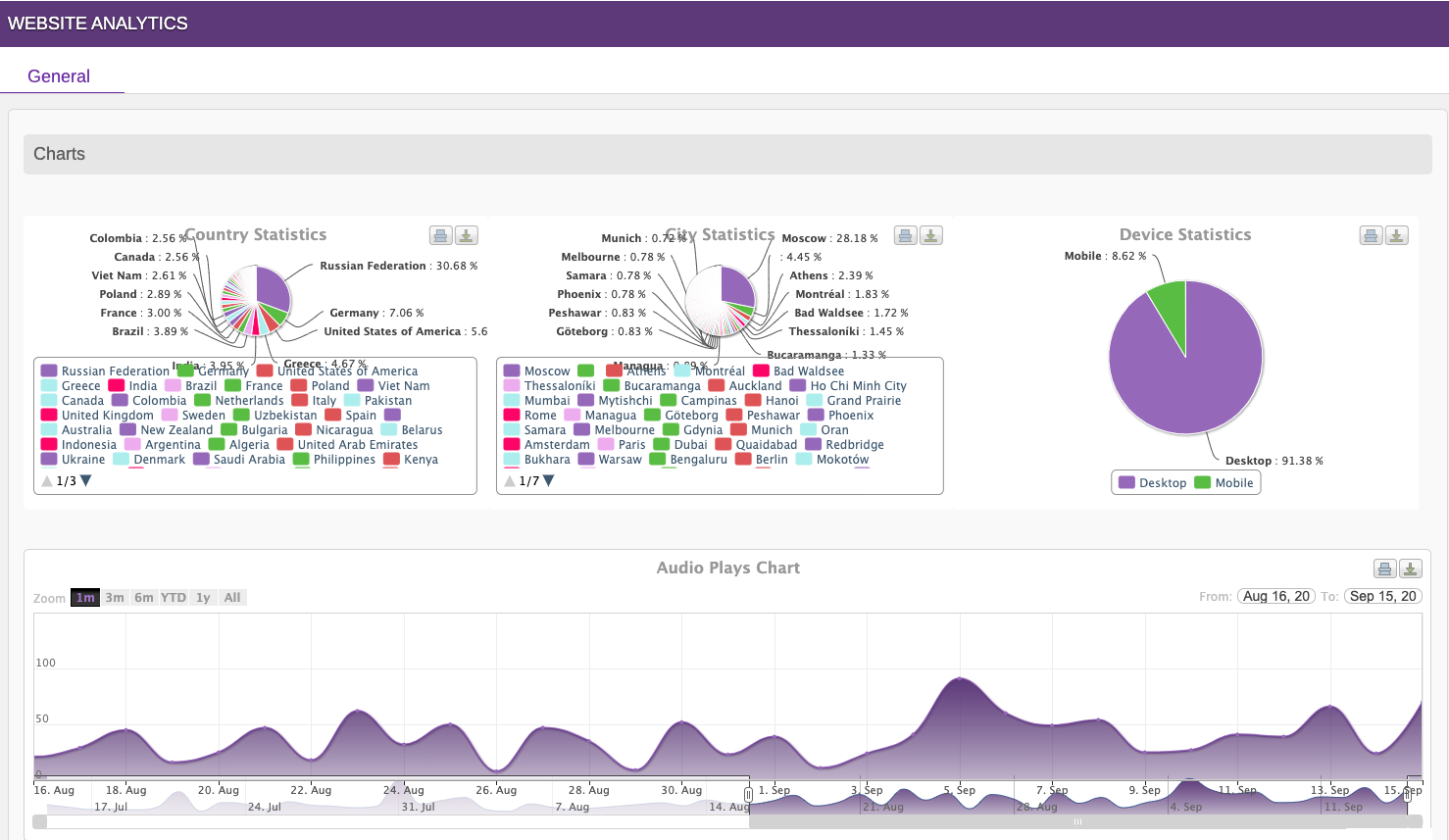
Analytics dashboard – Track plays, countries, and WordPress text-to-speech usage statistics. 
Button Player – Compact WordPress audio player for posts and pages. 
Circle Player – Lightweight text-to-speech player for WordPress content. 
Cloud Console – Manage voices, widgets, and audio settings from WordPress Admin.
Telepítés
- Go to the WordPress plugin installer and search for „GSpeech”.
- Install the plugin or upload the plugin file downloaded from WordPress.org.
- Activate the plugin through the Plugins menu in WordPress.
- After activation, you will see the GSpeech menu in your WordPress admin panel.
- Click Activate Cloud Console (one click). The required widgets will be created automatically.
- Insert a Full Page Player using the shortcode: [gspeech].
- Insert a Button Player using the shortcode: [gspeech-button].
- Insert a Circle Player using the shortcode: [gspeech-circle].
- The Read Highlighted Text (RHT) Player will be activated automatically.
GYIK
-
👉 What is GSpeech?
-
Text-to-Speech by GSpeech is a unified audio platform that converts website content into natural-sounding speech. It uses advanced AI technologies (commercial plans) to generate lifelike voices, helping publishers and content creators deliver immersive audio experiences and build their audio presence.
GSpeech was founded in 2012. In 2023, we introduced the powerful GSpeech Dashboard, featuring premium AI voices (commercial plans), multiple player types, real-time audio translation, downloadable audio files, detailed analytics, and full integration with the WordPress Admin Panel.
-
👉 Which languages are supported?
-
GSpeech supports a wide range of languages including Afrikaans, Albanian, Arabic, Armenian (commercial), Belarusian (commercial), Basque (commercial), Bengali, Bosnian, Bulgarian, Catalan, Cantonese, Chinese (Simplified), Chinese (Traditional), Croatian, Czech, Danish, Dutch, English (Australia, UK, India, US), Estonian, Filipino, Finnish, French (Canada, France), Galician (commercial), German, Greek, Gujarati, Hebrew, Hindi, Hungarian, Icelandic, Indonesian, Italian, Japanese, Javanese, Kannada, Kazakh (commercial), Khmer, Korean, Latin, Latvian, Lithuanian (commercial), Macedonian (commercial), Malay, Malayalam, Marathi, Maori (commercial), Myanmar, Nepali, Norwegian, Persian (commercial), Polish, Portuguese (Brazil, Portugal), Punjabi (Gurmukhi), Punjabi (Shahmukhi – commercial), Romanian, Russian, Serbian, Sinhala, Slovak, Slovenian (commercial), Spanish (Spain, US), Sundanese, Swahili, Swedish, Tamil, Telugu, Thai, Turkish, Ukrainian, Urdu, Vietnamese, Yue Chinese (commercial), Welsh.
-
👉 What is the best WordPress plugin for text to speech?
-
GSpeech is considered one of the top-rated WordPress plugins for converting text into speech. It provides AI voices (commercial plans), accessibility features, and full integration within the WordPress admin dashboard.
-
👉 How can I improve website accessibility with audio?
-
GSpeech allows visitors to listen to website content using modern audio players. This significantly improves accessibility for visually impaired users and supports WCAG accessibility standards.
-
👉 How do I install the plugin?
-
You can find the full installation guide here:
Implementation Guide. -
👉 Is it FREE?
-
Yes. The GSpeech 2.X version (included in the same package) provides unlimited text-to-speech usage.
For GSpeech 3.X you receive 50,000 characters per month for free. Characters are counted only when audio is generated. Once created, audio files are stored in the cloud and can be played unlimited times.
-
👉 Do you support dark themes?
-
Yes. Go to the plugin settings Design tab and select a theme that matches your website design.
-
👉 Does the plugin support pages and custom posts?
-
Yes. GSpeech has a flexible architecture and works with posts, pages, and custom post types. Players can be inserted using shortcodes or the multi-page widget. See the Implementation Guide.
-
👉 How to insert a player in a post, page, or article?
-
After activating the Cloud Console, the required widgets are created automatically.
Shortcodes:
1. Full Page Player – [gspeech]
2. Button Player – [gspeech-button]
3. Circle Player – [gspeech-circle]
4. Inline player – {gspeech id=ID}text to speech{/gspeech} (ID = widget ID)To edit player settings:
Go to WP-Admin GSpeech Cloud Console Widgets.To automatically add players on multiple pages:
Publish the Multi-Page Widget inside the Widgets section.You can also contact us and we will help configure it for your website.
-
👉 How can GSpeech improve WordPress accessibility?
-
GSpeech provides multiple audio players for reading website content aloud. It supports three player types and more than 16 player themes.
It also includes the RHT Player (Read Highlighted Text), allowing visitors to listen to any selected text on the page.
-
👉 What is the Read Highlighted Text (RHT) Player?
-
The RHT Player improves accessibility by allowing visitors to listen to any selected text on your website.
It activates automatically when the plugin and Cloud Console are enabled.
Configuration:
Go to WP-Admin GSpeech Cloud Console Widgets RHT Player.Available views:
• View 1 – Circle player with timeline, volume, and speed controls
• View 2 & 3 (commercial plans) – include translation and text panelsSee the Screenshots Section for examples.
-
👉 How to use Welcome Messages?
-
After activating the Cloud Console, the Welcome Message widget is created but disabled by default.
To enable it:
Go to WP-Admin GSpeech Cloud Console Widgets Welcome Message and set Status = Published.You can customize the message text, restrict it to specific pages using Allowed URLs, or configure it to play only once per session.
-
👉 Do you support themes like Divi?
-
Yes. GSpeech works with most WordPress themes and builders including Divi. If you encounter compatibility issues, please contact us.
-
👉 The player reads text that should be skipped – how can I fix this?
-
Add the class nospeech to elements that should be excluded from audio.
You can also use the Exclude List in the Content tab to specify elements that should not be read.
-
👉 GSpeech Structure
-
GSpeech uses a flexible architecture where each account can manage up to 10 websites, each with its own settings and analytics.
Website settings include language, default voice, speed, and pitch.
Players are managed through the Smart Widgets Architecture in
GSpeech Cloud Console Widgets. -
👉 Do I need to pay for Google TTS or Translation APIs?
-
No. All required TTS and translation API keys are included in GSpeech commercial plans, so you don’t need to manage external APIs.
Vélemények


Közreműködők és fejlesztők
“GSpeech TTS – WordPress Text To Speech Plugin” egy nyílt forráskódú szoftver. A bővítményhez a következő személyek járultak hozzá:
Közreműködők
“GSpeech TTS – WordPress Text To Speech Plugin” fordítása a saját nyelvünkre.
Érdekeltek vagyunk a fejlesztésben?
Browse the code, check out the SVN repository, or subscribe to the development log by RSS.
Változási napló
V 3.20.0 – 23/03/2026
- Added new AI voices from Google Gemini Pro, Gemini Flash, and Chirp 3.
- Improved voice quality and model availability across multiple languages.
- Backend parameter improvements.
- Readme updates.
V 3.19.5 – 14/03/2026
- Backend parameter corrections.
- Readme corrections.
V 3.19.4 – 02/02/2026
- Backend parameter corrections.
V 3.19.3 – 27/01/2026
- Option corrections.
V 3.19.2 – 01/01/2026
- Backend parameter corrections.
V 3.19.1 – 31/12/2025
- Happy New Year 2026! ✝️🎄🙂
- Backend fixes.
V 3.19.0 – 13/12/2025
- Added new options.
- Tested with WordPress 6.9.
V 3.18.1 – 23/10/2025
- Improved frontend stability.
- Fixed a script loading issue caused by redirects on certain servers.
V 3.18.0 – 11/10/2025
- Security: fixed an Admin+ SQL injection issue in
wpgsp_apply_ajax_save(CVE-2025-10187). Credit: Moose Love / Wordfence.
V 3.17.13 – 01/10/2025
- Minor fixes.
V 3.17.12 – 16/09/2025
- Minor fixes.
V 3.17.11 – 01/09/2025
- Minor fixes.
V 3.17.9, 3.17.10 – 22/08/2025
- Prevented potential auto-downloads by allowing only trusted, user-initiated clicks.
- Added frontend protection parameters to the transient cache to improve performance.
V 3.17.8 – 18/08/2025
- Added attributes for optimizers.
V 3.17.6 -> 3.17.7 – 11/08/2025
- Added frontend fallback to auto-load
gsp_ajax_obj,#gsp_data_html, andgspeech_front.jsif optimizers strip them. - Added jQuery auto-load if missing, with duplicate-load prevention.
- Improved compatibility with caching and minification plugins.
V 3.17.0 -> 3.17.5 – 10/08/2025
- Improved compatibility with Jetpack Boost and other optimization plugins.
V 3.16.6 – 09/08/2025
- Fixed duplicate cloud widget script insertion on some sites.
V 3.16.5 – 08/08/2025
- Minor fixes.
V 3.16.0 -> V 3.16.4 – 25/07/2025
- Enabled real-time translation and audio generation for large articles (1+ hour playback length).
- Replaced
str_containswithstrposto support PHP versions below 8.0. - Backend corrections.
- Minor fixes.
V 3.15.0 – 11/07/2025
- Optimized data storage for high-traffic sites by replacing cookie-based storage with
localStorageandsessionStorage, reducing server-side database usage. - Improved page caching by removing
setcookie, helping avoid cache bypass issues with Pagely and Cloudflare and achieving consistentcf-cache-status: HIT. - Enhanced frontend performance.
V 3.14.9 – 26/06/2025
- Dashboard updates.
V 3.14.8 – 12/06/2025
- Dashboard updates.
V 3.14.6, 3.14.7 – 11/06/2025
- Style corrections.
V 3.14.3, 3.14.4, 3.14.5 – 10/06/2025
- Updated internal content.
V 3.14.2 – 21/05/2025
- Added a language.
V 3.14.1 – 13/05/2025
- Fixed shortcode processing.
- Fixed potential error log generation.
V 3.14.0 – 25/04/2025
- Introduced architectural improvements for better performance.
- Implemented intelligent caching with WordPress transients.
- Eliminated session usage to improve efficiency.
V 3.13.0 – 19/04/2025
- Tested with WordPress 6.8.
- Dashboard corrections.
V 3.12.1, 3.12.2, 3.12.3 – 17/03/2025
- Updated dashboard parameters.
- Fixed issues in the JavaScript file.
V 3.12.0 – 10/03/2025
- Added dashboard parameters.
V 3.11.2 – 05/03/2025
- Fixed content annotation.
V 3.11.1 – 05/02/2025
- Updated video.
- Dashboard corrections.
V 3.11.0 – 01/02/2025
- Added the New York Player as a new full-page player type.
- Fixed dashboard issues.
- Added an on-the-fly translation option to let players wait for translation engines.
V 3.10.3 – 21/01/2025
- Added 50+ AI voices.
V 3.10.2 – 20/01/2025
- Added new AI voices.
V 3.10.1 – 07/01/2025
- Fixed a JavaScript issue when the login dialog is hidden.
V 3.10.0 – 06/01/2025
- Important fix after the 3.9.x update.
V 3.9.3 – 01/01/2025
- Happy New Year 2025 🙂 God Bless You ♱🙏
- Styling corrections.
V 3.9.2 – 31/12/2024
- Happy New Year 2025 🙂
- Dashboard corrections.
V 3.9.1 – 30/12/2024
- Added chat support.
V 3.9.0 – 29/12/2024
- Added a post type filter.
- Added post category filters.
- Added an auto-enable option.
- Improved multi-language website control.
- Implemented affiliate functionality.
V 3.8.13 – 03/12/2024
- Dashboard corrections.
V 3.8.10, 3.8.11, 3.8.12 – 14/11/2024
- Tested with WordPress 6.7.
- Style fixes.
V 3.8.9 – 01/11/2024
- Dashboard corrections.
V 3.8.8 – 29/10/2024
- Minor fixes.
V 3.8.7 – 16/10/2024
- Fixed admin-side JSON parsing issues.
V 3.8.6 – 10/10/2024
- Minor fixes.
V 3.8.5 – 26/09/2024
- Corrected class names.
V 3.8.4 – 16/09/2024
- UI fixes.
V 3.8.3 – 02/09/2024
- Updated video and text content.
V 3.8.1, 3.8.2 – 01/09/2024
- Backend improvements.
V 3.8.0 – 23/08/2024
- Moved cloud requests to a faster server.
V 3.7.1 – 18/08/2024
- Fixed the preview carousel.
V 3.7.0 – 17/08/2024
- Added 50+ new themes.
- Introduced the SoundCloud-style player.
- Added new player view controls and icons.
- Improved the Live Preview Wizard for players.
- Added new languages.
V 3.6.5 – 12/08/2024
- Fixed a shortcode processing issue.
V 3.6.3, 3.6.4 – 07/08/2024
- Fixed warnings.
V 3.6.2 – 03/08/2024
- Fixed compatibility with builders.
V 3.6.1 – 31/07/2024
- Fixed a session warning.
- Refactored code.
V 3.6.0 – 29/07/2024
- Moved to the WordPress token system on the backend.
- Fixed a hidden warning.
- Fully compatible with WordPress 6.8.
- Improved WordPress accessibility via WCAG-related features.
V 3.5.1, 3.5.2, 3.5.3 – 26/07/2024
- Updated FAQ.
- Improved Divi Builder compatibility.
- Updated dashboard content.
- Corrected GTranslate compatibility.
V 3.5.0 – 25/07/2024
- Added GTranslate on-the-fly translation compatibility for commercial plans.
V 3.4.11 – 18/07/2024
- JavaScript correction.
V 3.4.10 – 10/07/2024
- CSS correction.
V 3.4.9 – 04/07/2024
- Dashboard fixes.
- Style corrections.
V 3.4.8 – 29/06/2024
- Updated links and description.
- Corrected UI elements.
V 3.4.5 – 3.4.7 – 25/06/2024
- Updated FAQ.
- Dashboard corrections.
V 3.4.4 – 21/06/2024
- Added 2 languages.
V 3.4.3 – 18/06/2024
- Minor admin fix.
V 3.4.2 – 15/06/2024
- Corrected admin notices.
- Style corrections.
V 3.4.1 – 11/06/2024
- Minor fixes.
V 3.4.0 – 07/06/2024
- Added independence from the cURL library for GSpeech 2.X.
V 3.3.5 – 05/06/2024
- Corrected the statistics storage algorithm.
V 3.3.4 – 03/06/2024
- Style corrections.
V 3.3.3 – 30/05/2024
- Set playback speed step to 10%.
V 3.3.2 – 24/05/2024
- Added 0.9x and 1.1x playback speeds.
- Fixed YouTube videos not loading in WP Admin.
V 3.3.1 – 21/05/2024
- Fixed a
$wpdbnotice after migration to V3.3.
V 3.3.0 – 21/05/2024
- Refactored code.
- Stored GSpeech 2.X player title in settings.
- Added main submenus.
- Added FAQ and Upgrade menus.
- Added GSpeech notices.
- Added the GSpeech widget.
- Added feedback submission for deactivation reasons.
V 3.2.12 – 17/05/2024
- Corrected preview timeout to avoid lazy-loading issues.
V 3.2.11 – 16/05/2024
- Fixed Button and Circle player previews.
V 3.2.10 – 08/05/2024
- Corrected RHT widget CSS.
V 3.2.9 – 08/05/2024
- Fixed delayed display of the RHT widget preview.
V 3.2.8 – 08/05/2024
- JavaScript corrections.
V 3.2.7 – 08/05/2024
- Minor fixes in refactored parts.
V 3.2.6 – 08/05/2024
- Corrected
admin.js.
V 3.2.5 – 08/05/2024
- Corrected dashboard rendering.
V 3.2.4 – 26/04/2024
- Minor style fixes for the preview section.
V 3.2.3 – 25/04/2024
- Fixed the RHT player preview in WP Admin.
V 3.2.2 – 24/04/2024
- Fixed player previews in WP Admin.
V 3.2.1 – 23/04/2024
- Corrected shortcode rendering to fix rare issues in some editors.
V 3.2.0 – 22/03/2024
- Changed the way GSpeech stores cloud data to avoid conflicts with cache plugins.
- Improved frontend JavaScript.
V 3.1.21 – 15/03/2024
- UI optimization.
- Layout CSS correction.
- Backend correction for tooltips.
V 3.1.20 – 01/03/2024
- UI correction.
- Backend correction for the color picker.
V 3.1.19 – 24/02/2024
- Backend correction for the tab2 integration script.
- CSS correction.
V 3.1.18 – 18/02/2024
- Corrected UI.
- Fixed
gspeech.cssstyling forwww-prefixed elements.
V 3.1.17 – 15/02/2024
- Corrected UI.
- CSS fix.
V 3.1.16 – 12/02/2024
- Improved the Usage section on the dashboard.
- Corrected title.
V 3.1.15 – 06/02/2024
- GSpeech 2.X correction.
- Style fix.
V 3.1.14 – 06/02/2024
- Added license file.
- CSS corrections.
- Improved UI.
V 3.1.13 – 04/02/2024
- Improved UI.
- Added a link to the online dashboard.
- CSS corrections.
V 3.1.12 – 31/01/2024
- Added support for the [gspeech-full] shortcode.
- Added support for the [gspeech-button] shortcode.
- Added support for the [gspeech-circle] shortcode.
- CSS corrections.
- Improved the Usage section on the dashboard.
- Improved UI.
V 3.1.11 – 31/01/2024
- Tested with WordPress 6.4.3.
- Fixed a cache index issue on some websites.
- CSS corrections.
V 3.1.10 – 30/01/2024
- Fixed a PHP warning on some server settings.
- Corrected description.
- CSS corrections.
V 3.1.9 – 29/01/2024
- Corrected UI integration.
- Added links on the dashboard page.
- Corrected descriptions.
- CSS corrections.
V 3.1.8 – 27/01/2024
- Corrected UI integration.
- CSS corrections.
V 3.1.7 – 26/01/2024
- Corrected UI integration.
- JavaScript corrections.
- CSS corrections.
V 3.1.6 – 26/01/2024
- Corrected UI integration.
- Fixed the „GSpeech 2.X” tab button visibility on small screens.
V 3.1.5 – 23/01/2024
- Corrected dashboard integration issues in WordPress.
- Corrected voice preview in admin.
- Corrected RHT Player live preview.
- Fixed the „Listen to this voice” preview button issue.
- Added a Rate Us link on the dashboard.
- Improved UI.
V 3.1.4 – 09/11/2023
- Fixed a
session_startwarning in the Site Health section. - Tested with WordPress 6.4.2.
V 3.1.3 – 26/10/2023
- Important: fixed an issue in 3.1.X versions that prevented post saving.
V 3.1.2 – 26/10/2023
- Improved the WordPress dashboard homepage by adding logout links.
V 3.1.1 – 26/10/2023
- Improved the WordPress dashboard homepage by adding a Usage section.
V 3.1.0 – 25/10/2023
- Added a dashboard page with Cloud Console activation.
- Added shortcode support:
[gspeech]and[gspeech type=circle]. - Fixed dashboard integration issues.
V 3.0.5 – 21/10/2023
- Fixed a bug when creating a second website after login.
- Fixed a lazy-load issue with some cache plugins.
- Removed URLs and special characters from audio.
V 3.0.4 – 06/09/2023
- Corrected URL parameter handling.
V 3.0.3 – 05/09/2023
- Changed the way GSpeech renders the main JavaScript file to avoid unusual behavior on some websites.
V 3.0.2 – 30/08/2023
- Fixed an update issue.
V 3.0.1 – 30/08/2023
- Fixed the update system.
V 3.0.0 – 30/08/2023
- Major update: added Cloud Console support.
- Added dashboard integration into WordPress.
- Added full-page player support.
- Added button player support.
- Added circle player support.
- Added full mobile support.
- Added play statistics charts.
- Added country statistics charts.
- Added city statistics charts.
- Added device statistics charts.
- Tested with WordPress 6.3.
V 2.8.2 – 03/04/2023
- Tested with WordPress 6.2.
V 2.8.1 – 01/08/2022
- Tested with WordPress 6.
- Fixed the „update to pro version” alert bug.
V 2.8.0 – 02/04/2021
- Important style fix in
gspeech.cssto correct a tooltip issue in the latest WordPress version.
V 2.7.32 – 28/09/2020
- Style correction.
V 2.7.31 – 10/06/2020
- Minor fix.
V 2.7.3 – 10/06/2020
- Important: fixed functionality for PHP 7.x versions.
V 2.7.2 – 15/11/2019
- JavaScript corrections.
V 2.7.1 – 26/06/2017
- Style corrections.
V 2.7.0 – 12/10/2016
- Fixed a bug with predefined admin audio generation values.
V 2.0.1 – 14/08/2015
- Fixed a no-audio issue.
V 1.0.1 – 11/11/2012
- Initial release.