

Leírás
Easy Syntax Highlighter is a powerful WordPress plugin that helps improve your website’s code presentation by providing beautiful syntax highlighting. Using the latest Highlight.js library, it supports over 20 programming languages with 80+ color themes, copy-to-clipboard functionality, and seamless integration with both classic and Gutenberg editors.
Features
- Modern Highlight.js Engine: Uses the latest Highlight.js library for fast, accurate syntax highlighting
- 80+ Themes Included: Over 80 themes for both light and dark modes, all stored locally for offline compatibility
- Unlimited Language Support: Supports 20+ programming languages including JavaScript, PHP, Python, CSS, HTML, SQL, Bash, and more
- Modern JavaScript: Promise-based loading with proper error handling and performance optimizations
- Performance Optimized: Smart asset loading—only loads when code blocks are present on the page
- Security Focused: Proper input sanitization and output escaping
- Admin Interface: Clean, modern settings page with visual theme selector integrated with WordPress admin
- Localization Ready: Translation-ready with proper text domains
- Backward Compatible: Automatic migration from old plugin versions
How to Use
- Gutenberg Block Editor: Use the default WordPress „Code” block. The plugin automatically detects the language and highlights it. There is no language setting in the sidebar; detection is automatic. If you need to force a language, edit the block as HTML and add a class to the
<code>element (e.g.,<code class="language-php">). - Classic Editor: Use the TinyMCE button (code icon) with the modal dialog for easy code insertion.
- Copy to Clipboard: Double-click any code block to instantly copy its content with visual feedback.
Use Cases
- Technical blogs and tutorials
- Documentation websites
- Programming courses and educational content
- Developer portfolios
- API documentation
- Code examples and snippets
Support
For support, bug reports, or feature requests, please visit: Github
Contributing
Contributions are welcome! Please feel free to submit pull requests or open issues on GitHub.
License
This plugin is licensed under the GPLv2 or later.
License URI: https://www.gnu.org/licenses/gpl-2.0.html
Képernyőmentések

Settings Page 
Gutenberg Block 
Classic Editor 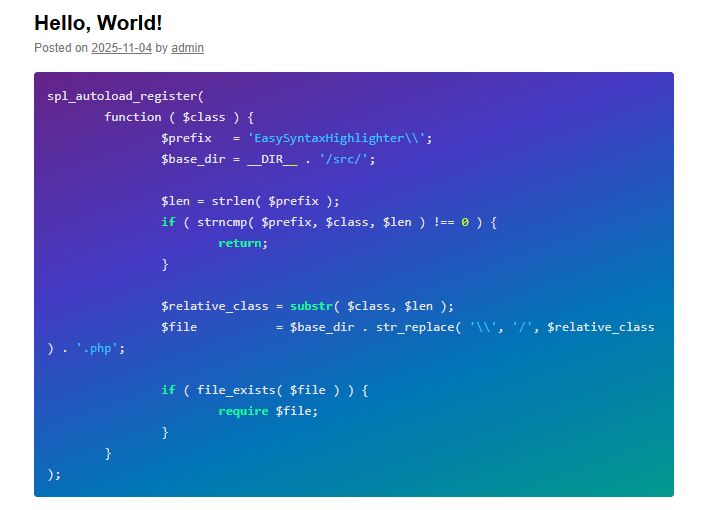
Frontend Display
Telepítés
Automatic Installation
- Log in to your WordPress admin dashboard
- Navigate to Plugins > Add New
- Search for „Easy Syntax Highlighter”
- Click Install Now
- Activate the plugin
Manual Installation
- Download the plugin ZIP file
- Upload the plugin files to
/wp-content/plugins/easy-syntax-highlighter/ - Activate the plugin through the Plugins menu in WordPress
GYIK
-
How does syntax highlighting work?
-
The plugin uses the powerful Highlight.js library to automatically find and highlight code within standard WordPress „Code” blocks. There’s no need to look for a special block; just use the default one, and the plugin handles the rest.
-
Which programming languages are supported?
-
The plugin supports: JavaScript, CSS, PHP, Python, Bash/Shell, SQL, Java, C++, C, C#, Ruby, Go, Rust, TypeScript, JSON, YAML, XML, HTML, Docker, Nginx, and plain text. Auto-detection is also available.
-
How many themes are available?
-
The plugin includes over 80 themes, including popular ones like GitHub, Monokai, Atom One, and many more. All themes are available in both light and dark variants.
-
Does this work with caching plugins?
-
Yes, the plugin works well with caching plugins and can complement them by ensuring proper asset loading and syntax highlighting even with cached content.
-
Can I customize the appearance?
-
Yes! Go to Settings > Syntax Highlighter to choose from over 80 different color themes using a visual theme selector. The copy-on-double-click feature is enabled by default.
-
Does it work with page builders?
-
Yes, the plugin should work with any page builder that uses the standard WordPress „Code” block. For other cases, you might need to use a custom HTML block and wrap your code in
<pre><code class="language-yourlanguage">...</code></pre>. -
How do I highlight specific lines?
-
Line highlighting is not currently supported. This feature may be added in future updates.
-
Is the plugin lightweight?
-
Yes! The plugin only loads its scripts and styles on pages that actually contain a code block, making it very performant.
Vélemények
Nincsenek értékelések erről a bővítményről.
Közreműködők és fejlesztők
“Easy Syntax Highlighter” egy nyílt forráskódú szoftver. A bővítményhez a következő személyek járultak hozzá:
Közreműködők
“Easy Syntax Highlighter” fordítása a saját nyelvünkre.
Érdekeltek vagyunk a fejlesztésben?
Browse the code, check out the SVN repository, or subscribe to the development log by RSS.
Változási napló
2.0.0
- Complete plugin rewrite using modern, object-oriented PHP and best practices.
- Replaced Google Code Prettify with the latest Highlight.js library for better performance and language detection.
- Added all 80+ official Highlight.js themes, stored locally for offline compatibility and speed.
- Redesigned the admin interface with a visual theme selector and live previews.
- Implemented smart asset loading, so scripts and styles only load on pages with code blocks.
1.0.0
- Initial release with Google Code Prettify integration.