
Opis
StifLi Flex MCP turns your WordPress site into an intelligent AI agent. Ask questions, create posts, manage orders, update settings — all through a natural conversation with the AI of your choice, right from your WordPress dashboard.
Also works as a full MCP server for external AI clients.
No complex setup, no external tools required. Just add your API key and start chatting.
🤖 AI Chat Agent — Your WordPress AI Assistant
The built-in AI Chat Agent gives you a powerful conversational interface to manage your entire WordPress site:
- Talk to your site — “Show me the last 5 orders”, “Create a blog post about SEO tips”, “What plugins are installed?”
- Multi-provider — Choose between OpenAI (GPT-4o, GPT-4.5), Anthropic (Claude 4 Opus/Sonnet, Haiku), or Google (Gemini 2.5 Pro/Flash)
- 117+ tools at its disposal — The AI agent can read posts, create content, manage WooCommerce products, check orders, update settings, and much more
- Smart suggestions — After each response, get contextual follow-up suggestions
- Conversation history — Auto-saved across sessions with multi-tab support
- Safe by design — Choose “Always Allow” or “Ask User” mode for tool execution confirmations
- Advanced tuning — Control temperature, max tokens, top_p, system prompts
💡 What Can You Do With It?
Here are just a few examples of what you can ask your AI agent:
- 📝 “Write a 500-word blog post about healthy eating and publish it as draft”
- 🛒 “Show me today’s WooCommerce orders and their total revenue”
- 🔍 “What are the top 10 most commented posts on my site?”
- 📊 “List all products with stock below 5 units”
- 🏷️ “Create a 20% discount coupon valid for the next 7 days”
- 🖼️ “Show me the last 10 images uploaded to the media library”
- ⚙️ “What is my site’s tagline and timezone?”
- 📦 “Update the price of product #123 to $29.99”
- 💬 “Show me all pending comments so I can review them”
- 🧩 “What plugins are currently active?”
The AI agent understands context, chains multiple operations, and works with your site’s real data in real time.
🚀 Extend With Custom Tools
Transform ANY WordPress plugin into an AI tool! Custom Tools lets you write simple PHP snippets that expose plugin functionality to your AI agent:
- Query Contact Form 7 submissions through conversation
- Get Yoast SEO scores and recommendations
- Control WP Super Cache settings with natural language
- Access Advanced Custom Fields data
- Build custom WooCommerce reports
No coding experience required — use the built-in examples as templates.
🧠 WordPress Abilities Integration (WordPress 6.9+)
Automatically discover and import abilities registered by other plugins into your AI agent’s toolkit. If a plugin supports the WordPress Abilities API, StifLi Flex MCP can detect, import, and expose it as an AI tool — zero configuration needed.
📡 Full MCP Server — Connect External AI Clients
StifLi Flex MCP also works as a standards-compliant Model Context Protocol (MCP) server, so you can connect external AI clients:
- ChatGPT — via Custom Connectors with SSE streaming
- Claude Desktop — direct MCP connection
- LibreChat — full MCP integration
- Any MCP-compatible client — JSON-RPC 2.0 + SSE
The server exposes 117+ tools (55 WordPress + 61 WooCommerce + 1 Core + Abilities + Custom Tools) that external AI agents can discover and execute.
🛡️ Security
- WordPress Application Passwords (native WordPress 5.6+ feature)
- Per-tool capability checks linked to WordPress roles
- Profile-based tool restrictions (8 predefined profiles + custom)
- Tool execution confirmations in AI Chat Agent
📋 Tool Profiles
- WordPress Read Only — safe read-only access
- WordPress Full Management — complete CRUD operations
- WooCommerce Read Only — query store data
- WooCommerce Store Management — products, orders, coupons
- Complete E-commerce — all WooCommerce tools
- Complete Site — all 117+ tools enabled
- Safe Mode — non-sensitive reads only
- Development/Debug — diagnostic tools
Demo & Installation Tutorial:
Snimke zaslona

AI Chat Agent – Chat with AI directly from WordPress admin 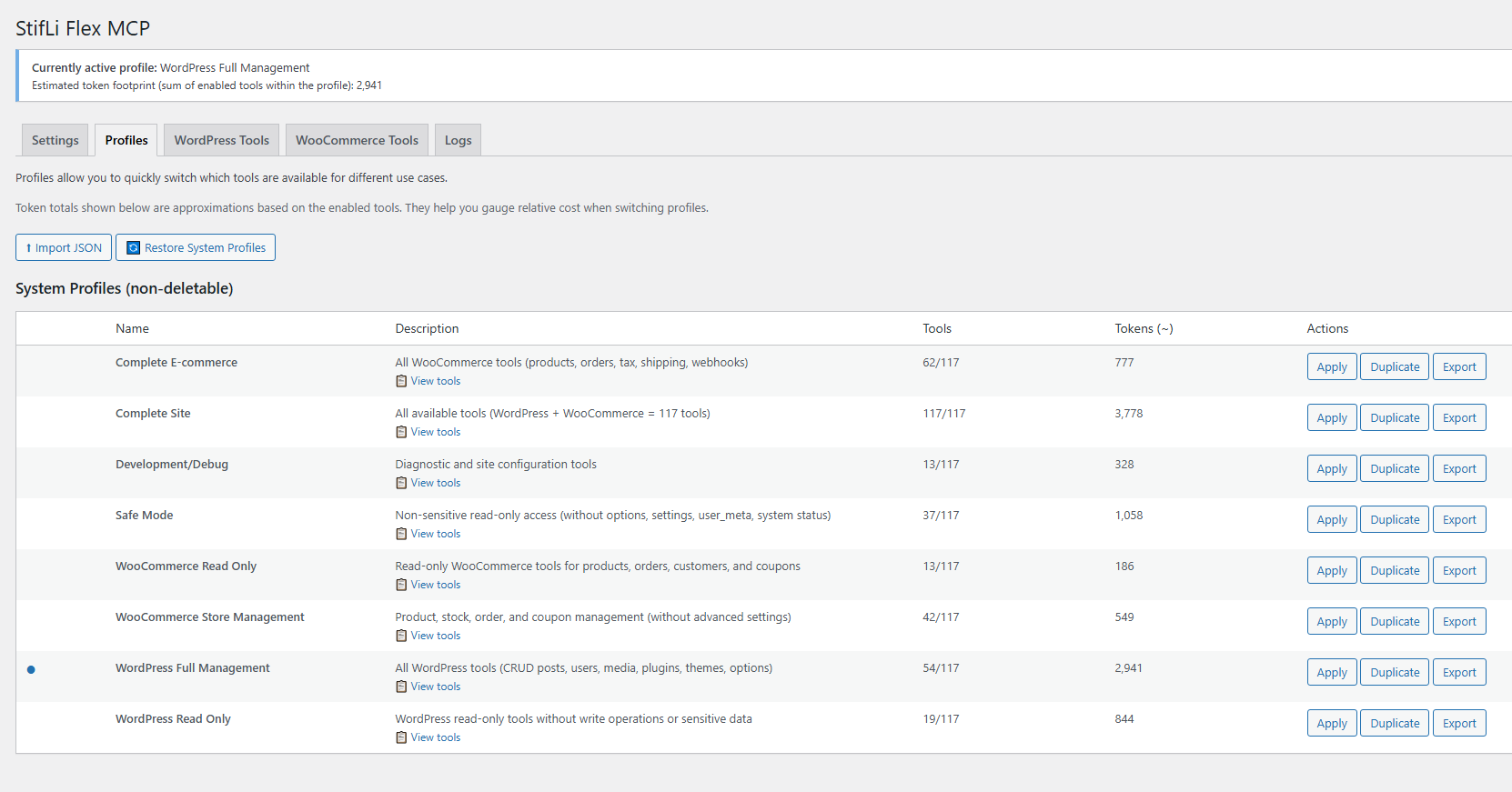
AI Chat Agent – Settings and provider configuration 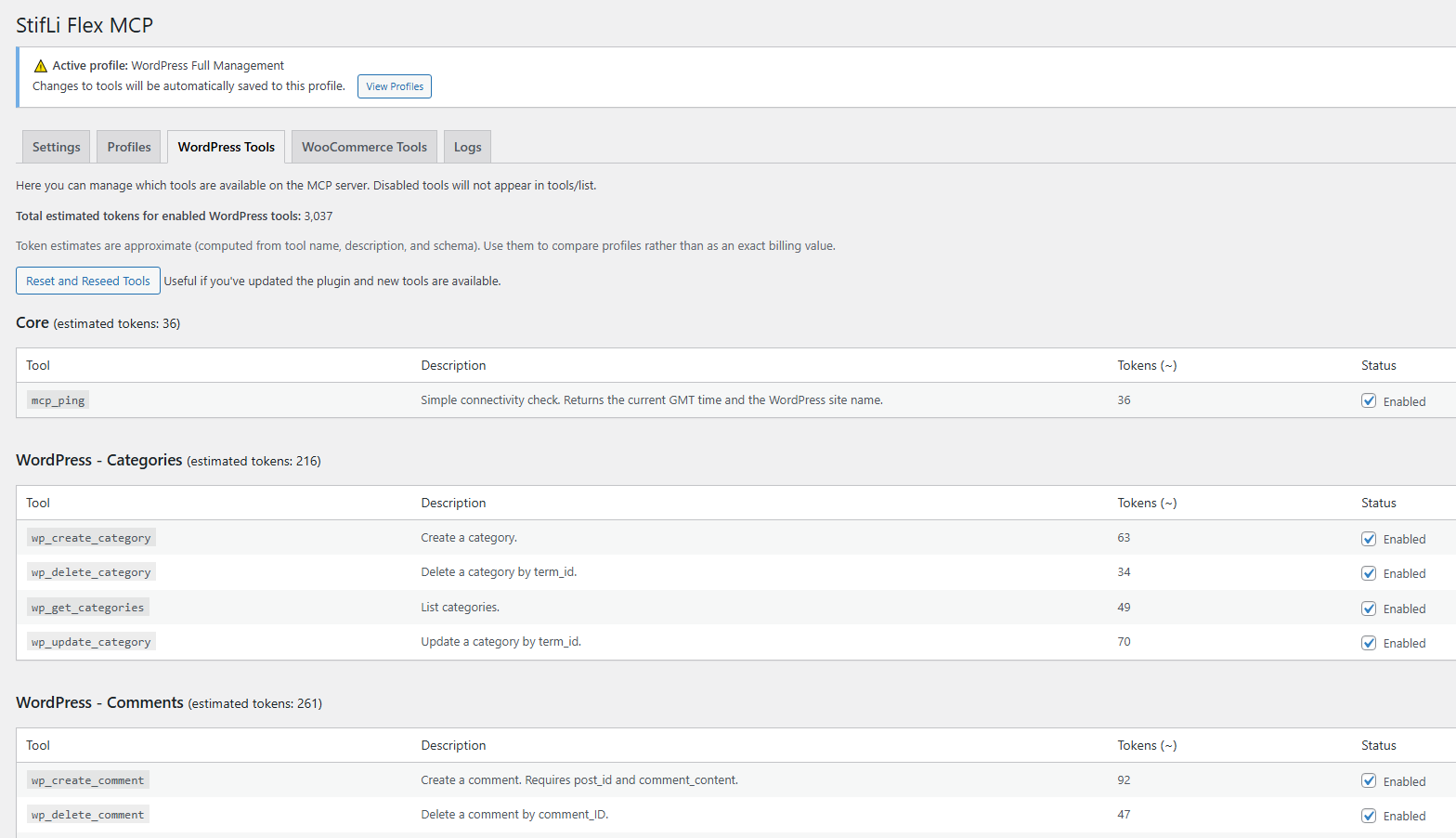
MCP Server – Endpoint URLs and authentication setup 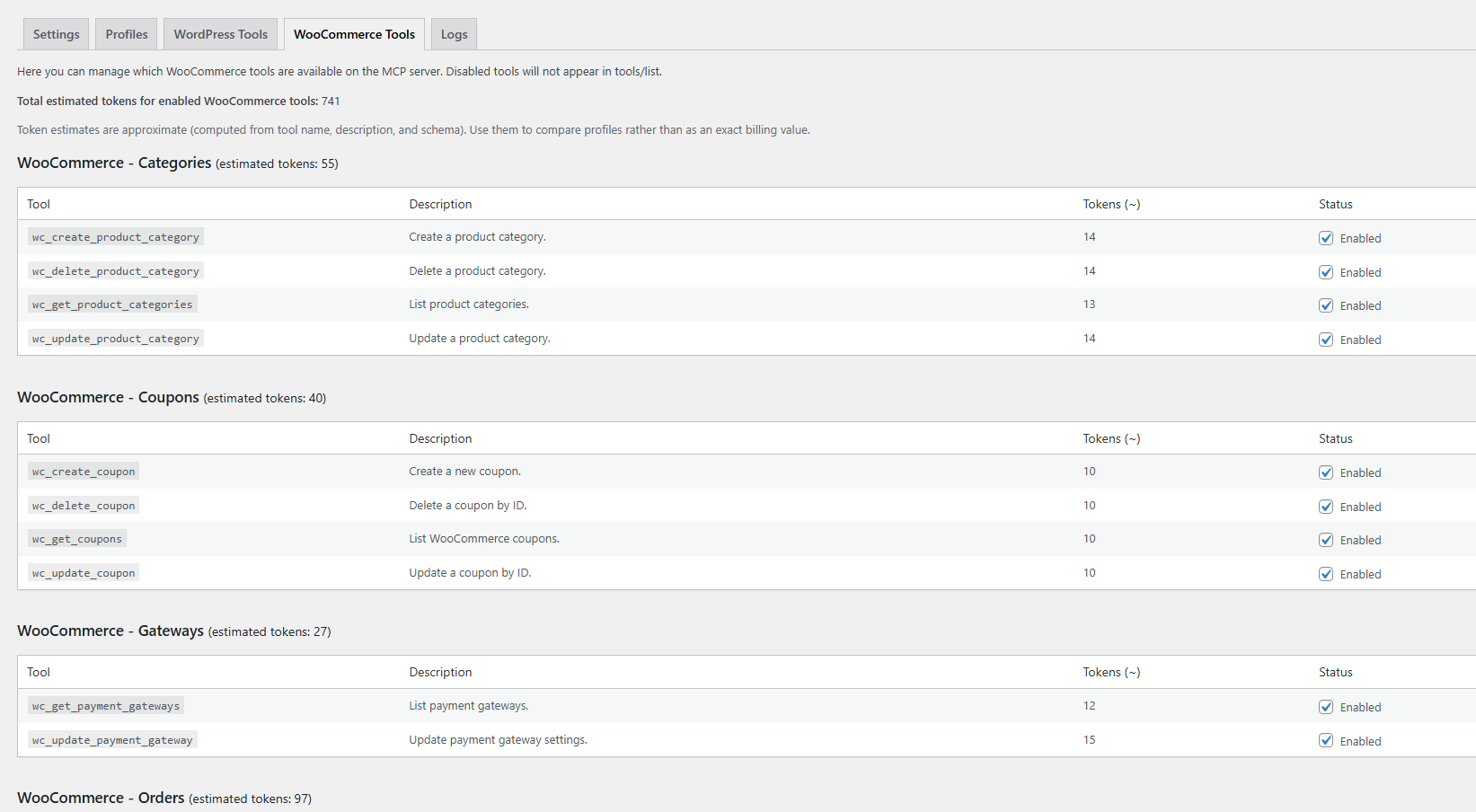
MCP Server – Tool profiles management
Instalacija
Quick Start (AI Chat Agent)
- Upload the
stifli-flex-mcpfolder to/wp-content/plugins/or install from the WordPress plugin directory - Activate the plugin
- Go to StifLi Flex MCP AI Chat Agent
- Open the Settings tab and select your AI provider (OpenAI, Claude, or Gemini)
- Enter your API key
- Start chatting!
That’s it — no external tools, no complex configuration. Your AI agent is ready.
Optional: MCP Server for External Clients
If you also want to connect external AI clients (ChatGPT Connectors, Claude Desktop, LibreChat):
- Go to StifLi Flex MCP MCP Server
- Create an Application Password in your WordPress profile (Users Profile Application Passwords)
- Use HTTP Basic Authentication with your username and application password
- Configure your MCP client with the provided endpoint URLs
Endpoints:
- JSON-RPC:
https://yoursite.com/wp-json/stifli-flex-mcp/v1/messages - SSE Streaming:
https://yoursite.com/wp-json/stifli-flex-mcp/v1/sse
ČPP
-
How do I set up the AI Chat Agent?
-
- Go to StifLi Flex MCP AI Chat Agent Settings
- Choose your AI provider (OpenAI, Claude, or Gemini)
- Enter your API key (you get this from your AI provider’s website)
- Go to the Chat tab and start talking!
-
Which AI provider should I use?
-
All three providers work great. Here’s a quick comparison:
- OpenAI (GPT-4o / GPT-4.5) — Best overall balance of speed and quality
- Claude (Opus / Sonnet) — Excellent at understanding complex instructions and writing
- Gemini (2.5 Pro / Flash) — Great value, fast responses
You can switch providers at any time from the Settings tab.
-
What can the AI agent do with my site?
-
The agent has access to 117+ tools covering:
- Content — Create, edit, delete posts, pages, and comments
- Media — Upload, list, and manage images and files
- WooCommerce — Products, orders, coupons, customers, shipping, taxes
- Taxonomies — Categories, tags, custom taxonomies
- Settings — Site options, menus, navigation
- System — Plugins, themes, site health
You control which tools are available through Profiles.
-
Is it safe to let AI manage my site?
-
Yes, with multiple layers of protection:
- Tool confirmations — In “Ask User” mode, you approve every action before it executes
- Permission checks — Every tool verifies WordPress capabilities before running
- Profiles — Restrict which tools are available (e.g., “Read Only” profiles)
- Application Passwords — Revocable at any time for MCP server connections
-
What is MCP?
-
Model Context Protocol (MCP) is a standard for connecting AI agents to data sources and tools. This plugin implements an MCP server so external AI clients like ChatGPT or Claude Desktop can discover and use your WordPress tools. This is in addition to the built-in AI Chat Agent.
-
Does this work with WooCommerce?
-
Yes! The plugin includes 61 WooCommerce tools. They activate automatically when WooCommerce is installed. Ask your AI agent “Show me today’s orders” and it just works.
-
Can I create my own tools?
-
Absolutely! Go to MCP Server Custom Tools and create PHP-powered tools that expose any plugin’s functionality to your AI agent. Built-in examples included.
-
What are WordPress Abilities?
-
WordPress 6.9 introduced the Abilities API, letting plugins register standardized capabilities. If you have plugins that support Abilities, StifLi Flex MCP can auto-discover and import them from MCP Server Abilities tab.
-
How do I connect ChatGPT or Claude Desktop?
-
- Go to StifLi Flex MCP MCP Server for the endpoint URLs
- Create an Application Password (Users Profile Application Passwords)
- Configure your external AI client with the SSE endpoint and credentials
- The client will auto-discover all available tools
Recenzije


Suradnici i Programeri
“StifLi Flex MCP – AI Chat Agent and MCP Server” je softver otvorenog koda. Sljedeće osobe su doprinijele ovom dodatku.
Suradnici
Prevedite “StifLi Flex MCP – AI Chat Agent and MCP Server” na svoj jezik.
Zainteresirani ste za razvoj?
Pregledajte kôd, pogledajte SVN spremišteili se pretplatite na dnevnik razvoja od RSS.
Dnevnik promjena
2.0.3
- ** Encrypted API Keys** – API keys are now stored encrypted (AES-256-CBC) in the database for improved security
- ** Prompt Caching (Claude)** – Enabled Anthropic prompt caching on system prompt and tools, reducing token usage and latency on repeated requests
- ** Provider Usage Logging** – Real-time logging of input/output/cached tokens for Claude, OpenAI, and Gemini
- ** Rate Limit Awareness** – Captures and logs rate limit headers from all three providers for better diagnostics on 429 errors
- New: Conversation history trimming with configurable “Max Tool Cycles in History” setting to control payload size
- New: Smart trim algorithm with safe cut points — never orphans tool_result references
- New: API key visibility toggle (eye icon) in chat settings
- New: Token estimation utilities (
estimateTokensFromString,estimateTokensFromJson) - Improved: Auto-save on all chat settings (removed manual “Save Settings” button)
- Improved: Compact request logging — summaries instead of full body dumps, reducing log noise
- Improved: HTTP request layer now returns headers and status code alongside body (
make_request_with_meta) - Improved: JSON encoding with
JSON_UNESCAPED_SLASHES | JSON_UNESCAPED_UNICODEfor cleaner payloads
2.0.2
- 🆕 WordPress Abilities Integration (WordPress 6.9+) – Auto-discover and import abilities from other plugins!
- New: Abilities tab in admin (appears only on WordPress 6.9+)
- New: Discover button to scan all registered abilities from themes/plugins
- New: Import, enable/disable, and delete individual abilities
- New: Abilities exposed as MCP tools (ability_* prefix) for AI agents
- New: Database table wp_sflmcp_abilities for persistent ability storage
- Improved: Plugin description updated to reflect 117+ tools
- Improved: Admin menu reordered — AI Chat Agent first, MCP Server second
- Improved: Renamed “AI Chat” to “AI Chat Agent” across the UI
- Technical: Uses wp_get_abilities(), wp_get_ability(), $ability->execute() APIs
2.0.1
- 🆕 Built-in AI Chat Client – Chat with AI directly from your WordPress admin panel!
- New: Multi-provider support – OpenAI, Claude (Anthropic), and Google Gemini
- New: Support for latest models including GPT-4.5, Claude 4 Opus/Sonnet, Gemini 2.5 Pro/Flash
- New: Smart suggestion chips that appear after AI responses
- New: Conversation history auto-saved per user (7-day retention)
- New: Stop button to cancel AI responses mid-generation
- New: Tool permission modes – “Always Allow” or “Ask User” for confirmations
- New: Advanced settings tab with temperature, max tokens, top_p, frequency/presence penalty
- New: Customizable system prompt for AI behavior
- New: Tool display options (Full details, Compact, or Hidden)
- New: Multilingual suggestions – AI responds in the same language you use
- Improved: Sequential tool execution for better reliability across all providers
- Improved: Claude 4.5 model compatibility (temperature/top_p handling)
- Improved: Gemini API message format conversion
- Fixed: Claude multiple tool_use error handling
- Fixed: Gemini “content” vs “parts” API format issue
1.0.5
- New: Custom Tools – Turn any WordPress plugin into an AI tool! Copy-paste examples included, no coding expertise required.
- New: Custom Tools management tab with code editor, enable/disable toggle, and built-in examples
- New: Pre-built Custom Tool examples (WooCommerce product lookup, CF7 forms, Yoast SEO, WP Super Cache)
- New: Custom Tools support input schemas for structured AI interactions
- Improved: All admin styles externalized for WordPress.org compliance
- Fix: Resolved object persistence issue in PHP 8.1+ causing 404 errors on API endpoints
- Fix: Deferred WooCommerce detection to ensure tools load correctly regardless of plugin load order
- Fix: WooCommerce module dispatch now correctly handles tool routing
1.0.4
- New: Debug logging system with dedicated log file (wp-content/uploads/sflmcp-logs/)
- New: Logs tab in admin UI to enable/disable logging and view debug logs
- New: Clear logs and refresh functionality from admin panel
- New: “WordPress Full Management” profile now active by default on fresh installs
- Security: Log directory protected with .htaccess and index.php
1.0.3
- Security: Replaced custom token authentication with WordPress Application Passwords
- Security: Removed wp_set_current_user calls for compliance with WordPress.org guidelines
- Removed: User management tools (wp_create_user, wp_update_user, wp_delete_user)
- Removed: Customer management tools (wc_get_customers, wc_create_customer, wc_update_customer, wc_delete_customer)
- Updated: Settings page now guides users to create Application Passwords
- Improved: Authentication uses native WordPress security features
1.0.0
- Initial public release
- 55 WordPress management tools (posts, pages, comments, media, taxonomies, options)
- 61 WooCommerce tools (products, orders, coupons, shipping, taxes, webhooks)
- Profile-based tool management with 8 predefined profiles
- WordPress Application Passwords authentication
- JSON-RPC 2.0 compliant REST API endpoint
- Server-Sent Events (SSE) support for real-time streaming
- Full internationalization support (i18n/l10n ready)
- Granular permission control per tool
- Profile import/export functionality
- Compatible with ChatGPT Custom Connectors, Claude Desktop, LibreChat