WordPress.org

Hrvatski

  • Teme
  • Dodaci
  • Vijesti
  • Podrška
  • Info
  • Openverse
  • Hrvatski prijevod
  • Codex
  • Kontakt
  • Nabavite WordPress
Nabavite WordPress
WordPress.org

Plugin Directory

Hide User Profile Fields

  • Submit a plugin
  • My favorites
  • Prijavi se
  • Submit a plugin
  • My favorites
  • Prijavi se

Dodatak nije testiran s zadnje 3 glavna izdanja WordPressa. Možda ga se više ne održava ili pruža podršku i možda ima probleme sa kompatibilnošću s novijim inačicama WordPressa.

Hide User Profile Fields

Od gugabguerra
Preuzmi
  • Detalji
  • Recenzije
  • Instalacija
  • Razvoj
Podrška

Opis

A simple plugin with no-backend interface, to clean up some dummy fields from user profiles edition and creation pages, focused on corporate purposes. The following fields are removed right after this plugin activation: Colors Profile, Keyboard Shortcuts, Toolbar, AIM, Jabber, Yahoo IM, Website URL, Biography Description and User Role (every new user is created as Subscriber)
Some contents was inspired on teachingyou.net

Snimke zaslona
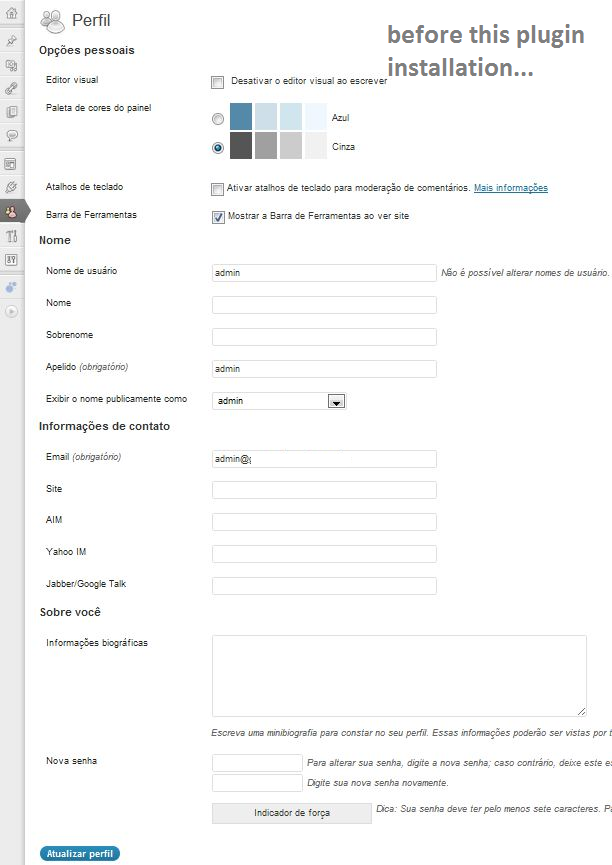
  • Before installation and activation of Hide User Profile Fields plugin.
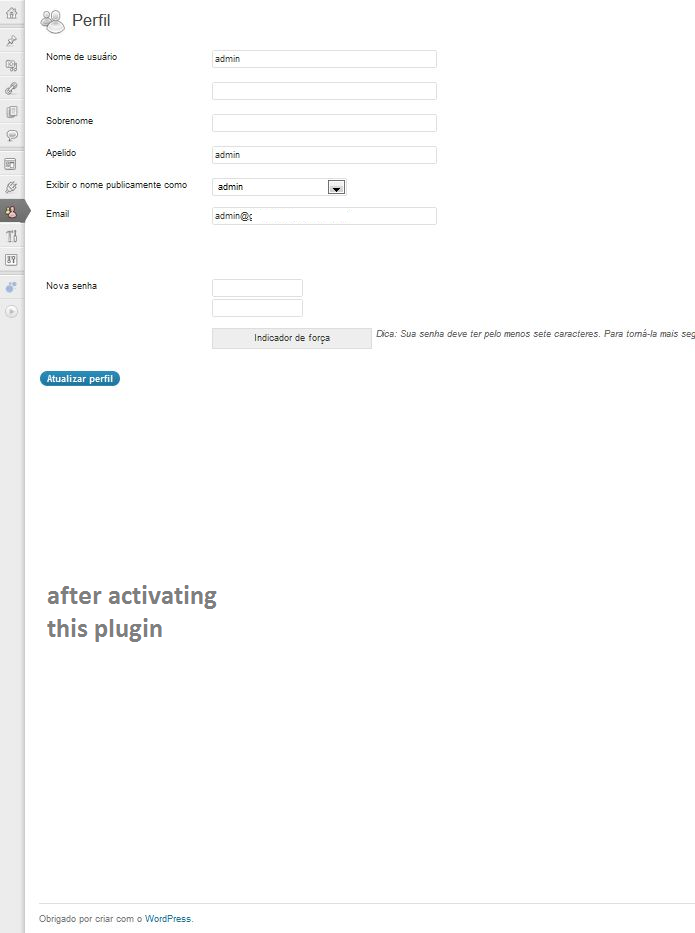
  • After installation and activation of Hide User Profile Fields plugin.

Instalacija

  1. Upload hide-user-fields.php to the /wp-content/plugins/ directory
  2. Activate the plugin through the ‘Plugins’ menu in WordPress
  3. Navigate to the ‘Hide User Profile Fields’ Settings menu and enable it.

ČPP

How do I enable this plugin?

Once the plugin itself is installed, navigate to the ‘Hide User-Profile Fields’ Settings menu, check the lone checkbox, and click ‘Update Options’.

How can I hide/unhide some specific fields?

You can’t, not through this plugin, but you can edit this as your needs.

Recenzije

Excellent but not for non programmers

rafi.w 03. rujna 2016.
Very good basis for hiding items on your profile. This plugin must be a result of lots of research work, on how to hide items on the profile page. Using browser’s “inspect” feature, you can find the individual fields info and edit the plugin accordingly to hide them.
Pročitajte svih 6 recenzija

Suradnici i Programeri

“Hide User Profile Fields” je softver otvorenog koda. Sljedeće osobe su doprinijele ovom dodatku.

Suradnici
  • gugabguerra

Prevedite “Hide User Profile Fields” na svoj jezik.

Zainteresirani ste za razvoj?

Pregledajte kôd, pogledajte SVN spremišteili se pretplatite na dnevnik razvoja od RSS.

Dnevnik promjena

1.2

  • Color Profiles and other checkboxes will also be hidden on this version.

1.0.0

  • First published version.

Meta

  • Version 1.2
  • Zadnje ažuriranje prije 13 godina
  • Aktivnih instalacija 200+
  • WordPress inačica 3.0.0 ili viša
  • Testirano do 3.4.2
  • Language
    English (US)
  • Oznake
    aimfieldshideuser profile
  • Napredni pogled

Ocjena

3.8 out of 5 stars.
  • 2 5-star reviews 5 stars 2
  • 2 4-star reviews 4 stars 2
  • 0 3-star reviews 3 stars 0
  • 0 2-star reviews 2 stars 0
  • 1 1-star review 1 star 1

Dodaj moju recenziju

See all reviews

Suradnici

  • gugabguerra

Podrška

Želite nešto reći? Potrebna vam je pomoć?

Pregledaj forum za podršku

Doniraj

Želite li podržati napredak ovog dodatka?

Donirajte ovom dodatku

  • About
  • News
  • Hosting
  • Privacy
  • Showcase
  • Themes
  • Plugins
  • Patterns
  • Learn
  • Support
  • Developers
  • WordPress.tv ↗
  • Uključite se
  • Events
  • Donate ↗
  • Five for the Future
  • WordPress.com ↗
  • Matt ↗
  • bbPress ↗
  • BuddyPress ↗
WordPress.org
WordPress.org

Hrvatski

  • Visit our X (formerly Twitter) account
  • Visit our Bluesky account
  • Visit our Mastodon account
  • Visit our Threads account
  • Visit our Facebook page
  • Visit our Instagram account
  • Visit our LinkedIn account
  • Visit our TikTok account
  • Visit our YouTube channel
  • Visit our Tumblr account
Kod je poezija.