

Opis
Content Bridge for Commerce provides a lightweight REST API endpoint that allows external commerce platforms such as Shopify to fetch WordPress editorial content.
This plugin does not sync databases or duplicate content. It simply exposes your WordPress posts through a clean, structured JSON API designed for external consumption.
Key Features
- Fetch latest WordPress posts via REST API
- Filter posts by category or tag (using slug)
- Return featured image, excerpt, and publish date
- Optional conversion of Jetpack (i0.wp.com) CDN image URLs back to original URLs
- Configurable default post count and limits
- Built-in transient cache (5 minutes) to reduce database load
- No data duplication or migration required
REST API Endpoint
Base endpoint:
/wp-json/content-bridge/v1/posts
Examples:
Latest posts:
/wp-json/content-bridge/v1/posts?per_page=4
Posts filtered by tag:
/wp-json/content-bridge/v1/posts?tax=post_tag&term=guidi&per_page=4
Posts filtered by category:
/wp-json/content-bridge/v1/posts?tax=category&term=news&per_page=4
If no taxonomy is specified, the API returns the latest posts from all published posts.
Authentication
This plugin protects its REST API using a simple API key mechanism.
Requests must include a valid API key via the following HTTP header:
X-Content-Bridge-Key: YOUR_API_KEY
If the API key is missing or invalid, the endpoint will return a 401 Unauthorized response.
The API key can be configured in the plugin settings screen.
The API key can be manually set or generated from the plugin settings screen.
Settings
Settings Content Bridge for Commerce
- Default number of posts
- Maximum allowed posts per request
- Image size (thumbnail / medium / large / full)
- Excerpt length (word count)
- Enable or disable Jetpack CDN URL unwrapping
Privacy
Content Bridge for Commerce does not collect, store, or transmit any personal data.
The plugin only exposes publicly available WordPress post data (such as title, excerpt, featured image, and permalink) via a REST API endpoint.
No data is sent to external servers by this plugin.
Snimke zaslona
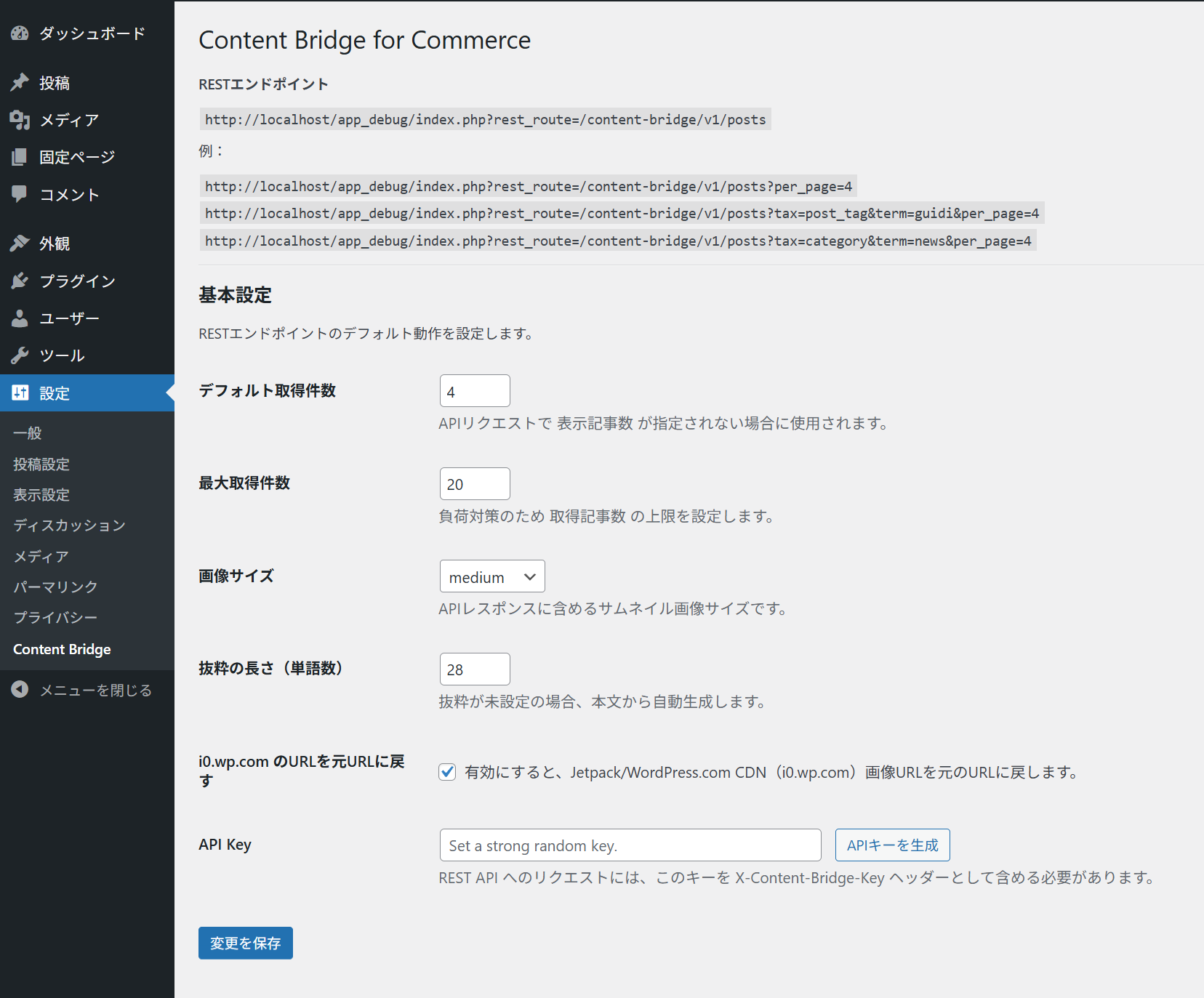
Plugin settings page (Japanese UI), including REST API endpoint and usage examples
Instalacija
- Upload the
content-bridge-for-commercefolder to the/wp-content/plugins/directory - Activate the plugin through the “Plugins” menu in WordPress
- Go to Settings Content Bridge for Commerce to configure defaults
- Use the REST API endpoint from your external platform
ČPP
-
Does this plugin sync data to Shopify?
-
No. This plugin does not sync or copy data. It only exposes WordPress content via REST API.
-
Can I use this without Shopify?
-
Yes. Any external frontend that can fetch JSON data can use this API.
-
Does it support custom post types or custom taxonomies?
-
Currently, the plugin supports standard posts filtered by category or tag.
Support for custom taxonomies and post types may be added in future versions.
Recenzije
Nema recenzija za ovaj dodatak.
Suradnici i Programeri
“Content Bridge for Commerce” je softver otvorenog koda. Sljedeće osobe su doprinijele ovom dodatku.
Suradnici
Prevedite “Content Bridge for Commerce” na svoj jezik.
Zainteresirani ste za razvoj?
Pregledajte kôd, pogledajte SVN spremišteili se pretplatite na dnevnik razvoja od RSS.
Dnevnik promjena
1.0.2
- Fixed an issue where translations were not loaded correctly.
- Ensured plugin textdomain is properly initialized on plugins_loaded.
1.0.1
- Added Plugin URI linking to the WordPress.org plugin page.
- Added Author URI to link the plugin author name to the official website.
1.0.0
- Initial public release.
0.2.1
- Review fixes (prefixes + proper script enqueue + directory assets removed)
0.2.0
- Fix Text Domain mismatch (plugin slug aligned)
- Replace direct SQL transient cleanup with tracked-key deletion (Plugin Check friendly)
- Fix uninstall cleanup keys
- Admin i18n improvements
0.1.2
- Add transient cache (5 minutes) for REST responses
- Add uninstall routine and privacy notes
- i18n improvements for admin UI