

Opis
Buy Now for WooCommerce lets you add a Buy Now button to single product & Shop catalog pages, enabling customers to skip the cart and go straight to checkout. The button can be positioned before, after, or in place of the Add to Cart button, and is fully customizable from the WooCommerce settings. Plugin Documentation
As of July 5, 2025, this project is maintained by Codeixer.
Key Features:
* Add a Buy Now button to single product pages & shop catalog
* Choose button position: before, after, or replace Add to Cart
* Option to show checkout in a popup or redirect to checkout page
* Customize button text, style, and colors
* Optionally reset cart before Buy Now
* Optionally hide quantity input
* Developer-friendly shortcode: [buy_now_woo_button]
Shortcode Usage:
[buy_now_woo_button title=”Buy Now” class=”wsb-button”]
Snimke zaslona

Shop Catalog page with Buy Now button 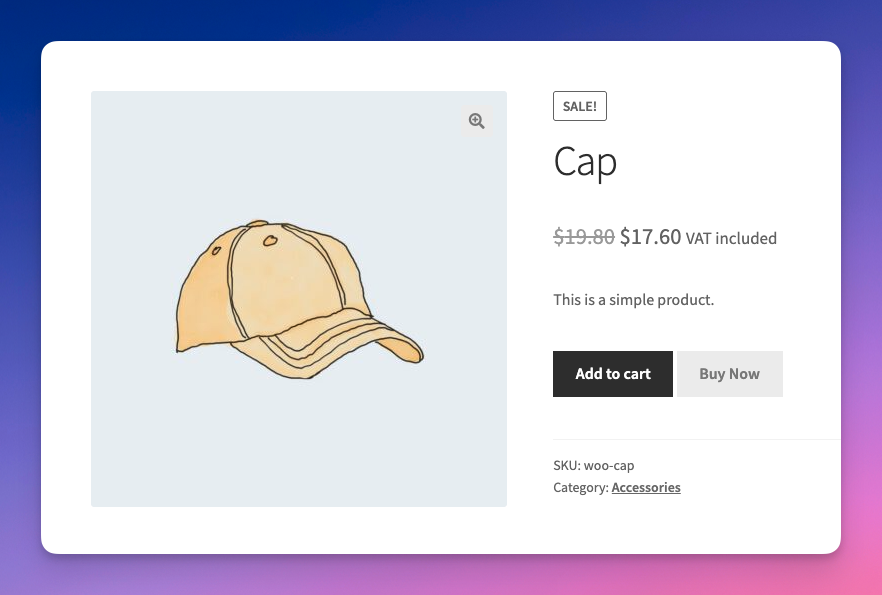
Single Product page with Buy Now button
Instalacija
- Upload the plugin files to the
/wp-content/plugins/buy-now-woo/directory, or install the plugin through the WordPress plugins screen directly. - Activate the plugin through the ‘Plugins’ screen in WordPress.
- Go to WooCommerce > Settings > Buy Now to configure the plugin.
ČPP
-
Where do I find the settings?
-
Go to WooCommerce > Settings > Buy Now tab.
-
Yes, you can change the button text, style, and position from the settings page.
-
Does it work with all product types?
-
The Buy Now button is designed for simple and variable products.
Recenzije


Suradnici i Programeri
“Quick Buy Now Button for WooCommerce” je softver otvorenog koda. Sljedeće osobe su doprinijele ovom dodatku.
Suradnici

Prevedite “Quick Buy Now Button for WooCommerce” na svoj jezik.
Zainteresirani ste za razvoj?
Pregledajte kôd, pogledajte SVN spremišteili se pretplatite na dnevnik razvoja od RSS.
Dnevnik promjena
1.1.2 – 2025-12-18
- Added: Button option for catalog pages.
- Added: Replace popup js with 3rd party jquery for better UX.
- Improve functions for better output.
1.1.1 – 2025-12-16
- Added Codeixer SDK for deactivation survey
- Added Settings link under plugin name for quick nagivation
- Fixed: Default Mini cart block not working in single product page.
- Minify js file
- Compatibility with WooCommerce 10.x
1.1.0 – 2025-07-05
- Maintenance and security improvements
1.0.0 – 2020-05-01
- Initial release