How To Create And Manage Grokipedia Pages For Clients

Grokipedia (by xAI) is an encyclopedia-style platform similar to Wikipedia, except it’s much easier to request new articles, suggest edits, and build connected entity pages for people, businesses, and brands. For client work, Grokipedia is a fast way to help a business owner build online credibility, connect their digital assets, and create a clean “entity footprint” that can support long-term trust online.

This SOP breaks down the exact process our team can follow to request Grokipedia pages for clients, get them approved, fix mistakes, and maintain them over time.

Why Grokipedia Pages Matter For Clients

A Grokipedia page becomes a central reference point that can connect the client to:

  • Their business entity
  • Their other related entities (podcasts, brands, associations, awards, etc.)
  • Other people in their network
  • Public sources across the internet

Unlike a standard blog post or landing page, Grokipedia pages are structured like a public encyclopedia entry. That matters because these pages are built to summarize “who the person is” or “what the business is” in a clean, structured way that aligns with how entity-based search and AI tools organize information.

Even when the first version isn’t perfect, the edit and revision process is simple enough that we can quickly refine it.

What To Create For Each Client (Required)

For every client, the goal is to create two separate pages, not just one

For example, we created a page for Jeff Hughes, as well as one of his businesses, Rocket Clicks.

1. The Client’s Personal Page

Example: the business owner, founder, doctor, attorney, etc.

Example of family law attorney Jeff Hughes’ page

2. The Company Page

Example: the client’s dental practice, law firm, home service business, agency, etc.

Example of Rocket Clicks’ page, one of Jeff’s companies

This matters because Grokipedia can sometimes confuse the business and the person if the request is framed incorrectly. Keeping them clearly separated increases the chances of approval and makes the pages more accurate.

Step 1: Check If The Page Already Exists

Before you suggest an article:

  • Search the client’s name inside Grokipedia
  • Search the business name inside Grokipedia
  • Confirm whether a page already exists for either one

Sometimes a page already exists without us needing to create it. If it does exist, we skip directly to the editing process.

Step 2: Suggest A New Article

If the client does not have a page yet:

  1. Click “Suggest Article” (or request the article after searching their name)
  2. Enter the Article Topic
    • Use the client’s real name (first + last)
  3. Add Additional Details
    • This is where you guide Grokipedia to pull the right informationWhat To Include In “Additional Details”
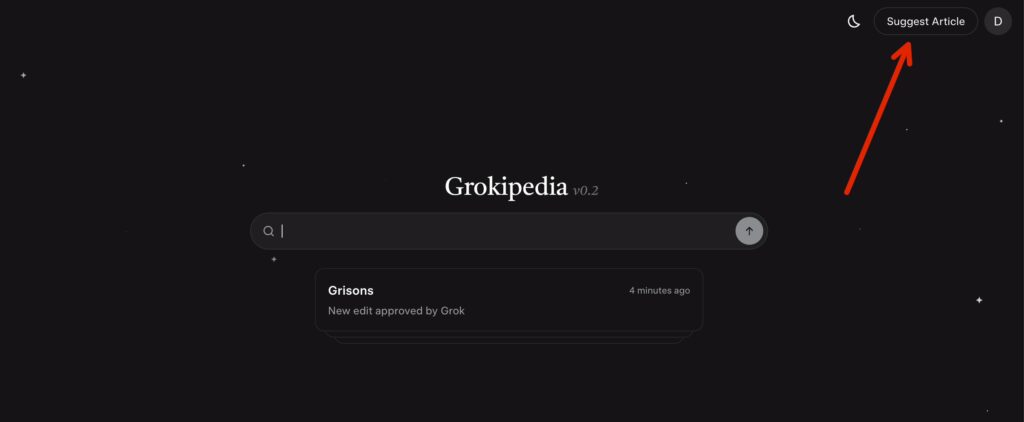
Select “Suggest Article”
Enter article topic / additional details

Focus on facts Grokipedia can verify from public sources, such as:

  • Their job title and role
  • Their business name and location
  • Their specialty (dentist, attorney, contractor, etc.)
  • Known awards, leadership roles, or credentials
  • Public-facing projects (podcast appearances, published interviews, etc.)

Goal: Give Grokipedia the correct angle so it generates a page that matches how the client should be and wants to be represented online.

Step 3: Suggest The Business Article Separately

After the personal page is submitted (or approved), request the business page as its own entry.

Important Note: Avoid The Duplicate Rejection Problem

Sometimes Grokipedia blocks a business page if it believes it overlaps with the owner’s page.

If the business article gets flagged as a duplicate:

  • Don’t mention the owner’s name heavily in the business request
  • Focus on the business as its own entity:
    • what it does
    • where it operates
    • what it’s known for
    • what services it provides

This usually fixes the issue.

Step 4: Review The Page After It Goes Live

Once Grokipedia accepts the request and generates the page, read it carefully.

You’re looking for:

  • Wrong dates
  • Incorrect job titles
  • Wrong location
  • Missing business name
  • Broken links to related entities
  • Mentions that should connect to other pages but don’t
  • Anything incorrect / non-factual

This step matters because Grokipedia is generating content by scraping the internet, which means it will occasionally pull incorrect info, misunderstand context, or mix in results from other people with the same name.

Step 5: Fix Incorrect Information With “Suggest Edit”

To fix something:

  1. Highlight or locate the incorrect line
  2. Click “Suggest Edit”
  3. Explain the correction clearly and simply (include verifiable sources, if applicable)
  4. Submit the edit
Select over the text you believe needs edited, then select “Suggest Edit”
Add summary of the edits that are needed, include supporting sources / URLs

Common Client Fixes

  • Correcting dates (events, awards, launches, etc.)
  • Clarifying job roles (owner vs associate, founder vs employee, etc.)
  • Fixing spelling of names or business names
  • Cleaning up descriptions that feel inaccurate or unclear

If your edit gets rejected due to lack of proof, it means the internet sources Grokipedia found didn’t support your change yet.

In that case, you have two options:

  • Find a stronger public source for the correct info
  • Publish a source yourself (website page, article, podcast mention, etc.) and retry later

Step 6: Improve Entity Linking (Huge Benefit)

One of the most valuable parts of Grokipedia is how it interlinks entities.

Even if the article content is fine, it might miss obvious links such as:

  • client → business page
  • client → podcast page
  • client → award / association page
  • business → founder page

How To Fix Linking Issues

If you see a company name mentioned but not linked:

  1. Click Suggest Edit
  2. Request that the term becomes a hyperlink to the correct Grokipedia page
  3. Submit

This is one of the easiest edits to get accepted because it’s not changing facts—just improving structure.

Step 7: Track Your Submissions And Results

Use the Grokipedia Activity/Statistics section to monitor:

  • Your suggested articles
  • Your edits
  • Approval rate
  • Rejections (and reasons)

This helps you learn patterns quickly, because Grokipedia has guidelines on notability and evidence—similar to Wikipedia, but easier to work with.

Common Rejection Reasons (And What To Do)

1. “Not Notable Enough”

This can happen if the entity has very little coverage online.

Fix: Build more digital proof first:

  • podcast appearances
  • client site content
  • interviews and articles
  • awards and associations

2. “Not Enough Sources”

This happens when Grokipedia can’t find enough trustworthy info across the web.

Fix: Create more public sources, then re-submit.

3. “Duplicate / Already Being Processed”

This is common when creating a business page that overlaps heavily with the owner’s page.

Fix: Rewrite the request so the business stands alone as an entity.

How To Deliver This To Clients (Simple Template)

Once the page is live, send it to the client inside Basecamp (or if you’re not on our team, whatever client communication tool you use):

Message Template:

Hey [Client Name] — great news! We just got your Grokipedia page published. Here’s the link: [paste link]

If you notice anything that needs to be updated (details, dates, links, etc.), send it to me and I can suggest edits, or you can request edits directly on the page as well.

Summary Checklist

For each client:

  • Search client name to check for an existing page
  • Request a personal Grokipedia page if missing
  • Request a business Grokipedia page separately
  • Review the published article for accuracy
  • Suggest edits for wrong info
  • Suggest edits to improve entity linking
  • Share the final link with the client
  • Track approvals and rejections in Activity/Stats

What Contractors Need To Know About Google Knowledge Panels

Most contractors don’t lose jobs because they’re bad at the work. They lose jobs because the customer can’t tell who’s legit in the first 10 seconds of a Google search.

That’s the real reason Google Knowledge Panels matter.

If someone searches your name or your company name and Google clearly understands who you are, what you do, and where you do it, you stop looking like “another option” in a list of blue links. You look like the obvious choice.

When Dennis Yu was in Minneapolis with Jack Wendt and I (Dylan Haugen), we recorded a session answering the most common questions we get from contractors about Knowledge Panels—what they are, how they work, why some people get them (and others don’t), and what to do if you want one.

This article is a written version of that conversation, organized so you can actually apply it.

What A Google Knowledge Panel Actually Is

A Knowledge Panel is what shows up when Google is confident about an “entity.”

An entity can be a person, a company, a city, a product, a park—anything that Google can identify as a real thing with real attributes.

You’ve seen this with celebrities. Search a musician or actor and you’ll get a panel with photos, bio details, social profiles, and related info. The difference is: contractors assume that’s only for famous people.

It’s not.

A Knowledge Panel shows up when Google understands you clearly enough that it can present you as a full object in search, not a guess.

Instead of “10 blue links,” Google can confidently say:

  • This is the person/company you’re looking for
  • These are their socials and trusted references
  • This is where they operate
  • These are related entities connected to them

And that clarity is what drives trust.

Example of Tommy Mello’s Knowledge Panel, which we helped claim.

Why Knowledge Panels Matter For Contractors

Contractors don’t win on “who’s best at HVAC repair” or “who’s the most skilled roofer.”

They win on trust.

People do business with people. When Google understands you as the figurehead of your business, trust flows:

  • From you → to the business
  • From the business → to your services in your city
  • From your relationships → into your overall credibility

If you’re clearly “the Indianapolis tree company” or “the Denver remodeler,” it helps across the board:

  • branded searches (your name/company name)
  • local SEO (city + service)
  • Google Maps signals
  • and even visibility in AI tools that pull from trusted web signals

The panel itself isn’t the end goal. It’s proof that Google understands you.

Do You Have To Be Famous To Get One?

No.

This was one of the biggest points we hit, because it’s the most common misconception.

Google doesn’t care about a blue checkmark or follower counts. It cares about clarity and trusted signals.

We talked about a contractor example where someone had a legit business, good work, and barely any social following—but still got a Knowledge Panel because the information was structured and tied together correctly.

It’s not about being “internet famous.”

It’s about being “Google-clear.”

How Google Decides Who Gets A Knowledge Panel

In the session, Dennis explained it simply:

Google is looking for trust, and trust isn’t something you can fake.

A lot of people confuse trust with:

  • press releases
  • buying links
  • auto-generated blog posts
  • “PR packages”
  • random podcast appearances you paid for

Those don’t build real authority because they can be manufactured by anyone.

What Google actually responds to are signals that reflect real-world credibility.

Here are the core categories we kept coming back to:

  • Your website (especially if it’s organized around you and your company correctly)
  • Your social profiles (consistent names, links, and identity)
  • Reviews and reputation across platforms
  • Earned media (real coverage, real mentions, real interviews)
  • Co-created content (podcasts, interviews, collaborations with credible people)
  • User behavior signals (people searching you, clicking you, staying on your content)

That last one matters more than most people realize.

Dennis referenced how Google watches clickstream behavior—what people actually do after they search. If people click your stuff and engage, Google gains confidence.

The Biggest Reason Contractors Don’t Get Knowledge Panels

It usually isn’t because they “need more content.”

It’s because they already have proof—reviews, jobs, community involvement, photos, team stories—but it’s scattered and not tied together.

Dennis gave examples like:

  • tons of content on a website with no author listed
  • podcasts where the contractor is featured, but nothing links back to them
  • service pages and blog posts that never connect to the person behind the company
  • social profiles that don’t match, don’t link, or don’t align on name/location

Most contractors don’t need to invent a reputation.

They need to organize the reputation they already earned.

Personal vs Business Knowledge Panels

This part clears up confusion fast.

A business can have a Google Business Profile, and that can show a panel-like result. But a true Knowledge Panel is broader: it can pull in socials, references, related entities, and more.

There are two key entities here:

  • You (the person)
  • Your business (the company)

Here’s an example of Dr. Hugh Flax’s Knowledge Panel compared to his business listing (Flax Dental’s Google Business Profile / GBP).

Dr. Hugh Flax’s Verified Google Knowledge Panel
Flax Dental’s GBP

If you want the strongest result, they should be connected properly.

When Google understands both entities and sees a clean relationship between them, everything strengthens.

What “Entity Consistency” Means (And Why It Matters)

Entity consistency is a technical term that basically means: Google sees the same person everywhere.

Your entity shows up across:

  • your website
  • your GBP
  • YouTube
  • Facebook/Instagram/LinkedIn
  • Yelp and other directories
  • podcast pages and interview write-ups
  • media mentions and community sites

If your name, links, bios, and identity don’t match, Google has to guess.

And when Google is guessing, you don’t get a Knowledge Panel.

A simple way we explained it in the conversation: every real story has entities.

A job story has:

  • who it happened to
  • where it happened
  • what service was done
  • when it happened
  • who did it

If that story is posted without those details being connected back to the right entity (you and your business), Google can’t confidently map it.

The Hub And Spokes Concept (Topic Wheel)

This was one of the most useful frameworks we shared.

Jack explained that your topic wheel has:

  • a hub (your “entity home,” usually your personal brand website)
  • spokes (topics and relationships that support your authority)

Contractors often have spokes—good reviews, real projects, community involvement—but no hub.

No hub = no central place where Google can see everything in one clean, structured way.

Jack Wendt and I presenting on the topic wheel at DigiMarCon Vegas 2025

For contractors, spokes can include things like:

  • your trade (roofing, HVAC, remodeling, etc.)
  • your city/region
  • your team and company story
  • community involvement
  • partnerships with other contractors
  • shared content with local organizations

When those spokes all connect back to a strong hub, Google stops guessing.

What Google Looks At When Verifying A Person

We covered this from a practical angle.

If you want to think like Google, focus on signals that are hard to fake.

Here are the types of things we pointed out in the session:

  • real interviews with credible people
  • real content hosted on real sites people actually visit
  • real traffic and engagement (people staying, scrolling, watching)
  • real connections between people and businesses
  • real-world proof tied to a specific geography

If a spammer in another country can create it instantly, it probably won’t carry much weight.

Can You Buy Or Fabricate A Knowledge Panel?

Yes—people try. And yes, there are agencies out there selling “knowledge panel packages.”

But here’s the truth: you can’t literally “buy” a Knowledge Panel.

Google doesn’t have a checkout page where you pay to become verified, and there isn’t some hidden “backdoor” where someone can flip a switch and force your panel to appear. A real Knowledge Panel is generated by Google’s algorithm, and it only shows up when Google is confident it understands who you are as an entity.

That’s why the only “package” that’s actually worth paying for is not one that claims it can sell you a panel—but one that helps you do the work the right way.

A legitimate Knowledge Panel service looks like this:

  • organizing your website and personal brand assets so Google can understand them
  • connecting your social profiles and citations consistently
  • tying your real-world proof (reviews, media, podcasts, job stories, community involvement) back to you and your business
  • creating clarity so Google stops guessing and starts recognizing the entity

So no—you cannot pay for a Knowledge Panel in the literal sense.

But you can pay someone to help you build the structure, consistency, and trust signals that make Google confident enough to show one.

Do Press Releases Help?

Usually no, for the reasons we discussed:

  • they get little to no traffic
  • they’re often labeled/treated as paid distribution
  • they don’t create real E-E-A-T signals
  • they rarely include meaningful proof

Dennis contrasted that with earned media—real stories people actually care about, shared by real people who have a reason to share them.

The Role Of Podcasts, Interviews, And Social Media

Podcasts and interviews can be huge—if they’re real and relevant.

They work when:

  • the guest and host share topic overlap
  • the audience overlap makes sense
  • it documents a real relationship
  • it gets repurposed into content that links back to the entity hub

They don’t work when:

  • you pay to be on random shows with no relevance
  • it’s just “PR placement”
  • nothing gets connected back to your website and profiles

Social media plays a different role.

It’s where you show proof and distribute the story, but it’s not the foundation. It’s one channel in a bigger system.

The Content Factory And Why Promotion Matters

Dennis explained the four stages:

  • Produce (capture real stories)
  • Process (turn them into usable assets)
  • Post (publish across channels)
  • Promote (drive the right traffic)

Promotion matters because behavior signals matter.

If you can drive real traffic to the assets that represent your entity—especially branded searches—you help Google gain confidence faster.

Fixing Incorrect Info On A Knowledge Panel

Once you claim a panel, you can submit edits.

But the key point we made: you usually have to fix the underlying sources too.

If your LinkedIn bio is wrong, or an old directory has incorrect info, Google can “re-learn” the wrong data later.

So you fix it at both levels:

  • submit the edit request
  • fix the source

What About Negative Press Or Haters?

This turned into a reputation management lesson.

The best defense is to build so much legitimate proof that negative content can’t outrank you.

If your topic wheel is strong, and your hub is strong, and you have consistent earned signals, random attacks have a hard time breaking through.

How Long Does It Take?

We gave a realistic range in the session: usually 3 to 12 months to earn a solid panel, and longer to make it consistently show and start impacting broader non-branded searches.

It depends on:

  • competition in your market
  • how common your name is
  • how organized your current assets are
  • how much real proof exists already

But the bigger point: it’s not a one-time checklist. It’s building a digital reflection of a real reputation.

What This Looks Like When It’s Done Right

At the end of the session, we talked about why people like Tommy Mello and Dan Antonelli are so strong in Google’s eyes.

They don’t just have success.

They publish their process, teach others, and show real relationships in public—proof that others trust them, follow them, and benefit from what they do.

Example of Dan Antonelli’s Panel

That creates a compounding effect:

  • their entity becomes stronger
  • their network becomes stronger
  • people associated with them gain trust too

If You Want This Implemented Inside Your Business

If you’re a contractor who wants to stop guessing and start building this the right way, the best move is to train someone on your team to do it consistently.

If you have a son, daughter, or team member you trust, enroll them in our AI Apprentice Program.

We teach them the exact systems, SOPs, and frameworks we use—so they can implement this for your business with real proof, clean structure, and a repeatable process you own.

Young Entrepreneurs: Stop Waiting and Take Action

If you’re a young entrepreneur trying to build a personal brand, you’re not “behind.” Most of the time, you’re simply stuck at the starting line.

This YouTube video was filmed in Las Vegas with the High Rise Influence team, and they walk through a real coaching moment with a young entrepreneur named George Paladichuk who is the founder of NaiL, An A.I. company for home services, and they explain why the reason most young adults don’t move forward has less to do with a lack of resources and more to do with hesitation and over-prep.

Video Context: What Happened With George

George joined the AI Apprenticeship Program by paying for it himself (not a scholarship, not a parent, not a free trial). That’s relevant because it signals commitment—and it usually means the person is willing to follow through when they get direction.

A week earlier, George told the team he wanted to start creating content, but he felt like he needed a full setup first:

  • a whiteboard
  • a camera
  • “the right equipment”
  • a perfect place to record

Instead of letting him stall, the team told him something simple:

The team’s message is direct:

“You just got to get started.”

When they checked back in, the results were immediate.

The Biggest Problem: Self-Limiting Beliefs (Not Skill)

This is a pattern you see over and over with young entrepreneurs: progress comes from publishing consistently and building a repeatable routine—not waiting for perfect conditions.

The entrepreneurs who move fastest don’t “prepare” for months. They start posting, get feedback, and improve in public.

This mirrors MAA (Metrics, Analysis, Action), because once he started posting, he finally had real data to work with. He could look at what was performing, what wasn’t, and then make adjustments and take action to improve. But if he never posted in the first place, he wouldn’t have any metrics to analyze—and nothing to improve on.

The team calls out the most common pattern they see in young entrepreneurs:

  • they overthink
  • they wait until they feel “ready”
  • they assume they’re too young to be taken seriously

That turns into self-limiting beliefs like:

  • “I’m too young for this.”
  • “They know more than me.”
  • “People will look down on me.”
  • “I need to have everything figured out first.”

The problem isn’t the belief itself—it’s what it does.

It delays execution.

George Posted 5 YouTube Videos

George stopped planning and started publishing.

By the time the team talked to him again, he had already posted five YouTube videos.

That’s the shift most people never make.

Most people stall on video #1.

George posted five and kept moving.

The Team Promoted His Videos (Same Day)

George didn’t just post and hope.

The team helped him promote the videos the same day.

That matters because content alone isn’t enough—you also need distribution. If something is working, put a little extra push behind it so it reaches the right people faster.

The best way to do this is using the Dollar a Day system which is a proven amplification strategy used to turn existing credibility, content, and customer trust into consistent visibility, leads, and sales without gambling on large ad budgets or guessing what works.

The team didn’t just tell George “good job.” They helped him push the content in the right direction and get distribution.

Promotion is the final stage of the Content Factory and it’s what turns content into:

  • Reach
  • Conversations
  • Opportunities

George Booked 8 Podcasts With Big Names

George took the next step that actually creates opportunities: conversations.

The most important part of the story wasn’t the five videos.

It was what happened next.

George booked eight podcast interviews with major players in his industry—people the team described as “titans.”

Not acquaintances.

Not friends.

People he didn’t already have access to.

100% Conversion Rate on Cold Outreach

George reached out to eight high-level people.

All eight said yes.

That’s a 100% conversion rate from cold outreach.

Jack Wendt pointed out how rare that is:

“Since when have you heard of a cold email campaign that had a 100% conversion rate?”

Most entrepreneurs assume cold outreach doesn’t work.

It works when:

  • the ask is clear
  • the message is honest
  • the person reaching out shows initiative

Why Being Young Can Actually Help You

A lot of young entrepreneurs treat youth as a disadvantage:

  • “They won’t respect me.”
  • “I don’t have credibility yet.”

The team argues that youth is a double-edged sword.

It can feel like a disadvantage at the beginning.

But when you reach out to established people who are already successful, many of them are open to helping because:

  • they remember what it was like starting out
  • they recognize effort
  • they respect initiative

In other words, youth can work in your favor when your execution backs it up.

The Actual Lesson: Execution Creates Credibility

George didn’t need a long track record to get responses—he needed visible work and a clear request.

In this case, the proof was simple:

  • five YouTube videos already published
  • outreach that led to eight podcast bookings

That sequence makes it easier for other people to take him seriously because they can see what he’s doing and where he’s headed.

What to Copy If You’re Starting From Zero

  • Let results build your confidence
  • Publish before you “upgrade”
  • Aim for volume early
  • Use content as proof, not performance
  • Reach out to people above you
  • Don’t assume “no” before you send the message

Final Takeaway

A lot of young entrepreneurs don’t fail because they lack talent.

They fail because they lack commitment.

George had commitment because he paid for the program himself—and then proved it by posting the videos and doing the outreach.

And because he was inside High Rise Academy, he also had direct coaching and feedback as he started putting content out.

This helped him post and promote the videos, sent the outreach, and book conversations.

That’s the difference between staying stuck and building real momentum.

The AI Content Process Every Business Should Be Using

A Practical Breakdown of the Content Factory System Taught at DigiMarCon

Most businesses aren’t short on things they could turn into content. What slows them down is what happens between recording something useful and actually publishing it. That gap is exactly what an AI content process is designed to eliminate.

At DigiMarCon, Jack Wendt and Dylan Haugen walked through the same AI-driven content workflow they’ve taught in professional and academic settings, including a recent session at Johns Hopkins University. The focus wasn’t on tools for their own sake, but on removing friction between recording something useful and getting it published consistently.

What follows is a practical explanation of that process, why it matters, and where most teams get stuck.

As Dylan Haugen put it during the session:

“If you can film the content, the rest of the way has become so easy with AI and these tools.”

Where Content Breaks Down in Real Businesses

Where Content Breaks Down in Real Businesses

In most organizations, content creation breaks down before it even begins.

  • A meeting, call, or presentation happens
  • No one records it—or the recording is never touched
  • Editing, posting, and promotion are delayed or skipped entirely

The issue isn’t a lack of ideas or content. Businesses already explain valuable things every day. The real problem is two-fold:

  1. They don’t record what’s already happening
  2. Even when they do, the follow-through stalls

Every additional dependency—editors, approvals, posting schedules—adds friction. Over time, teams stop recording altogether because the hand-off feels too heavy. The cycle resets, and great explanations are lost.

The Content Factory: A Four‑Stage Workflow

The Content Factory approach treats content as a repeatable process instead of a one‑off task. Each stage exists to reduce friction, not add complexity.

1. Produce

The first stage is simply capturing what already exists.

Sales calls, Zoom meetings, internal trainings, and live presentations all contain explanations your audience already asks for. Recording them turns routine work into raw material.

No scripting is required at this stage. The goal is accuracy and usefulness, not polish.

2. Process

This is where modern AI tools make the largest difference.

During the presentation, Dylan demonstrated how a single recording can be:

  • Cleaned up for clarity
  • Transcribed automatically
  • Split into long‑form and short‑form pieces

What used to take multiple roles and several days can now be done quickly by one person who understands the workflow.

The important shift here is speed. When processing is fast, content doesn’t pile up.

3. Publish

Processed content is then formatted for where people actually consume it:

  • Articles for a website
  • Long‑form video
  • Short clips for social platforms
  • Internal documentation or training

Publishing works best when it follows a checklist rather than a creative decision each time. Consistency matters more than novelty.

4. Promote

Many teams stop once something is published, but distribution determines whether the content is seen at all.

Promotion at this stage is not about aggressive marketing. It’s about making sure useful material is available in the places your audience already looks—search, social feeds, and internal knowledge bases.

AI‑assisted workflows reduce the effort required to do this repeatedly.

Why This Workflow Changes Output Without Lowering Quality

One example discussed during the video was used to illustrate where content workflows usually break down.

The example walked through what happens when each stage of content production is owned by a different person. Recordings sit in queues, tasks wait for handoffs, and small delays compound into long gaps between creation and publication.

The contrast was simple: when a single person understands and runs the full process—from recording through publishing and promotion—output and speed increase noticeably. Not because the work is rushed, but because the buffer zones between roles disappear.

This is also why learning the entire workflow matters. With current AI tools handling much of the mechanical work, it has become far easier for one trained operator to manage all stages without sacrificing quality.

Training People to Run the System

A recurring theme in the talk was that tools alone are not sufficient. Someone still needs to understand:

  • What content is worth capturing
  • How to preserve intent and tone
  • Where each piece fits in a broader topic structure

This is the focus of High Rise Academy’s training model, which emphasizes process ownership rather than isolated tasks. The same workflow is often paired with structured personal‑brand or company websites—such as those built through partners like Local Service Spotlight—so search engines can clearly associate content with real expertise.

A Practical Starting Point

The simplest takeaway from the session was straightforward:

If something required explanation once, it will likely need to be explained again.

Recording it the first time reduces future repetition. With a clear process for handling the rest, content becomes a byproduct of normal operations rather than an additional burden.

That shift—not any single tool—is what makes the system sustainable.

What This Means for Local Service Businesses

For local service businesses in particular, this workflow solves a common visibility problem: expertise exists, but it is scattered across conversations, estimates, and internal meetings.

When recordings are consistently turned into published content and tied back to a clear online identity, search engines can better understand who the business owner is, what they specialize in, and why they are credible.

Next Steps

For most businesses, the limiting factor isn’t effort—it’s ownership.

Recording content is easy. Deciding who is responsible for turning that recording into published, promoted assets is where momentum breaks down.

One effective approach is to assign a single person inside the business to own the entire content workflow end to end:

  • Capturing recordings consistently
  • Processing them into usable formats
  • Publishing them across the right channels
  • Ensuring distribution actually happens

This is the role High Rise Academy is designed to train for.

Rather than spreading content responsibilities across multiple vendors or internal roles, businesses send a dedicated team member—often a young adult—to learn how to run the full Content Factory system using modern AI tools while maintaining brand voice and quality standards.

When paired with the right infrastructure, such as an authority-focused site built through Local Service Spotlight, this model centralizes digital marketing under one accountable operator and allows content to compound over time instead of stalling out between handoffs.

For businesses looking to improve consistency, clarity, and output without expanding headcount, training someone internally to own this system is often the most durable next step.

Common Mistakes People Make in Content Processing

AI SEO is a joke for local businesses and not because AI is bad, but because people misunderstand how it actually works.

If you’re a plumber, roofer, or landscaper, no one’s finding you by asking ChatGPT who the “best local business” is. ChatGPT just regurgitates what’s already visible online: your Google listings, your reviews, and your social proof.

AI recommending Anthony’s Lawn Care and Landscaping as the best lawn care in Bloomington, IN
Google recommending Church Candy as the best digital marketing agency for churches in the US
ChatGPT recommending Ad Astra Softwash as the best exterior cleaning service in Overland Park
Google recommending The Awad Law Firm as the top-rated personal injury law firm in Atlanta

Here’s the truth: AI doesn’t make bad content good. It amplifies what’s already there.
Garbage in, garbage out.

Most content fails before it ever hits publish, not because of weak gear or sloppy captions, but because the person behind the screen doesn’t know why the content exists. They just start cutting clips, slapping on captions, and praying for a viral miracle.

That’s the #1 VA mistake:
Working on content without understanding the brand’s GCT: Goals, Content, and Targeting.

When you don’t know why a video matters, what it’s meant to communicate, or who it’s for, you’re not editing, you’re vandalizing it with good intentions.

This guide is your safety manual: the seven biggest mistakes we see in content processing and how to fix them. Miss one, and you’ll keep polishing videos that look great but do nothing. Nail them, and you’ll start producing content that actually drives calls, leads, and sales.

The 7 Most Common Mistakes in Content Processing

1. Ignoring the Core Message

Jumping into edits before understanding the point creates pretty, meaningless videos.
Fix: Write down the one-sentence message before editing. If you can’t explain it clearly, don’t hit play. Every piece of content should serve a measurable goal tied to GCT.

2. Weak or Missing Hook

The first 5-15 seconds decide whether people stay or scroll.
Fix: Start with the moment that makes you stop scrolling. No intro fluff. No “Hey guys.” The hook is your handshake, make it strong.

3. Generic Targeting

If your content is for everyone, it’s for no one.
Fix: Match tone, captions, and pacing to your real audience.
A contractor podcast should sound blue-collar, not corporate. Talk to real people in their language, not to an algorithm.

4. Sloppy Visual Standards

Mismatched fonts, awkward crops, and cluttered graphics scream “lazy.”
Fix: Follow your brand style guide like a pilot follows a pre-flight checklist. Every visual builds or erodes trust. Consistency equals credibility.

5. Overpowering Background Music

When your beat drowns out the voice, you’ve sabotaged yourself.
Fix: Keep background music subtle (around -25 dB).
Voice around -6 dB, with light sidechain compression. The message always wins over the music.

Here’s an example of overpowering background music drowning out the core message. The beat competes with the speaker instead of supporting them, making the content harder to follow and easier to ignore.

6. Typos and Caption Errors

Misspelled names or wrong titles destroy credibility instantly.
Fix: Run captions through GPT proofreading, then manually check all names and quotes.
Machines fix grammar, humans protect reputation.

7. Skipping the QA Checklist

Every recurring mistake traces back to someone skipping the process.
Fix: Use the Content Factory QA checklist every time. It exists because we’ve already paid the price for not doing it.

Why Most VAs Struggle (and What to Do Instead)

Most VAs think technical skill equals value.
You can be the best editor on earth, but if you don’t understand GCT, you’ll never produce results.

Let’s break it down:

  • Goals: What is this content supposed to achieve? (Leads? Awareness? Authority?)
  • Content: What story or message communicates that goal?
  • Targeting: Who is this for, and what tone and platform fit them best?

Without these, your edits are random, disconnected from the mission.
Editing without GCT is like walking into Apple HQ and asking, “What’s an iPhone?”

Here’s what separates pros from amateurs:

— They build topic wheels, not calendars.
Each piece of content ties back to key topics and relationships, reinforcing authority.

— They test before scaling.
Using the Dollar a Day strategy, they amplify what already performs, not what “feels good.”

— They measure outcomes, not likes.
Through digital plumbing, they connect impressions to leads and revenue.

— They repurpose with precision.
Evergreen content becomes shorts, articles, snippets, multiplying results without multiplying effort.

You don’t need more content.
You need content that deserves to live forever.

Required Checklists

One-Minute Videos

  • Names spelled correctly.
  • 1080×1080 or 1080×1920 format.
  • Captions ≤ 3 lines, centered, filler words trimmed.
  • No intro bumper.
  • Lower thirds (5s duration, bottom corner).
  • Copyright-free music, subtle volume.

Long-Form Podcasts

  • Hook first (≤15s), then bumper.
  • Color-grade and normalize audio.
  • Remove filler chatter.
  • Lower thirds for guests.
  • Reset attention every 10s with b-roll or overlays.
  • Natural CTA.
  • SEO title, description, thumbnail.

YouTube or Landing Page Videos

  • Format: 1920×1080.
  • Hook → OBB → Main content.
  • Strict brand colors and typography.
  • Proofread captions.
  • Clean transitions.
  • CTA at the end.

This Isn’t Magic: The Explainable Process Behind High Rise Academy

High Rise Academy’s message is straightforward: careers, skills, and opportunities aren’t mysterious or reserved for a select few. What looks impressive from the outside is usually the result of an explainable process.

The video opens with a simple visual trick and a quick, funny competition. The High Rise Academy founders pull long ribbons of color out of their mouths, making it look like the ribbons are appearing from nowhere. It feels surprising at first, but the point lands quickly—there’s a method behind it. That same idea carries through everything that follows.

Careers aren’t magic — they’re built

Early in the video, one of the speakers makes the foundation clear: life is full of surprises, but building a career isn’t magic. It’s presented as something practical and learnable, not reserved for a select group of people. The point is emphasized plainly: the people speaking aren’t theorizing about careers — they’re building them in real time and learning alongside others who are doing the same.

The program is framed as an opportunity for young entrepreneurs to launch a career and learn skills they’re unlikely to pick up in school or through everyday life alone. The emphasis is on exposure, practice, and building momentum through action.

Learning compounds when you’re doing real work

Luke Crowson expands on this by talking about how learning actually works in practice, including the line: “the more you learn, the more you learn that there’s more to learn.” People often join programs expecting one specific outcome. What they discover instead is that knowledge compounds.

You learn something new, then realize there’s more depth than you expected. That curiosity leads to more learning, which leads to improvement. The excitement comes from realizing you can keep getting better.

This distinction matters because it changes how people approach learning. The value isn’t just in what you learn first — it’s in becoming someone who learns faster over time.

Adaptability is what keeps you moving forward

When Dennis Yu spoke, he leaned into adaptability. As he pulls more ribbons out—colors changing as they come—he uses that visual to describe unpredictability: “sometimes it’s red or yellow or blue or whatever it might be, you just gotta adapt”. Sometimes things come out one way, sometimes another. The details change, but the requirement stays the same: you adapt.

The message is simple and practical. You don’t need certainty about what’s coming next. You need to be willing to learn, adjust, and keep going. That willingness is what prevents people from stalling when conditions shift.

“This isn’t magic” means there’s a technique

When Jack Wendt brings the metaphor back to the ribbon trick, the point becomes practical. If something feels too good to be true, it usually means you’re missing the method behind it.

High Rise Academy is built around the idea that techniques can be taught and systems can be followed. Rather than improvising, apprentices learn structured processes that have already been proven in real-world marketing.

One example is the Content Factory approach: creating consistent, repeatable content from real work instead of chasing one-off posts or trends. Another is Metrics–Analysis–Action (MAA), a discipline that forces teams to look at what actually happened, analyze why it happened, and decide the next action based on data—not opinions.

Apprentices are also introduced to documented workflows for local service marketing, where the focus is steady execution over time instead of sporadic campaigns. These processes turn effort into momentum.

Execution is the dividing line. To someone watching from the outside, the results may seem unrealistic. To someone who understands and follows the steps, they become achievable.

The part people don’t see is where the value is created

Dylan Haugen addresses the gap between perception and reality. Viewers may have seen the team doing “cool stuff” — traveling, working from interesting places, sharing highlights online.

What matters more, he explains, is what happens behind the scenes. The systems that Dennis Yu has built over more than 30 years. The daily work of implementing those systems. The constant learning and the responsibility of providing real value.

That back-end work is where the team finds the most meaning, because it’s where growth actually happens.

What ties all of this together

Each speaker reinforces the same core idea from a different angle:

  • Careers aren’t built through magic — they’re built through action.
  • Learning keeps giving when you apply it.
  • Adaptability matters more than certainty.
  • Systems turn effort into results.

The ribbon trick at the beginning isn’t there to impress. It’s there to make one thing clear: once you understand the method, what felt impossible becomes practical.

Where this leads

The point of the ribbon trick is the same point of the program: results look mysterious until you understand the method. Once you see the technique, the outcome stops feeling random.

High Rise Academy is built around that mindset—learn a repeatable process, practice it through real execution, and keep improving as conditions change.

For a young adult, that means building confidence and practical skill by doing the work, not just studying it.

For a local service business, that means developing a capable operator—often someone already close to the business—who learns the systems and applies them through digital marketing to improve lead flow and bring in more calls over time.

High Rise Academy is a place to learn, apply, and grow alongside real people who are implementing the process every day.

Stop Chasing the Lamborghini: Why Young Agencies Burn Out Chasing Cash Instead of Results

“Only made $20K last month,” the young agency owner laments, scrolling past some guy on Instagram bragging about his $300K month, flashing a Lamborghini Urus and a diamond-encrusted Rolex.

This right here is why so many young folks crash and burn in digital marketing.

When you’re obsessed with cash collected, you prioritize selling over actually delivering results.

You turn into THAT guy—flexing, over-promising, blasting out cold DMs just to book more sales calls.

Think doubling your income from $20K to $40K means you need twice as many sales calls?

What if you just kept your clients for 4 months instead of 2?

Hold onto them for a year, and you’re looking at a 600% revenue boost without chasing a single new lead.

When I suggest focusing on taking exceptional care of existing clients instead of spamming LinkedIn and Instagram, they say…

“But I need to generate sales right now.”

Here’s the thing—if you’re doing such an outstanding job that your clients can’t stop talking about you, the sales will come.

Every dollar I’ve earned—which adds up to millions—came from referrals and reputation.

Zero cold outreach. Zero spamming inboxes.

Stop chasing the quick cash and start building something that lasts.

How We Get AI Apprentices Back on Track

This article documents a repeatable recovery pattern we use when an AI Apprentice shows strong capability but inconsistent execution.

It exists so expectations are explicit, momentum is restored quickly, and the same conversations don’t need to happen repeatedly in private threads or one-off calls.

This is operational.

The goal is simple: restore momentum, clarify expectations, and convert potential into output.

The pattern we see repeatedly

Across AI Apprentices, the same pattern appears again and again.

When engagement is present, the quality of thinking is solid. Concepts are understood. Reflections are thoughtful. There is clear evidence of learning and intent. The issue is almost never intelligence or effort.

The breakdown is consistency.

The one habit everything compounds from

The entire AI Apprentice program compounds from one habit: submitting a weekly MAA.

Short MAAs are acceptable.

Imperfect MAAs are acceptable. Missing MAAs are not.

Weekly MAAs create rhythm. Rhythm creates feedback. Feedback creates growth. When MAAs are skipped, the feedback loop collapses and progress slows.

What a strong MAA looks like in practice

Here’s an excellent example of a weekly MAA:

Ethan from Fence Works and Holiday Light Works

This example is strong because the work shows steady optimization over time. The person submitting it is applying CID (communicate, iterate, delegate) week after week, making small improvements, responding to feedback, and compounding progress.

What we do when consistency breaks

When consistency slips, we follow the same recovery process every time.

First, we provide direct written feedback that clearly outlines the reporting period, the number of weeks tracked, how many MAAs were submitted, and an honest assessment of work quality when engagement did occur. There is no judgment and no ambiguity, only facts.

Second, we schedule a short alignment call. This conversation confirms commitment, removes confusion, surfaces constraints, and realigns priorities. Most friction disappears at this stage because expectations become explicit.

Third, we conduct a one-on-one implementation session. Early struggles are rarely solved by more theory. They are solved by hands-on execution that creates a visible win, rebuilds confidence, and restores momentum. This step alone often flips the switch.

Why this system works

This system works because it assumes good intent while demanding execution. It prioritizes consistency over perfection and forward motion over excuses.

By narrowing focus to one weekly habit, cognitive load is reduced and momentum is restored quickly instead of allowing disengagement to linger.

The standing expectation going forward

For every AI Apprentice, at every stage of the program, the expectation is the same: one MAA every week without gaps.

If life gets busy, submit a shorter MAA. If something is unclear, ask early.

Waiting for ideal conditions is how momentum is lost. Progress compounds from showing up, not from waiting to feel ready.

A final note to apprentices

Struggling early does not disqualify you. Quiet disengagement does.

We will meet you halfway. We will coach you. We will implement alongside you.

All we ask is that you show up every week.

Everything else compounds from there.

How to Verify and Edit Your Google Business Profile

Verifying your Google Business Profile (GBP) is crucial for visibility and customer trust. This guide covers the verification process, methods, and the importance of verification. For more techniques and troubleshooting tips, join our GBP course.

Why Verifying And Claiming Your Business Is Important

Verifying your business on Google enhances visibility, increasing your chances of appearing in local search results and the coveted local three-pack. It builds trust and credibility with potential customers, showing them your business is legitimate and well-maintained.

Step 1: Sign in to Google Business Profile

Go to www.google.com/business to sign in.

Step 2: Click Verify now

If you have multiple Google Business Profile accounts, make sure you choose the correct one.

Step 3: Choose a way to verify

Postcard by Mail is the default verification option. If your business is eligible for other methods, such as phone or email, choose the one you prefer. Fill in the required details.

Double-check to make sure you’ve entered it correctly, then submit the form.

It can take a few days to two weeks for the postcard to arrive.

When you receive your postcard, sign in and click Verify location from the menu. Enter the five-digit verification code from your postcard.

Note: It may take a few weeks for your business listing to appear on Google. While waiting, download the Google Business Profile app so you can manage your account.

Claim Your Business on Google

Do you need to claim an existing Google Business Profile? There are three options:

Option 1: Sign up or log in to your Google Business Profile. Search for your business, and select it. Then follow the steps to confirm that you are the owner.

Option 2: Look up the business listing in Google Search and click Own this business.

If someone has already claimed the business, and you work for the same company, ask them to add you as a user. If you don’t recognize the owner, follow the steps to reclaim your business.

Edit Your Business on Google

Do you need to edit information on your Google Business Profile? Here’s how:

  1. Sign in to Google Business Profile.
  2. Open the location you’d like to edit.
  3. In the menu on the left, click Info.
  4. Click the pencil icon to make your edits. If you want to remove a section, click the X. When you are finished, click Apply.

Keep in mind that it can take up to 60 days for the edit to appear. There may be some information from other sources that cannot be edited.

If you have multiple locations to manage, you might want to look into managing Google Business Profiles for multi-location businesses.

Does Your Business Qualify For Google’s Local Service Ads? Here’s How To Tell

Google Local Service Ads (LSA) are a pay-per-lead advertising platform that allows local service companies to promote their services on Google.

LSA Google only charges you for qualified calls.

Meaning that if potential customers aren’t actively searching for your service, you don’t pay.

Just like having a GMB profile helps you show up when someone is searching for your offer, LSA ads allow your ideal customers to reach you easier.

That means more calls and more customers to service.

Firstly – Google LSA ads aren’t everywhere.

They’re only available in:

  • United States
  • Canada
  • Germany
  • United Kingdom
  • France
  • Austria
  • Belgium
  • Ireland
  • Italy
  • Netherlands
  • Spain
  • Switzerland

There are also specific regulations depending upon the country.

To name a few:

  • United States: For certain categories like locksmiths and garage door services, advanced verification is required to prevent fraud.
  • Canada: Similar to the U.S., there might be additional verification processes for specific service categories.
  • Germany, United Kingdom, and other European countries: Data protection regulations like GDPR are more stringent, impacting how customer information is handled.
  • France: Specific regulations might apply to trades like plumbing or electrical work, requiring specific certifications or qualifications.

Here Are the Businesses Types That Qualify

Are you in one of these categories?

1. Air Duct Cleaning Service

2. Appliance Repair Service

3. Carpet Cleaner

4. Countertop Service

5. Electrician

6. Flooring Service

7. Foundation Repair Contractor

8. Garage Door Service Provider

9. House Cleaner

10. HVAC (Heating, Ventilation, and Air Conditioning) Service Provider

11. Junk Removal Provider

12. Lawn Care Provider

13. Locksmith

14. Moving Company

15. Painter

16. Pest Control Service

17. Plumber

18. Roofer

19. Siding Contractor

20. Tree Service Provider

21. Upholstery Cleaner

22. Water Damage Service Provider

23. Window Cleaner

24. Handyman

25. Home Inspector

26. Home Organizer

27. Home Stager

Automotive Services

28. Auto Glass Service

29. Auto Service Technician

Professional Services

30. Event Planner

31. Financial Planner

32. Real Estate Agent

33. Photographer

34. Tutor

35. Web Designer

36. Wedding Planner

37. Architect

38. Attorney

39. Computer Repair Service

40. Financial Consultant

41. Interpreter

42. Language Instructor

Personal Services

43. Pet Care Provider

44. Pet Groomer

45. Animal Trainer

46. Dog Trainer

47. Dog Walker

48. Fitness Trainer

49. Funeral Director

50. House Sitter

Retail and Rental Services

51. Appliance Installation Service

52. Auto Rental Service

53. Bicycle Repair Service

54. Boat Repair Shop

55. Cabinet Maker

56. Furniture Maker

Delivery and Transportation Services

57. Courier Service

58. Limo Service

Repair Services

59. Auto Detailing Service

60. Glass Repair Service

Construction and Home Improvement Services

61. Deck Builder

62. Fence Contractor

63. Landscape Designer

Cleaning and Janitorial Services

64. Dry Cleaner

65. Janitorial Service Provider

Google continues to add more every year!

If you fit into any of these categories, here’s how you can get started:

Before running LSA, you need a GMB (Google My Business).

A good example is Anthony’s Lawn Care, which offers tree removal and lawn care services in Bloomington, Indiana.

Before they run LSA, they need a proper GMB (Google My Business) so they can get started.

Now, when you type in “Anthony’s Tree Removal” into Google, they show up.

image 58
Anthony’s Tree Removal GMB

Remember to setup your digital plumbing (ads tracking) before you start spending money. We have an entire course on how to do so here.

Here’s How to Setup Your Local Service Ads

Verify Your Business

Ensure your business is eligible for LSA by verifying your business information on Google My Business (GMB). This includes providing accurate business details such as name, address, and phone number. We made a guide on how to do this you can find here.

GMB Optimization

Optimize your GMB profile by adding relevant business information, such as business hours, services offered, and photos. This helps improve your visibility in local searches. Make sure the photos are relevant and actually yours, as Google prioritizes this. This is how you start ranking in the top 3 on Google My Business.

In Anthony’s case, we wanted to make sure all photos listed were from his team’s trucks.

image 59
Anthony’s Lawn Care LSA
Get Verified

Verify your GMB listing to confirm your business details and ensure your business appears on Google Maps and local search results. This part is easy, as you simply need to submit documentation of your business’ existence and answer a few security questions.

Setting Up LSA

Access Local Service Ads

Go to the Local Service Ads website and click on “Get Started.”

Select Your Business Type

Choose the category that best describes your business from the list of eligible categories for LSA.

Set Your Service Area

Define the geographical area where you offer services. You can choose specific cities or regions where you want your ads to appear.

Create Your Profile

Enter your business information, including your business name, address, phone number, and website.

Select Your Services

Maybe you’re an HVAC company that also does electric work. Why only choose one when you can help others, too? Choose the services you offer from the list provided. You can select multiple services that your business provides.

Set Your Budget

Determine your budget for LSA. You can set a weekly budget based on the number of leads you want to receive. Initially, we recommend going with what Google offers.

Set Your Availability

Specify your business hours and when you are available to receive calls or messages from customers.

Verify Your License and Insurance

Upload copies of your license and insurance documents to verify your qualifications for the services you offer.

Review and Submit

Review your information to ensure it’s accurate, then submit your application for review by Google.

Receive Approval

Once your application is reviewed and approved by Google, your LSA campaign will be activated, and your ads will start appearing to potential customers.

The beauty of LSA is visibility of your business, without breaking the bank on expensive SEO or paid ads agencies. Remember to work on your local service pages as well – as this can directly impact your ranking through giving greater authority to Google.

We want to prove to Google that you’re a real business, doing real services, in the area you say you operate in.

And because this is such a common problem with local service businesses, we have a $297 Quick Audit which you can purchase now that can diagnose exactly the issues your business has online.