
Once you purchase a new subscription or renew your plan, all transactions and invoices are available to view and download.
Invoices for your subscriptions will be sent to the primary email associated with your account. They can be viewed, printed, and downloaded.
▎Note: To ensure the invoice reaches your inbox, not your spam folder, please add [email protected] to your verified senders and contacts list.
To check your invoice, hover over the avatar -> click [Billing & Payment] -> [Billing & Invoices].
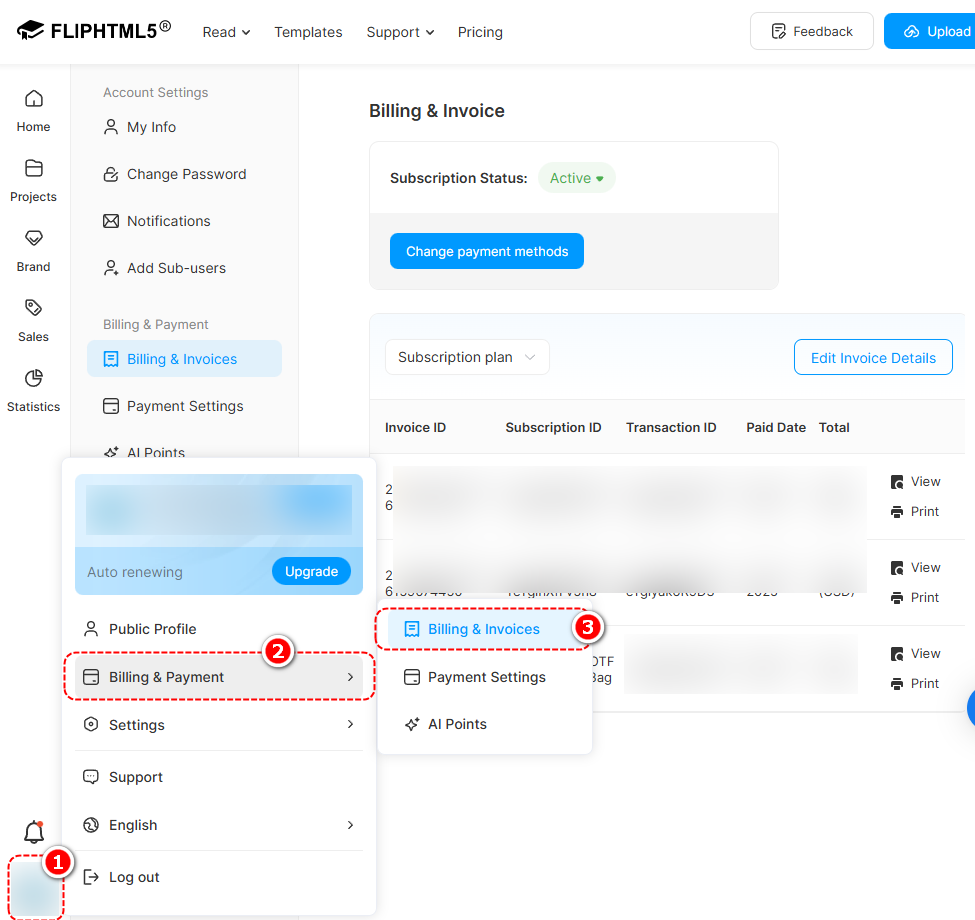
Before viewing, printing, or downloading the invoice, please click [Edit Invoice Details] to fill in your information.

Click [View] to check the entire invoice.

Click [Print] -> select your printer or [Save as PDF] on the [Destination] -> click [Print] or [Save] at the bottom.


▎Note: If you purchased by wire transfer, invoices will not be available in [Billing & Invoice]. If you need a copy of your invoice, please contact our support team for assistance.
Article-related terms:
Save invoice as PDF, Obtain payment receipt, Get invoice copy, Retrieve invoice, Payment history, and invoices, Invoice history and transaction details, Payment receipts
Related reading:


