
תיאור
Simple wordpress plugin that embeds a counter in your blog and shows the number of visits your website's pages and posts has. Enables you to display how many times a post/page had been viewed.
Feature:
- Works on all modern browsers.
- Work With all the cache plugins.
- Widget available.
- Simple configuration.
- Exclude Bot Views option available
- Most Viewed Template.
- Display Options.
Support Forums
Credits
- WP-PostViews By GamerZ
צילומי מסך
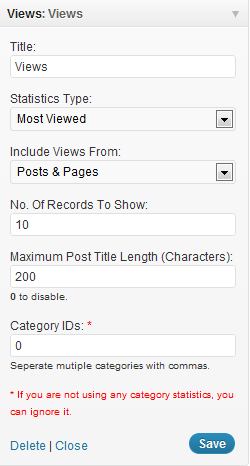
התקנה
To do a new installation of the plugin, please follow these steps
- Download the zipped plugin file to your local machine.
- Unzip the file.
- Upload the
WP-Post-Statsfolder to the/wp-content/plugins/directory. - Activate the plugin through the 'Plugins' menu in WordPress.
- Go to
WP-Admin -> Settings -> PostStatsto configure the plugin.
Check more details here.
Usage
- Open
wp-content/themes/<YOUR THEME NAME>/index.php - You may place it in archive.php, single.php, post.php or page.php also.
- Find:
<?php while (have_posts()) : the_post(); ?> - Add Anywhere Below It (The Place You Want The Views To Show):
<?php if(function_exists('the_views')) { the_views(); } ?>
Check more details here.
שאלות נפוצות
You can check more FAQ on plugin website URL :
WP Post Stats
סקירות
There are no reviews for this plugin.
מפתחים

ניתן לתרגם את "WP Post Stats" לשפה שלך.
מעוניינים בפיתוח?
עיינו בקוד, ראו את הקוד ב-SVN repository, או הירשמו ללוג פיתוח באמצעות RSS.
שינויים
2.2
Comfortable with wordpress 3.8. Check more details here.
2.1
Comfortable with wordpress 3.6. Check more details here.
2.0
- Works on all modern browsers.
- Work With all the cache plugins.
- Widget available.
- Simple configuration.
- Exclude Bot Views option available
- Most Viewed Template.
- Display Options.