The Virtual OS museum, screenshot

Virtual Museum Hosts Every OS You Haven’t Heard Of

OK, every operating system is a bit of a stretch — Windows Vista notably didn’t make the cut — but [Andrew]’s Virtual OS museum has a good claim to being the most comprehensive archive of operating systems yet assembled.

[Andrew] has a blog post describing the project, as well as a YouTube video that we’ve embedded below. But the real fun is in the downloading and spinning up one of 570+ operating systems for more than 250 platforms on pre-configured virtual machines that have been packaged up for us.

This isn’t just the usual retrocomputer nostalgia-fest of Macintosh System and DOSBox. There’s everything from IBM Big Iron and VAXen to Texas Instrument graphing calculators emulated in the museum, with software to run on them, too. If you’ve ever wondered what you could do with the Manchester Baby, well, all known software for that machine is included with its ‘operating system’.

Admission is free, but like any good museum you’ll be waiting in line a while to get in, so expect the full 128 GB download to take some time. If you’re into computer history, though, it’s going to very much be worth the wait. If you try it and like it, you could help others by seeding the torrent.

The actual museum launches in a VM as a modern Linux system — perhaps that can be considered an exhibit itself — with a launcher to select any of the other system/OS combos, including various other, older Linuxes hosted on their own VMs. There are more to come, too, as [Andrew] continues the long debugging process of making sure everything works as expected.

Purists may decry this virtual emulation as not being quite the real thing, which is true. But while MiSTer supports a lot of cores via FPGA, you probably won’t find everything here on that platform. We have, however, seen an FPGA recreation of the Manchester Baby. More than once, even.

Continue reading “Virtual Museum Hosts Every OS You Haven’t Heard Of”

A blue screen is visible, with an ASCII image of the text "Hello World" is displayed.

Designing A CPU For Native BASIC

Over the years there have been a few CPUs designed to directly run a high-level programming language, the most common approach being to build a physical manifestation of a portable code virtual machine. An example might be the experimental Java processors which implemented the JVM. Similarly, in 1976 Itty Bitty Computers released an implementation of Tiny BASIC which used a simple virtual machine, and to celebrate 50 years of Tiny BASIC, [Zoltan Pekic] designed a CPU that mirrors that VM.

The CPU was created within a Digilent Anvyl board, and the VHDL file is freely available. The microcode mapping ROM was generated by a microcode compiler, also written by [Zoltan]. The original design could execute all of the 40 instructions included in the reference implementation of Tiny BASIC; later iterations extended it a bit more. To benchmark its performance, [Zoltan] set the clock rate on the development board equal to those of various other retrocomputers, then compared the times each took to calculate the prime numbers under 1000 using the same Tiny BASIC program. The BASIC CPU outperformed all of them except for Digital Microsystems’ HEX29. Continue reading “Designing A CPU For Native BASIC”

C Project Turns Into Full-Fledged OS

While some of us may have learned C in order to interact with embedded electronics or deep with computing hardware of some sort, others learn C for the challenge alone. Compared to newer languages like Python there’s a lot that C leaves up to the programmer that can be incredibly daunting. At the beginning of the year [Ethan] set out with a goal of learning C for its own sake and ended up with a working operating system from scratch programmed in not only C but Assembly as well.

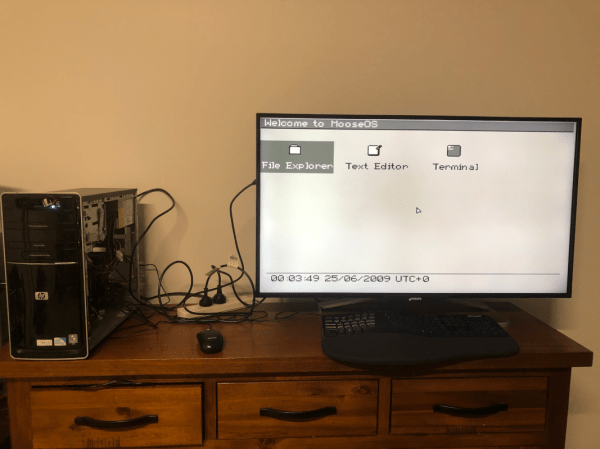
[Ethan] calls his project Moderate Overdose of System Eccentricity, or MooseOS. Original programming and testing was done in QEMU on a Mac where he was able to build all of the core components of the operating system one-by-one including a kernel, a basic filesystem, and drivers for PS/2 peripherals as well as 320×200 VGA video. It also includes a dock-based GUI with design cues from operating systems like Macintosh System 1. From that GUI users can launch a few applications, from a text editor, a file explorer, or a terminal. There’s plenty of additional information about this OS on his GitHub page as well as a separate blog post.

The project didn’t stay confined to the QEMU virtual machine either. A friend of his was throwing away a 2009-era desktop which [Ethan] quickly grabbed to test his operating system on bare metal. There was just one fault that the real hardware threw that QEMU never did, but with a bit of troubleshooting it was able to run. He also notes that this was inspired by a wiki called OSDev which, although a bit dated now, is a great place to go to learn about the fundamentals of operating systems. We’d also recommend checking out this project that performs a similar task but on the RISC-V instruction set instead.

Linux Fu: Windows Virtualization The Hard(ware) Way

As much as I love Linux, there are always one or two apps that I simply have to run under Windows for whatever reason. Sure, you can use wine, Crossover Office, or run Windows in a virtual machine, but it’s clunky, and I’m always fiddling with it to get it working right. But I recently came across something that — when used improperly — makes life pretty easy. Instead of virtualizing Windows or emulating it, I threw hardware at it, and it works surprisingly well.

Once Upon a Time

First, a story. Someone gave me a Surface Laptop 2 that was apparently dead. It wouldn’t charge, and you can’t remove the keyboard without power. Actually, you can with a paper clip, and I suggested pulling it to see if the screen would charge by itself. They said they had already bought a new computer, so they didn’t care.

Unsurprisingly, once I popped the keyboard off, the computer charged and was fine. You just have to replace the keyboard or use another one. Or use it as a tablet, which it is set up for anyway. But I have plenty of laptops and computers of every description. What was I going to do with this nice but keyboardless computer? Continue reading “Linux Fu: Windows Virtualization The Hard(ware) Way”

Network Infrastructure And Demon-Slaying: Virtualization Expands What A Desktop Can Do

The original DOOM is famously portable — any computer made within at least the last two decades, including those in printers, heart monitors, passenger vehicles, and routers is almost guaranteed to have a port of the iconic 1993 shooter. The more modern iterations in the series are a little trickier to port, though. Multi-core processors, discrete graphics cards, and gigabytes of memory are generally needed, and it’ll be a long time before something like an off-the-shelf router has all of these components.

But with a specialized distribution of Debian Linux called Proxmox and a healthy amount of configuration it’s possible to flip this idea on its head: getting a desktop computer capable of playing modern video games to take over the network infrastructure for a LAN instead, all with minimal impact to the overall desktop experience. In effect, it’s possible to have a router that can not only play DOOM but play 2020’s DOOM Eternal, likely with hardware most of us already have on hand.

The key that makes a setup like this work is virtualization. Although modern software makes it seem otherwise, not every piece of software needs an eight-core processor and 32 GB of memory. With that in mind, virtualization software splits modern multi-core processors into groups which can act as if they are independent computers. These virtual computers or virtual machines (VMs) can directly utilize not only groups or single processor cores independently, but reserved portions of memory as well as other hardware like peripherals and disk drives.

Proxmox itself is a version of Debian with a number of tools available that streamline this process, and it installs on PCs in essentially the same way as any other Linux distribution would. Once installed, tools like LXC for containerization, KVM for full-fledged virtual machines, and an intuitive web interface are easily accessed by the user to allow containers and VMs to be quickly set up, deployed, backed up, removed, and even sent to other Proxmox installations. Continue reading “Network Infrastructure And Demon-Slaying: Virtualization Expands What A Desktop Can Do”

Now KDE Users Will Get Easy Virtual Machine Management, Too

If you work with virtual machines, perhaps to spin up a clean OS install for testing, historically you have either bitten the bullet and used one of the commercial options, or spent time getting your hands dirty with something open source. Over recent years that has changed, with the arrival of open source graphical applications for effortless VM usage. We’ve used GNOME Boxes here to make our lives a lot easier.  Now KDE are also joining the party with Karton, a project which will deliver what looks very similar to Boxes in the KDE desktop.

The news comes in a post from Derek Lin, and shows us what work has already been done as well as a roadmap for future work. At the moment it’s in no way production ready and it only works with QEMU, but it can generate new VMs, run them, and capture their screens to a desktop window. Having no wish to join in any Linux desktop holy wars we look forward to seeing this piece of software progress, as it’s a Google Summer Of Code project we hope there will be plenty more to see shortly.

Still using the commercial option? You can move to open source too!

An image of a dark mode Linux desktop environment. A white iTunes window stands out in a virtualized Windows 10 environment. Two iPod games, "Phase" and "Texas Hold 'Em" are visible in the "iPod Games" section of the library.

IPod Clickwheel Games Preservation Project

The iPod once reigned supreme in the realm of portable music. Hackers are now working on preserving one of its less lauded functions — gaming. [via Ars Technica]

The run of 54 titles from 2006-2009 may not have made the iPod a handheld gaming success, but many still have fond memories of playing games on the devices. Unfortunately, Apple’s Fairplay DRM has made it nearly impossible to get those games back unless you happened to backup your library since those games can’t be downloaded again and are tied to both the account and iTunes installation that originally purchased the game.

Continue reading “IPod Clickwheel Games Preservation Project”