Linux Fu: Fake Webcams Have Many Uses

Dealing with text streams is a fundamental skill for the Linux power user. You can sort, merge, and search text files easily from the command line. What if you could do the same thing with video? Well, you can. Maybe you want to add a logo to a webcam feed before sending it to a conference app. Maybe you want to blur, color-correct, or annotate video in real time. Or perhaps you want to inject prerecorded video into Zoom while pretending it is a live camera. Linux can do all of this, and the key ingredient is usually the same: a loopback video device.

The basic idea is simple. Instead of an application reading directly from /dev/video0, you create a fake camera device using the v4l2loopback kernel module. Your software pipeline writes processed video into the fake camera, and applications read from it as if it were a normal webcam. The result is surprisingly powerful.

Continue reading “Linux Fu: Fake Webcams Have Many Uses”

NoiseCloud: Storing Data On YouTube

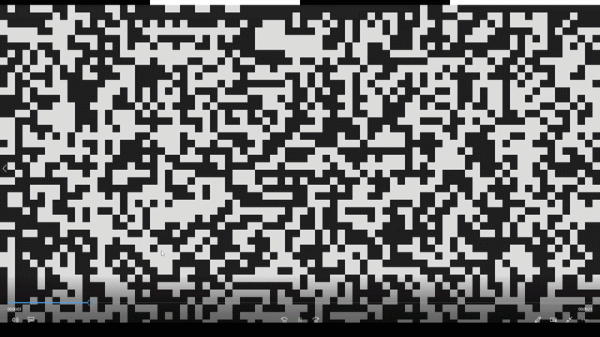
Storage is expensive these days, whether you’re looking at the prices of spinning rust or magic little sticks of silicon. But what if there was some benevolent overlord that you could trick into giving you unlimited storage? That’s where Noisecloud comes in.

Created by [Lucas], Noisecloud is a tool that lets you use YouTube as a form of effectively-unlimited file storage. It works by taking whatever file data you have on hand, and turns it into frames of digital noise that can be stored and transported as an MP4 file and uploaded to YouTube. The encoding process involves first compressing the data with gzip, then packaging it into a high-constrast series of video frames that are then encoded with FFmpeg. Video containers can be produced in various resolutions, all the way down to 640×360 @ 30 fps. There’s also a special “TikTok mode” which is optimised to best preserve data on short form sites that use vertical orientation as default. More commentary from the creator is available via the supporting article on Github.

It’s probably not a practical way to store your files, given the fussy encoding and decoding required to actually use the data. However, it’s an interesting proof of concept that explores how data can be stashed in unexpected places via publicly-accessible services. We’ve explored similar work before, too.

How Commodore Made A Sync Splitter

Recently we featured an unusual Commodore 8-bit computer on the bench of [Tynemouth Software] — a Commodore 64 in a PET case. One of the unique parts it had was a board which took the composite output from the mainboard and split out the sync pulses for the monitor, and now they’re back to give it a full reverse engineer.

Perhaps the first surprise is why this board is necessary at all, after all one might expect an 8-bit machine to have those signals already at hand. It seems that the VIC chip inside the 64 did the combination to composite internally, so no such luck for the Commodore engineers. The board they designed then is a complete and very well-engineered sync splitter.

The technology of a video signal has its origins in the 1930s, so it’s not hard to extract both vertical and horizontal sync pulses with little more than a few passive components and a couple of transistors. The trouble with such a simple approach is that the output will work, but it will be messy and crucially, not have quite the required timing. The Commodore board uses the same approach as a simple discrete circuit of having a pair of filters with a time constant selected to catch the relevant sync, but extends it with extra logic. There are one-shots designed to provide clean pulses of exactly the right length, and gates that provide blanking to remove the chance of pulses ending up where they shouldn’t. The video path is the only part which might differ from a conventional sync splitter, because as the output from the 64 is all-digital, it takes a TTL-level through a gate rather than a more conventional analogue path.

You can see the rest of the machine in our original write-up, and we’re reminded that the boards haven’t been cleaned at their owner’s request, to preserve their patina.

Running Video Through A Guitar Effects Pedal

Guitar pedals are designed to take in a sound signal, do fun stuff to it, and then spit it out to your amplifier where it hopefully impresses other people. However, [Liam Taylor] decided to see what would happen if you fed video through a guitar pedal instead. 

The device under test is a Boss ME-50 multi-effects unit. It’s capable of serving up a wide range of effects, from delay to chorus to reverb, along with compression and distortion and a smattering of others. [Liam] hooked up the composite video output from an old Sony camcorder from the 2000s to a 3.5 mm audio jack, and plugged it straight into the auxiliary input of the ME-50 (notably, not the main guitar input of the device).

The multi-effects pedal isn’t meant to work with an analog video signal, but it can pass it through and do weird things to it regardless. Using the volume pedal on the ME-50 puts weird lines on the signal, while using a wah effect makes everything a little wobbly. [Liam] then steps through a whole range of others, like ring modulation, octave effects, and reverb, all of which do different weird things to the visuals. Particularly fun are some of the periodic effects which create predictable variation to the signal. True to its name, the distortion effect did a particularly good job of messing things up overall.

It’s a fun experiment, and recalls us of some of the fantastic analog video synths of years past. Video after the break.

Continue reading “Running Video Through A Guitar Effects Pedal”

FLOSS Weekly Episode 863: Opencast: That Code Is There For A Reason

This week Jonathan chats with Olaf Andreas Schulte and Lars Kiesow about Opencast, the video management system for education. What does Opencast let a school or university accomplish, how has that changed over the last decade, and what exciting new things are coming? Watch to find out!

Continue reading “FLOSS Weekly Episode 863: Opencast: That Code Is There For A Reason”

How Big Is Your Video Again? Square Vs Rectangular Pixels

[Alexwlchan] noticed something funny. He knew that not putting a size for a video embedded in a web page would cause his page to jump around after the video loaded. So he put the right numbers in. But with some videos, the page would still refresh its layout. He learned that not all video sizes are equal and not all pixels are square.

For a variety of reasons, some videos have pixels that are rectangular, and it is up to your software to take this into account. For example, when he put one of the suspect videos into QuickTime Player, it showed the resolution was 1920×1080 (1350×1080). That’s the non-square pixel.

Continue reading “How Big Is Your Video Again? Square Vs Rectangular Pixels”

Converting A 1980s Broadcast Camera To HDMI

Although it might seem like there was a sudden step change from analog to digital sometime in the late 1900s, it was actually a slow, gradual change from things like record players to iPods or from magnetic tape to hard disk drives. Some of these changes happened slowly within the same piece of hardware, too. Take the Sony DXC-3000A, a broadcast camera from the 1980s. Although it outputs an analog signal, this actually has a discrete pixel CCD sensor capturing video. [Colby] decided to finish the digitization of this camera and converted it to output HDMI instead of the analog signal it was built for.

The analog signals it outputs are those that many of us are familiar with, though: composite video. This was an analog standard that only recently vanished from consumer electronics, and has a bit of a bad reputation that [Colby] thinks is mostly undeserved. But since so many semi-modern things had analog video outputs like these, inspiration was taken from a Wii mod chip that converts these consoles to HDMI. Unfortunately his first trials with one of these had confused colors, but it led him to a related chip which more easily outputted the correct colors. With a new PCB in hand with this chip, a Feather RP2040, and an HDMI port the camera is readily outputting digital video that any modern hardware can receive.

Besides being an interesting build, the project highlights a few other things. First of all, this Sony camera has a complete set of schematics, a manual meant for the end user, and almost complete user serviceability built in by design. In our modern world of planned obsolescence, religious devotion to proprietary software and hardware, and general user-unfriendliness this 1980s design is a breath of fresh air, and perhaps one of the reasons that so many people are converting old analog cameras to digital instead of buying modern equipment.