Homebrew Webcam Support For The Original Xbox

These days, we take it for granted that a video game console will have multiple USB ports. There’s even an expectation that basic peripherals such as storage devices will “Just Work” when plugged into the system — a far cry from the days when each system had its own proprietary memory card.

The original Xbox from 2001 actually had USB ports as well, it’s just that they were used for the controllers and had non-standard connectors that kept you from plugging in other devices. But a simple adapter gets you a standard USB-A port, and after that it’s just a matter of software. Like this homebrew project to get generic USB webcams working on Microsoft’s first foray into console gaming.

Well, “generic” may be pushing it a bit, as the project by [Darkone83] currently lists only two compatible cameras. The first is the Xbox Live Vision Camera, which was never intended to be used on the original Xbox and was instead an accessory for Microsoft’s follow-up console, the Xbox 360. Interestingly, the other supported camera happens to be Sony’s PS2 EyeToy. Claiming that you plugged a PS2 camera into your Xbox would have been fighting words back on the playground circa 2003, but now it’s a reality thanks to the power of open source.

Now there technically was a camera for the original Xbox, but it was only released in Japan and is quite rare. Perhaps unsurprisingly it used the same OV519 chipset as the EyeToy and later Vision Camera, and reverse engineering how the console communicated with it was critical to the development of this project.

As of right now, there’s not much practical application for this webcam driver. It just shows the image from the camera on your TV in glorious 320×240 resolution. But now that the code to make it work is out in the wild, hopefully other Xbox homebrew projects will add support for it.

Although things aren’t quite as active these days as they once were, the hacking scene for the original Xbox is the stuff of legend. If you ever see one of this gargantuan consoles at a flea market for cheap, there’s still plenty of fun to be had pushing the system outside of its comfort zone.

If You Want To Hack Me, Come In Through The Speaker

Some security hacks require someone to have physical access to your computer. In many cases, that’s easy to mitigate. Other attack vectors can put you at risk from anywhere via the network. That’s what firewalls are for. But there is an in-between risk where an attacker just has to be “around” your computer. [Rasmus Moorats] found out that a Creative Sound Blaster sound bar could open up just such an attack.

[Rasmus] was poking around the firmware just to write custom software to control it. The possibility of an attack was just an accidental find.

The soundbar connects to USB, but it also has Bluetooth, which, for some reason, is always on. There’s an app that can communicate with the speaker using BLE, and Creative has a special protocol to control it. The same protocol works on USB or Bluetooth, but with an important difference.

Continue reading “If You Want To Hack Me, Come In Through The Speaker”

ChargeCap Helps Your Batteries Last Longer By Limiting Charge Level

If you want to maximize the life of your lithium-ion batteries, proper storage voltage is critical. That is, don’t store them empty, and don’t store them completely full either. “Almost fully charged” is a sweet spot for occasional-use devices. Sadly, this is easier said than done. While many devices use integrated rechargeable batteries these days, most provide no method of limiting charge level. That’s where [DaverDavid]’s ChargeCap comes in.

By sampling charge current and disconnecting when it drops to 50 percent of peak, charging is reliably stopped when the target device is 80 to 90 percent charged, regardless of cell count or capacity.

ChargeCap sits between a USB charger and target device, disconnecting when it detects that recharging is 80 to 90 percent complete. This is particularly useful for maximizing the cell life of devices that see only intermittent use.

The way ChargeCap does this is clever, and relies on the fact that all lithium-ion charging curves look the same regardless of cell capacity or cell count. Charge current remains at pretty much the same level for most of the charging process, but tapers off quickly (and in a linear fashion) as cells approach their maximum capacity. That’s because charging a battery is a lot like blowing up a balloon: the first breaths are easy, but once the balloon fills out, every breath needs to push harder than the last.

ChargeCap works by sampling the peak charge current at the beginning of the charge cycle, then detecting when it drops below 50 percent of peak, at which point charging is stopped. The result is a device that reliably charges to 80 to 90 percent of capacity, and no more. ChargeCap uses an ESP32-C3 and a small OLED display that, as a nice touch, inverts colors to signal charge completion. Design files and code are at the GitHub repository.

Lithium-ion cells are fantastic devices, so flesh out your knowledge by reading [Arya Voronova]’s primer on designing them into your own projects, or a more in-depth explanation of how they work.

USB, Abstracted

Modern technology builds on abstractions. Most application programmers today don’t know what a non-maskable interrupt is, nor should they have to. Even fewer understand register coloring or reservation stations for instruction scheduling, and fewer still can explain the physics behind the transistors in the CPU. Sometimes tech starts out where you need to know everything (programming a bare-metal microprocessor, for example) and then evolves to abstraction. That’s where [WerWolv] wants to get you for writing USB code using the recent post USB for Software Developers.

Many USB tutorials assume you want to know about the intricacies of protocol negotiation, information about the hardware layer, and that you are willing to write a Linux kernel module to provide a driver. But thanks to abstraction, none of this has been absolutely necessary for many use cases for a long time.

While the post focuses on Linux, there is libusb for Windows. We presume the same principles would apply, more or less.

Continue reading “USB, Abstracted”

Drawing Tablet Controls Laser In Real-Time

Some projects need no complicated use case to justify their development, and so it was with [Janne]’s BeamInk, which mashes a Wacom pen tablet with an xTool F1 laser engraver with the help of a little digital glue. For what purpose? So one can use a digital pen to draw with a laser in real time, of course!

Pen events from the drawing tablet get translated into a stream of G-code that controls laser state and power.

Here’s how it works: a Python script grabs events from a USB drawing tablet via evdev (the Linux kernel’s event device, which allows user programs to read raw device events), scales the tablet size to the laser’s working area, and turns pen events into a stream of laser power and movement G-code. The result? Draw on tablet, receive laser engraving.

It’s a playful project, but it also exists as a highly modular concept that can be adapted to different uses. If you’re looking at this and sensing a visit from the Good Ideas Fairy, check out the GitHub repository for more technical details plus tips for adapting it to other hardware.

We’re reminded of past projects like a laser cutter with Etch-a-Sketch controls as well as an attempt to turn pen marks into laser cuts, but something about using a drawing tablet for real-time laser control makes this stand on its own.

Powering USB Devices With A Bench Supply Adapter Board

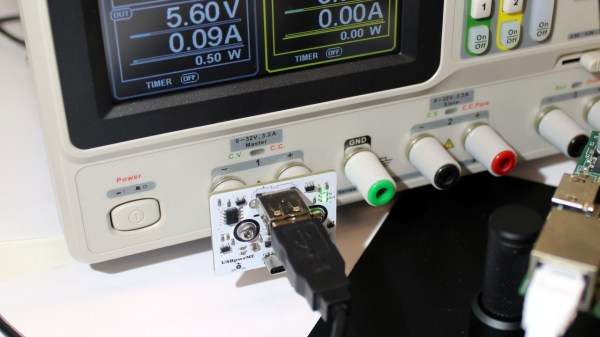
Sometimes you wanna test a piece of USB hardware, but you don’t just want to plug it into a random old phone charger. [KS-Elektronikdesign] has whipped up a useful tool for just that case, allowing one to easily power USB hardware from a common bench supply.

It would have been simple enough to whip up an adapter board to connect banana jacks to the power pins of a regular USB port. Easing the hookup process was indeed a part of the motivation for this project, in making it easy to power hardware that hooks up via USB-A and USB-C. However, it also goes a little further. It includes TUSB319 chip to handle the all-important power negotiation, without which many USB devices will not feel confident drawing their required amount of current.

There is also polarity protection and over-voltage protection to stop you from blowing stuff up if you hook the board up wrong, which might save you a smartphone or three in the lab. The board will allow negotiated output power up to 10 W via USB-A and 15 W via USB-C, which isn’t heaps, but will be fine for lots of smaller devices. You can up that to 25 W and 35 W respectively if the board is switched to pass-through mode. We particularly like the physical design—the board will plug straight into the banana plugs on any supply with a jack spacing of 19 to 23 mm.

Overall, this is a useful tool to have in the lab if you want to run USB hardware with the flexibility of the voltage and current limits available on your bench supply. There are other ways to power modern USB devices, too, and you can do all kinds of wild stuff if you learn about USB PD and USB PPS. If you’re working up your own nifty lab tools for similar purposes, we’d love to know about it on the tipsline.

Linux Hotplug Events Explained

There was a time when Linux was much simpler. You’d load a driver, it would find your device at boot up, or it wouldn’t. That was it. Now, though, people plug and unplug USB devices all the time and expect the system to react appropriately. [Arcanenibble] explains all “the gory details” about what really happens when you plug or unplug a device.

You might think, “Oh, libusb handles that.” But, of course, it doesn’t do the actual work. In fact, there are two possible backends: netlink or udev. However, the libusb developers strongly recommend udev. Turns out, udev also depends on netlink underneath, so if you use udev, you are sort of using netlink anyway.

If netlink sounds familiar, it is a generic BSD-socket-like API the kernel can use to send notifications to userspace. The post shows example code for listening to kernel event messages via netlink, just like udev does.

When udev sees a device add message from netlink, it resends a related udev message using… netlink! Turns out, netlink can send messages between two userspace programs, not just between the kernel and userspace. That means that the code to read udev events isn’t much different from the netlink example.

The next hoop is the udev event format. It uses a version number, but it seems stable at version 0xfeedcafe. Part of the structure contains a hash code that allows a bloom filter to quickly weed out uninteresting events, at least most of the time.

The post documents much of the obscure inner workings of USB hotplug events. However, there are some security nuances that aren’t clear. If you can explain them, we bet [Arcanenibble] would like to hear from you.

If you like digging into the Linux kernel and its friends, you might want to try creating kernel modules. If you get overwhelmed trying to read the kernel source, maybe go back a few versions.