This Week In Security: Ubiquiti Fixes, And FreeBSD Joins The Club You Don’t Want To Join

Ubiquiti released a new security bulletin detailing fixes for six security issues, including one rated 9.1 (critical) and one scoring a perfect 10.0 on the CVE risk scale.

The vulnerabilities range from path traversal revealing configuration files (escaping from the web server by requesting a path like “../../../../../etc/passwd” for instance), to command injection (running arbitrary shell commands on the system), and actually changing device configurations. Some of the reported vulnerabilities require an account on the management server, but some only require network access .

Fortunately, all of the vulnerabilities require access to the network in the first place to exploit – but this could include access to open guest networks as well as trusted users. If you run Ubiquti or UniFi equipment, chances are the automatic update function has already integrated the fixes, but make sure to check the advisory to see if you’re impacted and update accordingly!

FreeBSD Root Exploit

FatGid lets FreeBSD join the fun of kernel exploits to gain root.

The FatGid vulnerability doesn’t require any manipulation of disk cache; instead it is a direct kernel stack overflow in a system call. The kernel miscalculates the size of a variable as 8 bytes instead of 4, which when used later interacting with a user buffer allows the stack overflow.

Like the recent spate of Linux local privilege escalation attacks, this requires the attacker to already have an account on the system or the ability to run arbitrary programs, but remember that any bug in network services which allows command execution gets you there, so if you run network exposed FreeBSD, it’s time to update!

Kali365 Phishing-as-a-Service

Phishing-as-a-service platforms have been gaining traction, allowing criminals to automate targeting users with crafted lures. The FBI has issued a warning about the Kali365 service in particular.

Kali365 targets credentials for Microsoft 365 accounts by directing users to the official Microsoft portal for linking additional devices to the account, attaching an attacker device directly to the user identity. Alternatively, the framework steals credentials by directing the user through a hostile service which presents a false login page which captures browser sessions along with authentication cookies and tokens once the user answers the fake multi-factor login prompts.

Automating the phishing process lowers the bar for the skill level needed to create authentic-looking lures and makes it simpler for criminal groups to attack large numbers of users; Phishing-as-a-service groups operate as companies offering customer support, tracking dashboards, and pre-made phishing templates.

Glassworm Botnet Takedown

CrowdStrike, Google, and the ShadowServer Foundation have done a coordinated takedown of the infrastructure used by the Glassworm supply-chain botnet.

Glassworm has been mentioned previously; it is one of several major worms infecting the open source package supply chain repositories like NPM and PyPi or the Visual Studio extension repository. Once a victim installs a compromised package or extension, the Glassworm trojan steals any saved authentication tokens for package repositories, GitHub accounts, AI services, and any SSH keys found, and begins the stage two infection. Using the stolen credentials, the worm infects any GitHub workflows, packages, and extensions the user has access to, and installs a remote-access trojan which waits for further commands.

Glassworm used a complex control server structure including blockchain memos, BitTorrent files, and public Google Calendar entries, but the coalition of companies was able to interrupt all control channels simultaneously. Hard-coded aspects of the worm will continue to function, but all behavior which requires downloading payloads from the control servers has been disrupted.

This isn’t the first time multiple Internet companies have coordinated to take down malware, but it’s always good to see action against threats which have been decimating the package repository infrastructure lately.

TechCrunch Spyware Avoidance

On the positive side of things, TechCrunch has an article about modern features to protect users against spyware. If this isn’t news to you, there’s still almost certainly someone in your life who will benefit from a user-friendly write up of best practices!

Both major commercial mobile platforms (iOS and Android) offer advanced protection features which are minimally invasive. For users who are likely to be higher targets of spyware like journalists, lawyers, and human rights activists, or simply those who are worried, these features offer real protection.

The features explained in the article include Apple’s Lockdown mode, Androids Advanced protection mode, and WhatsApp specific application settings, all of which work to reduce common attack surfaces for devices. The advanced security modes typically have minor impacts on performance and battery life due to disabling optimization features which introduce additional complexity and attack surfaces (such as just-in-time compilation of JavaScript code into native instructions.). When situations call for an abundance of caution, a few percent of battery life daily is a reasonable compromise.

Go check out the full write up!

Microsoft Bans NightmareEclipse

An exploit researcher known only as “NightmareEclipse” has been featured here several times in the past months already. Showing intense frustration with their experience with the administrators of the Microsoft security bug bounty program, they have taken to releasing zero-day exploits against Windows, often coinciding with Patch Tuesday (clearly no accident; by releasing a new exploit on the same day as the Microsoft patch set, it’s unlikely to be fixed before the next months Patch Tuesday at the earliest). Previous exploits released by NightmareEclipse include BlueSun and RedHammer (local user to Windows SYSTEM privilege escalation), UnDefend to disable Windows Defender, and YellowKey which unlocks BitLocker drives using a collection of nothing more than magically named files.

Toms Hardware reports that Microsoft has disabled the researchers GitHub accounts (GitHub being owned by Microsoft has long been a point of concern for security researchers who find vulnerabilities in Microsoft products), as well as the actual Microsoft account used by the researcher.

While it’s certainly within the terms of service of Microsoft and GitHub that accounts may be terminated, the optics are particularly poor in this case, given the confusion around the initial interactions which led the researchers original anger. NightmareEclipse has moved their example code repositories to GitLab in the mean time, and promises Microsoft that “I will make sure your bones are shattered on July 14”, implying there will be additional releases (on, you guessed it, what looks like another Patch Tuesday).

Further clouding the issue, an official Microsoft statement indicates they are attempting to bring criminal (not just civil) charges against researchers who do not cooperate with the Microsoft disclosure policies, a stance which will certainly in no way exacerbate the situation.

Fingerprinting Devices by SSD

Dan Goodin at Ars Technica highlights a new paper on fingerprinting users via SSD disk performance, using just standard JavaScript.

The modern web is a hellscape of user tracking, and this attack, dubbed FROST, highlights another technique for identifying unique devices and user patterns based entirely on hardware behavior. By generating a large file using local browser storage via OPFS (origin private file system, an API for JavaScript to create raw files inside the browser storage area) and continually reading and writing data while monitoring the performance, a web page is able to monitor the disk access performance of the device.

Using a neural network trained on timing data, researchers say they are able to determine what apps may be running on the computer alongside the browser – and sometimes even what other websites are being viewed, based solely on the delays in disk IO caused by other applications and websites accessing the SSD. The paper will be presented in July, with researchers saying that the neural network can be trained to recognize “any system which reliably generates SSD accesses”.

Likely, browser developers can mitigate FROST by decreasing the performance of file operations in the OPFS API so that the performance data lacks the fidelity needed to derive user behavior.

FROST is a “side channel attack”; by monitoring one set of characteristics, side channel attacks are able to infer other system behaviors. Side channel attacks can be incredibly subtle and difficult to predict: Another side channel attack method has been to use extremely fine-grained monitoring of the power consumption of a device to derive encryption keys, predicting the CPU instructions and values based on the amount of power used to set the internal registers.

Improving Memory Safety in C#

Programming languages have been moving towards stronger default memory models, making programs more secure by default by eliminating behaviors which are commonly exploitable. Using a memory-safe language does not prevent logic errors or other security issues, but can still help by eliminating common mistakes.

Microsoft has posted an extensive article about new enhancements for C# in .NET 11. Borrowing in many ways (that’s a programming joke) from the Rust memory model, C# 16 will add additional memory enforcement and object lifetime, detecting when memory is no longer available and preventing invalid memory accesses on expired objects, with the goal of eliminating use-after-free memory corruption and attacks.

C# 16 will also increase the meaning of the “unsafe” keyword, a mechanism introduced in C# 1.0 and since heavily adopted by newer languages such as Rust and Swift. Code marked as unsafe in C# 16 is able to bypass the stricter memory model, but all code referencing it must also be marked as unsafe. Making unsafe code more difficult to use increases the overall friction of doing things the dangerous way, while clearly marking code which is higher risk.

There are few magic bullets for secure programming, but reducing the ways a programmer can make simple mistakes can be a big win.

This Week In Security: That Time I Caused A 9.5 CVE, IOS Spyware, And The Day The Internet Went Down

Meshtastic just released an eye-watering 9.5 CVSS CVE, warning about public/private keys being re-used among devices. And I’m the one that wrote the code. Not to mention, I triaged and fixed it. And I’m part of Meshtastic Solutions, the company associated with the project. This is is the story of how we got here, and a bit of perspective.

First things first, what kind of keys are we talking about, and what does Meshtastic use them for? These are X25519 keys, used specifically for encrypting and authenticating Direct Messages (DMs), as well as optionally for authorizing remote administration actions. It is, by the way, this remote administration scenario using a compromised key, that leads to such a high CVSS rating. Before version 2.5 of Meshtastic, the only cryptography in place was simple AES-CTR encryption using shared symmetric keys, still in use for multi-user channels. The problem was that DMs were also encrypted with this channel key, and just sent with the “to” field populated. Anyone with the channel key could read the DM.

I re-worked an old pull request that generated X25519 keys on boot, using the rweather/crypto library. This sentence highlights two separate problems, that both can lead to unintentional key re-use. First, the keys are generated at first boot. I was made painfully aware that this was a weakness, when a user sent an email to the project warning us that he had purchased two devices, and they had matching keys out of the box. When the vendor had manufactured this device, they flashed Meshtastic on one device, let it boot up once, and then use a debugger to copy off a “golden image” of the flash. Then every other device in that particular manufacturing run was flashed with this golden image — containing same private key. sigh

Continue reading “This Week In Security: That Time I Caused A 9.5 CVE, IOS Spyware, And The Day The Internet Went Down”

This Week In Security: Wyze, ScreenConnect, And Untrustworthy Job Postings

For a smart home company with an emphasis on cloud-connected cameras, what could possibly be worse than accidentally showing active cameras to the wrong users? Doing it again, to far more users, less than 6 months after the previous incident.

The setup for this breach was an AWS problem, that caused a Wyze system outage last Friday morning. As the system was restored, the load spiked and a caching library took the brunt of the unintentional DDoS. This library apparently has a fail state of serving images and videos to the wrong users. An official report from Wyze mentions that this library had been recently added, and that the number of thumbnails shown to unauthorized users was around 13,000. Eek. There’s a reason we recommend picking one of the Open Source NVR systems here at Hackaday.

ScreenConnect Exploit in the Wild

A pair of vulnerabilities in ConnectWise ScreenConnect were announced this week, Proof of Concepts were released, and are already being used in active exploitation. The vulnerabilities are a CVSS 10.0 authentication bypass and a CVSS 8.4 path traversal bypass.

Huntress has a guide out, detailing how embarrassingly easy the vulnerabilities are to exploit. The authentication bypass is a result of a .Net quirk, that adding an additional directory on the end of a .aspx URL doesn’t actually change the destination, but is captured as PathInfo. This allows a bypass of the protections against re-running the initial setup wizard: hostname/SetupWizard.aspx/literallyanything

The second vulnerability triggers during extension unpack, as the unzipping process doesn’t prevent path traversal. The most interesting part is that the unzip happens before the extension installation finishes. So an attacker can compromise the box, cancel the install, and leave very little trace of exploitation. Continue reading “This Week In Security: Wyze, ScreenConnect, And Untrustworthy Job Postings”

Liberté, égalité, Fraternité: France Loses Its Marbles On Internet Censorship

Over the years we’ve covered a lot of attempts by relatively clueless governments and politicians to enact think-of-the-children internet censorship or surveillance legislation, but there’s a law from France in the works which we think has the potential to be one of the most sinister we’ve seen yet.

It flew under our radar so we’re grateful to [0x1b5b] for bringing it to our attention, and it concerns a proposal to force browser vendors to incorporate French government censorship and spyware software in their products. We’re sure that most of our readers will understand the implications of this, but for anyone not versed in online privacy and censorship  this is a level of intrusion not even attempted by China in its state surveillance programme. Perhaps most surprisingly in a European country whose people have an often-fractious relationship with their government, very few French citizens seem to be aware of it or what it means.

It’s likely that if they push this law through it will cause significant consternation over the rest of the European continent. We’d expect those European countries with less liberty-focused governments to enthusiastically jump on the bandwagon, and we’d also expect the European hacker community to respond with a plethora of ways for their French cousins to evade the snooping eyes of Paris. We have little confidence in the wisdom of the EU parliament in Brussels when it comes to ill-thought-out laws though, so we hope this doesn’t portend a future dark day for all Europeans. We find it very sad to see in any case, because France on the whole isn’t that kind of place.

Header image: Pierre Blaché CC0.

Decoding ZeuS Malware Disguised As A .DOC

[Ronnie] recently posted about his adventures in decoding malware. One of his users reported a phishy email, which did indeed turn out to contain a nasty attachment. The process that [Ronnie] followed in order to figure out what this malware was trying to do is quite fascinating and worth the full read.

[Ronnie] started out by downloading the .doc attachment in a virtual machine. This would isolate any potential damage to a junk system that could be restored easily. When he tried to open the .doc file, he was presented with an error stating that he did not have either enough memory or disk space to proceed. With 45GB of free space and 2GB of RAM, this should not have been an issue. Something was definitely wrong.

The next step was to open the .doc file in Notepad++ for analysis. [Ronnie] quickly noticed that the file was actually a .rtf disguised as a .doc. [Ronnie] scanned through large chunks of data in an attempt to guess what the malware was trying to do. He noticed that one data chunk ended with the bytes “FF” and D9″, which are also found as the ending two bytes of .gif files.

[Ronnie] copied this data into a new document and removed all new line and return characters. He then converted the hex to ASCII, revealing some more signs that this was actually image data. He saved this file as a .gif and opened it up for viewing. It was a 79KB image of a 3D rendered house. He also found another chunk of data that was the same picture, but 3MB in size. Strange to say the least.

After finding a few other weird bits of data, [Ronnie] finally started to see more interesting sections. First he noticed some strings with mixed up capital and lowercase letters, a tactic sometimes used to avoid antivirus signatures. A bit lower he found a section of data that was about the size of typical shellcode. He decoded this data and found what he was looking for. The shellcode contained a readable URL. The URL pointed to a malicious .exe file that happened to still be available online.

Of course [Ronnie] downloaded the .exe and monitored it to see how it acted. He found that it set a run key in the registry to ensure that it would persist later on. The malware installed itself to the user’s appdata folder and also reached out repeatedly to an IP address known to be affiliated with ZeuS malware. It was a lot of obfuscation, but it was still no match for an experienced malware detective.

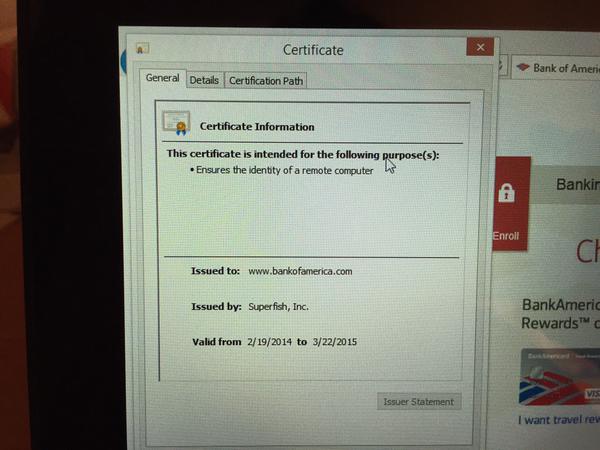
Fake Certificate

Lenovo Shipped PC’s With Spyware That Breaks HTTPS

If you’ve ever purchased a new computer then you are probably familiar with the barrage of bloatware that comes pre-installed. Usually there are system tools, antivirus software trials, and a whole bunch of other things that most of us never wanted in the first place. Well now we can add Superfish spyware to the list.

You may wonder what makes this case so special. A lot of PC’s come with software pre-installed that collect usage statistics for the manufacturer. Superfish is a somewhat extreme case of this. The software actually installs a self-signed root HTTPS certificate. Then, the software uses its own certificates for every single HTTPS session the user opens. If you visit your online banking portal for example, you won’t actually get the certificate from your bank. Instead, you’ll receive a certificate signed by Superfish. Your PC will trust it, because it already has the root certificate installed. This is essentially a man in the middle attack performed by software installed by Lenovo. Superfish uses this ability to do things to your encrypted connection including collecting data, and injecting ads.

As if that wasn’t bad enough, their certificate is actually using a deprecated SHA-1 certificate that uses 1024-bit RSA encryption. This level of encryption is weak and susceptible to attack. In fact, it was reported that [Rob Graham], CEO of Errata Security has already cracked the certificate and revealed the private key. With the private key known to the public, an attacker can easily spoof any HTTPS certificate and systems that are infected with Superfish will just trust it. The user will have no idea that they are visiting a fake phishing website.

Since this discovery was made, Lenovo has released a statement saying that Superfish was installed on some systems that shipped between September and December of 2014. They claim that server-side interactions have been disabled since January, which disables Superfish. They have no plans to pre-load Superfish on any new systems.

Blue Light Special: Earn $10 By Installing Spyware

sears

Ars technica is reporting on the ruling from the FTC about the software shenanigans of Kmart and Sears. The marketing geniuses behind the parent company of Sears and Kmart decided they needed more information about the users of their website. Their solution? Offering $10 to users who install their custom software which phones home with data on just about everything they do on their computer. Not content with just browsing habits of webites, the software apparently recorded everything the user did online, including secure sessions. Under the settlement (PDF) with the FTC, Sears says they will stop collecting data and promises to destroy any and all information they’ve collected so far. Selling what websites you’ve been to, how much money you have, which prescriptions you take and what products you’re interested in for the low low price of $10 seems like a bargain.