This Week In Security: Ubiquiti Fixes, And FreeBSD Joins The Club You Don’t Want To Join

Ubiquiti released a new security bulletin detailing fixes for six security issues, including one rated 9.1 (critical) and one scoring a perfect 10.0 on the CVE risk scale.

The vulnerabilities range from path traversal revealing configuration files (escaping from the web server by requesting a path like “../../../../../etc/passwd” for instance), to command injection (running arbitrary shell commands on the system), and actually changing device configurations. Some of the reported vulnerabilities require an account on the management server, but some only require network access .

Fortunately, all of the vulnerabilities require access to the network in the first place to exploit – but this could include access to open guest networks as well as trusted users. If you run Ubiquti or UniFi equipment, chances are the automatic update function has already integrated the fixes, but make sure to check the advisory to see if you’re impacted and update accordingly!

FreeBSD Root Exploit

FatGid lets FreeBSD join the fun of kernel exploits to gain root.

The FatGid vulnerability doesn’t require any manipulation of disk cache; instead it is a direct kernel stack overflow in a system call. The kernel miscalculates the size of a variable as 8 bytes instead of 4, which when used later interacting with a user buffer allows the stack overflow.

Like the recent spate of Linux local privilege escalation attacks, this requires the attacker to already have an account on the system or the ability to run arbitrary programs, but remember that any bug in network services which allows command execution gets you there, so if you run network exposed FreeBSD, it’s time to update!

Kali365 Phishing-as-a-Service

Phishing-as-a-service platforms have been gaining traction, allowing criminals to automate targeting users with crafted lures. The FBI has issued a warning about the Kali365 service in particular.

Kali365 targets credentials for Microsoft 365 accounts by directing users to the official Microsoft portal for linking additional devices to the account, attaching an attacker device directly to the user identity. Alternatively, the framework steals credentials by directing the user through a hostile service which presents a false login page which captures browser sessions along with authentication cookies and tokens once the user answers the fake multi-factor login prompts.

Automating the phishing process lowers the bar for the skill level needed to create authentic-looking lures and makes it simpler for criminal groups to attack large numbers of users; Phishing-as-a-service groups operate as companies offering customer support, tracking dashboards, and pre-made phishing templates.

Glassworm Botnet Takedown

CrowdStrike, Google, and the ShadowServer Foundation have done a coordinated takedown of the infrastructure used by the Glassworm supply-chain botnet.

Glassworm has been mentioned previously; it is one of several major worms infecting the open source package supply chain repositories like NPM and PyPi or the Visual Studio extension repository. Once a victim installs a compromised package or extension, the Glassworm trojan steals any saved authentication tokens for package repositories, GitHub accounts, AI services, and any SSH keys found, and begins the stage two infection. Using the stolen credentials, the worm infects any GitHub workflows, packages, and extensions the user has access to, and installs a remote-access trojan which waits for further commands.

Glassworm used a complex control server structure including blockchain memos, BitTorrent files, and public Google Calendar entries, but the coalition of companies was able to interrupt all control channels simultaneously. Hard-coded aspects of the worm will continue to function, but all behavior which requires downloading payloads from the control servers has been disrupted.

This isn’t the first time multiple Internet companies have coordinated to take down malware, but it’s always good to see action against threats which have been decimating the package repository infrastructure lately.

TechCrunch Spyware Avoidance

On the positive side of things, TechCrunch has an article about modern features to protect users against spyware. If this isn’t news to you, there’s still almost certainly someone in your life who will benefit from a user-friendly write up of best practices!

Both major commercial mobile platforms (iOS and Android) offer advanced protection features which are minimally invasive. For users who are likely to be higher targets of spyware like journalists, lawyers, and human rights activists, or simply those who are worried, these features offer real protection.

The features explained in the article include Apple’s Lockdown mode, Androids Advanced protection mode, and WhatsApp specific application settings, all of which work to reduce common attack surfaces for devices. The advanced security modes typically have minor impacts on performance and battery life due to disabling optimization features which introduce additional complexity and attack surfaces (such as just-in-time compilation of JavaScript code into native instructions.). When situations call for an abundance of caution, a few percent of battery life daily is a reasonable compromise.

Go check out the full write up!

Microsoft Bans NightmareEclipse

An exploit researcher known only as “NightmareEclipse” has been featured here several times in the past months already. Showing intense frustration with their experience with the administrators of the Microsoft security bug bounty program, they have taken to releasing zero-day exploits against Windows, often coinciding with Patch Tuesday (clearly no accident; by releasing a new exploit on the same day as the Microsoft patch set, it’s unlikely to be fixed before the next months Patch Tuesday at the earliest). Previous exploits released by NightmareEclipse include BlueSun and RedHammer (local user to Windows SYSTEM privilege escalation), UnDefend to disable Windows Defender, and YellowKey which unlocks BitLocker drives using a collection of nothing more than magically named files.

Toms Hardware reports that Microsoft has disabled the researchers GitHub accounts (GitHub being owned by Microsoft has long been a point of concern for security researchers who find vulnerabilities in Microsoft products), as well as the actual Microsoft account used by the researcher.

While it’s certainly within the terms of service of Microsoft and GitHub that accounts may be terminated, the optics are particularly poor in this case, given the confusion around the initial interactions which led the researchers original anger. NightmareEclipse has moved their example code repositories to GitLab in the mean time, and promises Microsoft that “I will make sure your bones are shattered on July 14”, implying there will be additional releases (on, you guessed it, what looks like another Patch Tuesday).

Further clouding the issue, an official Microsoft statement indicates they are attempting to bring criminal (not just civil) charges against researchers who do not cooperate with the Microsoft disclosure policies, a stance which will certainly in no way exacerbate the situation.

Fingerprinting Devices by SSD

Dan Goodin at Ars Technica highlights a new paper on fingerprinting users via SSD disk performance, using just standard JavaScript.

The modern web is a hellscape of user tracking, and this attack, dubbed FROST, highlights another technique for identifying unique devices and user patterns based entirely on hardware behavior. By generating a large file using local browser storage via OPFS (origin private file system, an API for JavaScript to create raw files inside the browser storage area) and continually reading and writing data while monitoring the performance, a web page is able to monitor the disk access performance of the device.

Using a neural network trained on timing data, researchers say they are able to determine what apps may be running on the computer alongside the browser – and sometimes even what other websites are being viewed, based solely on the delays in disk IO caused by other applications and websites accessing the SSD. The paper will be presented in July, with researchers saying that the neural network can be trained to recognize “any system which reliably generates SSD accesses”.

Likely, browser developers can mitigate FROST by decreasing the performance of file operations in the OPFS API so that the performance data lacks the fidelity needed to derive user behavior.

FROST is a “side channel attack”; by monitoring one set of characteristics, side channel attacks are able to infer other system behaviors. Side channel attacks can be incredibly subtle and difficult to predict: Another side channel attack method has been to use extremely fine-grained monitoring of the power consumption of a device to derive encryption keys, predicting the CPU instructions and values based on the amount of power used to set the internal registers.

Improving Memory Safety in C#

Programming languages have been moving towards stronger default memory models, making programs more secure by default by eliminating behaviors which are commonly exploitable. Using a memory-safe language does not prevent logic errors or other security issues, but can still help by eliminating common mistakes.

Microsoft has posted an extensive article about new enhancements for C# in .NET 11. Borrowing in many ways (that’s a programming joke) from the Rust memory model, C# 16 will add additional memory enforcement and object lifetime, detecting when memory is no longer available and preventing invalid memory accesses on expired objects, with the goal of eliminating use-after-free memory corruption and attacks.

C# 16 will also increase the meaning of the “unsafe” keyword, a mechanism introduced in C# 1.0 and since heavily adopted by newer languages such as Rust and Swift. Code marked as unsafe in C# 16 is able to bypass the stricter memory model, but all code referencing it must also be marked as unsafe. Making unsafe code more difficult to use increases the overall friction of doing things the dangerous way, while clearly marking code which is higher risk.

There are few magic bullets for secure programming, but reducing the ways a programmer can make simple mistakes can be a big win.

This Week In Security: Terrapin, Seized Unseized, And Autospill

There’s a new SSH vulnerability, Terrapin (pdf paper), and it’s got the potential to be nasty — but only in an extremely limited circumstance. To understand the problem, we have to understand what SSH is designed to do. It replaces telnet as a tool to get a command line shell on a remote computer. Telnet send all that text in the clear, but SSH wraps it all inside a public-key encrypted tunnel. It was designed to safely negotiate an unfriendly network, which is why SSH clients are so explicit about accepting new keys, and alerting when a key has changed.

SSH uses a sequence counter to detect Man-in-the-Middle (MitM) shenanigans like packet deletion, replay, or reordering. That sequence isn’t actually included in the packet, but is used as part of the Message Authentication Check (MAC) of several encryption modes. This means that if a packet is removed from the encrypted tunnel, the MAC fails on the rest of the packets, triggering a complete connection reset. This sequence actually starts at zero, with the first unencrypted packet sent after the version banners are exchanged. In theory, this means that an attacker fiddling with packets in the pre-encryption phase will invalidate the entire connection as well. There’s just one problem.

The innovation from the Terrapin researchers is that an attacker with MitM access to the connection can insert a number of benign messages in the pre-encryption phase, and then silently drop the first number of messages in the encrypted phase. Just a little TCP sequence rewriting for any messages between, and neither the server nor client can detect the deception. It’s a really interesting trick — but what can we do with it?

For most SSH implementations, not much. The 9.6 release of OpenSSH addresses the bug, calling it cryptographically novel, but noting that the actual impact is limited to disabling some of the timing obfuscation features added to release 9.5.

Continue reading “This Week In Security: Terrapin, Seized Unseized, And Autospill”

Phishing With Morse Code

All of us have seen our share of phishing emails, but there are a lot more that get caught by secure email gateways and client filters. Threat actors are constantly coming up with new ways to get past these virtual gatekeepers. [BleepingComputer] investigated a new phishing attack that used some old tricks by hiding the malicious script tags as morse code.

The phishing attack targets Microsoft account login credentials with an HTML page posing as an Excel invoice. When opened, it asks the user to re-enter their credentials before viewing the document. Some external scripts are required to render the fake invoice and login window but would be detected if the links were included normally. Instead, the actor encoded the script links using dots and dashes, for example, “.-” equals “a”. A simple function (creatively named “decodeMorse”) is used to decode and inject the scripts when it runs in the victim’s browser.

Of course, this sort of attack is easy to avoid with the basic precautions we are all familiar with, like not opening suspicious attachments and carefully inspecting URLs. The code used in this attack is simple enough to be used in a tutorial on JavaScript arrays, but it was good enough to slip past a few large company’s filters.

Phishing attacks are probably not going to stop anytime soon, so if you’re bored, you could go phishing for phishers, or write some scripts to flood them with fake information.

Give A Man A Phish, And You Entertain Him For A Day

With millions of phishing attempts happening daily, we’ve probably all had our fair share of coming across one. For the trained or naturally suspicious eye, it’s usually easy to spot them — maybe get a good chuckle out of the ridiculously bad ones along the way — and simply ignore them. Unfortunately, they wouldn’t exist if they weren’t successful enough in the big picture, so it might be a good idea to inform the targeted service about the attempt, in hopes they will notify users to act with caution. And then there’s [Christian Haschek], who decided to have some fun and trying to render the phished data useless by simply flooding it with garbage.

After his wife received a text message from “their bank”, [Christian] took a closer look at the URL it was pointing to, and found your typical copy of the real login form at a slightly misspelled address. As the usual goal is to steal the victim’s credentials, he simply wrote a shell script that sends random generated account numbers and PINs for all eternity via cURL, potentially lowering any value the attackers could get from their attempt.

As the form fields limit the input length of the account number and PIN, he eventually wondered if the server side will do the same, or whether it would crash if longer data is sent to it. Sadly, he’ll never know, because after he modified the script, the site itself returned a 404 and had disappeared.

In the quest against phishing attacks, this should count as a success, but as [Christian] seemed to enjoy himself, he yearned for more and decided to take a look at a similar attempt he saw mentioned earlier on Reddit. Despite targeting the same bank, the server-side implementation was more sophisticated, hinting at a different attack, and he definitely got his money worth this time — but we don’t want to give it all away here.

Rest assured, [Christian Haschek] continues the good fight, whether by annoying attackers as he did with ZIP-bombing random WordPress login attempts or battling child pornography with a Raspberry Pi cluster. Well, unless he’s busy hunting down an unidentified device hooked up in his own network.

(Banner image by Tumisu)

This Week In Security: Zoom (Really This Time), Fingerprints, And Bloatware

You were promised Zoom news last week, but due to a late night of writing, that story was delayed to this week. So what’s the deal with Zoom? Google, SpaceX, and even the government of Taiwan and the US Senate have banned Zoom. You may remember our coverage of Zoom from nearly a year ago, when Apple forcibly removed the Zoom service from countless machines. The realities of COVID-19 have brought about an explosion of popularity for Zoom, but also a renewed critical eye on the platform’s security.

“Zoombombing”, joining a Zoom meeting uninvited, made national headlines as a result of a few high profile incidents. The US DOJ even released a statement about it. Those incidents seem to have been a result of Zoom default settings: no meeting passwords, no “waiting room”, and meeting IDs that persist indefinitely. A troll could simply search google for Zoom links, and try connecting to them until finding an active meeting. Ars ran a great article on how to avoid getting zoombombed (thanks to Sheldon for pointing this out last week).

There is another wrinkle to the Zoom story. Zoom is technically an American company, but its Chinese roots put it in a precarious situation. Recently it’s been reported that encryption keying is routed through infrastructure in China, even though the calling parties are elsewhere. In some cases, call data itself goes through Chinese infrastructure, though that was labeled as a temporary bug. Zoom was also advertising its meetings as having end-to-end encryption. That claim was investigated, and discovered to be false. All meetings get decrypted at Zoom servers, and could theoretically be viewed by Zoom staff. Continue reading “This Week In Security: Zoom (Really This Time), Fingerprints, And Bloatware”

Social Engineering Is On The Rise: Protect Yourself Now

As Internet security has evolved it has gotten easier to lock your systems down. Many products come out of the box pre-configured to include decent security practices, and most of the popular online services have wised up about encryption and password storage. That’s not to say that things are perfect, but as the computer systems get tougher to crack, the bad guys will focus more on the unpatchable system in the mix — the human element.

History Repeats Itself

Ever since the days of the ancient Greeks, and probably before that, social engineering has been one option to get around your enemy’s defences. We all know the old tale of Ulysses using a giant wooden horse to trick the Trojans into allowing a small army into the city of Troy. They left the horse outside the city walls after a failed five-year siege, and the Trojans brought it in. Once inside the city walls a small army climbed out in the dead of night and captured the city.

How different is it to leave a USB flash drive loaded with malware around a large company’s car park, waiting for human curiosity to take over and an employee to plug the device into a computer hooked up to the corporate network? Both the wooden horse and the USB drive trick have one thing in common, humans are not perfect and make decisions which can be irrational. Continue reading “Social Engineering Is On The Rise: Protect Yourself Now”

You Think You Can’t Be Phished?

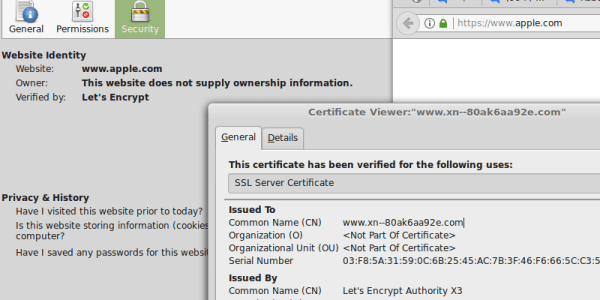
Well, think again. At least if you are using Chrome or Firefox. Don’t believe us? Well, check out Apple new website then, at https://www.apple.com . Notice anything? If you are not using an affected browser you are just seeing a strange URL after opening the webpage, otherwise it’s pretty legit. This is a page to demonstrate a type of Unicode vulnerability in how the browser interprets and show the URL to the user. Notice the valid HTTPS. Of course the domain is not from Apple, it is actually the domain: “https://www.xn--80ak6aa92e.com/“. If you open the page, you can see the actual URL by right-clicking and select view-source.

So what’s going on? This type of phishing attack, known as IDN homograph attacks, relies on the fact that the browser, in this case Chrome or Firefox, interprets the “xn--” prefix in a URL as an ASCII compatible encoding prefix. It is called Punycode and it’s a way to represent Unicode using only the ASCII characters used in Internet host names. Imagine a sort of Base64 for domains. This allows for domains with international characters to be registered, for example, the domain “xn--s7y.co” is equivalent to “短.co”, as [Xudong Zheng] explains in his blog.

Different alphabets have different glyphs that work in this kinds of attacks. Take the Cyrillic alphabet, it contains 11 lowercase glyphs that are identical or nearly identical to Latin counterparts. These class of attacks, where an attacker replaces one letter for its counterpart is widely known and are usually mitigated by the browser:

Continue reading “You Think You Can’t Be Phished?”