A Candle-Powered Light

For a little over two thousand years, the primary light sources after the sun had set were oil lamps and candles. This was well before the age of fossil fuels, so these oil lamps were often fueled with a labor-intensive agricultural product like olive oil. Candles were similarly difficult to make, made from tallow, beeswax, or even butter. Labor and materials costs aside, though, there’s a surprising amount of energy in these fuels and [Maciej Nowak Projects] has a generator that help these ancient light sources generate some electricity on the side.

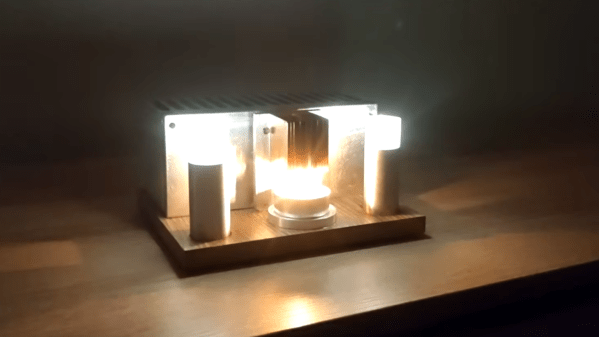
The generator is based around a piece of technology called a thermoelectric generator (TEG), which produces a voltage potential when placed in a temperature gradient. These aren’t new technologies, but their typically low efficiencies limit where they can be effectively used. In this case, however, [Maciej Nowak] has gone to great effort to boost this efficiency as high as possible by using a huge radiator on the cool side of the TEG and another one on the hot side, which in this case is heated by a small tea candle. The electricity produced is sent to a tiny DC converter which regulates the voltage to 3.3V, which then powers two custom-built pedestal lamps on either side of the TEG, each with a high-efficiency LED mounted to a custom-made circuit board.

Although this is certainly not the first time a TEG has been set up to run a small lighting system, we do appreciate this one for its polish, design, and high efficiency. It would make a fitting addition to anyone’s emergency power outage kit as it really increases the amount of available light produced from any given candle. When taken to the extreme, though, thermoelectric generators can be made to produce a surprising amount of energy, provided they are placed in the right environment.

Continue reading “A Candle-Powered Light”

New Tool Makes 3D Printed PCBs, Fast

Getting PCBs made is often the key step in taking a dodgy lab experiment and turning it into a functional piece of equipment. However, it can be tedious to wait for PCBs to ship, and that can really slow down the iterative development process. If you’ve got a 3D printer, though, there’s a neat way to make your own custom PCBs. Enter PCB Forge from [castpixel].

The online tool.

The concept involves producing a base and a companion mold on your 3D printer. You then stick copper tape all over the base part, using the type that comes with conductive adhesive. This allows the construction of a fully conductive copper surface across the whole base. The companion mold is then pressed on top, pushing copper tape into all the recessed traces on the base part. You can then remove the companion mold, quickly sand off any exposed copper, and you’re left with a base with conductive traces that are ready for you to start soldering on parts. No etching, no chemicals, no routing—just 3D printed parts and a bit of copper tape. It rarely gets easier than this.

You can design your PCB traces in any vector editor, and then export a SVG. Upload that into the tool, and it will generate the 3D printable PCB for you, automatically including the right clearances and alignment features to make it a simple press-together job to pump out a basic PCB. It bears noting that you’re probably not going to produce a four-layer FPGA board doing advanced high-speed signal processing using this technique. However, for quickly prototyping something or lacing together a few modules and other components, this could really come in handy.

The work was inspired by a recent technique demonstrated by [QZW Labs], which we featured earlier this year. If you’ve got your own hacks to speed up PCB production time, or simply work around it, we’d love to know on the tipsline! Video after the break.

Continue reading “New Tool Makes 3D Printed PCBs, Fast”

Cheetah 3d printer mobo

Cheetah MX4 Mini: A Pint-Sized 3D Printer Controller

There’s a seemingly unending list of modifications or upgrades you can make to a 3D printer. Most revolve around the mechanical side of things, many are simple prints or small add-ons. This upgrade is no small task: this 17-year-old hacker [Kai] took on designing and building his own 3D printer control motherboard, the Cheetah MX4 Mini.

He started the build by picking out the MCU to control everything. For that, he settled on the STM32H743, a fast chip with tons of support for all the protocols he could ask for, even as he was still nailing down the exact features to implement. For stepper drivers, [Kai] went with four TMC stepstick slots for silent motor control. There are provisions for sensorless homing and endstops, support for parallel and serial displays, and both USB-C and microSD card slots for receiving G-code. It can drive up to three fans as well as two high-amperage loads, such as for the heated bed.

All these features are packed into a board roughly the size of a drink coaster. Thanks to the STM32H743, the Cheetah MX4 Mini supports both Marlin and Klipper firmware, a smart choice that lets [Kai] leverage the massive amount of work that’s already gone into those projects.

One of the things that stood out about this project is the lengths to which [Kai] went to document what he did. Check out the day-by-day breakdown of the 86 hours that went into this build; reading through it is a fantastic learning aid for others. Thanks [JohnU] for sending in this tip! It’s great to see such an ambitious project not only taken on and accomplished, but documented along the way for others to learn from. This is a fantastic addition to the other 3D printer controllers we’ve seen.

Styrofoam watercraft, PCB hydrofoil

A PCB Can Be A Hydrofoil, If It Really Wants To

You know those old cliche that the younger generations have begun to cynically despise: “follow your dreams!” “You can be anything you put your mind to!” — well, perhaps they are true on occasion. For instance when [rctestflight] had PCBs that dreamed of becoming a hydrofoil, he found a way to make that dream come true.

It’s kind of obvious in retrospect: printed circuit boards are made of FR4, which is a form of fiberglass, and you know what else is commonly made of fiberglass? Boats. So yes, the material is suited for this task. The fact that solder joints hold up to use in a little remote-control hydrofoil is less obvious, but good to know. It certainly makes for easier assembly for those of us who have developed an allergy to epoxy.

Ease of assembly wasn’t really the point here: the point was that by making the “mast” of the hydrofoil out of PCB– that’s the part that holds the underwater wing– [rctestflight] figured he could (shock!) print a circuit onto it. Specifically, a liquid-level sensor, and because microcontrollers are so cheap these days he went the “total overkill” route of embedding an ESP32 on each mast. He started with a resistive sensor, but since those self-corrode too quickly, the team switched to a capacitive sensor that doesn’t need to form a galvanic cell in salt water. Come to think of it, that might still be a problem with the solder joint between the PCBs. Good thing nobody will be riding this one.

Having such a sensor and brain close-coupled allows for a faster control loop than the sonar [rctestflight] had previously been using to control his hydrofoil’s altitude.. Pivoting each mast with its own servo made for a smooth flight over the water— well, once they got the PID tuning set, anyway. Check it out in the video embedded below.

We’ve seen PCB used for enclosures before, and even the chassis of a rover, but using it for a hydrofoil is a new hack. Continue reading “A PCB Can Be A Hydrofoil, If It Really Wants To”

Is This The Last PCB You’ll Ever Buy?

Breadboards are great, but as the world moves more and more to having SMD as a standard, prototyping straight PCBs is becoming more common. If you’re mailing off to China for your PCBs, it’s shockingly quick for what it is, but a one-week turnaround is not “rapid prototyping”. [Stephen Hawes] has been on a quest on his YouTube channel for the ideal rapid-prototyping PCB solution, and he thinks he’s finally got it.

Now, if you’re only doing single-layer PCBs, this is a solved problem. You can mechanically mill, or laser cut, or chemically etch your way to PCB perfection, far faster than the Chinese fabs can get you a part. If you want a double-sided board, however, vias are both a pain in the keister to do yourself, and a rate-limiting step.

[Stephen Hawes] hit on the idea of buying a bulk set of PCBs from the usual vendors. The boards will be simple copper pours with vias in a grid with just a bit of etching. PCB Vendors are good at that, after all, and it’s not going to cost much more than raw copper. [Stephen] then uses the template of this “viagrid” board to lay out the circuit he’s prototyping, and it’s off to the races. Continue reading “Is This The Last PCB You’ll Ever Buy?”

PCBs The Prehistoric Way

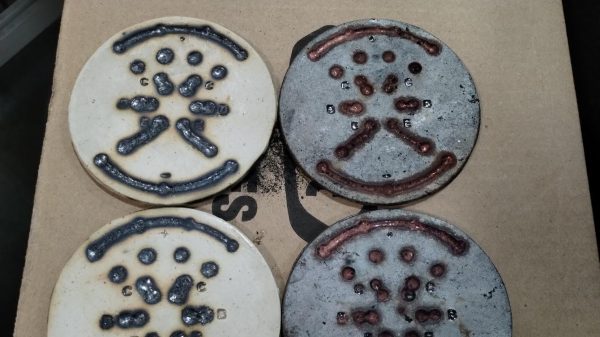
When we see an extremely DIY project, you always get someone who jokes “well, you didn’t collect sand and grow your own silicon”. [Patrícia J. Reis] and [Stefanie Wuschitz] did the next best thing: they collected local soil, sieved it down, and fired their own clay PCB substrates over a campfire. They even built up a portable lab-in-a-backpack so they could go from dirt to blinky in the woods with just what they carried on their back.

This project is half art, half extreme DIY practice, and half environmental consciousness.  (There’s overlap.)  And the clay PCB is just part of the equation. In an effort to approach zero-impact electronics, they pulled ATmega328s out of broken Arduino boards, and otherwise “urban mined” everything else they could: desoldering components from the junk bin along the way.

The traces themselves turned out to be the tricky bit. They are embossed with a 3D print into the clay and then filled with silver before firing. The pair experimented with a variety of the obvious metals, and silver was the only candidate that was both conductive and could be soldered to after firing. Where did they get the silver dust? They bought silver paint from a local supplier who makes it out of waste dust from a jewelry factory. We suppose they could have sat around the campfire with some old silver spoons and a file, but you have to draw the line somewhere. These are clay PCBs, people!

Is this practical? Nope! It’s an experiment to see how far they can take the idea of the pre-industrial, or maybe post-apocalyptic, Arduino. [Patrícia] mentions that the firing is particularly unreliable, and variations in thickness and firing temperature lead to many cracks. It’s an art that takes experience to master.

We actually got to see the working demos in the flesh, and can confirm that they did indeed blink! Plus, they look super cool. The video from their talk is heavy on theory, but we love the practice.

DIY clay PCBs make our own toner transfer techniques look like something out of the Jetsons.

Continue reading “PCBs The Prehistoric Way”

A photo of the PDP-1 replica.

Hacking Printed Circuit Board To Create Casing And Instrument Panels

Over on Hackaday.io our hackers [Angelo] and [Oscarv] are making a replica of the PDP-1. That is interesting in and of itself but the particularly remarkable feature of this project is its novel use of printed circuit boards for casing and instrument panels.

What does that mean in practice? It means creating a KiCad file with a PCB for each side of the case/panel. These pieces can then be ordered from a board house and assembled. In the video below the break you will see an example of putting such a case together. They use sticky tape for scaffolding and then finish things off by soldering the solder joints on each edge together.

Continue reading “Hacking Printed Circuit Board To Create Casing And Instrument Panels”