LIPS Is An Open Source Sip-And-Puff Interface

Lots of us have– thanks to repetative stress injuries– developed mobility issues that we have to work around when using computers. Maybe it’s a trackball instead of a mouse, or a split keyboard, or mechanical keys with very specific force requirements– but those are small potatoes compared to people with such severe movement issues such as quadriplegia who need to fall back on things like a sip-and-puff device to control the computer with their mouths. Commercial options of course come with absurd price tags, but a DIY option is a different story. [DanielYordanov]’s L.I.P.S project can be built for only a couple percent of what the big boys want, and it’s fully-open source.

So you might think a sip-and-puff device is a two-bit interface, only slightly more advanced than the morse terminal we featured earlier. While Morse code might be an option, these devices also act as pointers, as the lips and chin can be used to point the mouthpiece. Thus there are a few sensors needed: a hall-effect joystick for pointing info, and one or more pressure sensors to detect the breathing interface for ‘clicks’. [Daniel] has single and dual-sensor versions, creating at minimum a four-button mouse. In reality this hardware can distinguish long and short pulses, or combinations of breath to run some nice macros. With operating-system features like an on-screen keyboard, L.I.P.S. can provide someone with digital freedom– and at a tiny fraction of the cost of a ‘real’ medical device.

Despite the DIY nature, for the end-user control and config is easy enough thanks to a webserial portal run on the CH552 that you can preview on the official website. Code, ki-cad and STL files are all on his GitHub repository. If you’re interested in the design process, we’ve embedded his video about that below.

Thanks to [Daniel] for the tip! Do you know of a hack to make life better for someone, disabled or otherwise? Send us a tip!

From one-handed typing to open-source prosthesis, this sort quality-of-life hack may be the best thing about our community. Continue reading “LIPS Is An Open Source Sip-And-Puff Interface”

Turning Horrible Browser Controls Into A Game

With all of the various keyboards, mouses (mice?), and other human interface devices (HID) available for our computers, there’s no possible way for developers to anticipate every type of input for every piece of software they build. Most of the time everything will work fine as long as some basic standards are kept, both from the hardware and software sides, but that’s not always the case. [Losso] noticed a truly terrible volume control method when visiting certain websites while also using a USB volume knob, and used this quirk to build a Breakout game with it.

It turns out his volume control knob would interact simultaneously with certain video players’ built-in volume control and the system volume for the operating system, leading to a number of undesirable conditions. However, the fact that this control is built in to certain browsers in the first place led to this being the foundation for the Breakout clone [Losso] is calling KNOB-OUT. Unlike volume buttons on something like a multimedia keyboard, the USB volume control knob can be configured much more easily to account for acceleration, making it more faithful to the original arcade version of the game. The game itself is coded in JavaScript with the source code available right in the browser.

If you’d like to play [Losso]’s game here’s a direct link to it although sometimes small web-based projects like these tend to experience some slowdown when they first get posted here. And, if you’re looking for some other games to play in a browser like it’s the mid-00s again, we’re fans of this project which brings the unofficial Zelda game Zelda Classic to our screens.

Flute Now Included On List Of Human Interface Devices

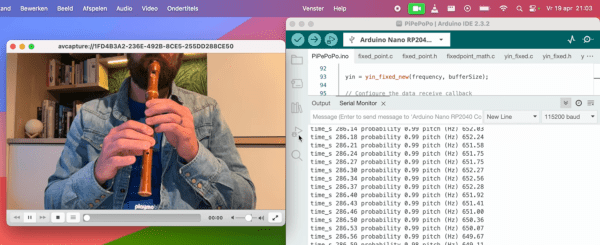
For decades now, we’ve been able to quickly and reliably interface musical instruments to computers. These tools have generally made making and recording music much easier, but they’ve also opened up a number of other out-of-the-box ideas we might not otherwise see or even think about. For example, [Joren] recently built a human interface device that lets him control a computer’s cursor using a flute instead of the traditional mouse.

Rather than using a MIDI interface, [Joren] is using an RP2040 chip to listen to the flute, process the audio, and interpret that audio before finally sending relevant commands to control the computer’s mouse pointer. The chip is capable of acting as a mouse on its own, but it did have a problem performing floating point calculations to the audio. This was solved by converting these calculations into much faster fixed point calculations instead. With a processing improvement of around five orders of magnitude, this change allows the small microcontroller to perform all of the audio processing.

[Joren] also built a Chrome browser extension that lets a flute player move a virtual cursor of sorts (not the computer’s actual cursor) from within the browser, allowing those without physical hardware to try out their flute-to-mouse skills. If you prefer your human interface device to be larger, louder, and more trombone-shaped we also have a trombone-based HID for those who play the game Trombone Champ.

Latency Meter For Accurate Gaming

The gaming world experienced a bit of a resurgence in 2020 that is still seen in the present day. Even putting aside the effects from the pandemic, the affordability and accessibility has arguably never been better. Building a gaming PC can have its downsides, though, and a challenging issue to troubleshoot is input lag or input latency. This is something that’s best measured with standalone hardware, and if this is an issue on your setup you may want to take a look at this latency meter.

Unlike other measurement devices that use the time between a mouse button input and the monitor’s display of a bullet or shooting event, this one looks at mouse movement and the change in the scene instead. This makes it much more versatile than other methods since it’s independent of specific actions, and can be used in any game without any specific events needed to perform the measurement. A camera phototransistor is placed on the monitor’s top edge and the Arduino-based device sends mouse commands to the computer while measuring the time between those commands and the shift in the image on the monitor.

The project is open source, so with the right hardware it’s possible to build one to troubleshoot latency issues or just to learn more about a particular hardware configuration’s behavior. Arduinos and other microcontrollers have been doing all kinds of things by pretending to be human interface devices like this for a while now. One of our favorites of late was this effects pedal that replicates musical effects on mice and keyboards.

Vintage Remote Control Gets Bluetooth Upgrade

This swanky Magnavox remote is old enough to predate the use of infrared, and actually relies on ultrasound to communicate with the television. It’s a neat conversation starter, but not terribly useful today. Which is why [Chad Lawson] decided to gut the original electronics and replace it with a Adafruit Feather 32u4 Bluefruit LE that can actually talk to modern devices.

We know, we know. Some in the audience will  probably take offense to such a cool gadget being unceremoniously torn apart, but to be fair, [Chad] does say he has a second one that will remain in its original state. Plus a quick check on eBay shows these old remotes don’t seem to be particularly rare or valuable. In fact, after some browsing through the recently concluded auctions, we’re fairly sure he paid $27 USD for both of these remotes.

Anyway, [Chad] found that a piece of perfboard in his collection just happened to be nearly the same size as the PCB from the remote, which made the rest of the conversion pretty straightforward. He simply had to mount tactile switches on one side of the perfboard so the remote’s original buttons would hit them when pressed, and then wire those to the Adafruit on the other side. We know there’s a 3.7 V 500 mAh pouch battery in there someplace as well, though it’s not immediately clear where he hid it in the images.

The code [Chad] came up with tells the Adafruit to mimic a Bluetooth Human Interface Device (HID) and send standard key codes to whatever device pairs with it. That makes it easy to use as a media remote on the computer, for example. We’ve seen something similar done with the ESP32, if you’ve already got one in the parts bin and are looking to revamp a remote control of your own.

At the end of the write-up, [Chad] mentions he may try developing an ultrasonic receiver that can pick up the signals from the unmodified remote control. That would be a nice way to bring this whole thing full circle, and should appease even the most hardcore vintage remote control aficionados.

This ESP32 Bluetooth Page Turner Can’t Get Any Easier

Commercial Bluetooth pedals, designed to allow musicians to flip pages of sheet music on a tablet, have the sort of inflated price tag you’d expect for a niche electronic device. Rather than forking as much as $100 USD over for the privilege of hands-free page flipping, [Joonas Pihlajamaa] decided to build his own extremely low cost version using an ESP32 and a cheap foot pedal switch.

In terms of hardware, it does’t get much easier than this. All [Joonas] had to do was hook the pedal up to one of the ESP32’s digital pins, and plug the microcontroller into a USB power bank. From there, it became a software project. With the ESP32-BLE-Keyboard library, it only took a few lines of code to send RIGHT_ARROW or LEFT_ARROW depending on whether the pedal was quickly tapped or held down for a bit; allowing him to navigate back and forth through the pages with just one button.

[Joonas] mentions that the ESP32 development board he’s using is too large to fit inside the pedal itself, though we wonder if the bare module could get slipped in there someplace. Of course you could always build your own pedal with a bit of extra room to fit the electronics, but for less than $2 USD on AliExpress, it’s hard to go wrong with this turn-key unit.

Looking for an alternate approach? We covered a Bluetooth page turner last month that doubled the inputs and packed it all into a handsome wooden enclosure.

Continue reading “This ESP32 Bluetooth Page Turner Can’t Get Any Easier”

Flashpen Is A High Fidelity Pen Input Device

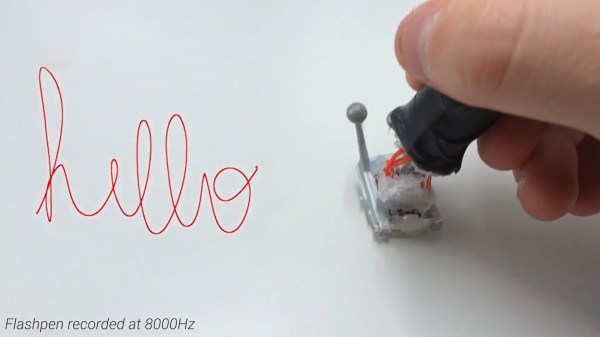
Pen input has never really taken off in the computing mainstream, though it’s had somewhat of a renaissance in the last decade or so. Various smartphones and tablets are shipping with the technology, and some diehard users swear by it as the best way to take notes on the go. Recently, researchers at the Sensing, Interaction and Perception Lab at ETH Zurich have been working on Flashpen, a high-fidelity pen interface for a wide range of applications. 

The fundamental technology behind the pen is simple, with the device using an optical flow sensor harvested from a high-end gaming mouse. This is a device that uses an image sensor to detect the motion of the sensor itself across a surface. Working at an update rate of 8 KHz, it eclipses other devices in the market from manufacturers such as Wacom that typically operate at rates closer to 200Hz. The optical sensor is mounted to a plastic joint that allows the user to hold the pen at a natural angle while keeping the sensor parallel to the writing surface. There’s also a reflective sensor on the pen tip which allows cameras to track its position in space, for use in combination with VR technology.

The team show off the device being used in several ways, primarily in VR tasks, but also in simple handwriting and coloring work. It’s a project that could readily be replicated by any eager experimenter by gutting a gaming mouse and getting down to work; our writers will expect six of your submissions by June 1st to the tipsline. Those eager to learn more can check out the project paper, and may also find the team’s TapID technology interesting. Video after the break. Continue reading “Flashpen Is A High Fidelity Pen Input Device”