4-bit Relay Logic Counter Begs To Have Its Buttons Pushed

What’s one to do with some nice little relays of questionable pinout, and prototyping board? How about a quietly clicky 4-bit counter using relay logic with tons of buttons?

The register with LEDs and buttons is on the top board, the incrementer on the bottom board.

[Agatha Mallett] made the counter after finding herself in possession of a quantity of relays burdened by terrible documentation (the datasheet shockingly lacks a pinout, and doesn’t even mention the coil being unidirectional). But since the relays are also small and of decent quality, they were a good candidate for a small relay logic-based project.

The key to the build is implementing D-type flip-flops using relays. This is done by holding the coil voltage of each relay between its set and release voltage levels. A small voltage bump will energize the coil, closing the relay and leaving it closed. Conversely, a small negative spike releases the coil, leaving it open. This forms the basis of the counter, and [Agatha] has a separate write-up all about the details of using relays in this way.

Implementing this was rather less straightforward than it may sound because it relies on balancing the coils of many relays on a figurative knife-edge of voltage, but not every component is perfectly identical. A tweaked resistor or capacitor here and there was needed before things settled into reliability.

The end product has indicator LEDs, buttons to increment or clear the current count, and it even has buttons to set or clear individual bits. This is a project that begs to be interacted with, and there’s a short video on the project page so you can watch it go through its paces.

Thanks to [Jess] for the tip!

A High Resolution ADC From Scratch

It’s a well-known conundrum that while most computers these days are digital in nature, almost nothing in nature is. Most things we encounter in the real world, whether it’s temperature, time, sound, pressure, or any other measurable phenomenon comes to us in analog form. To convert these signals to something understandable by a digital converter we need an analog-to-digital converter or ADC, and [Igor] has built a unique one from scratch called a delta sigma converter.

What separates delta sigma converters apart is their high sampling rate combined with a clever way of averaging the measurements to get a very precise final value. In [Igor]’s version this average is provided by an op-amp that integrates the input signal and a feedback signal, allowing for an extremely precise digital value to be outputted at the end of the conversion process. [Igor] has built this one from scratch as well, and is using it to interface a magnetic rotary encoder to control digital audio playback.

Although he has this set up with specific hardware, he has enough detail in his video (including timing diagrams and explanations of all of the theory behind these circuits) for anyone else to build one of these for other means, and it should be easily adaptable for plenty of uses. There are plenty of different ADC topologies too, and we saw many different ones a few years ago during our op-amp challenge.

Continue reading “A High Resolution ADC From Scratch”

A Breadboard Computer In Three Chips

Building a computer on a breadboard is a seminal project for many builders, but it can become complicated quite quickly, not to mention that all the parts needed for a computer are being placed on a medium which often lends itself to loose wires and other hardware bugs. [3DSage] has a working breadboard computer that is as simple as it can possibly be, putting it together piece by piece to show exactly what’s needed to get a computer which can count, access memory, and even perform basic mathematical operations.

The first step for any computer is to build a clock, and in this case it’s being provided by a 555 timer which is configured to provide an adjustable time standard and which steps through the clock pulses when a button is pressed. The next piece is a four-bit counter and a memory chip, which lets the computer read and write data. A set of DIP switches allows a user to write data to memory, and by using the last three bits of the data as opcodes, the computer can reset, halt, and jump to various points in a simple program.

Although these three chips make it possible to perform basic programming, [3DSage] takes this a bit further in his video by demonstrating some other simple programs, such as one which can play music or behave as an alarm clock. He also shows how to use a fourth chip in the form of a binary adder to perform some basic math, and then packages it all into a retro-styled computer kit. Of course you can take these principles and build them out as far as they will go, like this full 8-bit computer built on a breadboard or even this breadboard computer that hosts a 486.

Continue reading “A Breadboard Computer In Three Chips”

Moving Software Down To Hardware

In theory, any piece of software could be built out of discrete pieces of hardware, provided there are enough transistors, passive components, and time available. In general, though, we’re much more likely to reach for a programmable computer or microcontroller for all but the simplest tasks for several reasons: cost, effort, complexity, economics, and sanity. [Igor Brichkov] was working with I2C and decided that he wanted to see just where this line between hardware and software should be by implementing this protocol itself directly with hardware.

One of the keys to “programming” a communications protocol in hardware is getting the timing right, the first part of which is initializing communications between this device and another on the bus. [Igor] is going to be building up the signal in parts and then ORing them together. The first part is a start condition, generated by one oscillator and a counter. This also creates a pause, at which point a second oscillator takes over and sends data out. The first data needed for I2C is an address, which is done with a shift register and a counter pre-set to send the correct bits out on the communications lines.

To build up the rest of the signal, including data from the rotary encoder [Igor] is using for his project, essentially sets of shift registers and counters are paired together to pass data out through the I2C communications lines in sequence. It could be thought of that the main loop of the hardware program is a counter, which steps through all the functions sequentially, sending out data from the shift registers one by one. We saw a similar project over a decade ago, but rather than automating the task of sending data on I2C it allowed the user to key in data manually instead.

Continue reading “Moving Software Down To Hardware”

Clever Circuit Makes Exercise Slightly Less Boring

We say this with the greatest respect, but [Joel] — your exercise routine is horrible! Kudos for getting up and doing something, but 108 trips up and down the stairs? That sounds like torture, not exercise. Even [Joel] admits that it’s so boring that he loses count, and while we’d bet that he isn’t likely to restart the routine when that happens, it’s still annoying enough that he built this clever little lap counter to automate the task.

We kid, of course; any exercise is better than no exercise, and the stairs offer few excuses for skipping the daily workout. To bust the boredom problem, [Joel] toyed with a couple of ideas for toting up his laps before landing on a beam-break optical system with sensors at the top and the bottom of the stairs. Worried about the potential for false triggering by swinging arms and legs, he searched for ideas for bounceless switch circuits in the old “Engineer’s Notebook” by [Forrest Mims] and found a circuit close enough to modify for his needs. Each sensor setup has a high-output red LED and a phototransistor on one side of the stairwell, and a retroreflector on the opposite wall. Breaking the beam switches off the LED on that sensor and switches the other one on, to save on battery power.

The sensor’s flips and flops are counted and displayed on a three-digit seven-segment LED; [Joel] offers no detail on the counter itself, but with [Mims] as his muse, we suspect it’s something like the three-digit BCD counter circuit a few pages on from the bounceless switch circuit. The lap counter is shown in action in the brief video below.

Continue reading “Clever Circuit Makes Exercise Slightly Less Boring”

Celebrating The [Jack Ells] Automatic Photometric Telescope

Here at Hackaday, we take pride in presenting the freshest hacks and the best of what’s going on today in the world of hardware hacking. But sometimes, we stumble upon a hack from the past so compelling that we’ve got to bring it to you, so we can all marvel at what was possible in the Before Times.

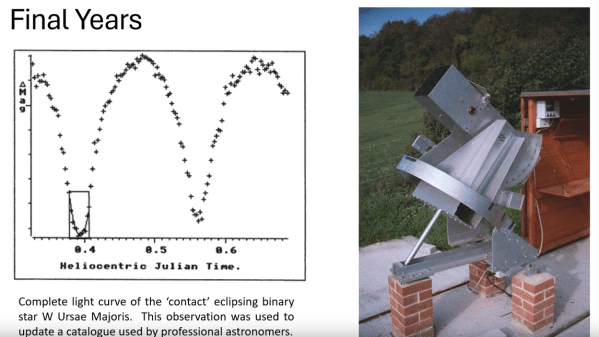
This one, a completely homebrewed automatic photometric telescope, was designed and built by the father-son team of [Jack Ells] and [Peter Ells]. From the elder [Ells]’ field notes, the telescope saw its first light in 1988, giving us some idea of the scale of problems that had to be overcome to get this wonderful machine working. The optics are straightforward, as least as telescopes go — it’s an f-4.0 Newtonian reflector with an 8.5″ (221 mm) primary mirror on an equatorial mount. The telescope is very rugged-looking indeed, and even stands on brick piers for stability. The telescope’s mount is controlled by a BBC Micro running custom BASIC software.

For the photometric parts, the [Ells] boys installed a photo-multiplier tube at the focus of the telescope. More precisely, they used a liquid light guide to connect the eyepiece to a rack full of equipment, which included the PM tube, its high-voltage power supply, and a series of signal conditioners and counter circuits. The idea was to view a single star through a pinhole mask over the objective of the telescope and count the rate of photons received over time. Doing so would reveal periodic changes in the star’s brightness. Today we’d use similar data to search for exoplanet transits; while we don’t think that was a thing back in 1988, it looks like this telescope could easily have handled the job.

Sadly, [Jack Ells] died only two years after finishing the telescope. But he left it with his son, who eventually moved it to a location with better seeing conditions, where it gathered data for another eight years. The quality of the work is amazing, and as father-son projects go, this one is tough to beat.

Continue reading “Celebrating The [Jack Ells] Automatic Photometric Telescope”

Homebrew Computer From The Ground Up

Building a retro computer of some sort is a rite of passage for many of us, with some building replicas or restorations of old Commodores, Ataris, and other machines from decades past. Others go even further back, to the time of the Intel 8008 or earlier, and a dedicated few will build something completely novel. This project from [3DSage] falls squarely in the latter category, with his completely DIY computer built component by component from scratch, including the machine code needed to run it.

[3DSage] starts with the backbone of every computer: the clock. He first demonstrates how a pair of NOT gates with a set of capacitors can be used as a rudimentary clock pulse, then builds a more refined version with a 555 timer and potentiometer for adjustable rates. Then, it’s on to creating a binary counter, which is a fundamental part of the memory system for this small computer, and finally, allows this circuitry to behave like a normal computer. Using a set of switches to store values in memory and stepping through them with the clock, the computer can be programmed to do plenty of tasks just like a modern microcontroller.

[3DSage] built this project a few years ago and has used it for real-world applications such as controlling servos, LED arrays, playing music, and other tasks. Although he has to program it using his own machine code by hand, it’s a usable computer in many ways. If you want to eschew modernity and build a retro computer in the style of the 1960s, though, this piece goes through what it would have been like to build a similar system in the era when these computers were more common. If you have a switch fetish, you might like to see how real computers worked back then, too.

Continue reading “Homebrew Computer From The Ground Up”