How Small Can You Make A C Executable?

It’s well known that the difference in executable size between a compiled binary and one hand-written in optimized assembler will be significant. The compiler brings in all manner of boilerplate whether it needs all of it or not, which is responsible for the extra space. [Weineng] has fallen down the rabbit hole of trying to make the smallest possible gcc-compiled C executable, and the resulting write-up is a fascinating read.

Surprisingly the smallest C program isn’t “Hello World”, but one which simply does nothing but return 0. This results in a binary weighing in at a surprisingly large 15,816 bytes — something which surely could be improved. There follows a set of clever compiler flags and bits of code manipulation to remove some debugging information, and strip out unnecessary stuff executed before void main().

At 13,632 bytes it’s still a little on the chunky side, so it’s time to examine what libraries it brings in. More compiler flags get it down to 8,704 bytes. Removing a code comment section and error handling with more flags takes it to 4,320 bytes. Then there’s code which dictates how memory is allocated, which brings it down to 400 bytes. That’s an impressive reduction!

Reading this as hardware people we maybe don’t have the elite knowledge of compiler flags it takes to manage something like this. But we’ve all at times had to reduce the size of a bit of software, so we’re sure some of the techniques used are going to be interesting to quite a few readers.

After all, even hardware people need to trim the fat at times.

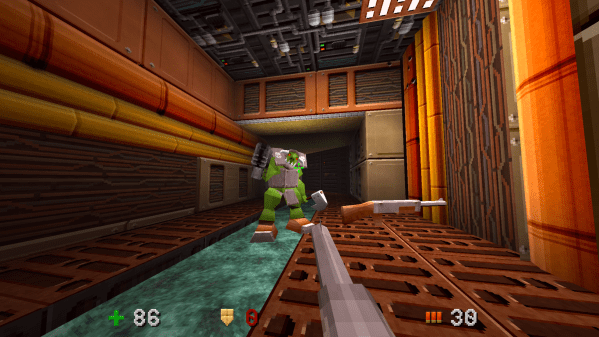
A screenshot of the world's first 64kB boomer shooter

QUOD Is A Quake-Like In Only 64kB

The demoscene is still alive and well, and the proof is in this truly awe-inspiring game demo by [daivuk] : a Quake-like “boomer shooter” squeezed into a Windows executable of only 64 kB he calls “QUOD”. We’ve included the full explanation video below, but before you check out all the technical details, consider playing the game. It’ll make his explanations even more impressive.

OK, what’s so impressive? Well, aside from the fact that this is a playable 3D shooter in 64kB, with multiple enemies, multiple levels, oodles of textures, running, jumping et cetera–it’s so Quake-like he’s using TrenchBroom to make the levels. Of course he’s reprocessing them into a more space-efficient, optimized format. Yeah, unlike the famous .kkrieger and a lot of other demos in the 64kB space, this isn’t all procedurally generated. [daivuk] did make his own image editing program for procedurally generated textures, though. Which makes sense: as a PNG, the QUOD logo is probably half the size of the (compressed) executable.

The low-poly models are created in Blender, and all created to be symmetric–having the engine mirror the meshes saves 50% of the vertex data. . Blender is just exporting half of a low-poly mesh; just as he wrote his own image editor, he has his own bespoke model tool. This allows tiling model elements, as well as handling bones and poses to keyframe the model’s animation.

Audio is treated similarly to textures and meshes: built up at runtime from stored data and a layered series of effects. When you realize all the sounds were put together in his sound tool from square and sine waves, it makes it very impressive. He’s also got an old-style tracker to create the music. All of these tools output byte arrays that get embedded directly in the game code.

The video also gets into some of his optimization techniques; we like his use of a map file and analyzing it with a python tool to find the exact size of game elements and test his optimizations thereby. One thing he notes is that his optmizations are all for space, not for speed. Except, perhaps, for one thing: [daivuk] created a new language and virtual machine for the game, which seems downright extravagant. It actually makes sense, though, as the virtual machine can be optimized for the limits of the game, as he explains starting at about 20 minutes into the video. Apparently it saved a whole 2kB, which seems like nothing these days but actually let [daivuk] fit an extra level into his 64kB limit. Sure, it’s still bigger than Quake13k–and how did we never cover that?–but you get a lot more game, too.

So, to recap: [daivuk] didn’t just make a game with an impressively tiny size on disk, he made the entire toolchain, and a language for it to boot. If you think this is overoptimized, check out Wolfenstien in 600 lines of AWK. Of course in spite of the 1980s file size, this needs modern hardware to run. You can get surprising graphics performance from a fraction of that, like this ATtiny sprite engine.

Thanks to [Keith Olson] for the tip, which probably took up more than 64kB on our tips line.

Continue reading “QUOD Is A Quake-Like In Only 64kB”

Optimizing Software With Zero-Copy And Other Techniques

An important aspect in software engineering is the ability to distinguish between premature, unnecessary, and necessary optimizations. A strong case can be made that the initial design benefits massively from optimizations that prevent well-known issues later on, while unnecessary optimizations are those simply do not make any significant difference either way. Meanwhile ‘premature’ optimizations are harder to define, with Knuth’s often quoted-out-of-context statement about these being ‘the root of all evil’ causing significant confusion.

We can find Donald Knuth’s full quote deep in the 1974 article Structured Programming with go to Statements, which at the time was a contentious optimization topic. On page 268, along with the cited quote, we see that it’s a reference to making presumed optimizations without understanding their effect, and without a clear picture of which parts of the program really take up most processing time. Definitely sound advice.

And unlike back in the 1970s we have today many easy ways to analyze application performance and to quantize bottlenecks. This makes it rather inexcusable to spend more time today vilifying the goto statement than to optimize one’s code with simple techniques like zero-copy and binary message formats.

Continue reading “Optimizing Software With Zero-Copy And Other Techniques”

Making Code A Hundred Times Slower With False Sharing

The cache hierarchy of the 2008 Intel Nehalem x86 architecture. (Source: Intel)

Writing good, performant code depends strongly on an understanding of the underlying hardware. This is especially the case in scenarios like those involving embarrassingly parallel processing, which at first glance ought to be a cakewalk. With multiple threads doing their own thing without having to nag the other threads about anything it seems highly doubtful that even a novice could screw this up. Yet as [Keifer] details in a recent video on so-called false sharing, this is actually very easy, for a variety of reasons.

With a multi-core and/or multi-processor system each core has its own local cache that contains a reflection of the current values in system RAM. If any core modifies its cached data, this automatically invalidates the other cache lines, resulting in a cache miss for those cores and forcing a refresh from system RAM. This is the case even if the accessed data isn’t one that another core was going to use, with an obvious impact on performance. As cache lines are a contiguous block of data with a size and source alignment of 64 bytes on x86, it’s easy enough to get some kind of overlap here.

The worst case scenario as detailed and demonstrated using the Google Benchmark sample projects, involves a shared global data structure, with a recorded hundred times reduction in performance. Also noticeable is the impact on scaling performance, with the cache misses becoming more severe with more threads running.

A less obvious cause of performance loss here is due to memory alignment and how data fits in the cache lines. Making sure that your data is aligned in e.g. data structures can prevent more unwanted cache invalidation events. With most applications being multi-threaded these days, it’s a good thing to not only know how to diagnose false sharing issues, but also how to prevent them.

Continue reading “Making Code A Hundred Times Slower With False Sharing”

Simple Tricks To Make Your Python Code Faster

Python has become one of the most popular programming languages out there, particularly for beginners and those new to the hacker/maker world. Unfortunately, while it’s easy to  get something up and running in Python, it’s performance compared to other languages is generally lacking. Often, when starting out, we’re just happy to have our code run successfully. Eventually, though, performance always becomes a priority. When that happens for you, you might like to check out the nifty tips from [Evgenia Verbina] on how to make your Python code faster.

Many of the tricks are simple common sense. For example, it’s useful to avoid creating duplicates of large objects in memory, so altering an object instead of copying it can save a lot of processing time. Another easy win is using the Python math module instead of using the exponent (**) operator since math calls some C code that runs super fast. Others may be unfamiliar to new coders—like the benefits of using sets instead of lists for faster lookups, particularly when it comes to working with larger datasets. These sorts of efficiency gains might be merely useful, or they might be a critical part of making sure your project is actually practical and fit for purpose.

It’s worth looking over the whole list, even if you’re an intermediate coder. You might find some easy wins that drastically improve your code for minimal effort. We’ve explored similar tricks for speeding up code on embedded platforms like Arduino, too. If you’ve got your own nifty Python speed hacks, don’t hesitate to notify the tipsline!

Why Super Mario 64 Wastes So Much Memory

The Nintendo 64 was an amazing video game console, and alongside consoles like the Sony PlayStation, helped herald in the era of 3D games. That said, it was new hardware, with new development tools, and thus creating those early N64 games was a daunting task. In an in-depth review of Super Mario 64’s code, [Kaze Emanuar] goes over the curious and wasteful memory usage, mostly due to unused memory map sections, unoptimized math look-up tables, and greedy asset loading.

The game as delivered in the Japanese and North-American markets also seems to have been a debug build, with unneeded code everywhere. That said, within the context of the three-year development cycle, it’s not bad at all — with twenty months spent by seven programmers on actual development for a system whose hardware and tooling were still being finalized, with few examples available of how to do aspects like level management, a virtual camera, etc. Over the years [Kaze] has probably spent more time combing over SM64‘s code than the original developers, as evidenced by his other videos.

As noted in the video, later N64 games like Legend of Zelda: Ocarina of Time are massively more optimized and streamlined, as lessons were learned and tooling improved. For the SM64 developers, however, they had a gargantuan 4 MB of fast RDRAM to work with, so optimization and memory management likely got kicked down to the bottom on the priority list. Considering the absolute smash hit that SM64 became, it seems that these priorities were indeed correct.

Continue reading “Why Super Mario 64 Wastes So Much Memory”

Speed Up Arduino With Clever Coding

We love Arduino here at Hackaday; they’ve probably done more to make embedded programming accessible to more people than anything else in the history of the field. One thing the Arduino ecosystem is rarely praised for is its speed. That’s where [Playduino]  comes in, with his video (embedded below) that promises to make everyone’s favourite microcontroller run 50x faster.

You might be expecting an unstable overclocking setup, with swapped crystals, tweaked voltages and a hefty heat sink, but no! This is stock hardware. The 50x speedup comes from one simple hack: don’t use digitalWrite();

If you aren’t familiar, the digitalWrite() function is one of the key functions Arduino gives you to operate its boards– specify the pin and the value (high or low) to drive it. It’s very easy, but it’s also very slow. [Playduino] takes a moment to show just how much is going on under the hood when you call digitalWrite(), and shows you what you can do instead if you have a need for speed. (Hint: there’s no Arduino-provided code involved; hardware registers and the __asm keyword show up.)

If you learned embedded programming in an earlier era, this will probably seem glaringly obvious. If you, like so many of us, got started inside of the Arduino ecosystem, these closer-to-the-metal programming techniques could prove useful tools in your quiver. Big thanks to [Stephan Walters] for the tip.

Of course if you prefer to speed things up by hardware rather than software, you can overclock an Arduino– with liquid nitrogen, even.

Continue reading “Speed Up Arduino With Clever Coding”