Some security hacks require someone to have physical access to your computer. In many cases, that’s easy to mitigate. Other attack vectors can put you at risk from anywhere via the network. That’s what firewalls are for. But there is an in-between risk where an attacker just has to be “around” your computer. [Rasmus Moorats] found out that a Creative Sound Blaster sound bar could open up just such an attack.
[Rasmus] was poking around the firmware just to write custom software to control it. The possibility of an attack was just an accidental find.
The soundbar connects to USB, but it also has Bluetooth, which, for some reason, is always on. There’s an app that can communicate with the speaker using BLE, and Creative has a special protocol to control it. The same protocol works on USB or Bluetooth, but with an important difference.
It’s hard to deny that label printers have become more accessible than ever, but an annoying aspect of many of these cheap units is that their only user interface is a proprietary smartphone app connected via Bluetooth. The Fichero-branded label printer that [0xMH] obtained for a mere 10 Euro at a store in the Netherlands was much the same, with an associated app that doesn’t just bind it to smartphones, but also requires no fewer than 26 permissions. Obviously this required some reverse-engineering of the BLE protocol.
The fruits of this reverse-engineering effort can be found in the GitHub repository, with the most interesting part probably being that this Fichero is just one of many relabeling of generic label printers, this one being an AiYin D11, by Xiamen Printer Future Technology. This means that other iterations of this D11 will work exactly the same, as they all use the same ‘LuckPrinter’ SDK.
[0xMH] provides a Web GUI to talk with a local D11 printer, though you can also use the Python scripts, or of course implement the protocol using your favorite language and frameworks, so that you can finally control a cheap label printer from a PC or even BLE-equipped MCU like the software gods intended.
Few things rival the usability and speed of a full-sized keyboard for text input. For decades, though, keyboards were mostly wired, which can limit where you use your favorite one. To address this, [KoStard]’s latest project uses an ESP32 to bridge a USB keyboard to BLE devices.
The ESP32-S3 packs a ton of fantastic functionality into its small size and low price—including USB-OTG support, which is key here. Taking advantage of this, [KoStard] programmed an ESP32-S3 to host a keyboard over its USB port while connecting via BLE to devices like cellphones.
There are some slick tricks baked in, too: you can pair with up to three devices and switch between them using a key combo. Some of you might be wondering how you can just plug a microcontroller into a keyboard and have it work. The truth is, it doesn’t without extra hardware. Both the keyboard and ESP32-S3 need power. The simplest fix is a powered USB hub: it can be battery-powered for a truly mobile setup, or use a wired 5V supply so you never have to charge batteries.
We love seeing a simple, affordable microcontroller extend the usefulness of gear you already have. Let us know in the comments about other hacks you’ve used to connect keyboards to devices never designed for them.
What the Flock? It’s probably just some quirk of The Almighty Algorithm, but ever since we featured a story on Flock’s crime-fighting drones last week, we’ve been flooded with other stories about the company, some of which aren’t very flattering. The first thing that we were pushed was this handy interactive map of the company’s network of automatic license plate readers. We had no idea how extensive the network was, and while our location is relatively free from these devices, at least ones operated on behalf of state, county, or local law enforcement, we did learn to our dismay that our local Lowe’s saw fit to install three of these cameras on the entrances to their parking lot. Not wishing to have our coming and goings documented, we’ll be taking our home improvement dollars elsewhere for now.
Unitree have a number of robotic offerings, and are one of the first manufacturers offering humanoid robotic platforms. It seems they are also the subject of UniPwn, one of the first public exploits of a vulnerability across an entire robotic product line. In this case, the vulnerability allows an attacker not only to utterly compromise a device from within the affected product lines, but infected robots can also infect others within wireless range. This is done via a remote command-injection exploit that involves a robot’s Bluetooth Low Energy (BLE) Wi-Fi configuration service.
Unitree’s flagship G1 humanoid robot platform (one of the many models affected)
While this may be the first public humanoid robot exploit we have seen (it also affects their quadruped models), the lead-up to announcing the details in a post on X is a familiar one. Researchers discover a security vulnerability and attempt responsible disclosure by privately notifying the affected party. Ideally the manufacturer responds, communicates, and fixes the vulnerability so devices are no longer vulnerable by the time details come out. That’s not always how things go. If efforts at responsible disclosure fail and action isn’t taken, a public release can help inform people of a serious issue, and point out workarounds and mitigations to a vulnerability that the manufacturer isn’t addressing.
The biggest security issues involved in this vulnerability (summed up in a total of four CVEs) include:
Hardcoded cryptographic keys for encrypting and decrypting BLE control packets (allowing anyone with a key to send valid packets.)
Trivial handshake security (consists simply of checking for the string “unitree” as the secret.)
Unsanitized user data that gets concatenated into shell commands and passed to system().
The complete attack sequence is a chain of events that leverages the above in order to ultimately send commands which run with root privileges.
We’ve seen a Unitree security glitch before, but it was used to provide an unofficial SDK that opened up expensive features of the Go1 “robot dog” model for free. This one is rather more serious and reportedly affects not just the humanoid models, but also newer quadrupeds such as the Go2 and B2. The whole exploit is comprehensively documented, so get a fresh cup of whatever you’re drinking before sitting down to read through it.
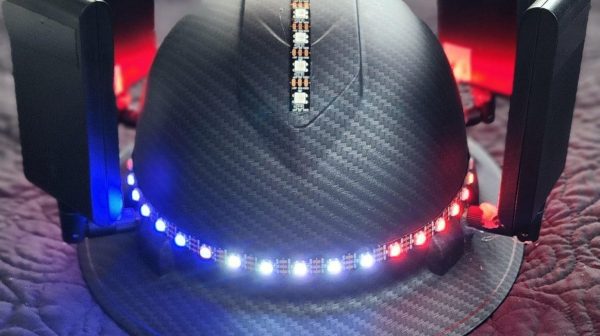
Have you ever wanted to find a Bluetooth device out in the wild while looking like the comic relief character from a science-fiction series? You might like Dendrite, the direction-finding hat from [SolidStat3].
Dendrite is intended for hunting down Bluetooth devices. It’s capable of direction estimation based on signal strength readings from four ESP32 microcontrollers mounted on an off-the-shelf hard hat. Each ESP32 searches for BLE devices in the immediate area and reports the apparent signal strength to a fifth ESP32, which collates readings from all units. It then runs a simple multilateration algorithm to estimate the direction of the device. This information is then displayed via a ring of addressable LEDs around the perimeter of the hat. White LEDs marking the direction of the detected device. The only problem? You can’t see the LEDs while you’re wearing the hat. You might need a friend to help you… or you can simply take it off to see what it’s doing.
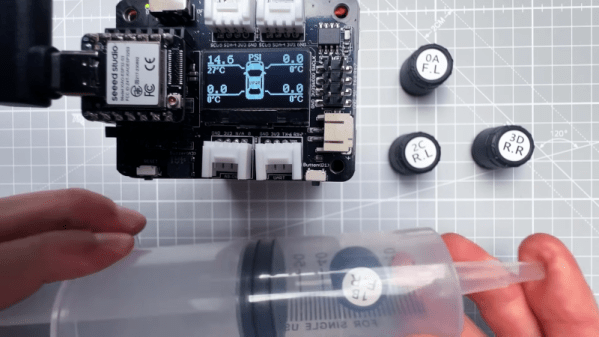
When [upir] saw that you could buy tire valve stem caps that read pressure electronically, he decided to roll his own Tire Pressure Monitoring System (TPMS) like the one found on modern cars. An ESP32 and an OLED display read the pressure values. He didn’t have a car tire on his workbench though, so he had to improvise there.
Of course, a real TPMS sensor goes inside the tire, but screwing them on the valve stem is much easier to deal with. The sensors use Bluetooth Low Energy and take tiny batteries. In theory, you’re supposed to connect to them to your phone, although two different apps failed to find the sensors. Even a BLE scanner app wouldn’t pick them up. Turns out — and this makes sense — the sensors don’t send data if there’s no pressure on them, so as not to run down the batteries. Putting pressure on them made them pop up on the scanner.