Using Windows 11 On An LGA 775 PC With AGP Videocard

Although the thought of installing a modern operating system like Windows 11 on something as archaic as a Core 2 Quad Q6600 Intel CPU may seem ridiculous, it being the flagship CPU of the time means that it still chews up low-end Celeron systems that are on the supported hardware list like the N4020. Hence [Omores] commencing on this latest adventure, with the snag being that the chosen mainboard features an AGP bus that Windows 11 no longer supports.

A GPU box from the related HD 4670 PCIe card, not the used HD 4650 AGP card with 1 GB of DDR2. (Credit: Omores, YouTube)
A GPU box from the related HD 4670 PCIe card, not the used HD 4650 AGP card with 1 GB of DDR2.

This system is intended to multi-boot a range of Windows OSes starting with Windows 98, while also playing nice with DOS and even Windows 11. In addition to the quad-core, 2.4 GHz Q6600 there’s also an amazing 3 GB of DDR1 RAM in the system.

The mainboard is the 2003-era Asrock 865PE, with the GPU being the highest-end GPU that still came in AGP flavor: the Radeon HD 4650 from 2009. Since the sole reason that Windows 11 doesn’t support AGP any more is due to the supporting files not being included with Windows 11, hence you can track it down on a Windows 10 1507 release install – such as the Intel AGP440.sys driver here – and install them with some file editing.

Since Windows 11 still supports the WDDM driver model from Windows Vista and 7 you can then install the Catalyst drivers from 2012 and be up and running. You only get 1 GB of VRAM for this card, but you probably don’t need much more on this level of hardware.

One major stumbling block remains, however, as Windows 11 24H2 enforces SSE4.2 instructions which the CPU doesn’t support. Ergo 23H2 is the newest Windows 11 version that can run on this system, with only the Education and Enterprise still receiving security updates, making it a bit of a pyrrhic victory, especially as Windows 7 benchmarks a fair bit faster on the same hardware.

Continue reading “Using Windows 11 On An LGA 775 PC With AGP Videocard”

Why Some S3 Videocards Have A Brightness Issue

Once a pioneer in videocards, S3’s legacy is today mostly found in details like texture compression as well as the strong presence of S3-branded videocards in the retro-computing world. There’s however a bit of a funny issue with some of these S3 cards in what is often called a ‘brightness bug’, but which as [Bits und Bolts] covers in a recent video was actually a hardware feature that we can once again blame composite video for.

This issue appears with AGP cards like the Trio 3D, Trio64 and ViRGE, where the brightness on the output signal is set too high, easily seen with the washed out look on boot, where especially on CRTs you’d expect to see the nice deep black background. Using an S3 Trio 3D 2X card that was saved from the e-waste pile this so-called Pedestal Bit responsible is investigated and tweaked to show what difference it makes.

At the core is adjusting the black level to make scanline changes easier to detect for TVs, which is no longer relevant for CRTs, LCDs, etc., while adjusting the brightness for one videocard in a system can cause issues elsewhere, such as when using said card alongside a 3dfx Voodoo II card or with inconsistent brightness levels inside 3D games.

Fortunately S3 provided in-depth datasheets on their chips, including how to address the responsible bit. After demonstrating the principle, the BIOS is then patched to set this Pedestal Bit to the value of 0 on boot, solving the issue once and for all.

Continue reading “Why Some S3 Videocards Have A Brightness Issue”

A Walk Down PC Video Card Memory Lane

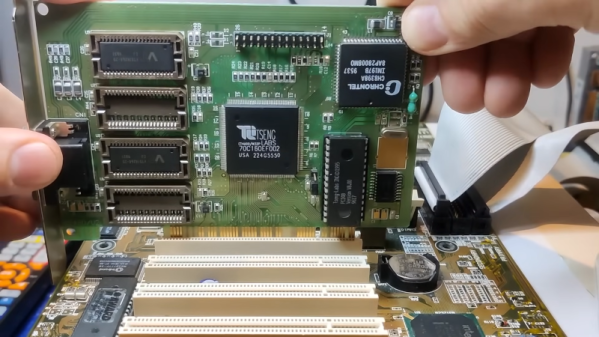
These days, video cards are virtually supercomputers. When they aren’t driving your screen, they are decoding video, crunching physics models, or processing large-language model algorithms. But it wasn’t always like that. The old video cards were downright simple. Once PCs gained more sophisticated buses, video cards got a little better. But hardware acceleration on an old-fashioned VGA card would be unworthy of the cheapest burner phone at the big box store. Not to mention, the card is probably twice the size of the phone. [Bits and Bolts] has a look at several old cards, including a PCI version of the Tseng ET4000, state-of-the-art of the late 1990s.

You might think that’s a misprint. Most of the older Tseng boards were ISA, but apparently, there were some with the PCI bus or the older VESA local bus. Acceleration here typically meant dedicated hardware for handling BitBlt and, perhaps, a hardware cursor.

Continue reading “A Walk Down PC Video Card Memory Lane”

A Better Use For The AGP Slot, Decades Later

For a while around a quarter century ago PC motherboards came with a special slot, a little shorter than the PCI slots which ruled the roost back then, and offset from them further into the case. This was the Accelerated Graphics Port, or AGP, a standard created to more quickly serve the 3D graphics cards which were then taking the world by storm. It was everywhere for a few years, then in the mid-2000s it was replaced by PCI Express and faded into obscurity. [Peter] has a Socket 7-based NAS with an AGP slot, and was left wondering whether the unused port could be put to a worthwhile purpose.

AGP is a superset of PCI clocked at 66 MHz, and usually benefiting from having its own exclusive bridge to the processor bus. Thus he reasoned that he could make an AGP to PCI adapter and it might work, as the right connections are all there. A hacked-together version was made by butchering two riser cards, and when a network card worked quite happily he knew he was on to something and made a PCB. There’s a caveat that it only works with 66-MHz capable PCI cards so not everything will work, but if you’re one of the very few people who must be in the market for one, he can do you a PCB.

We’d normally end with a link to a related project here, but we must instead congratulate [Peter]. As far as we can find, this is Hackaday’s first AGP hack, two decades later. Continue reading “A Better Use For The AGP Slot, Decades Later”