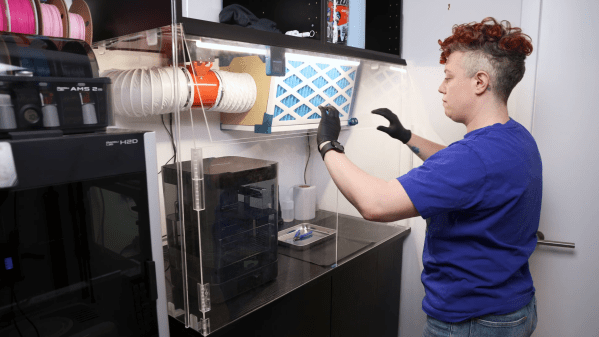
A person is standing in front of an acrylic enclosure, lowering a door on the enclosure. The enclosure contains the space between two sets of cabinets, and has three doors on the front. Inside the enclosure is an air filter and a washing station.

A Fume-Control Cabinet For Resin 3D Printing

For a certain kind of intricate, highly-detailed manufacturing, there’s really no substitute for a resin 3D printer, and it’s therefore unfortunate that they require so many poisonous chemicals. The resin itself usually contains irritating acrylates and methacrylates, it can emit a wide spectrum of volatile organic compounds (VOCs) during printing, and even the isopropyl alcohol used in cleaning is moderately toxic. [Allie Katz] accordingly built this fume-control enclosure for resin printing and other ventilation-critical processes.

The biggest constraint was space: [Allie]’s workspace had a fairly limited volume available, and the enclosure needed to hold an SLA printer, an isopropyl alcohol washing station, a UV curing chamber, and miscellaneous supplies. Most of the enclosure was made out of IKEA cabinets, using some large cabinets at the base to hold the printer and curing station, a countertop over these to hold the washing station, and more cabinets above to hold supplies. An MDF backing panel and acrylic side panels enclose the workspace between the cabinets. There was no safe way to exhaust fumes, so the enclosure recycles its air: a fan pulls air in through an activated-carbon filter mounted above the work area and into the plenum behind the chamber, from which it passes through the printer’s cabinet back into the workspace enclosure. Panel filters surround the carbon filter to catch particulate matter.

The enclosure uses four ESP32-based boards for automation: one uses a touchscreen to display data, and three are paired with BME680 sensors, primarily to report VOC concentrations. One, which also has a particulate matter sensor, senses air quality in the main chamber and plenum, one monitors air quality in the rest of the shop, and the third detects clogging from within the filter enclosure. The first real test of the chamber was to 3D print and paint some handles for the cabinets. It worked as expected, detecting the increased VOCs and ramping up the fan to keep them in check.

We’ve seen a ventilated printer enclosure before, that time for an FDM printer. Although their hazards are less blatant, they too can produce dangerous fumes, which could possibly be carcinogenic.

Thanks to [Keith Olson] for the tip!

A Smart Printer Enclosure For The Open Source World

3D printing has had its time to spread its wings into the everyday home, yet many of those homes lack the proper ventilation to prevent the toxic VOCs from escaping. Because of this, [Clura] has put together an entire open-sourced smart enclosure for most open concept printers.

While certain 3D printers or filament choices lend themselves to being worse than others, any type of plastic particles floating around shouldn’t find their way into your lungs. The [Clura] enclosure design includes HEPA and carbon filters in an attempt to remove this material from the air. Of course, there’s always the choice to have a tent around your printer, but this won’t actually remove any VOCs and air located inside a simple enclosure will inevitably escape.

What makes this enclosure different from other, either commercial or open-source designs, is the documentation included with the project. There are kits available for purchase, which you may want for the custom PCB boards for smart features such as filament weighing or fume detection. Even still, if you don’t want to purchase these custom boards the Gerber files are available on their GitHub page.

As smart as this enclosure is, it still won’t fix the issues of what happens to the toxins in your print after it’s done printing. If you are interested in this big picture question, you are not alone. Make sure to stay educated and help others learn by checking out this article here about plastic in our oceans.

Chamber-Master

Chamber Master: Control Your 3D Printer Enclosure Like A Pro

Having an enclosed 3D printer can make a huge difference when printing certain filaments that are prone to warping. It’s easy enough to build an enclosure to stick your own printer in, but it can get tricky when you want to actively control the conditions inside the chamber. That’s where [Jayant Bhatia]’s Chamber Master project comes in.

This system is built around the ESP32 microcontroller, which provides control to various elements as well as hosts a web dashboard letting you monitor the chamber status remotely. The ESP32 is connected to an SSD1306 OLED display and a rotary encoder, allowing for navigating menus and functions right at the printer, letting you select filament type presets and set custom ones of your own. A DHT11 humidity sensor and a pair of DS18B20 temperature sensors are used to sense the chamber’s environment and intake temperatures.

One of the eye-catching features of the Chamber Master is the iris-controlled 120 mm fan mounted to the side of the chamber, allowing for an adjustable-size opening for air to flow. When paired with PWM fan control, the amount of airflow can be precisely controlled.

Continue reading “Chamber Master: Control Your 3D Printer Enclosure Like A Pro”

Custom Enclosure For 3D Printer

Having an enclosure around an FDM 3D printer is generally a good idea, even when printing only with PLA, as it keeps the noise in, and the heat (and smell, with ABS) inside. With all the available options for enclosures out there, however, [David McDaid] figured that it should be possible to make an enclosure that does not look like a grow tent and is not overly expensive. He also shared the design files on GitHub.

The essential idea is very simple and straightforward: the structural part is cut out of pine beams that are cut to size and joined into a cube by (3D-printed) corner brackets, with acrylic (Perspex) sheets filling in the space between the wooden beams. A door is formed using (also 3D-printed) hinges and door handles. The whole enclosure is rounded off with a lick of paint on the wooden elements, and a diffused set of LED lights for internal illumination.

It definitely has to be admitted that it makes for a very stylish enclosure, with a lot of modding potential. It can also easily be adapted to differently sized printers and filament material demands.

Prusa’s Official Enclosure Pulls Out All The Stops

It’s well known in the desktop 3D printing world that you get what you pay for. If you want to spend under $300 USD, you get a Creality Ender 3 and deal with its slightly half-baked nature. Or if you’ve got the money to burn, you buy a Prusa i3 MK3 and know that you’ll remain on the cutting edge thanks to a constantly evolving slicer and regular hardware revisions.

Now it stands to reason that an expensive product will have expensive accessories, but even still, the recently unveiled “Original Prusa Enclosure” is sure to induce a bit of sticker shock in even the most ardent of [Josef Průša]’s fans — the most bare-bones configuration of the 10 kg (22 lbs) box rings up at $349 USD. You read that right, just the enclosure for Prusa’s flagship machine costs more than the average Chinese 3D printer. In fact it costs as much as the kit version of the Prusa Mini, which incidentally, is set to get its own version of the enclosure sometime in the future. If you select all the bells and whistles, a fully-decked out Prusa Enclosure will cost you $700 USD, plus shipping.

Continue reading “Prusa’s Official Enclosure Pulls Out All The Stops”

Art of 3D printer in the middle of printing a Hackaday Jolly Wrencher logo

3D Printering: Why Aren’t Enclosures Easier?

For 3D printers that aren’t already enclosed, why is easily adding a cheap and effective enclosure still not a completely solved problem? The reason is simple: unless one’s needs are very basic, enclosures are more than just boxes.

Different people need different features, printers come in different shapes and sizes, and creating something that can be both manufactured and shipped cheaply is a challenge in itself. In this article I’ll explain how those things make boxing up your printer a tougher nut to crack then may seem at first glance.

Enclosures Have Different Jobs

People have different expectations of what an enclosure’s job should be, and that determines which features are important to them and which are not. Here is a list of meaningful features for 3D printer enclosures; not everything on this list is important to everyone, but everything on this list is important to someone. Continue reading “3D Printering: Why Aren’t Enclosures Easier?”

Prusa Mini Gets Custom Heavy Duty Enclosure

Still waiting on your Prusa Mini to arrive? Join the club. Between the incredible amount of interest in the inexpensive 3D printer and the COVID-19 pandemic, it can take months for the machine to arrive at your doorstep. But patient makers are finally taking delivery of their new printers, and as such the hacks and modifications are starting to trickle their way in.

First up is this gloriously over-engineered enclosure from [Build Comics]. While PLA and PETG usually print fine with nothing more exotic than a heated bed, trickier materials like ABS work best when the printer is enclosed as it helps maintain a consistent temperature. Plus it keeps any curious hands and paws a safe distance from the hot moving bits, and if things go really pear-shaped, can help contain smoke and flames.

The enclosure is made from welded steel square tube, wood, and fire-retardant fiber board. A hinged polycarbonate cover, taking the form of a four-sided cube, is lowered over the printer with some heavy-duty hinges that look like they were intended for a fence. To keep the cover from slamming back down, [Build Comics] came up with a simple locking mechanism that can easily be operated from the front or side of the enclosure. With the addition of a small temperature and humidity display, the conditions inside the chamber can easily be monitored.

But [Build Comics] didn’t stop there. He also rigged up a relay box that will cut power to the printer should the smoke detector mounted above it trip. While there’s no reason to think the Prusa Mini would suffer the same fate of earlier budget desktop 3D printers, but there’s certainly no harm in taking precautions.

Will you need to build a similar enclosure whenever your Prusa Mini shows up? Maybe not. But if you felt so inclined, at least now you’ve got plenty of images and details that can help you spin up your own solution.