A small, orange 3D printer is shown on a desk with a filament dry box. The printer is printing a waving cat figurine. The printer is a CoreXY configuration, and the side panels are 3D-printed orange plastic.

3D Printing A Miniature CoreXY Printer

Although no longer so common as during the heyday of the RepRap movement, it’s easier than ever to build your own largely-printed 3D printer, with designs such as Voron’s delivering excellent quality. Nevertheless, there are still niches to be filled by new designs, such as [Alex Yu]’s mostly-printed Encore design.

The Encore uses CoreXY kinematics and linear rails for the X and Y axes. Its has no internal frame; the linear rails are mounted directly to the side panels, which were printed but provided sufficient rigidity. The printer is modular, and all the parts are designed to fit within a 225 mm print bed. The Encore itself uses a 120 mm bed, a Bowden extruder, and a lightweight Bambu-style hotend. The drive motors are NEMA 17 stepper motors, and they use sliding mounts for belt tensioning. The power supply sits behind the rods supporting the Z axis, and the controller board is in the base of the printer.

Building the printer was simple; tuning it, less so. The combination of a Bambu-type hotend with a Bowden extruder created some complications, and the hotend initially received too little cooling. [Alex] solved the cooling issues by using a stronger fan on the hotend, redesigning the ventilation shroud, and adding two inward-blowing fans along the sides of the build volume. After correcting some issues with Z-axis stability, the Encore produced some quite good-looking parts. [Alex] is still improving and documenting some aspects of the printer, but he’s uploaded his progress so far to GitHub.

We’ve seen some mostly-printed printers before, including a high-speed printer, one which printed all structural components, and one which was entirely 3D printed.
Continue reading “3D Printing A Miniature CoreXY Printer”

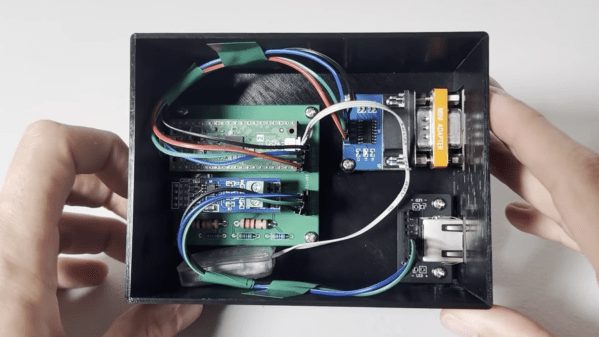
A black plastic box is shown, with a green circuit board inside. The circuit board is wired to an RS-232 connector and an RJ-45 connector.

A High-Vacuum Controller For An Eventual Electron Microscope

[Chris Doble] has high ambitions: he’s making his own scanning-electron microscope, and as the first step he’s built a high-vacuum system. This required its own controller to manage the various electronics involved in the system, which he’s documented and open-sourced.

The vacuum system itself starts with a rotary-vane roughing pump, which can bring a chamber down from atmospheric pressure to about 10-3 millibar. This is still too high a pressure, so the second stage is a turbomolecular high-vacuum pump, which can operate from 18 millibar down to 10-7 millibar. To protect the turbomolecular pump in case the roughing pump suddenly stops, it includes an anti-suckback valve. Connected to these pumps is a pressure gauge which uses a pair of sensors to sense the entire pressure range. All this setup worked well, but the turbomolecular pump and the pressure sensor each used their own interfaces, while [Chris] wanted a single interface for the eventual microscope.

[Chris] therefore designed his own controller based on the Raspberry Pi Pico 2, with firmware written in Rust. The pressure gauge uses an RS-232 interface, which he connected to the Pico’s UART pins using an RS-232 level shifter, with a null modem to swap over the transmitting and receiving pins. The turbomolecular pump used an RS-485 interface, which required a converter circuit and some level-shifting resistors. A custom PCB and 3D-printed case hold the final circuit, which provides a host computer with a single USB interface. When [Chris] tested the controller, the vacuum chamber reached a pressure of 10-6 millibar, and was still slowly falling when he ended the test.

This isn’t the first vacuum chamber controller we’ve seen. Of course, this assumes that the pressure gauge already has a controller; if not, we’ve also covered one of those. To see the inspiration for [Chris]’s project, check out [Ben Krasnow]’s scanning-electron microscope.

A 3D printer hotend with four filament leads in positioned on an arm above a hole in a glass plate. Wires lead from a carbon fiber frame under the glass to four stepper motors with pulleys.

The Final Steps To A Sub-Minute Benchy

In 2024, [Jan Roetz] decided to see whether he could 3D print a Benchy – the boat-shaped benchmarking tool used in 3D printer calibration – in less than one minute. Two years later, after experiments with air bearing print beds, dry ice cooling, multi-filament hotends, and more, he’s finally broken the one-minute mark.

There are three primary factors limiting the speed of the printer: the extrusion flow rate, the cooling rate for extruded plastic, and the motion system itself. The printer’s hotend combines four strands of filament in one hotend and can extrude about 400 cubic millimeters of plastic per second. For cooling, an air duct around the nozzle could deliver about 400 liters of air per minute, which left the motion system as the only bottleneck.

The original print bed was on top of an air bearing on a granite base, and its motion could be controlled by cords connected to stepper motors. This whole system had very low friction, but its inertia was too high. [Jan] therefore replaced the build plate with a lighter carbon-fiber frame. This had no air bearing, but it slid between the base granite slab and a glass plate above it, which had an opening above the portion used as a build plate. Even the metal pulleys used on the stepper motors had too much inertia, so [Jan] replaced them with smaller, semi-circular plastic pulleys.

The first test was a sub-60-second dry run to make sure nothing would break. This revealed the need for cable guides to keep them from whipping around (not surprising when they were pulling the bed at an acceleration of 225 G). Finally, [Jan] was able to successfully print several successive 59-second Benchies. The prints weren’t photogenic, but they were mechanically sound and dimensionally correct. [Jan] could have gone even faster, but this degraded the print quality too much.

It’s quite an accomplishment, and an impressive conclusion to a major project; we covered the beginning of the project back when [Jan] was going for parallelization rather than speed. The final print didn’t use it, but he also experimented with dynamic temperature control.

Continue reading “The Final Steps To A Sub-Minute Benchy”

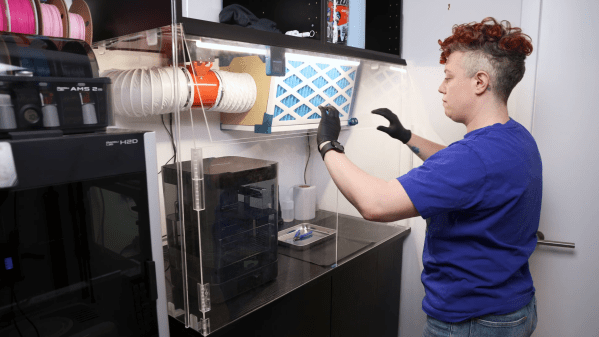
A person is standing in front of an acrylic enclosure, lowering a door on the enclosure. The enclosure contains the space between two sets of cabinets, and has three doors on the front. Inside the enclosure is an air filter and a washing station.

A Fume-Control Cabinet For Resin 3D Printing

For a certain kind of intricate, highly-detailed manufacturing, there’s really no substitute for a resin 3D printer, and it’s therefore unfortunate that they require so many poisonous chemicals. The resin itself usually contains irritating acrylates and methacrylates, it can emit a wide spectrum of volatile organic compounds (VOCs) during printing, and even the isopropyl alcohol used in cleaning is moderately toxic. [Allie Katz] accordingly built this fume-control enclosure for resin printing and other ventilation-critical processes.

The biggest constraint was space: [Allie]’s workspace had a fairly limited volume available, and the enclosure needed to hold an SLA printer, an isopropyl alcohol washing station, a UV curing chamber, and miscellaneous supplies. Most of the enclosure was made out of IKEA cabinets, using some large cabinets at the base to hold the printer and curing station, a countertop over these to hold the washing station, and more cabinets above to hold supplies. An MDF backing panel and acrylic side panels enclose the workspace between the cabinets. There was no safe way to exhaust fumes, so the enclosure recycles its air: a fan pulls air in through an activated-carbon filter mounted above the work area and into the plenum behind the chamber, from which it passes through the printer’s cabinet back into the workspace enclosure. Panel filters surround the carbon filter to catch particulate matter.

The enclosure uses four ESP32-based boards for automation: one uses a touchscreen to display data, and three are paired with BME680 sensors, primarily to report VOC concentrations. One, which also has a particulate matter sensor, senses air quality in the main chamber and plenum, one monitors air quality in the rest of the shop, and the third detects clogging from within the filter enclosure. The first real test of the chamber was to 3D print and paint some handles for the cabinets. It worked as expected, detecting the increased VOCs and ramping up the fan to keep them in check.

We’ve seen a ventilated printer enclosure before, that time for an FDM printer. Although their hazards are less blatant, they too can produce dangerous fumes, which could possibly be carcinogenic.

Thanks to [Keith Olson] for the tip!

A black-and-white clock face is shown. The numerals are ranged around the right edge of the clock. One pointer extends from the center of the clock, and one is on the left side of the face.

A Clock Inspired By Failed Cognitive Tests

One simple screening tool for cognitive impairment is the clock-drawing test (CDT): the patient is provided with a printed circle and asked to draw a clock face with the hands pointing to a certain time. Depending on how the clock is drawn, this could indicate a variety of different disorders, particularly dementia, with a particular deformity in the drawing sometimes pointing to a specific issue. These failed tests inspired [John Silvia] to create a clock with a unique, disordered face.

The numerals in this clock face are placed exclusively along the right half of the clock (in the test, this can be a sign of damage to the right parietal lobe, or of executive dysfunction caused by dementia), and out of order. The hour hand is controlled by a servo motor, and the minute hand is mounted on a separate, commercially-purchased clock mechanism on the left-hand side of the face.

The frame for the clock and the face are 3D-printed, and the servo motor is controlled by an ESP32-C3 with an RTC module. To minimize power draw, a MOSFET disconnects the servo motor from power except for the once-per-hour position update. Once per month, the ESP32 connects to Wi-Fi to synchronize to NTP time, otherwise remaining in a low-power state – even its indicator LEDs are disconnected to save power. These efforts paid off: when the servo isn’t active, it draws only about 160 µA, and a set of three AA NiMH cells lasts about a year.

Since the servo motor draws most of the power budget, it wouldn’t make much difference, but the ESP32’s co-processor can also be used for ultra-low-power projects. For a happier take on a drawing-related clock, check out one of these projects.

A phone running the XFCE desktop environment is placed on a desk, with a wireless keyboard in front of it.

Linux On Android Provides Inexpensive, Powerful Computing

In some parts of the world it’s common for cell service providers to sell new phones at a price significantly below market value, with the caveat that these phones are locked to that service provider alone. It’s questionable whether this practice is good for consumers, but as [Gabriel Broussard Korr] notes, it’s an opportunity for hackers: since it’s possible to run a Linux environment on these phones, they make an inexpensive source of quite powerful computing hardware.

In this case, [Gabriel] was using the Moto G Power 2024, which has 128 GB of storage, 12 GB of RAM, and costs less than $50 when carrier-locked. Rather than trying to install a mobile-oriented Linux distribution (such as postmarketOS), [Gabriel] installed Termux, a terminal emulator which provides a Linux environment within Android. Before doing this, he set up the phone and configured a number of settings for a better Linux experience. Since automatic updates can interfere with these settings, and since none of the provided settings effectively disable these, he used NetGuard to block Internet access from the updater app and from Google Play services.

The next step was to actually install Termux, as well as an X11 extension and an app which exposes an API for Termux. The desktop environment (XFCE in this case) was installed through Termux, and [Gabriel] wrote a shell script to go through the steps of starting it. XFCE worked well on mobile devices because of its full-desktop zoom capability. Even running Linux indirectly, the experience was smooth; [Gabriel] found that GIMP, Shotcut, and VS Code all performed well.

It’s not quite the same set of software, but we’ve previously featured a guide to setting up a similar Linux environment using Termux and AnLinux. Lindroid provides a similar containerized Linux environment; on the other hand, you can also use postmarketOS to make a server from an old phone.

A diagram of a neutron generator is shown in the top portion of the image, with the physical version below.

A Benchtop Neutron Generator For The Home Reactor

There are a surprising number of experiments an amateur nuclear physicist can perform, from making a Geiger counter to fusing hydrogen atoms in a fusor. One project which we haven’t seen before is a neutron generator, such as the benchtop neutron generator made by [Rapp Instruments] (translated).

This particular generator takes a feedstock of pure deuterium, which it ionizes and accelerates into a titanium target. The first deuterium nuclei to hit the target react with it to form titanium deuteride, immobilizing them until more ions strike them and they undergo nuclear fusion. The fusion reaction mostly forms helium-4, but sometimes forms helium-3 and a free neutron, which is radiated away. The radiated neutrons are slowed down by a block of high-density polyethylene, and a portion of them strike a silver or indium foil wrapped around a Geiger counter tube. The neutrons activate the silver or indium, and the Geiger counter detects the resultant increase in radioactivity.

The design is a linear particle accelerator built inside an evacuated glass tube. It uses two high-voltage power supplies: a 20 kV supply which ionizes the deuterium gas fed into the tube, and a 100 kV supply which accelerates ions emitted from the source into the target. The target itself is surrounded by a cup-shaped electrode to capture secondary electrons emitted during impact. To prevent arcing, the tube needs to be at a very low pressure, reached by extensive use of an oil diffusion pump.

Radioactivity measurements of the silver and indium foils showed that the generator did work; when irradiating the silver foil for five minutes, it generated 175 counts per second after the neutron source was turned off. Plotting the count rate versus time suggested that a mixture of two silver isotopes was being generated, Ag-110 and Ag-108, based on their half-lives. Irradiation of indium produced a similar exponential decay in radiation.

We recommend checking out the rest of the site; it’s a gold mine of projects, such as this mass spectrometer. For more background on neutron generators, we’ve covered their theory and some of the more common varieties.