JBI SUMARI
-
JBI Sumari (Ovid) This link opens in a new windowInstructions for use
Develop, conduct, and report on systematic reviews of multiple research papers. **You must create a FREE personal Ovid account to access this product.**
UCF has an organizational subscription which covers faculty, staff and students. If collaborating with members from other institutions, each collaborator must also have access to JBI Sumari through their own organization's subscription or an individual subscription.

Create a user account
Signing in to JBI Sumari
Signing in to JBI is a two step process. Users must create an individual JBI Sumari account in addition to their UCF credentials.
1) Start by logging in to JBI Sumari (Ovid) with your NID/pw.
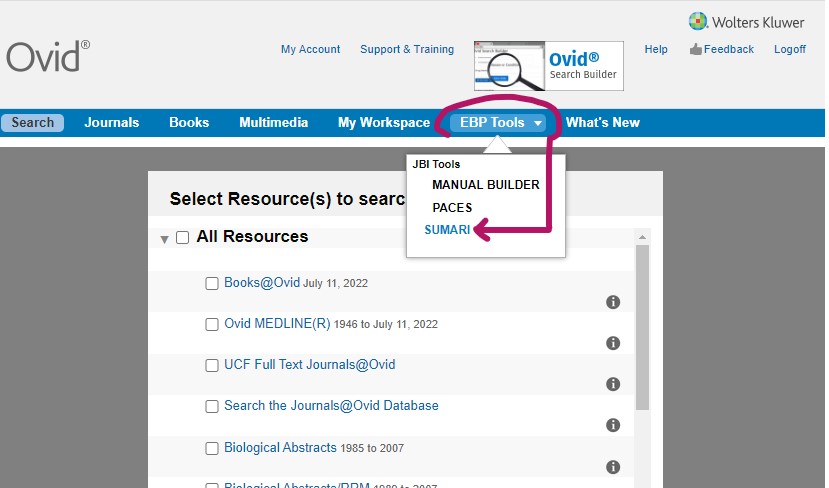
2) Select the EBP Tools dropdown menu, then click on JBI Sumari:
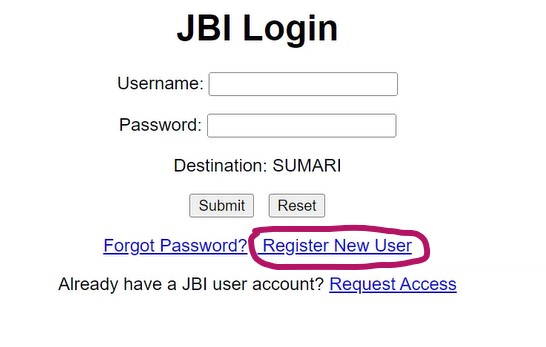
Click on Register New User:
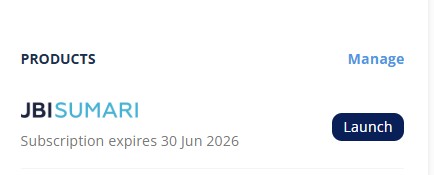
After filling out the registration form and log in with your username and password, you should be routed to a new page. Click Launch.
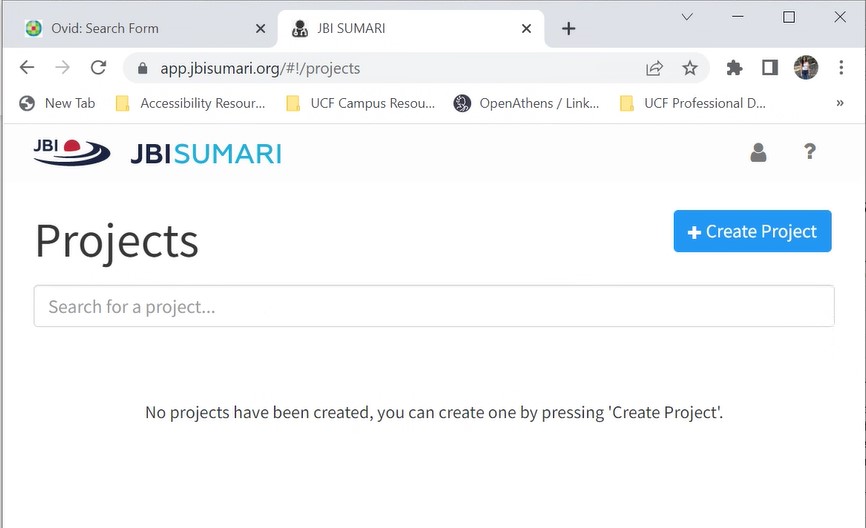
Click on Create Project to start:
Instructional Videos from the Joanna Briggs Institute
Other Resources
-
JBI Manual for Evidence Synthesis This link opens in a new window"The JBI Manual for Evidence Synthesis is designed to provide authors with a comprehensive guide to conducting JBI systematic reviews. It describes in detail the process of planning, undertaking and writing up a systematic review using JBI methods."
-
A review of JBI SUMARI: A systematic review tool This link opens in a new windowGillum, S. (2019, May 19). A review of JBI SUMARI: A systematic review tool. Doody's Collection Development Monthly. Retrieved from https://dcdm.doody.com/2019/05/a-review-of-jbi-sumari-a-systematic-review-tool/
-
The development of software to support multiple systematic review types: The Joanna Briggs Institute System for the Unified Management, Assessment and Review of Information (JBI SUMARI) This link opens in a new windowMunn, Z., Aromataris, E., Tufanaru, C., Stern, C., Porritt, K., Farrow, J., … Jordan, Z. (2019). The development of software to support multiple systematic review types: The Joanna Briggs Institute System for the Unified Management, Assessment and Review of Information (JBI SUMARI). International Journal Of Evidence-Based Healthcare, 17(1), 36–43. https://doi.org/10.1097/XEB.0000000000000152
-
Software to support the systematic review process: The Joanna Briggs Institute System for the Unified Management, Assessment and Review of Information (JBI-SUMARI) This link opens in a new windowMunn, Z. (2016). Software to support the systematic review process: The Joanna Briggs Institute System for the Unified Management, Assessment and Review of Information (JBI-SUMARI). JBI Database Of Systematic Reviews And Implementation Reports, 14(10),