
વર્ણન
Displays sunrise and sunset times for locations in widgets
સ્ક્રીનશોટ
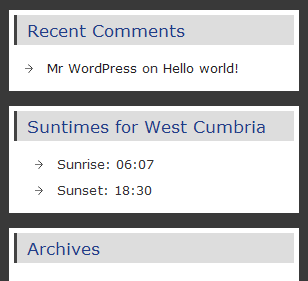
The suntimes widget
સ્થાપન
This section describes how to install the plugin and get it working.
- Go to the Plugins page in the admin area, search for
suntimes widgetand install it. - Or Extract
suntimes-widget.zipin the/wp-content/plugins/directory. This will create a subfolder calledsuntimes-widgetcontaining the plugin files. - Activate the
Suntimes Widgetthrough the ‘Plugins’ menu in WordPress - Go to
appearance->widgets, add the widget to a widget area and then add the title, latitude and longitude. - Google Maps will give you a longitude and latitude of the location you would like the sunrise and sunset times for.
એફએક્યુ (FAQ)
- Where are the options?
-
On the widget page.
- Where to report bugs, ask for support or suggest features?
-
At the plugin page.
સમીક્ષાઓ

એપ્રિલ 19, 2019
It’s a great shame but this very handy widget no longer seems to work under 5.1

ઓક્ટોબર 30, 2018
This example helped me a lot with the basics of plugin/widget development. The times for sunset/sunrise etc. are retrieved by calling a web service. I later found out that (depending on the php version available) the data can be calculated using the built-in function date_sun_info i.e. without the need to call an external web service. Implementing the aforementioned date_sun_info instead of the web service is simple.
ફાળો આપનાર & ડેવલપર્સ

“Suntimes Widget” ને તમારી ભાષામાં અનુવાદ કરો.
વિકાસમાં રસ ધરાવો છો?
કોડ બ્રાઉઝ કરો, જોવોઅસ્વીએન રેપોઝિટરીમાંથી,અથવા સબ્સ્ક્રાઇબ કરોડેવલપમેન્ટ દ્વારાઆરઅસઅસ.
ચેન્જલૉગ
0.9.2
DST related bugfix
0.9.1
Bugfix
0.9
Initial version