
વર્ણન
A more connected world means more opportunities. That’s why customers count on our diverse portfolio of transportation, e-commerce, and business solutions. Our air, ground and sea networks cover more than 220 countries and territories, linking more than 99 percent of the world’s GDP.
Key Features
- Includes negotiated shipping rates in the shopping cart and on the checkout page.
- Ability to control which Usps services to display
- Support for variable products.
- Define multiple warehouses and drop ship locations
- Option to include residential delivery surcharge
- Option to mark up shipping rates by a set dollar amount or by a percentage.
Requirements
- WooCommerce 6.4 or newer.
- An API key from Eniture Technology.
સ્ક્રીનશોટ
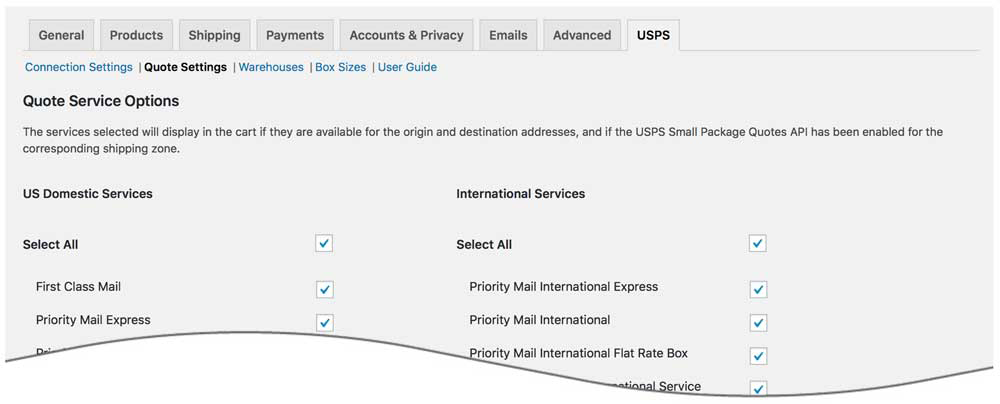
Plugin options page 
Connection settings page 
Quotes returned to cart
સ્થાપન
Installation Overview
Before installing this plugin you should have the following information handy:
- Your Usps account number.
- Your username and password to Usps.
If you need assistance obtaining any of the above information, contact your local Usps
or call the Usps corporate headquarters at 1.888.Go.Usps® (888.874.6388)..
A more extensive and graphically illustrated set of instructions can be found on the Documentation tab at
eniture.com.
1. Install and activate the plugin
In your WordPress dashboard, go to Plugins => Add New. Search for “eniture small package quotes”, and click Install Now on Small Package Quotes – FedEx Edition.
After the installation process completes, click the Activate Plugin link to activate the plugin.
2. Get an API key from Eniture Technology
Go to Eniture Technology and pick a
subscription package. When you complete the registration process you will receive an email containing your API key and
your login to eniture.com. Save your login information in a safe place. You will need it to access your customer dashboard
where you can manage your API keys and subscriptions. A credit card is not required for the free trial. If you opt for the free
trial you will need to login to your Eniture Technology dashboard before the trial period expires to purchase
a subscription to the API key. Without a paid subscription, the plugin will stop working once the trial period expires.
3. Establish the connection
Go to WooCommerce => Settings => Usps. Use the Connection link to create a connection to your Usps
account; and the Setting link to configure the plugin according to your preferences.
4. Enable the plugin
Go to WooCommerce => Settings => Shipping. Click on the link for Usps and enable the plugin.
એફએક્યુ (FAQ)
-
How do I get a Usps account number?
-
Visit the customer support section of usps.com for FAQs, e-mail inquiries or telephone support. We also post verifications of insurance as a courtesy to our customers.
For additional information, call our customer service number: 1.888.Go.Usps® (888.874.6388).
-
Where do I find my Usps username and password?
-
Usernames and passwords to usps.com.
Visit the customer support section of usps.com for FAQs, e-mail inquiries or telephone support. We also post verifications of insurance as a courtesy to our customers.For additional information, call our customer service number: 1.888.Go.Usps® (888.874.6388).
-
How do I get a API key for my plugin?
-
You must register your installation of the plugin, regardless of whether you are taking advantage of the trial period or
purchased an API key outright. At the conclusion of the registration process an email will be sent to you that will include
the API key key. You can also login to eniture.com using the username and password you created during the registration process
and retrieve the API key key from the My API keys tab. -
How do I change my plugin API key from the trail version to one of the paid subscriptions?
-
Login to eniture.com and navigate to the My API keys tab. There you will be able to manage the licensing of all of your Eniture Technology plugins.
-
How do I install the plugin on another website?
-
The plugin has a single site API key. To use it on another website you will need to purchase an additional API key. If you want
to change the website with which the plugin is registered, login to eniture.com and navigate to the My API keys tab. There you will
be able to change the domain name that is associated with the API key. -
Do I have to purchase a second API key for my staging or development site?
-
No. Each API key allows you to identify one domain for your production environment and one domain for your staging or
development environment. The rate estimates returned in the staging environment will have the word “Sandbox�? appended to them. -
Why isn’t the plugin working on my other website?
-
If you can successfully test your credentials from the Connection page (WooCommerce > Settings > Usps > Connections)
then you have one or more of the following licensing issue(s): 1) You are using the API key on more than one domain.
The API keys are for single sites. You will need to purchase an additional API key. 2) Your trial period has expired.
3) Your current API key has expired and we have been unable to process your form of payment to renew it. Login to eniture.com and
go to the My API keys tab to resolve any of these issues. -
Why were the shipment charges I received on the invoice from Usps different than what was quoted by the plugin?
-
Common reasons include one of the shipment parameters (weight, dimensions) is different, or additional services (such as residential
delivery) were required. Compare the details of the invoice to the shipping settings on the products included in the shipment.
Consider making changes as needed. Remember that the weight of the packing materials is included in the billable weight for the shipment.
If you are unable to reconcile the differences call your local Worldwide Express office for assistance. -
Why do I sometimes get a message that a shipping rate estimate couldn’t be provided?
-
There are several possibilities:
- Usps has restrictions on a shipment’s maximum weight, length and girth which your shipment may have exceeded.
- There wasn’t enough information about the weight or dimensions for the products in the shopping cart to retrieve a shipping rate estimate.
- The usps.com isn’t operational.
- Your Usps account has been suspended or cancelled.
- Your Eniture Technology API key for this plugin has expired.
સમીક્ષાઓ
આ પ્લગઇન માટે કોઈ સમીક્ષાઓ નથી.
ફાળો આપનાર & ડેવલપર્સ

“Small Package Quotes – USPS Edition” ને તમારી ભાષામાં અનુવાદ કરો.
વિકાસમાં રસ ધરાવો છો?
કોડ બ્રાઉઝ કરો, જોવોઅસ્વીએન રેપોઝિટરીમાંથી,અથવા સબ્સ્ક્રાઇબ કરોડેવલપમેન્ટ દ્વારાઆરઅસઅસ.
ચેન્જલૉગ
1.3.12 – 2026-01-14
- Update: Added data sanitization in the quotes request to ensure cleaner and more reliable API communication.
- Update: Added blocked stores notification status feature for improved store monitoring.
- Update: Added a caching mechanism to efficiently handle multiple identical quote requests and reduce redundant API calls.
- Update: Added a backup rates feature to ensure rate availability when primary responses fail.
- Update: Added validation checks on sender and receiver addresses to prevent invalid quote requests.
- Fix: Resolved UI issues related to extra white background and the logs pop-up form display.
= 1.3.11=
* Update: Restricted Quoting API calls when the zipcode parameter is missing.
= 1.3.10=
* Update: Improved form data handling to address potential security vulnerabilities and align with WordPress security best practices.
= 1.3.9=
* Update: Added a new “Review Plugin” button for improved user feedback and engagement.
= 1.3.8=
* Fix: Security Enhancements – Addressed vulnerability issues in compliance with WordPress standards.
= 1.3.7=
* Fix: Security Enhancements – Addressed vulnerability issues in compliance with WordPress standards.
= 1.3.6=
* Update: Fix: Security Enhancements: Resolved vulnerability issues for improved plugin security and compliance.
= 1.3.5=
* Fix: Resolved UI compatibility issue with WooCommerce versions later than 9.0.0
= 1.3.4=
* Update: Updated connection tab according to wordpress requirements
= 1.3.3=
* Fix: Fixed a conflict with ShipEngine.
= 1.3.2=
* Update: Repositioning of the “Shipping Rule” navigation.
= 1.3.1=
* Update: Compatibility with WordPress version 6.5.1
* Update: Compatibility with PHP version 8.2.0
* Update: Introduced feature suppress parcel rates when weight threshold is met
= 1.3.0=
* Update: Introduced Shipping Rules feature
= 1.2.1=
* Update: Removed account notice from the connection settings tab.
= 1.2.0=
* Update: Display “Free Shipping” at checkout when handling fee in the quote settings is -100% .
* Update: Introduced the Shipping Logs feature.
* Update: Introduced “product level markup” and “origin level markup”.
= 1.1.2=
* Update: Compatibility with WooCommerce HPOS(High-Performance Order Storage)
= 1.1.1=
* Fix: Fixed Flat Rate case in the service name format.
= 1.1.0=
* Update: Introduced optimizing space utilization.
= 1.0.1=
* Update: Compatibility with WordPress version 6.1
* Update: Compatibility with WooCommerce version 7.0.1
1.0.0
- Initial release.