

વર્ણન
Any Posts Widget provides a light widget allow user choose any posts to display quickly, easily drag and drop ordering.
Documentation
See the FAQ tab for documentation on custom templates, hooks, common issues, and more.
More Information
- For help use wordpress.org
- Fork or contribute on Github
- Visit my website for more
- View my other WordPress Plugins
સ્ક્રીનશોટ
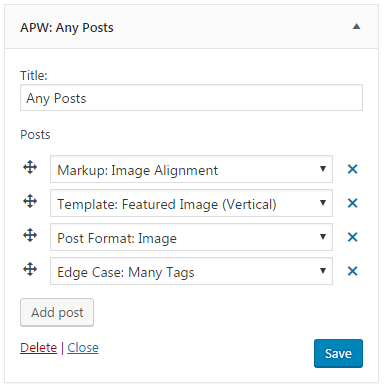
Widget options 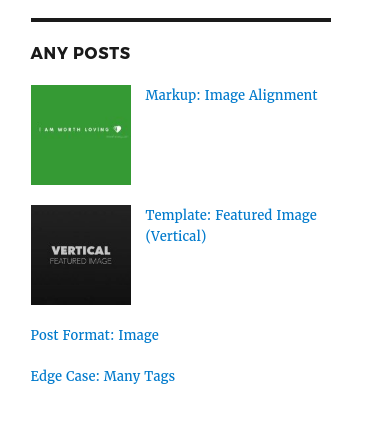
Example with Twenty Sixteen theme
સ્થાપન
- Download and extract the zip archive
- Upload
any-posts-widgetfolder to/wp-content/plugins/ - Activate the plugin through the ‘Plugins’ menu in WordPress
- Add the
APW: Any Postswidget to a sidebar and configure the options
એફએક્યુ (FAQ)
- Installation Instructions
-
- Download and extract the zip archive
- Upload
any-posts-widgetfolder to/wp-content/plugins/ - Activate the plugin through the ‘Plugins’ menu in WordPress
- Add the
APW: Any Postswidget to a sidebar and configure the options
- Filters
-
-
apw_posts_widget_query_args (array):
Allows changing the posts query arguments -
apw_list_posts_open (string):
Allows changing the open tag of posts list. -
apw_list_posts_close (string):
Allows changing the close tag of posts list.
-
- Template
-
Template files can be found within the
templates/directory. Copy any template file(s) toyour-theme/any-posts-widget/directory (with same structure) to override it.

ફાળો આપનાર & ડેવલપર્સ

“Any Posts Widget” ને તમારી ભાષામાં અનુવાદ કરો.
વિકાસમાં રસ ધરાવો છો?
કોડ બ્રાઉઝ કરો, જોવોઅસ્વીએન રેપોઝિટરીમાંથી,અથવા સબ્સ્ક્રાઇબ કરોડેવલપમેન્ટ દ્વારાઆરઅસઅસ.
ચેન્જલૉગ
1.0.1
- Added: Remove post button.
- Added: apw_posts_widget_query_args filter hook.
- Improved: Auto focus on post select field when add post.
- Fixed: Wrong posts order.
1.0.0
- First release.