Everything Included — Free
All the Features Your Team Needs to Ship Faster

Drag-and-Drop Kanban Boards
Visualize your workflow with customizable Kanban columns. Drag tasks between statuses, assign team members, set priorities, and track progress — all in real time.
- Custom status columns (To Do, In Progress, Review, Done)
- Drag-and-drop task reordering
- Priority levels with color-coded badges
- Assignee avatars on each card
Powerful List View with Sorting & Filters
Prefer spreadsheets? Switch to List view for a dense, sortable table of all tasks. Filter by status, priority, assignee, or due date to find exactly what you need.
- Sortable columns (status, priority, due date, assignee)
- Multi-filter support
- Inline quick actions
- Toggle between Kanban and List view instantly


Built-In Time Tracking
Track time on any task with a one-click timer or manual entries. View time reports across your entire team to understand where hours are going.
- Start/stop timer per task
- Manual time entry with notes
- Time reports with date range filters
- Per-user and per-task breakdowns
Rich Task Detail with Comments
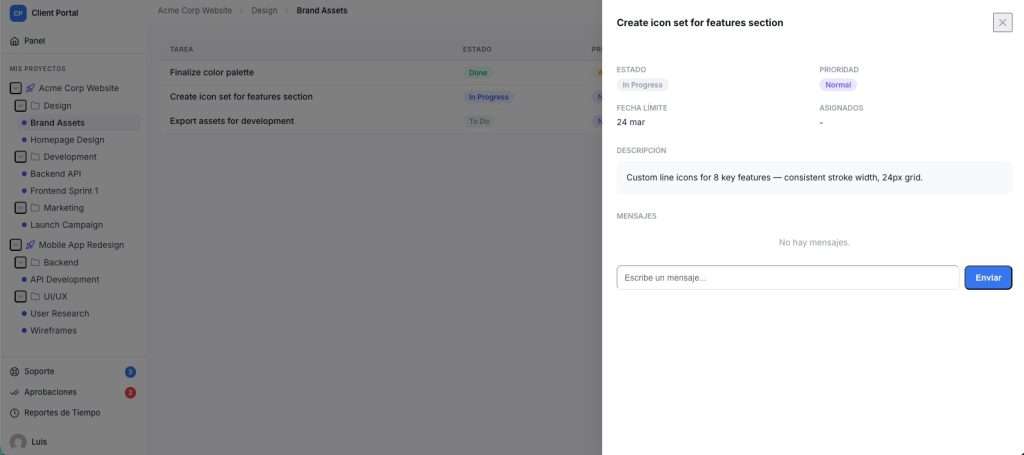
Every task opens into a full detail panel. Add descriptions, assign multiple team members, set due dates, leave comments, and track time — all without leaving the page.
- Slide-in detail panel (no page reload)
- Rich task descriptions
- Threaded comments for team discussion
- Multiple assignees with avatar display
- Tags, due dates, and priority levels
AI-Ready
Built for the agentic web. Native to WordPress 7.
GrowthProjects exposes its full project-management surface through the new WordPress Abilities API. Any AI assistant, MCP client or automation can discover, schema-validate and safely invoke your projects, tasks, comments and time tracking — with the same capability checks your team already uses.
WordPress 7.0+
Abilities API
MCP-compatible
JSON Schema typed
Capability-aware
What your AI can do
| Category | Abilities | Sample |
|---|---|---|
| Workspaces | 5 | list / create-workspace |
| Structure | 10 | create-folder / update-list |
| Tasks | 9 | search-tasks / set-task-status |
| Comments | 3 | create-task-comment |
| Time tracking | 8 | start-timer / get-time-report |
| Navigation | 1 | get-navigation-tree |
- Ask in plain language. “Create a task in Marketing for tomorrow and assign it to Sara”.
- Safe by design. Every ability declares readonly, idempotent or destructive intent.
- Your permissions still apply. Each call goes through WordPress capabilities.
- Tune it from wp-admin. Decide which abilities are exposed to MCP clients.
36 typed abilities across 6 categories, registered under the growthprojects/* namespace.
Requires WordPress 7.0+.
Up and Running in 3 Steps
1
Install & Activate
Upload the plugin via Plugins → Add New, or install directly from the WordPress plugin repository. Activate it.
2
Add the Shortcode
Create a new page and paste [workhub_projects]. That’s it — your full project management app loads on that page.
3
Create Your First Project
Set up a Workspace, add Folders and Lists, then start creating tasks. Invite your team by assigning them WordPress roles.
WorkHub Free vs. SaaS Alternatives
See how WorkHub stacks up against paid project management tools.
| Feature | WorkHub Free | Trello Free | Asana Free | Monday.com |
|---|---|---|---|---|
| Self-hosted / own your data | ✓ | ✗ | ✗ | ✗ |
| Unlimited users | ✓ | ✓ | 15 max | ✗ |
| Kanban boards | ✓ | ✓ | ✓ | ✓ |
| List / table view | ✓ | ✗ | ✓ | ✓ |
| Built-in time tracking | ✓ | ✗ | ✗ | Paid add-on |
| Workspace hierarchy | ✓ | ✗ | Limited | ✓ |
| Comments on tasks | ✓ | ✓ | ✓ | ✓ |
| WordPress native | ✓ | ✗ | ✗ | ✗ |
| No monthly fees | ✓ | Freemium | Freemium | ✗ |
Built for Teams Like Yours
Whether you’re a freelancer, agency, or internal team, WorkHub adapts to your workflow.
Freelancers & Solopreneurs
Track client projects, log billable hours, and keep all your work organized in one place — right where your website lives.
Small Teams & Startups
Collaborate with your team using Kanban boards, comments, and time tracking — without adding yet another SaaS subscription to your stack.
WordPress Agencies
Manage multiple client projects with Workspaces. Upgrade to Pro for support tickets or Business for a branded client portal.
Frequently Asked Questions
Is WorkHub really free?
Yes. The free version includes Kanban boards, list view, task management, time tracking, time reports, comments, workspaces, folders, and lists. There are no user limits and no time restrictions. Optional Pro and Business plans add support tickets and a client portal.
Does WorkHub work with my WordPress theme?
Yes. WorkHub renders inside a shortcode and uses scoped CSS with its own design system. It’s been tested with classic themes, block themes (like Twenty Twenty-Five), and page builders. It won’t conflict with your theme’s styles.
How many users can I add?
Unlimited. WorkHub uses your existing WordPress users. Anyone with the Administrator, Editor, or Author role automatically gets access. There’s no per-seat pricing on any plan.
What’s the difference between Free, Pro, and Business?
Free includes full project management with Kanban, list view, time tracking, and reports. Pro adds support tickets and CSV export for time reports. Business adds everything in Pro plus a branded client portal with approvals, messaging, and client-facing project views.
Where is my data stored?
All data is stored in your WordPress database on your own server. WorkHub is fully self-hosted — nothing is sent to external services. You maintain full ownership and control over your project data.
Can I use WorkHub for client work?
Absolutely. Use Workspaces to separate client projects. Track billable time with the built-in timer. When you’re ready to give clients their own portal, upgrade to the Business plan for a branded, white-label client experience.
Need More? Upgrade Anytime.
Start free, grow when you’re ready. Upgrade to Pro for support tickets and CSV exports, or to Business for a full client portal with approvals, messaging, and time reports.