

Descrición
ZZ Image Slider goes PRO! All PRO version features are free now.
ZZ Image Slider is a WordPress plugin based on JSSOR Slider and compatible with smart devices. This plugin is perfectly suitable for homepage and also can be used in WordPress posts or pages for showing awesome responsive images slideshows. Supports horizontal and vertical slide direction.
Samples can be found here.
Features:
- Responsive design
- Auto slide show
- Navigation bullets
- Navigation arrows
- Custom slides timings
- Pause on mouse hover
- Custom each slide title, description and “Read More” link
- Drag and drop to change image place
Capturas

Admin window, slider images list. 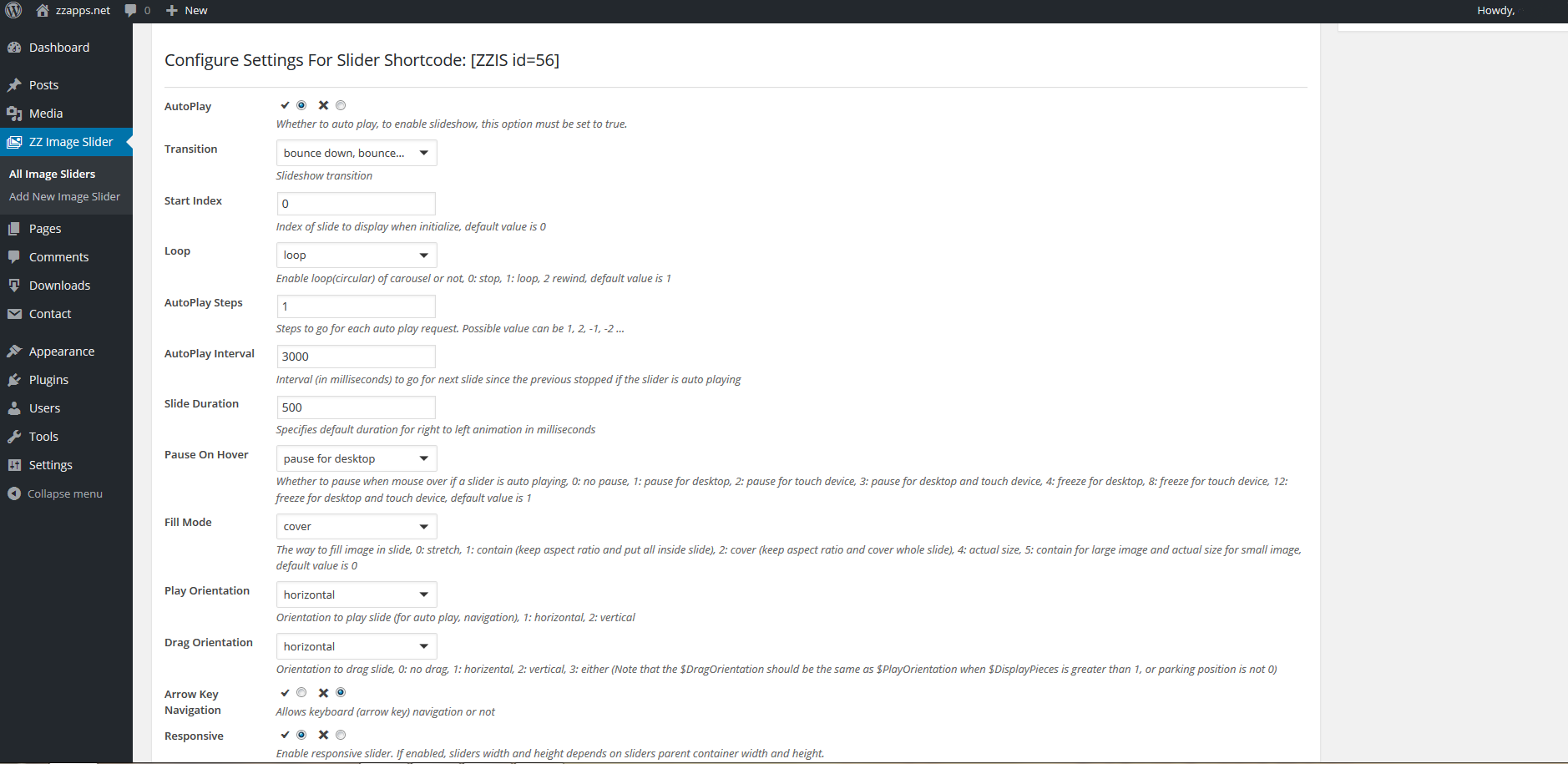
Admin window, slider settings. 
Slider samples.
Instalación
From your WordPress dashboard
- Visit “Plugins > Add New”
- Search for “ZZ Image Slider”
- Activate “ZZ Image Slider” from your Plugins page.
- Visit “ZZ Image Slider > Add New Image Slider” to create new slider.
- Copy and paste shortcode of the slider to the post or page.
From WordPress.org
- Download “ZZ Image Slider”
- Upload the “zz-image-slider” directory to your “/wp-content/plugins/” directory, using your favorite method (ftp, sftp, scp, etc…)
- Activate “ZZ Image Slider” from your Plugins page.
- Visit “ZZ Image Slider > Add New Image Slider” to create new slider.
- Copy and paste shortcode of the slider to the post or page.
Preguntas frecuentes
-
I have a question about ZZ Image Slider, what to do?
-
You can checkout the the Support section of the slider page and ask your question there.
Comentarios

30 de Agosto, 2018
I downloaded and was using the free version when my site crashed which caused a problem with the slider. An email to the developer and the problem was fixed almost immediately.
I have now purchased the Pro version for some added functionality. Overall, it’s easy to use and is the only one I could find that had all the things I was looking for i.e. able to put different size and shape images into one slider. This one did the job beautifully.
I was able to use it out of the box without any problems and although there are quite a few adjustments you can make, it is a really simply dashboard and I would recommend it to anyone.

3 de Setembro, 2016
2 respostas
Like all plugins, you need first to get into how it works, get the feel, the functionality. After spending an hour doing so (I like to dig deep) here is my take :
If your reading this, your probably one of the hundreds; nay, thousands who have hunted high and low for a slider plugin that does exactly what it says on the tin right?
Well, here it is – it’s simple, easy to use, unbloated and you can get your slider up and running within three minutes (if you have already set up your images for it!)
And yes, you can also add your ow CSS and mess with the style sheet (as I did) 😉
Sure it also has a ‘Pro’ version, but a man has to eat right?
Only criticism I have is ‘why oh why’ do devs make videos and not add a narration? If they can’t speak English get a one on Fiverr.Com (I recommend an VO Artist called’BookMyVoice’
Love to test and try the pro version out!
Anyway, bottom line > Nice plugin, Written well, Unbloated, Fast!
Colaboradores e desenvolvedores
“ZZ Image Slider” é un software de código aberto. As seguintes persoas colaboraron con este plugin.
Colaboradores
Traduce “ZZ Image Slider” ao teu idioma.
Interesado no desenvolvemento?
Revisa o código, bota unha ollada aorepositorio SVN, ou subscríbete ao log de desenvolvemento por RSS.
Rexistro de cambios
2.0.0
- PRO version features included!
1.3.3
- setup bugfix
1.3.2
- ability to center arrows horizontal and vertical
- minor translation changes
- minor code fixes
1.3.1
- jssor script loaded where required (not in all pages)
1.3.0
- ability to deactivate (not delete) the image from viewing in frontend
- minor html structure changes
- minor translation changes
1.2.0
- ability to disable default css
- ability to use whole the image for Read More link
- ability to select multiple transitions (PRO)
- jssor script loading an the end of the body
- minor html structure changes
- transitions fix (PRO)
1.1.0
- PHP code
1.0.0
- Initial release