

Descrición
Showcase your 3D Models with immersive AR experiences directly in the browser using advanced 3D Viewer WordPress plugin. No apps or coding needed. Just add a browser-based 3d model, Experience in real environment and build confidence, cut returns, and boost conversions.
🚀 NEW IN VERSION 1.8.0: Pro version now available with Dimensions, Hotspots, Slider Configurators, and Automatic Compression!
👉 View Pro Pricing & Features
Key AR features at a Glance:
- Inspect 3D models from every angle (rotate/zoom) Dining Armchair Demo.
- Place products in real spaces using smartphone AR (floor/wall) Office Chair Demo.
- Preview model Preview model in the product editor page.
- **Integrated with Tripo3D API to generate .glb/3D model
- 🔥 NEW: Automatic model compression (Pro) – Reduce file sizes by up to 70%
- 🔥 NEW: Product dimensions display (Pro) – Show real-world sizes in AR
- 🔥 NEW: Interactive hotspots (Pro) – Educate customers with clickable info points
- 🔥 NEW: Product configurators (Pro) – Let customers customize colors, materials, options
SOME USEFUL LINKS:
How To Install Augmented Reality ( AR VR Try On ) Plugin By AtlasAidev
Augmented Reality Plugin From Mobile Phone
Why Choose Our 3d viewer WordPress Solution?
- ✅ Unlimited 3D Uploads: Free version supports unlimited .glb/.gltf/.usdz files.
- ✅ True Mobile AR: Android (GLB) + iOS (USDZ) compatibility.
- ✅ WooCommerce Native: Automatic integration with product pages.
- ✅ Zero Coding: Automatic AR button placement on product pages – no coding required.
- ✅ ShortCode: Easy shortcode setup
[atlas_ar]. - ✅ QR Code: Display a QR code in desktop view .
- ✅ **Integrated with Tripo3D API to generate .glb/3D model
- ✅ Pro Features: Dimensions, Hotspots, Sliders, Auto-Compression
Core Features:
1. Complete 3D Model Control
- Upload .GLB/.GLTF files for Android AR and 3D view in desktop.
- Add .USDZ files for iOS AR Quick Look.
- Set custom posters/thumbnails for each 3D model viewer.
- Automatic fallback to interactive 3D model viewer on desktop/mobile.
- 🔥 NEW (Pro): Automatic model compression – Reduce file sizes by up to 70% for faster loading
2. Mobile Augmented Reality Magic (AR Placement Options)
- **Floor 3d viewer **: Allow customers to visualize furniture, appliances, and other large items in their rooms. Office Chair Demo
- **Wall 3d viewer **: Let users preview wall art, mirrors, and décor directly on their walls. Sun Painting Demo
- 🔥 NEW (Pro): Dimensions Display – Show product measurements in AR to reduce “will it fit?” questions
- Glass Mode (Pro Version – Coming Soon): Enable virtual try-ons for glasses, sunglasses, and jewelry.
3. WooCommerce Optimization
- Dedicated “AtlasAR” tab and settings within the WooCommerce product editor.
- Automatic “View in AR ” button placement on product pages.
- Full support for simple and variable/configurable products.
- Designed to work seamlessly with all standard WooCommerce themes.
- 🔥 NEW (Pro): Interactive hotspots – Add clickable information points to educate customers
- 🔥 NEW (Pro): Product configurators – Let customers customize colors, materials, and options
4. Enterprise-Ready Performance
- Host unlimited 3D models with no file size restrictions in the free version.
- Optimized for fast and smooth mobile Augmented Reality experiences.
- Asynchronous loading of models to ensure fast page speeds.
- 🔥 NEW (Pro): Automatic GLB/GLTF compression using Draco and Basis Universal
- Coming Soon (Pro): Background compression processing for large files
- Coming Soon (Pro): Bulk compression for entire product catalog
5. QR Code
Display a QR code in desktop view, allowing users to scan and switch to an AR capable device.
3D Model Generation
How to Generate 3D Models with Tripo3D API
- Generate your API key from the Tripo3D API.
- Copy the API key.
- Go to the AtlasAR metabox in the post edit screen.
- Click on the Integration tab.
- Paste your API key in the Integration settings and save.
- Now, go back to the Edit Post page.
- In the AtlasAR metabox, enter your prompt for the 3D model.
- Click on the Generate Model button.
- A
task_idwill be generated. - Wait a few seconds while the model is being processed.
- A
- Once the model is generated, a 3D preview will appear on the right side.
- Click on the Save This Model button to save the generated model and update the post data.
- After saving, you can view the generated 3D model on the front end of your site.
How It Works – 3 Simple Steps
- Install & Activate:
- In your WordPress admin panel, go to Plugins Add New.
- Search for “AR VR 3D Model Try On”.
- Click “Install Now” and then “Activate.”
- Find the “AtlasAR” menu.
- Setup you basic settings.
- Upload Models:
- Navigate to a WordPress post eiditing screen
- Find the “AtlasAR” Metabox.
- Select the place where you want to display the 3D Model like Floor/Wall etc.
- Upload your Android Model:
.glb/.gltffile. - Upload your iOS Model:
.usdzfile. - Optionally, add a Poster Image (thumbnail) for the 3D model viewer.
- If your site is WooCommerce Store then first go to settings page of the plugin. And Look “Enable AR For Post Types” by default If would be
post' change it toproduct’ and save.
- Display 3D Model Viewer:
- The “View in AR ” button is automatically placed on your WordPress Posts/WooCommerce product pages.
- For manual placement in other locations, you can use the shortcode:
[atlas_ar]. - Pro Users: Enable dimensions, hotspots, and sliders from the AtlasAR metabox settings.
Real-World 3D Viewer Applications
- 🪑 Furniture Stores: “Customers visualize sofas in their living rooms before buying.” Office Chair Demo
- 🖼️ Home Decor: “Preview wall art placement through phone camera.” Dining Armchair Demo
- 🛋️ Pro Feature – Dimensions: Show exact measurements in AR to answer “will it fit?” questions
- 🎨 Pro Feature – Configurators: Let customers customize furniture colors and materials before purchase
Competitive Advantages
Free Model Limits
– Our Plugin: Unlimited ⭐
– Others: Often 1–10 models
iOS AR Support
– Our Plugin: Full native .USDZ compatibility ⭐
– Others: Android-only or limited iOS support
WooCommerce Integration
– Our Plugin: Native, seamless implementation ⭐
– Others: May require add-ons or hacks
Model Compression
– Our Plugin: Automatic compression up to 70% savings ⭐
– Others: Manual compression required
Product Dimensions
– Our Plugin: Real-world size display in AR (Pro) ⭐
– Others: No dimension features
Pro Version Features
🎯 Upgrade to Pro and unlock powerful features that boost conversions and reduce returns!
👉 See Pro Pricing Plans
Available Now in Pro:
⭐ Dimensions Display:
* Show product measurements (length, width, height) directly in AR view
* Help customers answer “will it fit?” before buying
* Reduce returns caused by size mismatches
* Perfect for furniture, appliances, home decor
⭐ Interactive Hotspots:
* Add clickable information points on your 3D models
* Educate customers about product features, materials, care instructions
* Increase customer confidence and reduce support questions
* Perfect for complex products like furniture, electronics, jewelry
⭐ Product Configurators (Sliders):
* Let customers customize colors, materials, finishes, and options
* Increase engagement and time spent viewing products
* Higher average order value through personalization
* Perfect for furniture, fashion, custom products
⭐ Automatic Model Compression:
* Reduce 3D file sizes by up to 70% automatically
* Faster loading times = better user experience
* Uses industry-standard Draco geometry compression
* Basis Universal texture compression for optimal quality
* Keeps original files for backup
Coming Soon in Pro:
🚀 Advanced Analytics Dashboard (Q1 2026):
* Track AR engagement, device types, placement attempts
* See which products perform best in AR
* Prove ROI with conversion tracking
* Integration with Google Analytics
🚀 Per-Variation 3D Models (Q1 2026):
* Upload different 3D models for each product variation (color, size, style)
* Critical for WooCommerce stores with variable products
* Automatic model switching when customers select variations
🚀 Background Processing & Bulk Compression (Q2 2026):
* Compress large files in background (no upload delays)
* Bulk compress your entire product catalog with one click
* Queue system for processing multiple models
🚀 Glass Mode Virtual Try-On (Q2 2026):
* Enable realistic virtual try-ons for eyewear and jewelry
* Face tracking for accurate placement
* Unique feature – no other AR plugin has this!
🚀 Desktop WebAR (Q3 2026):
* AR experiences on desktop browsers (no phone needed)
* Broader accessibility for all users
🚀 Multi-Model Scenes (Q3 2026):
* Display multiple products together in AR
* Room planning and outfit builders
* Advanced configurators
Pro Support & Updates:
- Priority email support (24-hour response time)
- Regular feature updates
- Early access to beta features
- Dedicated documentation
👉 Upgrade to Pro Now
💰 Starter Plan: Only $49.99/year – All Pro features for 1 site
Technical Specifications
- Supported 3D Formats:
.glb,.gltf(for Android/Web 3D),.usdz(for iOS AR Quick Look). - Mobile Device Requirements: Android 9.0+ with ARCore support, iOS 12+ with ARKit support.
- WooCommerce Compatibility: Version 3.0 and above.
- WordPress Compatibility: Version 5.0 and above.
- Performance: Models load asynchronously. Lazy loading implemented for archive pages to minimize performance impact. Optimized for mobile 3D rendering.
- Pro Compression: Draco geometry compression + Basis Universal texture compression for up to 70% file size reduction.
Start Your AR Journey Today
- Install the Free Version: Get started with unlimited 3D model uploads, no credit card needed.
- Upload Your First Model: Add a
.glb/.gltffile for Android/Web and a.usdzfile for iOS to a product. - Watch Engagement Soar: Provide interactive AR experiences.
- Upgrade to Pro: Unlock dimensions, hotspots, compression, and configurators to maximize conversions.
CHECK OUT OUR OTHER ADDONS 👑:
🔥 Text To Speech TTS Accessibility – Text To Speech TTS Accessibility is the most user-friendly Text-to-Speech tts plugin. Just install and automatically add a text to audio player to your WordPress site!.
Capturas

Settings For Wordpress 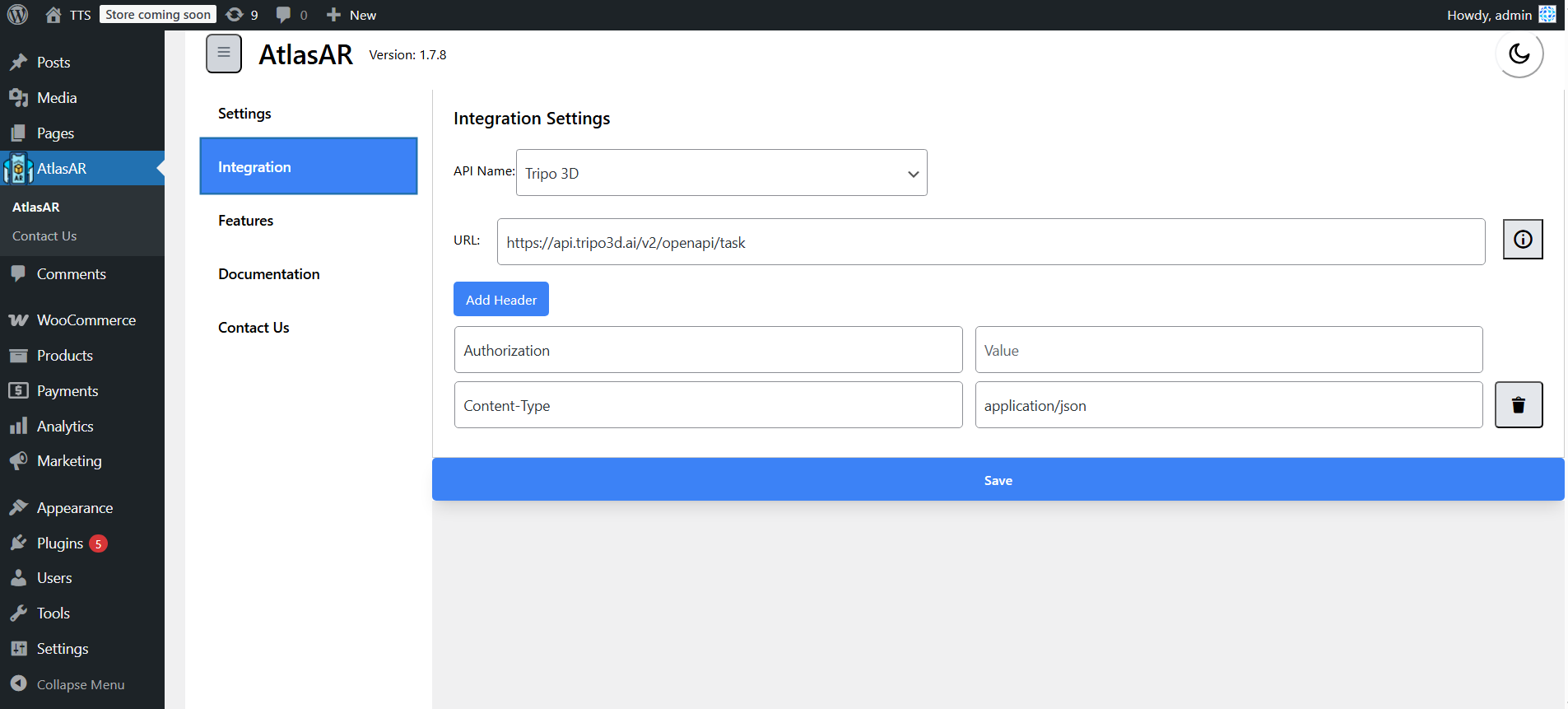
Settings For WooCommerce 
Upload 3D Model By Metabox 
Demo Product In Frontend 
Plugin Features
Blocks
Este plugin proporciona 1 bloque.
- AtlasAR – 3D Model Viewer
Instalación
- Upload the plugin folder (
ar-vr-3d-model-try-on) to the/wp-content/plugins/directory via FTP, OR - Install directly through the WordPress plugins screen: Go to ‘Plugins’ > ‘Add New’, search for “3D Model Viewer & AR for WordPress & WooCommerce” by
Azizul Hasan, and click ‘Install Now’. - Activate the plugin through the ‘Plugins’ menu in WordPress.
- Navigate to a WordPress Post, post metabox section, and find the “AtlasAR” metabox to upload your 3D models.
- Navigate to a WooCommerce product, go to the product metabox section, and find the “AtlasAR” metabox to upload your 3D models.
- The “View in AR ” button will automatically appear on product pages. You can also use the shortcode
[atlas_ar]for manual placement. - If your site is WooCommerce Store then first go to settings page of the plugin. And Look “Enable AR For Post Types” by default If would be
post' change it toproduct’ and save. - For Pro Features: After upgrading to Pro, enable dimensions, hotspots, and compression from the AtlasAR metabox settings.
Preguntas frecuentes
-
Q: What’s included in the Free version vs Pro version?
-
A: Free version includes unlimited 3D model uploads, full iOS + Android AR support, WooCommerce integration, QR codes, and Tripo3D AI generation. Pro version adds dimensions display, interactive hotspots, product configurators, automatic compression, and upcoming features like analytics and per-variation models. Compare plans here.
-
Q: How does the Pro compression feature work?
-
A: Pro version automatically compresses your .glb and .gltf files using industry-standard Draco geometry compression and Basis Universal texture compression. This reduces file sizes by up to 70% while maintaining visual quality, resulting in faster loading times and better user experience. The original files are kept as backup.
-
Q: Can I try Pro features before buying?
-
A: Yes! We offer a 14-day money-back guarantee on all Pro plans. If you’re not satisfied with the Pro features, you can request a full refund within 14 days of purchase.
-
Q: What are dimensions and how do they help?
-
A: The dimensions feature (Pro only) displays real-world measurements (length, width, height) directly in the AR view. This helps customers answer “will it fit?” questions before buying, significantly reducing returns caused by size mismatches. Perfect for furniture, appliances, and home decor products.
-
Q: What are hotspots and why should I use them?
-
A: Hotspots (Pro only) are clickable information points you can add to your 3D models. They let you educate customers about specific features, materials, care instructions, or benefits. This increases customer confidence, reduces support questions, and helps sell complex products.
-
Q: What is the product configurator (slider) feature?
-
A: The slider/configurator feature (Pro only) lets customers customize product options like colors, materials, finishes, and styles directly in the 3D viewer. This increases engagement, time on page, and often leads to higher average order values through personalization.
-
Q: Can I display 3D Models with custom post types?
-
A: Yes, By default it enabled with post type post. If you want to enabled for any other post then go to settings page of the plugin. And Look “Enable AR For Post Types”. Change it to `you_custom_post_type’ and save.
-
Q: Which 3D file formats are supported?
-
A: You can upload
.glband.gltffiles for Android and desktop viewers, and.usdzfiles to enable native iOS AR Quick Look functionality. -
Q: Do my customers need to install an app to use AR?
-
A: No— AtlasAR launch directly in mobile browsers on both Android (via Scene Viewer) and iOS (via Quick Look), with no extra app downloads required.
-
Q: How do I display the 3D/AR viewer on my product pages?
-
A: Once the plugin is active, “View in AR ” buttons are automatically added to all WooCommerce product pages where models are assigned. For Pro users, dimensions, hotspots, and configurators appear automatically when enabled.
-
Q: Is there a limit on how many models I can upload with the free version?
-
A: No. The free version supports unlimited
.glb/.gltfmodel uploads—no size or quantity caps. This is a major advantage over competitors who limit free users to 1-5 models. -
Q: Will loading 3D models slow down my site?
-
A: We’ve optimized the plugin for performance. Models load asynchronously (typically taking 0.3–0.7 seconds on a stable 4G connection) and utilize lazy loading on archive/shop pages to minimize any impact on your site’s speed. Pro compression makes files even smaller for faster loading.
-
Q: Which WooCommerce versions and themes are supported?
-
A: The plugin is compatible with WooCommerce 3.0 and above. It is designed to work seamlessly with all standard WooCommerce themes and major page builders (like Elementor, WPBakery, Beaver Builder, etc.).
-
Q: How do I upgrade to Pro?
-
A: Visit our pricing page to choose a plan. After purchase, you’ll receive a license key to activate Pro features. We offer plans starting at $39/year for single sites.
-
Q: What happens when my Pro subscription expires?
-
A: If your Pro subscription expires, the Pro features (dimensions, hotspots, compression, configurators) will be disabled, but your site will continue to work with all the free features. Your existing compressed models will continue to work. You can renew anytime to regain Pro features.
-
Q: Can I use Pro on multiple sites?
-
A: Yes! We offer multi-site plans. The Professional plan ($99/year) covers 3 sites, and the Business plan ($199/year) covers 10 sites. See all plans.
Comentarios

Colaboradores e desenvolvedores
“3D Viewer – 3D Model Viewer – Augmented Reality” é un software de código aberto. As seguintes persoas colaboraron con este plugin.
Colaboradores


Traduce “3D Viewer – 3D Model Viewer – Augmented Reality” ao teu idioma.
Interesado no desenvolvemento?
Revisa o código, bota unha ollada aorepositorio SVN, ou subscríbete ao log de desenvolvemento por RSS.
Rexistro de cambios
1.8.2 ( 6 February 2026 )
fixed : file upload issue solved
1.8.1 ( 2 February 2026 )
Added : Overview section added
1.8.0 ( 25 January 2026 )
Added : .glb file compression feature added (Pro).
Added : Dimensions feature added (Pro) – Display product measurements in AR.
Added : Hotspots feature added (Pro) – Interactive information points on 3D models.
Added : Slider feature added (Pro) – Product configurators for customization.
Added : Pro version released – Professional features for WooCommerce stores.
Improved : Plugin performance improved.
Improved : README updated with comprehensive Pro feature documentation.
Improved : FAQ expanded with Pro-specific questions.
1.7.8 ( 28 December 2025 )
Updated : documentation updated
1.7.6 ( 26 November 2025 )
Introduced : gutenbarg block added for shortcode [atlas_ar].
Fixed : normal post page 3d render issue fixed when woocommerce is not active.
1.7.5 ( 21 November 2025 )
Improved : Fatal error fixed
1.7.4 ( 21 November 2025 )
Improved : Spinner added during saving.
Improved : Modal UI improved.
Fixed : Modal title special character issue fixed.
Fixed : Modal title special character issue fixed.
Improved : Dashboard UI improved.
1.7.3 ( 19 November 2025 )
Improved : Settings buttons primary color set.
Improved : Integration buttons color matched to settings page.
Fixed : 3d model hide after scroll down in metabox, issue fixed.
1.7.2 ( 25 October 2025 )
Added: woocommerce_product_thumbnails woocommerce product thumbnail action hook added for Showing 3D file.
1.7.1 ( 17 October 2025 )
Improved: Dashboard UI improved.
1.7.0 ( 13 October 2025 )
Improved: UI improved.
Introduced: Dark Mode and Light Mode feature added.
1.6.1 ( 26 September 2025 )
Introduced: New modal added for 3d model display.
Improved: 3d Model loading time improved.
1.6.0 ( 04 September 2025 )
Introduced: model generation UI.
Introduced: User can generate model from post edit page.
integrated with Tripo3D API
1.5.4 ( 31 August 2025 )
Fixed: model upload issue fixed.
Fixed: multiple model load issue fixed.
Fixed: Cache issue not working issue fixed.
Fixed: QR code , post types settings not working issue fixed.
1.5.3 ( 31 August 2025 )
Introduced: Documentation menu added’
Changed: Plugin menu and tab and metabox name changed.
Fixed: minor bug fixed.
1.5.2 ( 14 August 2025 )
Fixed: Default model loading issue solved when current post have any model.
1.5.1 ( 13 August 2025 )
Fixed: Reload issue onClick on tab fixed.
1.5.0 ( 13 August 2025 )
Added: auto retate option added.
Added: skybox image option added.
Added: environment image option added.
Added: disable tap option added.
Added: disable zoom option added.
Added: shadow intesity option added.
Added: alignment, margin, padding, width, height option added.
Improved: Metabox UI improved.
Added: Default model value added.
Improved: performance of model loading improved.
Added: Custom css option added.
1.4.8 ( 07 August 2025 )
Fixed: 3D view button not showing up is fixed.
1.4.7 ( 04 August 2025 )
Improved: QR code will only load for Desktop.
Changed: AR button Name changed.
Updated: Documentation updated.
1.4.6 ( 24 July 2025 )
Fixed: UI related bug fixed.
1.4.5 ( 20 July 2025 )
Fixed: QR Code issue fixed.
1.4.4 ( 20 July 2025 )
Fixed: Major bug fixed.
1.4.3 ( 14 July 2025 )
Introduced: QR code feature added.
1.4.2 ( 11 July 2025 )
Fixed: Activation issue fixed.
1.4.1 ( 03 July 2025 )
Minor change.
1.4. ( 19 June 2025 )
Added: ShortCode “[atlas_ar]” introduced.
Added: Option for adding AR button automatically.
Improved: Code structure improved.
Fixed: Minor bug fixed.
1.3.4 ( 17 June 2025 )
Added: Model preview added to woocommerce tab in front end.
1.3.3 ( 15 June 2025 )
Changed: Contact Us page link changed.
Added: Link added to preview demo page.
Updated: Feature list updated.
1.3.2 ( 12 May 2025 )
Added: Documentation, youtube video link added.
Added: Real application of the plugin demo added
1.3.1 ( 08 May 2025 )
Added: Readme.txt updated.
1.3.0 ( 21 April 2025 )
Added: Preview added in admin metabox.
1.2.0 ( 16 April 2025 )
Added: tracker added.
1.1.2 ( 08 April 2025 )
Added: Compatible with wordpress 6.8.0
Added: Screenshots added of the plugin.
1.1.1 ( 25 Mar 2025 )
Added: Initial setup video added.
1.1.0 ( 09 Mar 2025 )
Freemius integrated.
1.0.12 ( 10 Feb 2025 )
Title changed.
1.0.11 ( 09 Feb 2025 )
Fixed bug on helper file.
1.0.10 ( 09 Feb 2025 )
- Fixed: Unnecessary button load issue solved.
- Fixed: Unnecessary tab adding in woocommerce solved.
1.0.9 ( 28 Jan 2025 )
- Improved: Minor changes.
- Improved: Documentation improved.
1.0.8 ( 20 Jan 2025 )
- Improved: UI improved.
- Contact information added.
- Feature added to dashboard
1.0.7 ( 14 Jan 2025 )
- Fixed: Settings save issue fixed.
- Moved: AR placement moved to model settings metabox.
- improved: Model settings make dynamic.
- GLTF file support added.
1.0.6 ( 10 Jan 2025 )
- Fixed: demo error fixed.
1.0.5 ( 09 Jan 2025 )
- Fixed: preview url issue fixed.
1.0.4 ( 09 Jan 2025 )
- added: Demo preview system added.
1.0.3 ( 09 Jan 2025 )
- added: Woocommerce tab added.
1.0.2 ( 07 Jan 2025 )
- added: prefix added to css class.
1.0.1 ( 5 Jan 2025 )
- Short description issue fixed.
- Unnecessary code removed.
1.0.0
- Initial release