

 PostgresApp
Dabases Not Showing in app - PostgreSQL 10
I have multiple databases created, but none of them are showing in the app. They did on the first install run, but since have not shown when running postgresql.app
screenshot: https://imgur.com/zzgBOFW

Hm. Did you change ph_hba.conf to require a password? Postgres.app always connects without a password, assuming that connections from localhost are set to trust.

I did not change ph_hba.conf to require a password (at least not on purpose). How would I go about checking this?
Can you try executing this command in the terminal:
/Applications/Postgres.app/Contents/Versions/latest/bin/psql 'postgresql://:5432' -c 'SELECT datname FROM pg_database WHERE datallowconn ORDER BY LOWER(datname)'
That's basically what Postgres.app does to get a list of databases. (If you changed the default port, replace 5432 with the port you are using)
Huh, yep... that worked. The four databases I have all showed up with that command. So strange.
I had the same problem, no database shows. so I tried the command as indicated and returned an error. psql: FATAL: database "cesar" does not exist and cesar is my user name.
So I created a database with my name and now everything works both in the terminal and in the application.
I hope it serves as a clue to find out what's going on.


I had the same problem, no database shows. so I tried the command as indicated and returned an error.
psql: FATAL: database "cesar" does not existandcesaris my user name.So I created a database with my name and now everything works both in the terminal and in the application.
I hope it serves as a clue to find out what's going on.
For anyone else running into this, as indicated in the troubleshooting section of the PostgresApp Docs:
You can create the missing database using the command
createdb $USER

I had the same problem, no database shows. so I tried the command as indicated and returned an error.
psql: FATAL: database "cesar" does not existandcesaris my user name.So I created a database with my name and now everything works both in the terminal and in the application.
I hope it serves as a clue to find out what's going on.
My database is created by Spring Boot Jpa and using postgresql, but I have the same error.

Hi, guys. When I try running the command above I get this error:
psql: error: connection to server on socket "/tmp/.s.PGSQL.5432" failed: FATAL: role "macbook" does not exist
Have any idea how to fix? Thank you.
Cc: @jakob

I just had this issue. Helping those who find this. My solutions was the same as @crgimenes To short-circuit reading through the troubleshooting I ran the following command to fix my issue.
/Applications/Postgres.app/Contents/Versions/latest/bin/createdb
For the maintainers of this very helpful app -- thank you for your work. The problem for me manifested during an updgrade. Everything was fine. I upgraded to Version 2.5.8 (145), and then I had this error. I use postgres very often, so I was likely very close to latest prior to upgrading.

@softwaregravy : I can not imagine how an update to Postgres.app can cause the mentioned problem and a createdb would fix it - this would mean a database to 'vanish' during the update. Are you sure, you are not looking to a different server before / after the update? Can you please expand the sidebar and check whether there is another server that confuses things? After the update, the server(s) with have the Automatically start server option set in the Server Settings... dialogue would start. If you successfully ran createdb without parameters, that was targeting a server running on Port 5432. If there are multiple servers configured for autostart on the same port, it is possible that these alternate on each start.

@tbussmann I also have no idea.
-
I have an old Postgres12 which shows up in the sidebar, but I've been running 14 for quite some time. The V12 is neither installed nor was running.

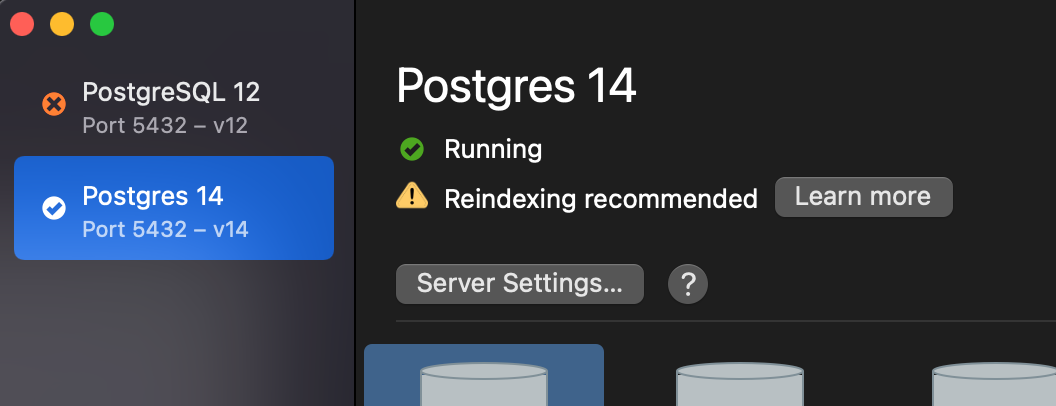
-
While troubleshooting I stopped and started the server via the UI a couple of times. Nothing worked

-
When running that command, everything "fixed itself". I haven't really been jiggering with anything on my computer lately. Just vanilla software development. So I'm not sure how I might have accidentally deleted a database. I haven't even been in Postgres directly in a couple of weeks -- just via Rails app and Rails commandline.
Always possible to be user error. I can't reproduce it, so it's possible I did this without realizing it.
thanks for the additional information! Did I understand you correctly - the databases were shown prior to the update? If so, I'm out of ideas what could potentially have caused this.
At some point in the recent past, the databases were definitely visible. After I ran the update, they were not. I didn't verify immediately before updating, though, so I cannot definitively say that updating caused the issue. The databases that my app rely on have been up and running continuously all in Postgres14 -- so it's been up and working.
The UI is my normal way for me to start a session to directly access the database when I need to. I haven't needed to in the last week, though. Sorry I'm not able to narrow it down much more than that.
if you dropped Database names with your username that problem occurs. Create database with your username
