Do you want to request a feature or report a bug?
Bug
What is the current behavior?
Upon installing yarn using brew and adding global binaries all of my globals are present in the global bin and the command can be found using which <package>.
which yarn: /usr/local/bin/yarn
yarn global bin: /usr/local/bin
yarn global dir: $HOME/.config/yarn/global
Should I run yarn global upgrade-interactive any package that is updated will be found in the global bin and the command will be found which <package>. However it looks as though this wipes out any global binaries not updated and does not update the package.json & yarn.lock in the global dir.
global bin
All other global binaries are missing now as of the upgrade of the only outdated binary now.
Initial install of all global binaries was 09 November.

global dir node_modules
I updated now last night from 8.4.0 to 8.5.1. yarn global list will show [email protected] yet the package.json shows 8.4.0 & the yarn.lock shows 8.4.0 & 8.5.1. I checked in the now/ and it is the 8.5.1 code so it seems this is not being reflected in those places.


On the other hand which create-react-app (which was found and working fine before the update to now) returns that it is not found. Checking the global bin it is not there and the global dir shows that it has been updated this morning yet it did not need to be updated when running yarn global upgrade-interactive.

It did look as though running yarn global list ran an install, #4465. I didn't get a screenshot at the time but it said installing 0 of 14235 but you can see it took 130s.
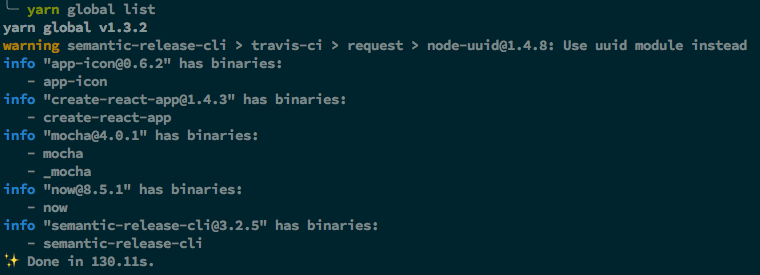
I did notice that a package.json and yarn.lock were generated in my home directory upon running the yarn global upgrade-interactive command as well: #4728.
Currently the only way I know of around this is to just reinstall the global binaries that I need.
What is the expected behavior?
Upgrade global binaries and not lose the links to global binaries that were not updated.
Please mention your node.js, yarn and operating system version.
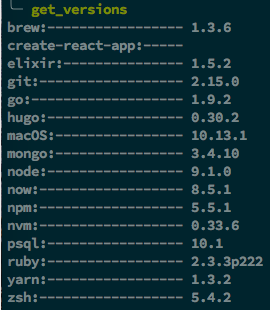
As you can see the function I made doesn't find create-react-app so it cannot display a version for it.
# I use `nvm` to manage `node`.
# installed yarn using
brew install yarn --without-node


Do you want to request a feature or report a bug?
Bug
What is the current behavior?
Upon installing
yarnusingbrewand adding global binaries all of my globals are present in theglobal binand the command can be found usingwhich <package>.which yarn:/usr/local/bin/yarnyarn global bin:/usr/local/binyarn global dir:$HOME/.config/yarn/globalShould I run
yarn global upgrade-interactiveany package that is updated will be found in theglobal binand the command will be foundwhich <package>. However it looks as though this wipes out any global binaries not updated and does not update thepackage.json&yarn.lockin theglobal dir.global bin

All other global binaries are missing now as of the upgrade of the only outdated binary
now.Initial install of all global binaries was 09 November.
global dir node_modules
I updated
nowlast night from8.4.0to8.5.1.yarn global listwill show[email protected]yet thepackage.jsonshows8.4.0& theyarn.lockshows8.4.0&8.5.1. I checked in thenow/and it is the8.5.1code so it seems this is not being reflected in those places.On the other hand

which create-react-app(which was found and working fine before the update tonow) returns that it is not found. Checking theglobal binit is not there and theglobal dirshows that it has been updated this morning yet it did not need to be updated when runningyarn global upgrade-interactive.It did look as though running

yarn global listran an install, #4465. I didn't get a screenshot at the time but it saidinstalling 0 of 14235but you can see it took130s.I did notice that a
package.jsonandyarn.lockwere generated in my home directory upon running theyarn global upgrade-interactivecommand as well: #4728.Currently the only way I know of around this is to just reinstall the global binaries that I need.
What is the expected behavior?
Upgrade global binaries and not lose the links to global binaries that were not updated.
Please mention your node.js, yarn and operating system version.
As you can see the function I made doesn't find
create-react-appso it cannot display a version for it.