Fix accessibility issues with image widget#50
Conversation


 westonruter
changed the title
westonruter
changed the title

 timmyc
left a comment
timmyc
left a comment
timmyc
left a comment
There was a problem hiding this comment.
One minor note about the debounce usage added here, otherwise this is testing out well for me.
|
|
||
| // Re-render the preview when the attachment changes. | ||
| control.selectedAttachment = new wp.media.model.Attachment( { id: 0 } ); | ||
| control.renderPreview = _.debounce( control.renderPreview ); |
There was a problem hiding this comment.
I believe, though I could be wrong, that renderPreview is only called when the media modal is closed when the 'Update' button is clicked... if the dialog is closed with the 'x' or hitting the escape key, the model is not updated and renderPreview is not called. So not sure if we need to debounce this or not...
There was a problem hiding this comment.
The reason I added the debounce is because the preview is also now re-rendering in due to changes to control.model. So when you change the media, it will result the model being changed (the attachment_id and url props) as well as the selectedAttachment model, resulting in renderPreview being called twice. So this was intended to be a minor DOM performance improvement to not waste cycles.
There was a problem hiding this comment.
Gotcha, so this saves one render in instances where you are changing media/url. Looks like the preview is rendered twice upon initial load as well when the model is being updated. While playing with this I noticed renderPreview is called on each keystroke when editing the widget title currently so perhaps that is a good candidate for a _.throttle if we are concerned about too many renders.
There was a problem hiding this comment.
The preview rendering is separate. It actually already has throttling via the Customizer in two places. If you type quickly you'll note that the preview doesn't update until you slow down. Debouncing the updates to the widget instance settings is currently handled here: https://github.com/WordPress/wordpress-develop/blob/4.7.3/src/wp-admin/js/customize-widgets.js#L887-L889
The selective refresh of the widget in the preview also gets debounced here: https://github.com/WordPress/wordpress-develop/blob/4.7.3/src/wp-includes/js/customize-selective-refresh.js#L684-L712
And full refreshes are debounced here: https://github.com/WordPress/wordpress-develop/blob/4.7.3/src/wp-admin/js/customize-controls.js#L3655-L3677
For the core fix to reduce the number of preview refreshes in rapid succession, such as with implementing a decay, see https://core.trac.wordpress.org/ticket/38954
There was a problem hiding this comment.
Great stuff, thanks for those links... so much to learn here. So here is the renderPreview bit in action in the widget itself. I've hacked the alt attribute in the renderPreview method to show how many times it is called. Note that the number increments with each keystroke of the title which is triggering the change on control.model. This is happening in , mis-spoke there, it is the addition of master here toocontrol.listenTo( control.model, 'change', control.renderPreview ); that causes the preview to re-render whenever the title changes.


|
Would it be possible to put the filename in the |

|
@afercia Yes, but isn't that the behavior for screen readers when the |
|
@westonruter yes but I'd like to avoid a missing alt. We've discussed a bit this on Slack with Joe Dolson, I think he's going to comment :) |

|
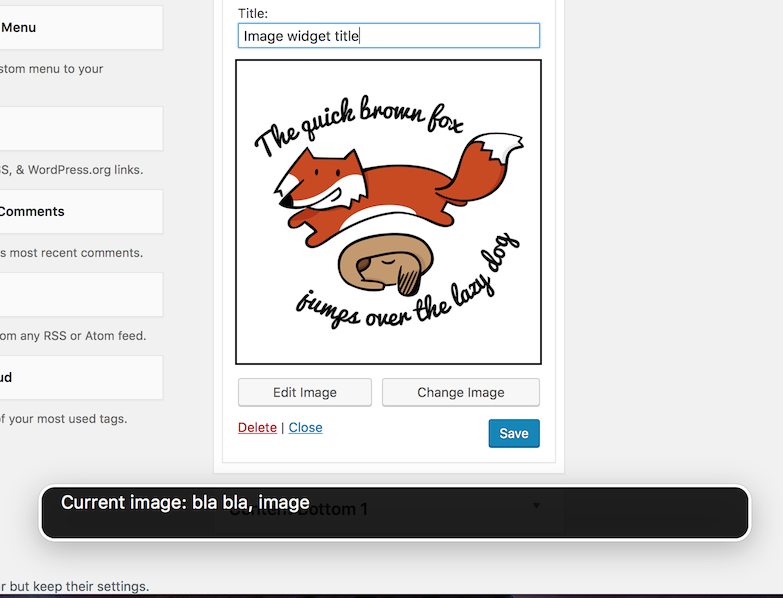
Had a conversation with @afercia about the alt attribute issue, and there is some ambiguity about it. A user with a screen reader needs to know what the image they've added is, which would generally be presented via the alt attribute. However, because they're in an editing context, they also need to be able to distinguish between the alt attribute that will be present on the front end and what they see in the admin. We hypothesized a solution where the alt attribute is given context, such as an aria-describedby with "Current image: {alt attribute or filename}", or appending text to the alt attribute to indicate that the text is only available because the user is currently editing. In thinking about this, it seems like adding the alt attribute as it would appear on the front-end, then also adding an aria-describedby description which indicates what the current image is would be best, but it may require some user testing to see how clearly this is presented by the screen readers. |
|
This is the result of s quick test, only run on Safari+VoiceOver. The image preview has an empty alt attribute and an
just a rough test, the |
|
@afercia @joedolson how is b4146ab? What also about the
|

… selection is made
…into bugfix/image-accessibility
This is fixed in c19a07b. |
|
Please advise if additional changes are needed. |
4 participants


Fixes #47