Product creation experience: shortcut to add variation price #34948
Conversation


 github-actions
bot
added
the
plugin: woocommerce
github-actions
bot
added
the
plugin: woocommerce

Test Results SummaryCommit SHA: fc2777a
To view the full API test report, click here. To view the full E2E test report, click here. To view all test reports, visit the WooCommerce Test Reports Dashboard. |
 octaedro
force-pushed
the
add/33554_variation-price
branch
from
octaedro
force-pushed
the
add/33554_variation-price
branch
from
13dc88e to
a1aee3d
Compare
github-actions
bot
added
the
release: highlight
octaedro
changed the title

| .on( | ||
| 'click', | ||
| 'button.add_price_for_variations', | ||
| this.open_modal_to_set_variations_price |
There was a problem hiding this comment.
Just underlining the lines added to this file. The lint modified a lot of things here.
| /** | ||
| * Sets a price for every variation | ||
| */ | ||
| set_variations_price: function () { | ||
| var variation_price = $( '.wc_input_variations_price' ).val(); | ||
| var product_type = $( 'select#product-type' ).val(); | ||
| var input_type = | ||
| 'variable-subscription' === product_type | ||
| ? 'variable_subscription_sign_up_fee' | ||
| : 'variable_regular_price'; | ||
| var input = $( `.wc_input_price[name^=${ input_type }]` ); | ||
|
|
||
| // We don't want to override prices already set | ||
| input.each( function ( index, el ) { | ||
| if ( '0' === $( el ).val() || '' === $( el ).val() ) { | ||
| $( el ).val( variation_price ).trigger( 'change' ); | ||
| } | ||
| } ); | ||
| }, | ||
|
|
||
| /** | ||
| * Opens the modal to set a price for every variation | ||
| */ | ||
| open_modal_to_set_variations_price: function () { | ||
| $( this ).WCBackboneModal( { | ||
| template: 'wc-modal-set-price-variations', | ||
| } ); | ||
| $( '.add_variations_price_button' ).on( | ||
| 'click', | ||
| wc_meta_boxes_product_variations_actions.set_variations_price | ||
| ); | ||
| }, |
There was a problem hiding this comment.
These lines have been added too.
| '.wc_input_price[type=text], .wc_input_decimal[type=text], .wc-order-totals #refund_amount[type=text]', | ||
| function() { | ||
| var regex, decimalRegex, | ||
| '.wc_input_price[type=text], .wc_input_decimal[type=text], .wc-order-totals #refund_amount[type=text], ' + |
There was a problem hiding this comment.
Everything related to the class wc_input_variations_price in this file has been added by this PR.
There was a problem hiding this comment.
Is this part suppose to handle the number parsing?
When I enter a number of 1231231.1231231 it gets used as is, and doesn't get formatted nor does the decimal get trimmed.
There was a problem hiding this comment.
Is this part suppose to handle the number parsing?
Nope, it has the same behavior that the variations fields have. The numbers aren't formatted, we were only checking the thousands and decimal pointing.
There was a problem hiding this comment.
I'm not sure if it will worth adding that validation to the old product management experience, but if you think that we need it I'll be happy to add it in a follow-up PR.

 louwie17
left a comment
louwie17
left a comment
louwie17
left a comment
There was a problem hiding this comment.
Stellar work on this @octaedro, this was testing very well.
I did notice the number formatting wasn't working for me though, also left a comment in the code about that.
I also have a couple suggestions:
- Update the copy of the Modal to be more specific that we are only updating the variations that don't have a price
- Triggering Save changes after the user clicks
OKin the add price modal, so the notice disappears automatically and this would follow inline with the Set regular prices action. - Lastly if we should change the
OKin the modal to be more specific? like Add prices? This is not a must, as I assume we are trying to simulate the same thing as awindow.confirmwhich usually only contains cancel and ok.
One last thing I noticed, the wireframe updated the Default Form Values: copy to Default Variations:, something that wasn't explicitly mentioned in the issue, but I guess should also be added as part of this? cc @jarekmorawski
Just note that if we update this name, we should update the popover to, to reflect his name change. As the popover explicitly mentioned default form values.
Although I find both Default Form Values or Default Variations semi confusing, the tooltip seems to be really necessary.
| </div> | ||
| <div class="woocommerce-usage-modal__wrapper"> | ||
| <div class="woocommerce-usage-modal__message"> | ||
| <span>Add price to all variations (<?php echo esc_attr( get_woocommerce_currency_symbol() ); ?> <?php echo esc_textarea( get_woocommerce_currency() ); ?>)</span> |
There was a problem hiding this comment.
Maybe we want to update this copy to be a bit more specific, given we won't be updating the price of all variations, if some of the variations already contain a price.
Maybe we should tag on: that don't have a price:
Add price to all variations that don't have a price?
There was a problem hiding this comment.
I like this suggestion. If it's ok with @jarekmorawski I'll change the text to Add price to variations that don't have a price.
| '.wc_input_price[type=text], .wc_input_decimal[type=text], .wc-order-totals #refund_amount[type=text]', | ||
| function() { | ||
| var regex, decimalRegex, | ||
| '.wc_input_price[type=text], .wc_input_decimal[type=text], .wc-order-totals #refund_amount[type=text], ' + |
There was a problem hiding this comment.
Is this part suppose to handle the number parsing?
When I enter a number of 1231231.1231231 it gets used as is, and doesn't get formatted nor does the decimal get trimmed.
| ?> | ||
| </p> | ||
| <div class="woocommerce-add-variation-price-container"> | ||
| <button type="button" class="button add_price_for_variations"><?php esc_html_e( 'Add price', 'woocommerce' ); ?></button> |
There was a problem hiding this comment.
Could we potentially hide the Add price button after the price has been added?
Or maybe we want to auto trigger the Save changes button, just like what happens when a user clicks Go for the Set regular prices option, this in turn auto triggers a save changes.
This would also auto hide the notice and provide a better feedback loop to the user.
As the Save changes is not very obvious and its confusing for the user to see the notice of the prices still missing after they just added them.
There was a problem hiding this comment.
Could we potentially hide the Add price button after the price has been added?
Good idea!
There was a problem hiding this comment.
As mentioned above, could we change Add price to Add prices depending if their are multiple or not?

|
Thanks for the ping, y'all! I can see great work has happened here, but I wonder why we've decided to build a custom modal instead of the browser's default one? It is already used for bulk variation editing and it'd be good to keep these actions consistent.
The yellow notice already mentions the number of variations that don't have the price added yet. We could show it in the modal, too (image above).
I agree and confirm that this is the expected behavior.
I wasn't sure if that's possible for browser-managed modals. 🤔 If it is, we should definitely change
It's a very minor change, so we can leave it out for now. |
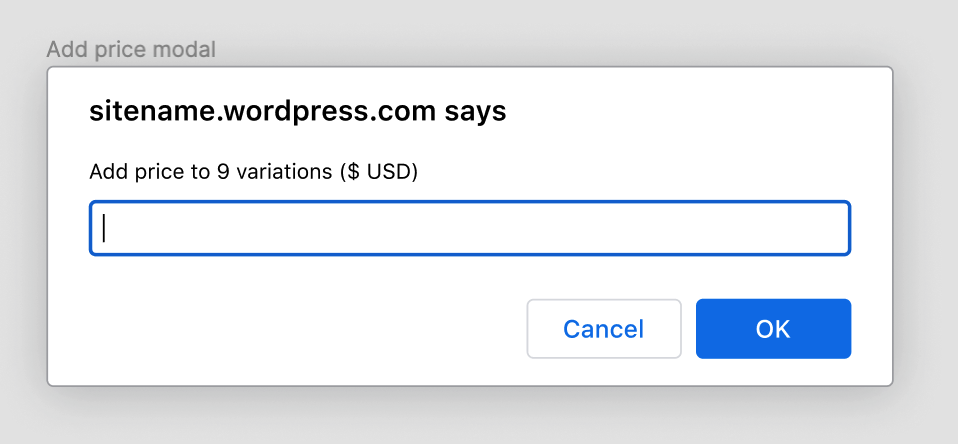

|
Hi @jarekmorawski, thank you for your feedback.
We didn't build a custom modal. The modal we use is the same one we use to add a product and add taxes when creating an order, but I get your point. I was confused because my
If we lean towards the prompt modal, we won't be able to add the on-the-fly validation that we are using for the price inputs. Is that expected?
I think that there is a little confusion here; the IMO the modal used in this PR provides a better user experience, it allows us to add the on-the-fly validation (it feels pretty handy), the button renaming, and the |


|
Good call. I didn't want to add the extra work, but it looks better with our version of the modal. 😃 Let's change the button's label from |
|
Hi @louwie17, thank you for your review! |

louwie17
left a comment
louwie17
left a comment
There was a problem hiding this comment.
Thanks for the updates @octaedro, those updates look good!
I just noticed one piece of text not wrapped around the translation function, and was curious if we could update the Add price to Add prices and the other way around depending on how many variations need prices.
| </div> | ||
| <div class="woocommerce-usage-modal__wrapper"> | ||
| <div class="woocommerce-usage-modal__message"> | ||
| <span>Add price to all variations that don't have a price (<?php echo esc_attr( get_woocommerce_currency_symbol() ); ?> <?php echo esc_textarea( get_woocommerce_currency() ); ?>)</span> |
There was a problem hiding this comment.
This should be surround with the esc_html_e right?
| </div> | ||
| <div class="woocommerce-usage-modal__actions"> | ||
| <button class="modal-close components-button is-secondary"><?php esc_html_e( 'Cancel', 'woocommerce' ); ?></button> | ||
| <button class="modal-close button components-button add_variations_price_button is-primary" disabled><?php esc_html_e( 'Add prices', 'woocommerce' ); ?></button> |
There was a problem hiding this comment.
Does PHP provide a helper function for esc_html_e for multiple as well?
It might be nice to show either Add price or Add prices depending on how many are missing their price.
Same in the notice, the notice might be easier to do given you already have access to the count.
This is not a must, but might be nice, if it's not to difficult.
There was a problem hiding this comment.
Hi @louwie17,
This change is not trivial and it would imply calling the database again.
The number of variations without price is calculated here. Because html-product-data-variations.php is being loaded before wc-admin-functions.php we're not able to use a global variable, since the value is calculated after the first file is processed.
I'm not sure if the change is worth the effort. What do you think about merging this PR as it is and maybe tackling that change in a follow-up PR?
There was a problem hiding this comment.
A follow-up PR sounds good with me.
| ?> | ||
| </p> | ||
| <div class="woocommerce-add-variation-price-container"> | ||
| <button type="button" class="button add_price_for_variations"><?php esc_html_e( 'Add price', 'woocommerce' ); ?></button> |
There was a problem hiding this comment.
As mentioned above, could we change Add price to Add prices depending if their are multiple or not?
github-actions
bot
removed
the
release: highlight
octaedro
force-pushed
the
add/33554_variation-price
branch
from
0773200 to
6c6c75b
Compare
| .woocommerce-add-variation-price-container { | ||
| width: 15%; | ||
| display: flex; | ||
| justify-content: center; |
There was a problem hiding this comment.
We may want to use flex-end here? the spacing on the right looks a little weird, this seems to happen on larger screens it appears.

There was a problem hiding this comment.
Good idea! I fixed it in the commit 82e59b8
octaedro
force-pushed
the
add/33554_variation-price
branch
from
f445c95 to
82e59b8
Compare
louwie17
left a comment
louwie17
left a comment
There was a problem hiding this comment.
Thanks @octaedro this looks good, appreciate all your hard work on this!
In terms of the failing Github action it does show as required, so I do hope you can still merge without it passing, otherwise you maybe have to fix all those lint errors, or add an exception for that file for now.

 octaedro
force-pushed
the
add/33554_variation-price
branch
from
octaedro
force-pushed
the
add/33554_variation-price
branch
from
8dad80b to
3de4b8c
Compare
louwie17
left a comment
louwie17
left a comment
There was a problem hiding this comment.
Thanks for the final update and adding those exceptions for the PHP errors.
louwie17
left a comment
louwie17
left a comment
There was a problem hiding this comment.
Thanks for fixing the lint errors, LGTM 🚀
|
Hi @octaedro, thanks for merging this pull request. Please take a look at these follow-up tasks you may need to perform:
|


All Submissions:
Changes proposed in this Pull Request:
This PR aims to introduce an easy way for users to add the variation price. It also modifies a few styles to show the action buttons for the variations without hovering over the rows.
Closes #33554.
How to test the changes in this Pull Request:
Products>Add New.Product datasection selectVariable product.Attributesand create (or select) a product attribute to use for variations.Variationsand add a few variations (don't modify them).Save changes.Press

Add price. A modal like the one below will be visible.Verify the currency matches the currency used on the site.
Add a text (not numbers) and verify that the validation fails. Add a number with multiple decimal points and verify that the error text says:
Please enter a value with one decimal point (%s) without thousand separators.After adding a valid number the button
OKshould be enabled.Add a valid number and press
Add prices.Verify that the
Regular pricefor every variation is set with the number added in the modal.Verify that the accordion expands after pressing
Edit.Press
Save changes. The warning should disappear.Publish the product.
Add another variation. Press
Save changes. The warning should be shown again.Now add another value and verify that the new value has been added to the new variation without modifying the other variations' values.
Now create a new product but select
Variable subscriptioninstead ofVariable productin step 3, and continue with the other steps.Other information:
pnpm --filter=<project> run changelog add?FOR PR REVIEWER ONLY: