app.juster.fi - Vertical line on the graph has different position than the mouse cursor #94500
Description

URL: https://app.juster.fi/explore
Browser / Version: Firefox 95.0
Operating System: Mac OS X 10.15
Tested Another Browser: Yes Chrome
Problem type: Something else
Description: Might be JavaScript issue
Steps to Reproduce:
Hold mouse on any graph on the "Top markets" section.
You'll notice that the vertical line in the graph is not the same position as your mouse position.
I think it's might be JavaScript or CSS support-related issue.
Please see the screen record here if it's not clearly explained.
https://www.dropbox.com/s/dtorfrcqdx7nffs/Screen%20Recording%202021-11-25%20at%2001.12.23.mp4?dl=0
Browser Configuration
- None
From webcompat.com with ❤️
Activity
[-]In the moderation queue.[/-][+]app.juster.fi - see bug description[/+][-]app.juster.fi - see bug description[/-][+]app.juster.fi - Vertical line on the graph has different poistion than the mouse cursor[/+]softvision-oana-arbuzov commentedon Nov 25, 2021
Thanks for the report, but I'm not able to reproduce the issue. The mouse cursor

Note: The issue is not reproducible on Chrome.
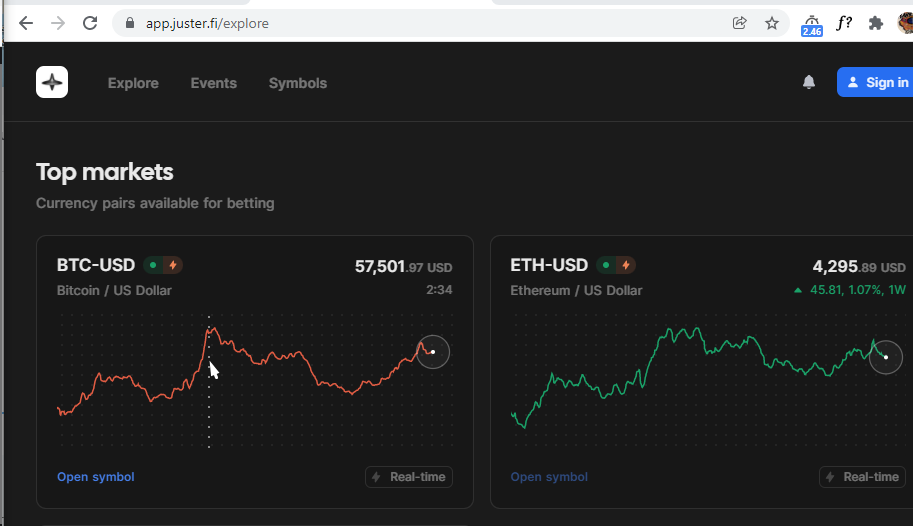
Tested with:
Browser / Version: Firefox Nightly 96.0a1 (2021-11-24)
Operating System: Windows 10 Pro
Moving to Needsdiagnosis for further investigation.
[-]app.juster.fi - Vertical line on the graph has different poistion than the mouse cursor[/-][+]app.juster.fi - Vertical line on the graph has different position than the mouse cursor[/+]karlcow commentedon Nov 29, 2021
Same issue is happening in Safari.
The line position is computed in https://app.juster.fi/js/event~explore.38a750d3.js:formatted
it adds a
lineelement on mousemove.in
Initially I thought it was due to a bug on
e.layerXwhereeismousemove. So I replaced layerX with clientX in the code but there was the same issue. So I wondered about the size of the box.in my current screen:
.SymbolCard_chart_1pv8his defined as 344px, but#chart5is 500px wide.mousemoveis listening the layer onchart5Ah!
#chart5at the level of thebodyI get the right behavior..SymbolCard_chart_1pv8hat the level of thebodyI get the wrong behavior.But I wonder if it's because the layer is redrawn or not. It's not perfect either and seems a bit random the gap in between the position of the line and the position of the cursor.
@emilio is it possible the initial position of
mousemovedepends on the rendering phase in a complex layout? (multiple grid and flexbox nested).emilio commentedon Nov 29, 2021
@karlcow seems unlikely.
This is just about what point we return
layerXrelative to. The page seems to want the coordinates relative to the SVG, but that's not necessarily the spec behavior. Since#chart_5is not a "layer" either (an abspos containing block), we return the coordinates relative to the parent, which is moved by a few pixels.Here's a reduced test-case: https://crisal.io/tmp/layer-point-svg.html
I think including outer svg as a "layer" makes some amount of sense. I've pinged folks in w3c/pointerevents#626 anyways though...
emilio commentedon Nov 29, 2021
I filed https://bugzilla.mozilla.org/show_bug.cgi?id=1743402 with a patch that would fix this site, though probably we want some consensus on what a "layer" for this purpose is, so I probably won't land it right away.
The site can fix this trivially adding
position: relativeto theid="chart_*"elements or the<svg>itself. @karlcow can you contact them?emilio commentedon Nov 29, 2021
Ah, I commented on juster-finance/juster-app#15
emilio commentedon Nov 29, 2021
juster-finance/juster-app#25 should fix it.
emilio commentedon Nov 30, 2021
Fixed by juster-finance/juster-app#25, @karlcow can we close this?
karlcow commentedon Dec 1, 2021
thanks
softvision-oana-arbuzov commentedon Dec 6, 2021
I can confirm it works now.

Tested with:
Browser / Version: Firefox Nightly 96.0a1 (2021-12-04), Firefox Nightly 100.
Operating System: Windows 10 Pro