This repository was archived by the owner on Nov 4, 2026. It is now read-only.
Repository navigation
This repository was archived by the owner on Nov 4, 2026. It is now read-only.
High CPU usage on windows #1221
Description

Just started Hyper Terminal uses about 13% of CPU on Windows 10.

Hyper 1.0.0
Electron 1.4.7
win32 x64 10.0.14393
Reacted by Saran Tanpituckpong ✔️, Alex Howard, Bartosz Gościński, Giovanni Bassi, Michael Beer, Matthieu Harlé, Flux Xu, Duke, Micah Loffer, Quang Anh and 2 more
Activity
stereokai commentedon Dec 15, 2016
And that is only the main process. I have 4 additional processes running
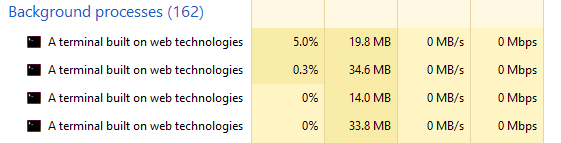
What shell are you using with Hyper? (Options: cmd - default, powershell, native bash, maybe others I don't know). Are you using plugins? Try to disable them if you do and report back.
oleynikandrey commentedon Dec 15, 2016
I have made no changes to default settings of Hyper. So it use cmd as shell and no plugins at all.
iframeskills commentedon Dec 16, 2016
+1; also experiencing this issue.
default install and not even running anything ...
omnicons commentedon Dec 27, 2016
Also experiencing this, though it is more pronounced when I get into zsh going up to about 7% usage
giggio commentedon Jan 6, 2017
I also experienced, and also just the default experience. Made it unusable, had to close it and stop using. I will wait for a later release.
cdhunt commentedon Mar 10, 2017
Just updated to 1.3.0 and CPU utilization is still quite high. About 30% constantly across the 4 processes. Also Windows 10 build 14393. I'm using Powershell.exe. My Config.
cdhunt commentedon Mar 10, 2017
FWIW, after letting the window site idle for a couple of hours, I found CPU utilization to be near 0. I don't know really how long. That and JS profiling shows nothing leads me to believe it's some background task that eventually finishes or times out.
cdhunt commentedon Mar 11, 2017
And I let it sit overnight and it's still using 30%+ CPU this morning. /shrug
mloffer commentedon Apr 17, 2017
This also happens to me on Win 10 build 1607, but only when I install hyper-tabs-enhanced. As soon as I remove it, CPU usage goes back to normal. Curiously, the Desktop Window Manager also cranks up at the same time.
Hyper 1.3.1
Win 10 1607
chabou commentedon Apr 18, 2017
@cdhunt Can you try with a vanilla HyperApp. Without any (hyper-tabs-enhanced) plugin?
cdhunt commentedon Apr 18, 2017
I was just testing and I can corroborate disabling
hyper-tabs-enhancedreduces CPU usage to ~0%.chabou commentedon Apr 18, 2017
Great!
So we can close this issue (other feedbacks are old).
But feel free to reopen if last version of Hyper has a high CPU usage without any plugin.
MartyGentillon commentedon Apr 18, 2017
Transferred issue to hyper-tabs-enhanced repository as henrikruscon/hyper-tabs-enhanced#13.
pcnate commentedon Aug 21, 2018
I had a similar issue. I would verify if you have
hyper-material-themeinstalledidanshimon commentedon Sep 4, 2018
this still happend on hyper 2.0.0. stable with hyper-tabs-enhanced plugin installed my CPU goes upto 100%
once i removed the hyper-tabs-enhanced plugin it resolved and cpu went down to 30%~
CosmicCatnap commentedon Oct 7, 2019
Can confirm this still happens on hyper 3.0.2 on Windows build 18362.388
Turns my laptop into a leaf blower with just cmd open. Installed today and made no changes to the settings or configuration.
Marko721 commentedon Nov 14, 2019
Also confirming - build 1909. Used like 70% of my cpu.